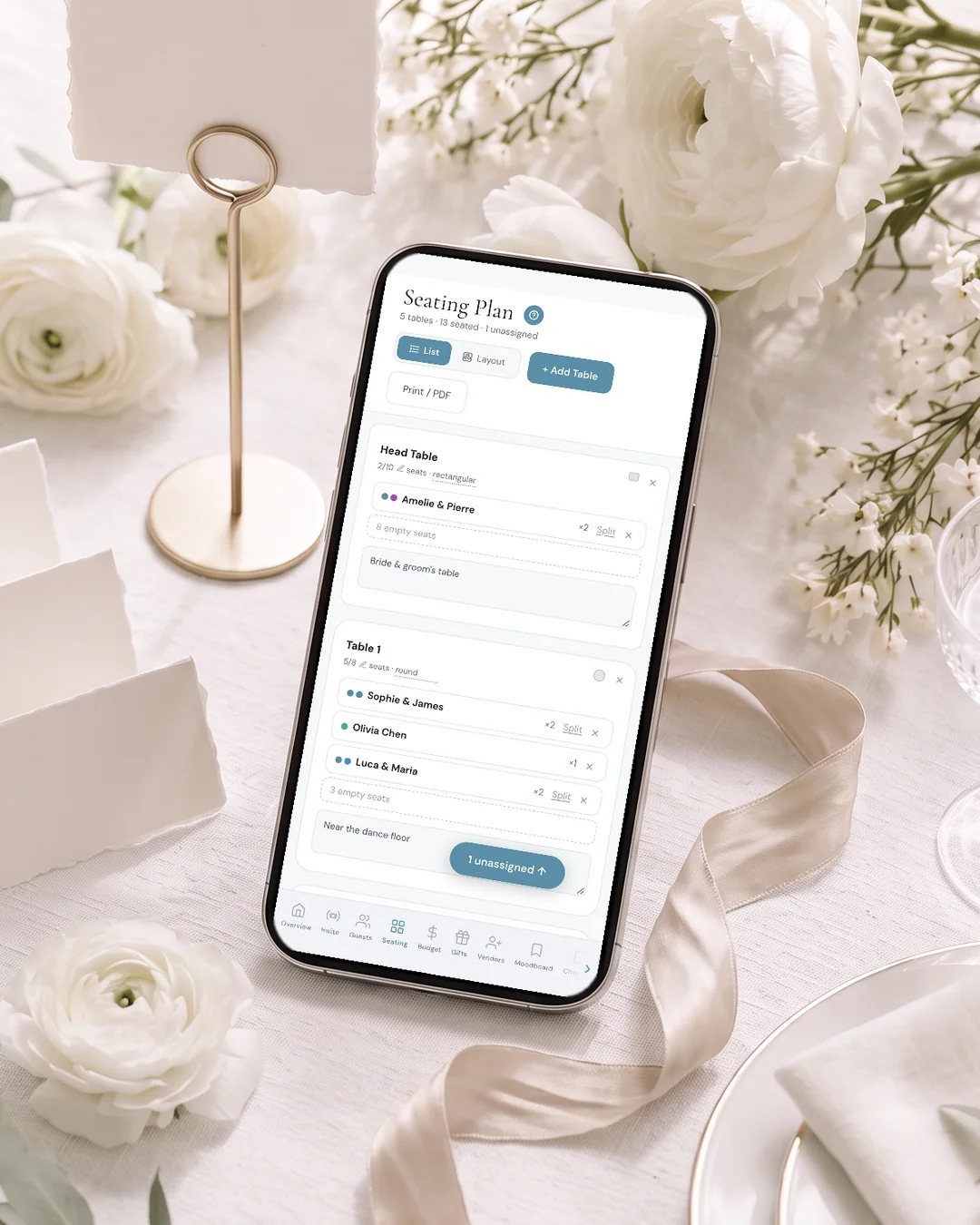
With Prismm closed to new events since 26 August 2026 and existing events going view-only after June 2027, the best wedding seating alternative for venues and planners in 2026 is The Private Wedding App ($189 once, or $19.99/mo), because its seating chart is fed by the same guest list the couple's RSVPs land in: a guest confirms, picks a meal and notes an allergy, and they appear as a seatable card, so a late change updates the tables and the caterer counts instead of forcing a retype. For a venue that used Prismm for diagramming, the venue account draws each room to scale in 2D with real table sizes and a clearance warning, keeps reusable room layouts and a bookings calendar with date-clash warnings, and shows the couple the venue's name and logo in their login; it is 2D, not 3D, and it is not white-label. Cvent Event Diagramming, the successor Prismm accounts are moved into, is a venue diagramming tool at $0 free, $49, $150 and $320 a month, built around the room, not a couple's live RSVP list. Standalone seating-chart makers work the same way: you import or type the guests and there is no RSVP flowing in. But the real distinction is bigger than the chart: the alternatives Prismm points to are seating tools and nothing more, while The Private Wedding App is a complete wedding platform - the cinematic digital invitation your guests open (bilingual, with your story, schedule, song requests and RSVP), the guest list, the caterer day sheet, the budget, the vendor manager and an AI planner - with the seating chart as one page of it, fed by the RSVPs the invitation collects. Since November 2026 the seating chart in The Private Wedding App goes down to the seat: open a table and each guest's name sits beside a numbered seat that you choose.
For wedding planners · All guides
It is the platform migration nobody planning weddings asked for. AllSeated became Prismm, Cvent acquired Prismm, and now Prismm is being sunset: since 26 August 2026 new events can only be created in Cvent Event Diagramming, existing Prismm events stay editable through June 2027, and after that Prismm work remains in Cvent in view-only mode. Anyone who ran their tables in AllSeated or Prismm now has to move, and the tools they are being pointed to are all the same shape as what they are leaving - a standalone diagram of a room that you fill with guests by hand, then keep in sync with a guest list that lives somewhere else. For a wedding, that somewhere else is the RSVPs. We compared the realistic destinations on the one thing that decides the final fortnight: whether the seating chart is fed by the guests who actually replied, or rebuilt by hand every time an answer changes. And it is worth saying plainly up front, because the shape of the choice is easy to miss: the tools Prismm points you to are seating tools and nothing else, while one of the options here is an entire wedding platform where the seating is a single page, fed by the invitation your guests open.
Named seats: place each guest on a numbered seat
The seating chart now goes down to the seat. In Layout view, tap a table and it opens with every guest's name beside a numbered seat: seat 1 is at the top, then clockwise. Tap a guest, then a seat, to decide who sits next to whom (on a computer you can drag the name), and a seat that is already taken simply swaps the two guests. Each seat takes the colour of the guest's dietary note, on round, square and long tables.
Print / PDF gives your venue a numbered floor plan and a seat key for every table, with each guest's diet and severe allergies. The caterer day sheet lists names in seat order, and Find your table can show guests their seat number if you switch it on.
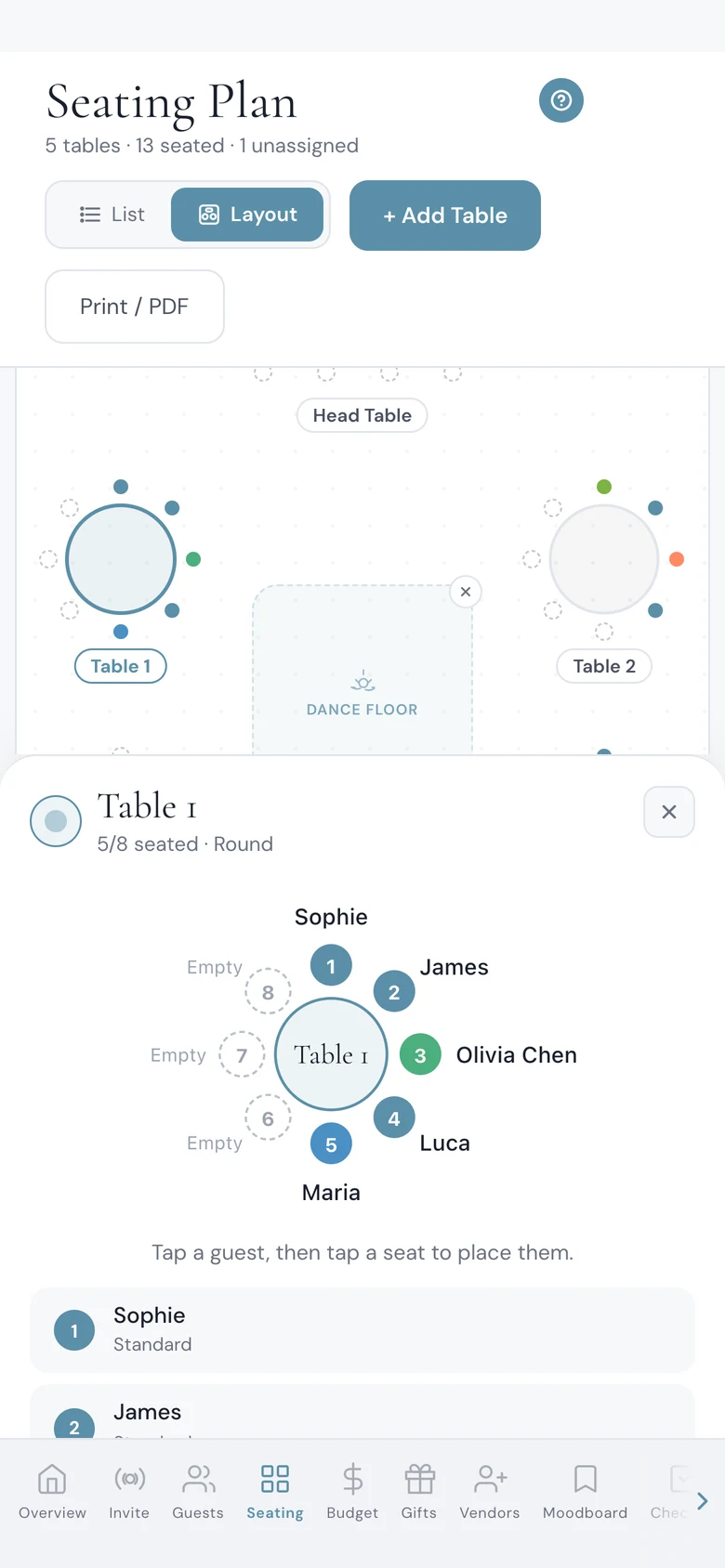
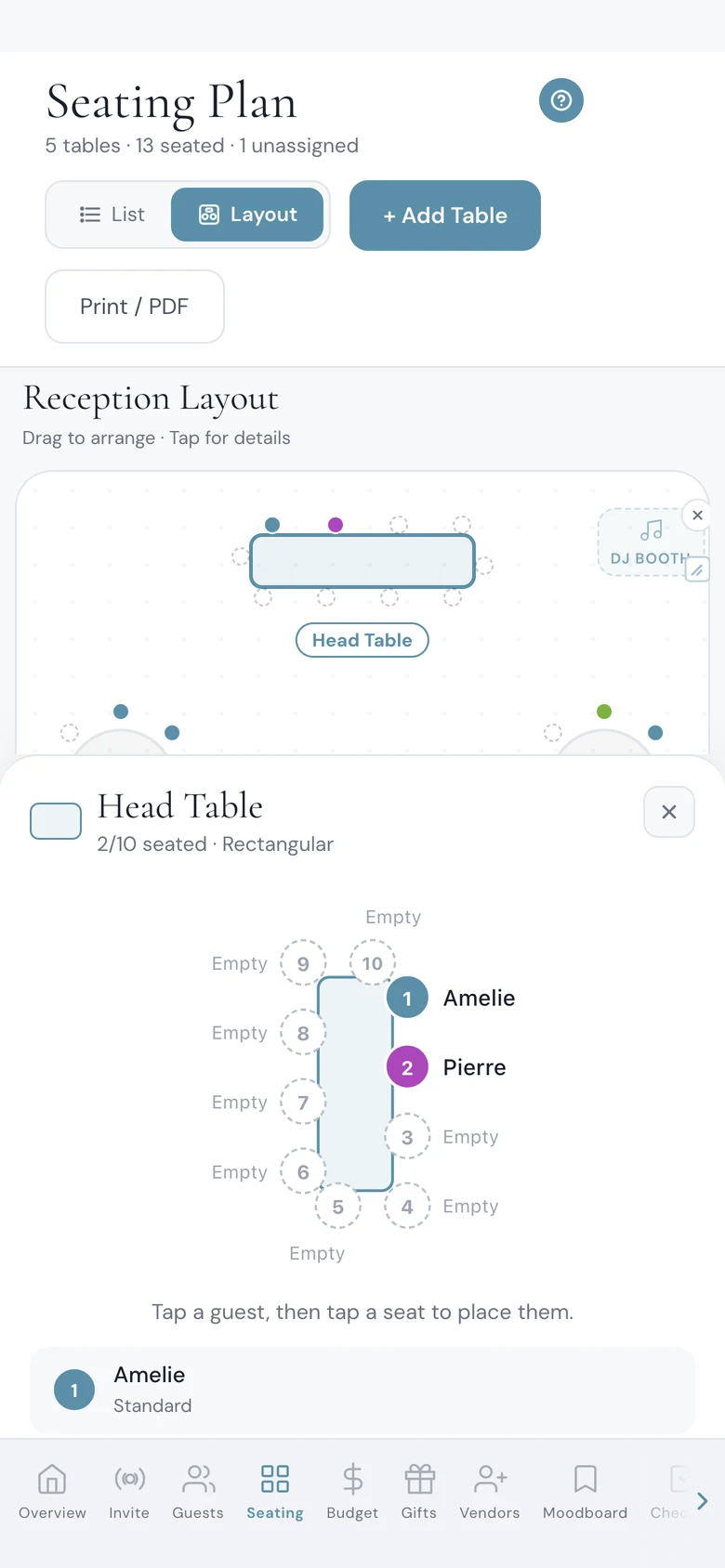
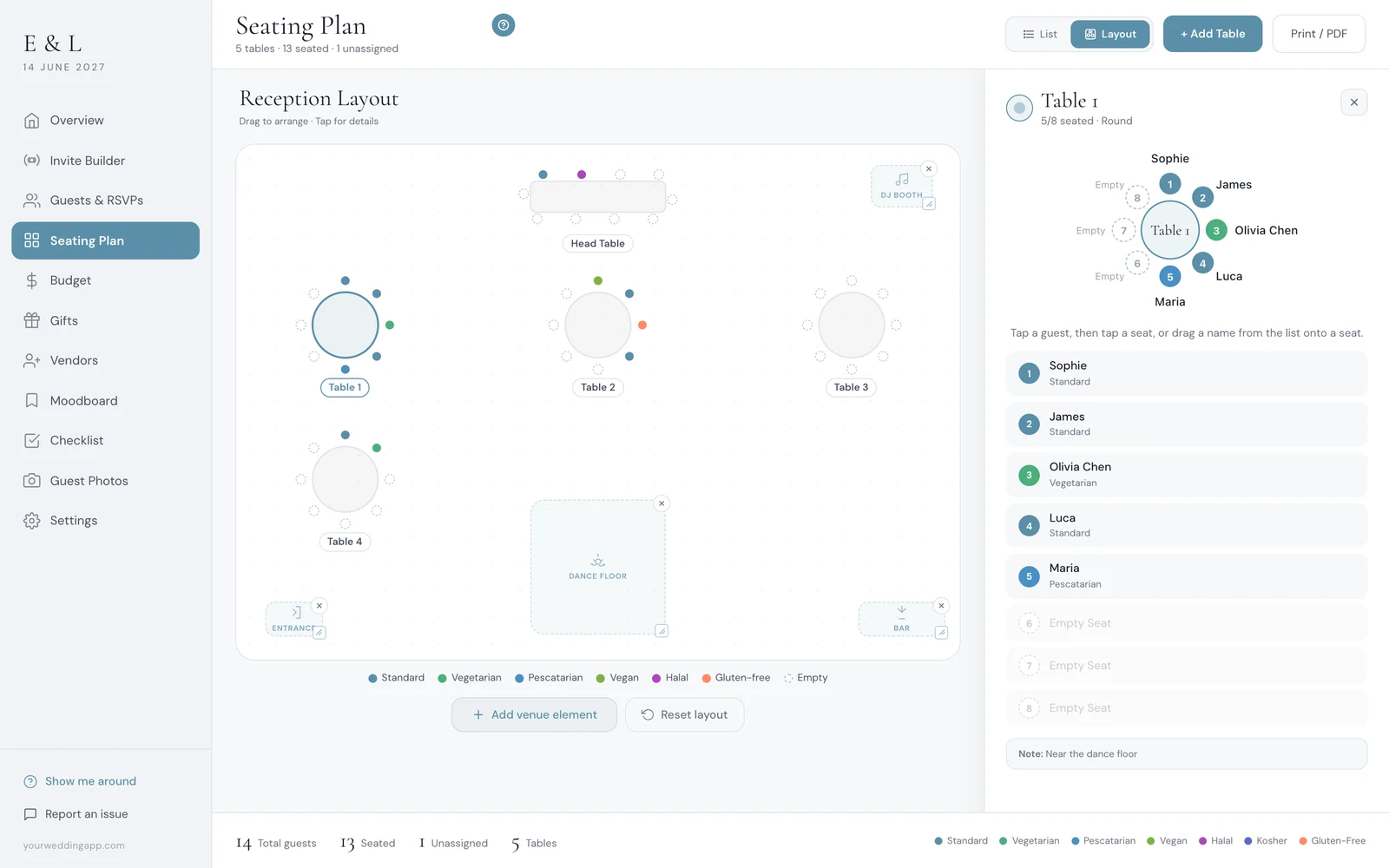
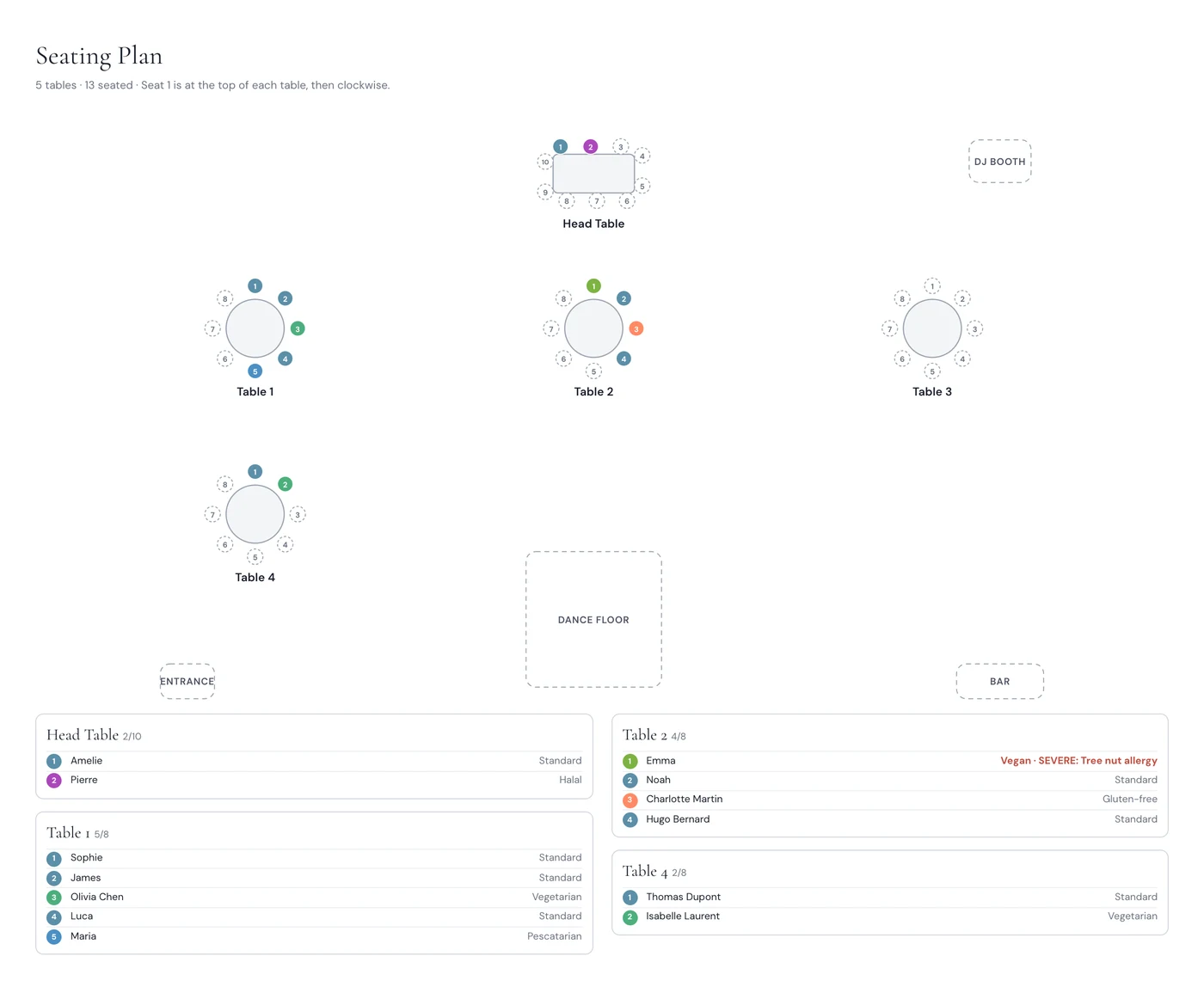
Real screens from the app: a round table and a long table opened on a phone, the same table beside the floor plan on a computer, and the sheet that Print / PDF produces.
A note on method: the shutdown dates are taken from Cvent's own community and migration pages, not from third-party blogs - Prismm's marketing site now only says it is part of Cvent. Every price below was checked on October 22, 2026 on the named company's own pricing page, and the dates were rechecked on 22 October 2026 after Cvent moved the sunset date. We compared the tools on the question a wedding actually turns on, which is different from the question a corporate event turns on: not how precisely you can draw the room, but whether the seating chart knows who replied, what they are eating and who cannot sit near the nuts - because for a wedding that information changes every day for the last two weeks.
At a glanceSide-by-side comparison
| What decides it | Cvent Event Diagramming | Private Wedding App |
|---|---|---|
| Fed by live RSVPs | No - diagram you populate, Cvent Registration link on Enterprise | Yes - confirmed guests become cards |
| Meal choices on the chart | Manual attendee data | Per guest, exports for the caterer |
| Allergy / dietary flags | Manual notes | Severe-allergy flag, by table |
| Built for | Venues and corporate events | Weddings, end to end |
| Room layout / floor plan | To-scale 2D/3D diagramming | To scale in 2D, real table sizes, no 3D |
| Everything else a wedding needs | Diagramming module only | Invitation, RSVP, guest list, budget, day sheet, AI |
| Where you use it | Browser, venue-oriented | Any phone or computer, nothing to install |
| Price | Free / $49 / $150 / $320 a month | $189 once or $19.99/mo |
Every competitor cell, price and the migration timeline were checked on October 22, 2026 on each company's own pages: Cvent's migration page and Cvent Event Diagramming's pricing and product pages; the linked sources are listed at the end of this article. Cvent Event Diagramming is built for to-scale venue diagramming rather than RSVP lists; the comparison here is specifically about weddings, where the chart's link to live RSVPs matters more than draughtsmanship. Details change; verify before you commit.
Tool 01Cvent Event Diagramming
Tool 02The Private Wedding App
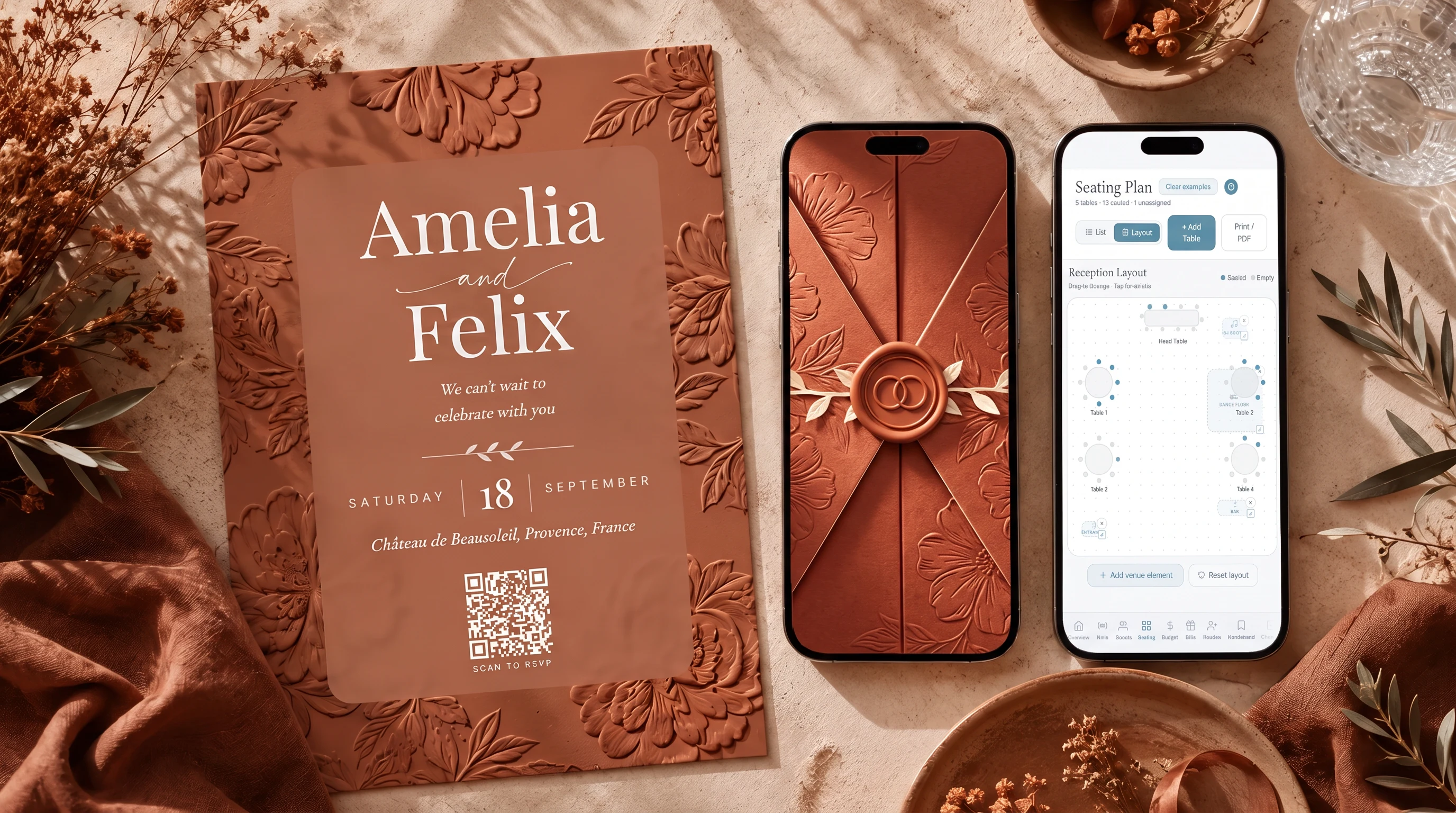
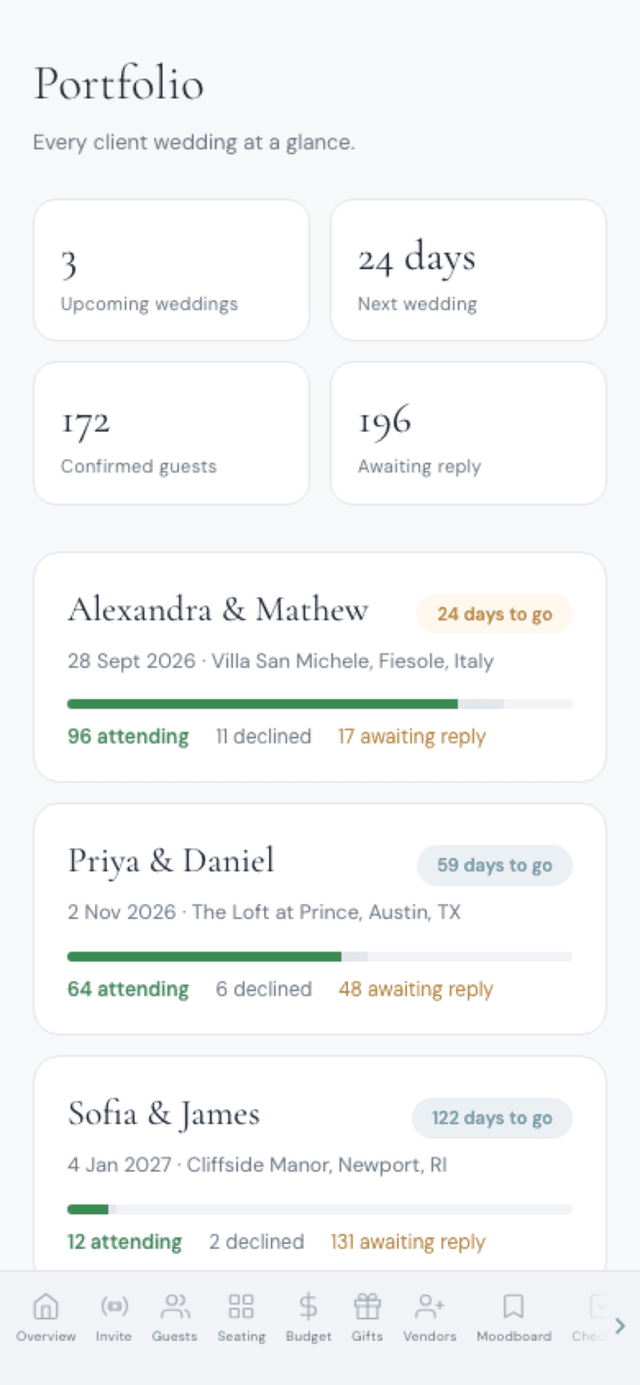
The planner workspace below is live. Tap a tab to open the screens a planner works on every day:
Explore it before you buy
Your invitation
Click to switch theme

Your studio
Click to explore
VerdictWhich tool fits your business?
It depends on how you work:
The Private Wedding App's chart is built around the couple's live RSVP list, while Cvent Event Diagramming, where Prismm accounts are being moved, is a 2D/3D diagramming product priced from free to $320 a month, built around the room rather than that list.
The Private Wedding App collects the RSVPs, meals and allergies behind the chart, while standalone seating-chart makers do the layout only, with the RSVPs, meals and allergies yours to track by hand, because they do not collect them.
And if the point of the seating chart is to reflect the guests who actually replied - so a late cancellation updates the tables and the caterer count at once, and every seat carries its meal and its allergy flag - The Private Wedding App's seating chart is the one built that way, because it is fed by the same guest list your RSVPs land in. See it on the seating chart page, or open the live demo wedding and drag a confirmed guest onto a table the way you would the week of the wedding. Planners running several client weddings can run every seating chart from one planner account.
01Prismm is shutting down: what should a wedding venue switch to?
If you run a venue, here is the venue answer first. A wedding venue replacing Prismm or AllSeated needs more than a drawing: the room at its real dimensions, tables at their real sizes, a check that people can walk between them, the same layout ready for the next wedding in that room, a diary that shows which room is taken on which date, and the guest numbers the kitchen will be asked for.
The venue account of The Private Wedding App covers that list on each wedding. The room is drawn to scale in 2D, seen from above, with a clearance warning between tables. Room layouts are saved once and reused. A bookings calendar holds inquiries, tours, dates on hold and confirmed dates, and warns when two entries take the same room on the same date. Each wedding carries its guest list and online RSVPs, and a caterer and venue day sheet with final counts, plates per meal choice and the allergy roster by table. The couple gets their own login, where they see "with" followed by your venue's name, and your logo.
Two limits to know before you switch. The plan is 2D, not 3D: there is no walk-through rendering of the room. And it is not white-label: your venue's name and logo appear beside The Private Wedding App, not in place of it, and the logo does not appear on the invitation guests see.
See the whole venue account on the wedding venues page, or read the two venue guides: wedding venue software with guest management and RSVPs and how venues track bookings, inquiries and deposits.
For the whole category side by side, Tripleseat, Perfect Venue, Planning Pod, HoneyBook and Cvent Event Diagramming included, read wedding venue software compared.
- Room drawn to scale in 2D, with real table sizes
- Clearance warning when two tables are closer than the minimum gap
- Reusable room layouts, drawn once per room
- Bookings calendar with date-clash warnings
- Guest list and online RSVPs on each wedding
- Caterer and venue day sheet with counts, meals and allergies
- Couple login showing your venue's name and logo
02What replaces Prismm for wedding venue diagramming: the room, to scale
Diagramming is the part a venue has to replace first, so this is exactly how it works. Inside the seating plan you enter the room's width and length, in metres or feet, and the plan is drawn to scale from above. Round tables take their real diameter, rectangular tables their length and width, and the fixtures (dance floor, stage, bar, DJ booth, entrance) are placed at real size. An optional grid shows one square per metre, with a scale bar.
The clearance warning flags any two tables closer than the minimum gap, set to 1.5 m or 5 ft by default and adjustable. The room prints, or saves as a PDF, at a standard scale such as 1:100, ready to hand to a caterer, a rental company or a florist.
A venue draws each room once. The layout, with its dimensions, tables and fixtures, is saved as a reusable room layout and applied to a new wedding's empty seating plan, then adjusted for that couple's numbers. From there the seating is drag and drop, and only the guests who replied yes appear as cards to seat.
SourcesEvery fact on this page, with the date it was checked
The Private Wedding App, checked October 22, 2026: pricing ($189 once, or $19.99/month with a 3-day trial), the seating chart (confirmed guests become seatable cards, reception layout with dance floor, DJ booth and bar) and the meal and allergy tracker (meals per guest, severe-allergy flag, caterer day sheet).
Cvent Event Diagramming, checked October 22, 2026: Prismm to Cvent Event Diagramming migration page (CED-only event creation since August 26, 2026, existing Prismm events editable through June 2027, view-only in Cvent after that, users moved to CED); pricing page (Free $0, Standard $49, Pro $150 and Premium $320 a month billed monthly, Enterprise priced by their team with integration with Cvent Registration and 3D rendering); Event Diagramming page (fully to-scale diagrams built from the venue's architectural files, 2D floor plans and 3D views).
Spotted a fact that has changed? Tell us through the contact page and it will be re-checked and re-dated.
See it for yourself.
Everything a planner runs client weddings on: a portfolio of your season, the caterer day sheet, the run of show with per-vendor links, studio templates, couple access, client invoicing with deposits and contracts your couple signs online - plus each wedding's invitation, RSVP, guest list, seating, budget, vendors and AI planner.
See the planner tools →What is the best alternative to Prismm and AllSeated for weddings?
For weddings, The Private Wedding App ($189 once or $19.99/mo) is the strongest alternative, because its seating chart is fed by the same guest list the couple's RSVPs land in - a guest confirms, picks a meal and notes an allergy, and becomes a seatable card, so late changes update the tables and the caterer counts without a retype. Cvent Event Diagramming, where Prismm accounts are being moved, is a venue diagramming tool (free, $49, $150 or $320 a month) built around the room rather than a live RSVP list. Standalone seating-chart makers draw the tables with no RSVP collection.
Can I assign each guest to a specific seat at the table?
Yes. In The Private Wedding App you first place guests at tables, then open a table in Layout view: every guest's name sits beside a numbered seat, seat 1 at the top and then clockwise. Tap a guest, then a seat, to place them (drag on a computer); a taken seat swaps the two guests. Print / PDF gives a numbered floor plan and a seat key per table for the venue and caterer, and guests can see their seat number in Find your table if you switch it on. Guests you never place by hand fill the seats in order, couples together.
Prismm is shutting down, what should my venue switch to?
For weddings, a venue can move to the venue account of The Private Wedding App: each room drawn to scale in 2D with real table sizes and a clearance warning, reusable room layouts, a bookings calendar with date-clash warnings, the guest list and online RSVPs on each wedding, a caterer and venue day sheet, and a couple login that shows your venue's name and logo. Two limits: it is 2D, not 3D, and it is not white-label.
What replaces Prismm for wedding venue diagramming?
In The Private Wedding App the seating plan is drawn to scale in 2D from the room's width and length, in metres or feet, with tables and fixtures at real size, an optional grid, a scale bar and a clearance warning between tables, and it prints or saves as a PDF at a standard scale such as 1:100. A room is drawn once and reused as a room layout. It does not produce 3D views. Cvent Event Diagramming, where Prismm accounts are being moved, does 2D and 3D diagramming built around the room.
What are the best AllSeated alternatives for wedding venues?
It depends on what the venue used AllSeated for. For wedding seating tied to the guests who replied, The Private Wedding App gives a venue a to-scale 2D room, reusable room layouts, a bookings calendar with date-clash warnings, guest list and RSVPs, and the caterer and venue day sheet, with the couple working in their own login. For 3D diagramming, Cvent Event Diagramming is where AllSeated and Prismm accounts are being moved; The Private Wedding App is 2D only.
When is Prismm shutting down?
According to Cvent's migration page, checked 22 October 2026, the sunset date moved: since 26 August 2026 new events can only be created in Cvent Event Diagramming, existing Prismm events stay editable through June 2027, and Prismm access then ends, with Prismm-created work remaining in Cvent in view-only mode.
Is Cvent Event Diagramming a good replacement for a wedding?
For a wedding, The Private Wedding App fits better: its seating chart is fed by the RSVPs, so meal choices and allergy flags flow in from the invitation. Cvent Event Diagramming, the official successor to Prismm with a free tier and paid plans at $49, $150 and $320 a month, is built for to-scale venue diagramming around the room, not around a couple's live RSVP list, so meal choices and allergy flags stay manual attendee data.
Do any wedding seating tools sync with RSVPs automatically?
The dedicated floor-plan tools that Prismm users are pointed to - Cvent Event Diagramming and the standalone seating-chart makers - are standalone diagrams you populate by import or by hand (Cvent links to its own Registration product on its Enterprise plan), so wedding RSVPs and meal choices do not flow in on their own. The Private Wedding App works the other way around: the seating chart is a view of the same guest list your RSVPs land in, so a guest who confirms and picks a meal becomes a seatable card automatically, and a cancellation updates the tables and the caterer count together.
How much does a wedding seating chart tool cost in 2026?
The Private Wedding App is $189 once or $19.99 a month, and that single price covers the guest list, RSVP, seating chart, budget, vendors and the caterer day sheet rather than the diagram alone. The dedicated floor-plan tools price the diagram by itself and leave the rest to you: Cvent Event Diagramming is free, $49, $150 or $320 a month at venue scale.
I used AllSeated - where did it go?
AllSeated rebranded to Prismm, Cvent then acquired Prismm, and Prismm is now being sunset: no new events since 26 August 2026, existing events editable through June 2027 and view-only in Cvent after that, with accounts moved into Cvent Event Diagramming. If you used AllSeated or Prismm mainly for wedding seating, this is the moment to choose where it goes next - and for weddings specifically, a chart fed by live RSVPs and meal choices, like The Private Wedding App's, replaces the hand-maintained guest list that AllSeated always sat on top of.