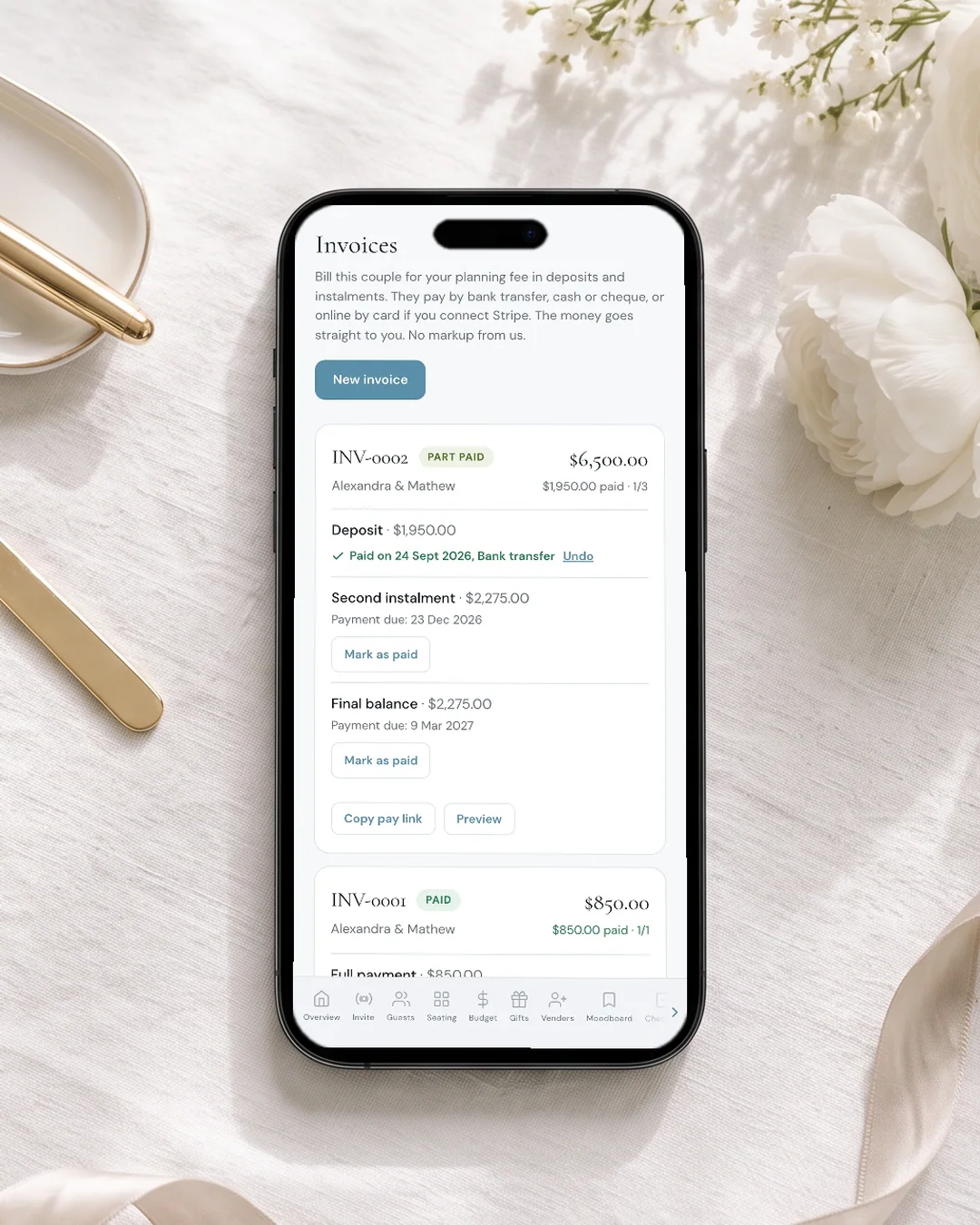
The simplest way to take a deposit from a wedding client is to send an invoice with the deposit as its first instalment. In The Private Wedding App you create the couple's invoice on the wedding you are already managing, in your own currency, and split it into a deposit, staged instalments and a final balance dated from the wedding day. The couple pays each one by bank transfer, using the bank details and payment reference on the invoice, or by cash or cheque, and you mark it paid; no Stripe account is needed. If you want card payment online as well, you connect your own Stripe account. You keep the full fee either way, because the platform takes no commission, and every payment tracks against that couple's guest list and budget instead of a separate billing app. The Private Wedding App costs $189 once for lifetime access, or $19.99/month.
For wedding planners · All guides
Most wedding planners hit the same friction in the first week of a booking: the couple is ready to commit, and you need money to hold the date, but the deposit, the instalments and the final balance live in a different tool from everything else about the wedding. So you juggle an invoicing app, a spreadsheet of who paid what, and a separate reminder to chase the balance a fortnight before the day. This guide walks through how to take a deposit properly, how to build a payment plan that dates itself from the wedding, and how to collect it so the fee lands in your own account and the payments track against the same wedding that holds the guest list, seating and budget.
Decide the deposit and when the balance is due
Before any tool, settle the shape of the money. A deposit exists to hold the date and cover the work you do up front, so it is usually taken as a non-refundable retainer and stated plainly in your contract. Many planners take a share of the fee to book, then stage the rest across the engagement, with the final balance falling due shortly before the wedding so no money is outstanding on the day itself.
Whatever structure you choose, write it into your agreement before you invoice, so the deposit, the instalment dates and the refund position are agreed rather than assumed. The schedule below is an example, not a norm: adapt the shares and the dates to your fee and the length of the engagement.
Build the payment plan and payment schedule from the wedding date
A payment plan is just an invoice split into instalments with dates attached, and the list of those dates is the payment schedule. The tedious part is doing the date arithmetic by hand for every client. In The Private Wedding App, when you create the couple's invoice it scaffolds a deposit, a second instalment and a final balance already dated from the wedding day, so ninety days out and fourteen days out land on the right calendar dates for that specific wedding. You adjust the amounts, or split the total across the instalments in one tap, and rename or add stages to fit the booking.
Because the invoice is created on the wedding you already manage, the couple's name is filled in for you and the plan sits beside their guest list, seating and budget rather than in a separate billing tool you have to reconcile later.
- Set the deposit as the first instalment, due on booking
- Stage the middle payments against the wedding date, not fixed calendar dates
- Put the final balance a week or two before the wedding, never on the day
- Match the plan to the fee and payment terms already in your signed contract
Send the invoice and let the couple pay by bank transfer, or by card
Send the couple a private link to their invoice. It shows each instalment with its due date, your bank details (IBAN, BIC and account holder, or the payment instructions you write) and a payment reference, so the couple pays by bank transfer when an instalment falls due, or hands you cash or a cheque. No Stripe account is needed, and you invoice in your own currency: about 30 are available, US dollars, pounds, euros, Canadian and Australian dollars among them. The money goes from the couple straight to you. The Private Wedding App takes no cut of the payment, so you keep the full fee.
Card payment online is optional. Connect your own Stripe account, which Stripe opens in the countries it supports, and the couple can pay each instalment by card from the same link; on invoices in US dollars they can also pay by bank debit from a US account, which carries a much smaller fee than card on a wedding-sized instalment. You are the merchant of record, not the platform, and the money lands in your own account. The invoice shows you exactly what you will net after Stripe's processing fee before you send it, and if you would rather absorb nothing at all, you can pass the card fee to the couple so you receive the full amount.

Track what is paid without chasing
The reason planners dread payment plans is the chasing. Here each instalment shows paid or due on the invoice, with the amount paid so far and how many instalments are settled. When a transfer, cash or a cheque arrives, you record it with Mark as paid: a whole instalment, a partial payment, or one amount spread over several instalments, and an entry made by mistake can be undone, with a trace. A card payment through Stripe marks its instalment paid automatically. The invoice sits inside that client's wedding, so you check what a couple has paid where you already work, not in a billing app you open once a month.
How wedding planners track expenses and income: what the app shows, and what stays with your accountant
Expense tracking and income tracking mean two different things for a planner, and it helps to separate them. One is the wedding's money: what the couple owes each vendor, and what they owe you. The other is your business's money: your own costs and your total income across every client. The Private Wedding App handles the first and not the second.
Income per client. Each client wedding holds its invoices. An invoice lists its instalments, each marked paid or due, with the amount paid so far, so you see what that couple has paid and what is still to come. The payments you have recorded export as a CSV file for your accountant; card payments, and their payouts to your bank, are also listed in your own Stripe account if you connected one.
Expenses per wedding. The budget on each wedding is the couple's wedding budget. Every vendor or cost is a line with its estimate and its actual amount, the deposit paid, a due date and an instalment schedule, and each line shows whether it is paid in full, deposit only or overdue. The top of the page gives the total budget, what is committed, what is paid so far and what is left. Budget lines can be imported into an invoice as line items when you bill costs through to the couple.
What the app does not do. There is no business expense ledger and no income report across your clients. Your own costs (travel, assistants, software, insurance) and your income totals for the year belong in accounting software or with your accountant, who stays in charge of your tax documents. The invoice carries your business details and a tax rate line, but The Private Wedding App is not an accounting or tax-filing tool.
Keep the money on the same wedding as everything else
This is the difference that matters over a season. Business tools that handle invoicing hold none of the wedding: no guest list, no RSVPs, no meals, no seating, no day-of timeline. So the couple's payments live in one place and the wedding lives in another, and you are the integration between them. Running the invoice on the same wedding that already holds the guest list and budget means one couple, one place, from the deposit to the final headcount.
See what each client wedding includes on the wedding planners page, or view the planner pricing, one plan per wedding, billed through to the couple.
If you are weighing software that drafts and books for you, AI for wedding planners, tool by tool sets out what each assistant can and cannot do on a client wedding.
Everything you need, in one place
See it for yourself.
Everything a planner runs client weddings on: a portfolio of your season, the caterer day sheet, the run of show with per-vendor links, studio templates, couple access, client invoicing with deposits and contracts your couple signs online - plus each wedding's invitation, RSVP, guest list, seating, budget, vendors and AI planner.
See the planner tools →How do I take a deposit from a wedding client?
Send the couple an invoice with the deposit as its first instalment. In The Private Wedding App you create the invoice on the wedding you are already managing, set the deposit amount, and the couple opens it from a private link and pays by bank transfer, with the bank details and reference shown on the invoice, or by cash or cheque; you mark the deposit paid when it arrives. If you have connected your own Stripe account, they can also pay online by card. The money goes straight to you and the date is held. Because a deposit is usually a non-refundable retainer, state the amount and the refund position in your contract before you invoice.
How do I set up a payment plan for a wedding client?
Split the invoice total into instalments: a deposit on booking, one or more staged payments, and the final balance before the wedding. In The Private Wedding App the instalment dates scaffold automatically from the wedding date, and you can split the total across the stages in one tap. Each instalment is paid separately, by bank transfer, cash or cheque, or by card if you connect your own Stripe account, and paid versus due shows on the invoice.
What does a payment schedule for a wedding client look like?
A payment schedule is the list of instalments with their due dates. In The Private Wedding App a new invoice starts from a schedule you edit: a deposit dated on the day you create it, a second instalment 90 days before the wedding and a final balance 14 days before the wedding. Treat it as an example to adapt, change the dates, the amounts and the number of stages, and keep the schedule identical to the one in your signed contract.
How do wedding planners track expenses and income?
In two places. The wedding's money sits on the wedding: in The Private Wedding App the couple's budget tracks every vendor cost with its deposit, instalments and due dates, and the invoice shows what the couple has paid you and what is still due. Your business's money, your own expenses and your income across all clients, stays in accounting software or with your accountant: the app has no business expense ledger and no income report, and it is not an accounting or tax tool.
When should a wedding planner's final payment be due?
Many planners set the final balance shortly before the wedding, so nothing is outstanding on the day itself; a new invoice in The Private Wedding App dates it 14 days before the wedding by default, and you can change it. Building the schedule from the wedding date, rather than fixed calendar dates, keeps that final payment correctly placed for every client without recalculating it by hand.
Is a wedding planner deposit refundable?
Deposits are commonly taken as non-refundable retainers, because they hold the date and cover the work done up front, but the refund position is whatever your contract says. Set it out clearly in your agreement before you take the deposit. This is general information, not legal advice, so use your own contract terms or your lawyer's.
How do wedding planners collect payments from couples?
The cleanest way is an invoice with a deposit and instalments that the couple pays by bank transfer, or online by card. With The Private Wedding App the invoice carries the planner's bank details and a payment reference; the couple pays by transfer, cash or cheque and the planner marks each instalment paid. A planner who connects their own Stripe account can also be paid by card: the charge goes directly to that account, the planner is the merchant of record, and the platform takes no commission. The invoice sits on the wedding, so payments track against the same client whose guest list and budget you already manage.
Can I take card payments from wedding clients?
Yes, and it is optional: an invoice works without it, paid by bank transfer, cash or cheque. Once you have connected your own Stripe account, which Stripe opens in the countries it supports, couples can pay each instalment online by card, and on invoices in US dollars also by bank debit from a US account, which is much cheaper on a large instalment. Card carries Stripe's standard processing fee, and the invoice shows exactly what you will net before you send it. You can also pass the card fee to the couple so you receive the full amount.