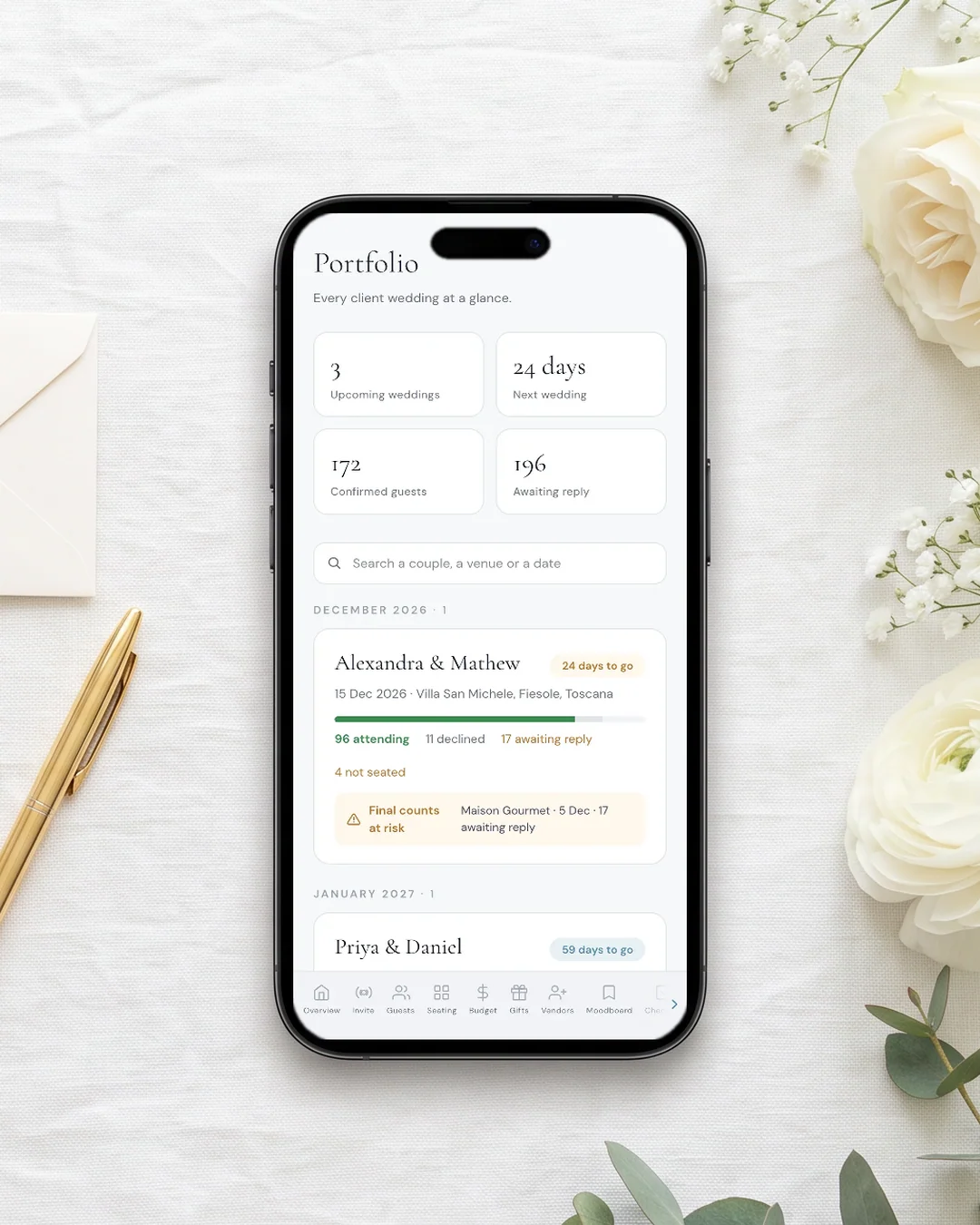
Wedding planners manage RSVPs for multiple wedding clients, and keep track of guests across all of them, by keeping every wedding in one account rather than a separate login per couple. In The Private Wedding App a planner's Portfolio holds every client wedding with live RSVP counts side by side, each wedding completely sealed from the others with its own invitation, guest list, meals and seating, and a selector switches between them in one click. RSVPs, meal choices and allergies land in each wedding's own guest list automatically, so nothing is retyped and no client ever sees another's data. The Private Wedding App costs $189 once for lifetime access, or $19.99/month.
For wedding planners · All guides
One wedding's RSVPs are easy. Ten at once, each with a different guest list, a different caterer waiting on meal counts, and none of them allowed to see each other, is the actual job. Most planners end up doing one of two things nobody recommends: keeping a separate couple account per client and logging in and out all season, or running the whole thing on spreadsheets emailed back and forth. This guide covers a cleaner workflow, one workspace that holds every client wedding, sealed from each other, with the RSVPs, meals and allergies landing where they belong automatically.
The real problem: a login per couple, or spreadsheets
The tools most couples use, the big wedding-website platforms, are built around one couple and one account. That is fine for the couple, but for a planner it means each new client is a new login, a new dashboard that knows nothing about the others, and no view of the season as a whole. Exporting anything means a spreadsheet, and the spreadsheets multiply.
The professional business platforms have the opposite problem: they are built for your contracts and leads, with the guest-facing RSVP as an afterthought, so planners often bolt a separate guest tool onto them per wedding. Either way, the guest side ends up scattered across accounts and files. The fix is a single workspace that treats each wedding as its own sealed space.
Manage multiple wedding clients in one workspace, each wedding sealed
In The Private Wedding App a planner account opens on a Portfolio: every client wedding in one place, each one completely separate. A wedding has its own private invitation, its own guest list, its own RSVP with meals and allergies, its own seating chart and budget, and none of it leaks to another client. You are never one wrong tab away from showing one couple another couple's guest list.
Switching between clients is a selector in the sidebar, not a log out and log back in. Add a new client wedding and it joins the Portfolio; open it and you are inside that wedding with everything it holds.
How do wedding planners keep track of guests? Live counts for every wedding
Wedding planners keep track of guests by letting the replies do the counting. The Portfolio shows live RSVP counts for each wedding side by side, attending, declined and awaiting reply, with the days to go, so a glance tells you which weddings are filling up and which are quiet with the date closing in. Instead of opening ten dashboards to answer where things stand, you see the whole season at once, and the weddings that need chasing surface themselves. Try it in the demo below.

Meals and allergies land in the right wedding, for the right caterer
Each wedding usually has a different caterer, and each caterer needs its own meal counts and allergy roster. Because every RSVP lands in its own wedding's guest list, the meal choices, dietary notes and severe-allergy flags for one wedding stay with that wedding. When it is time to send final numbers, the caterer day sheet builds them from that wedding's RSVPs, so you are never untangling two clients' dietary lists from one spreadsheet.
This is the difference from running a season on files: the guest data is structured per wedding from the moment a guest replies, not sorted out by hand at the end.
Pricing that survives being multiplied
A workflow that works for one wedding has to still work at ten, and that includes the bill. The Private Wedding App is priced per wedding, $189 lifetime or $19.99 a month while the wedding is active, with no monthly platform fee on the account and no cap on how many weddings it holds. The cost attaches to each client and bills through to them, the way stationery does, so the cost follows the weddings you have and a busy June does not push you into a higher tier.
That is the honest contrast with dedicated planner platforms, which tend to price by tier or project count, so the software bill climbs with your season regardless of whether a given couple ever pays for it. See how it works for planners on the wedding planners page, or compare the RSVP tools in detail in the best RSVP tools for wedding planners.
Two comparisons go further on this workflow: the wedding planner client portal compared, on what each couple sees, and AI for wedding planners, tool by tool, on what an assistant does with each wedding's guest list.
Everything you need, in one place
See it for yourself.
Everything a planner runs client weddings on: a portfolio of your season, the caterer day sheet, the run of show with per-vendor links, studio templates, couple access, client invoicing with deposits and contracts your couple signs online - plus each wedding's invitation, RSVP, guest list, seating, budget, vendors and AI planner.
See the planner tools →How do wedding planners manage RSVPs for multiple clients?
The workable way is one workspace holding every client wedding, rather than a separate couple account per client. In The Private Wedding App the Portfolio shows all your weddings with live RSVP counts, each wedding sealed and private with its own invitation, guest list, meals and seating, and a selector switches between them in one click. RSVPs land in each wedding's own guest list automatically, so nothing is retyped and clients never see each other's data.
How do wedding planners keep track of guests?
By keeping one guest list per wedding that fills itself from the RSVPs. In The Private Wedding App guests reply on the couple's private invitation link, and each reply lands in that wedding's guest list with the meal choice, dietary notes, plus-ones and children. The planner's Portfolio then shows, for every client wedding, how many guests are attending, declined and awaiting reply, and raises a "final counts at risk" alert when a vendor deadline is within a week and guests are still awaiting reply.
How do I manage multiple wedding clients at once?
Put every client wedding in one workspace and keep each one sealed. In The Private Wedding App the Portfolio lists every wedding grouped by month and searchable, a selector switches between them under one login, and each wedding keeps its own invitation, guest list, seating and budget. Checklists, vendor shortlists and runs of show can be saved as templates and applied to the next client's wedding.
Can I manage multiple weddings in one account?
Yes. A planner account on The Private Wedding App holds every client wedding under one login, with no cap on how many. Each wedding is completely separate, its own invitation, guests, RSVPs, meals, seating and budget, and you move between them with a sidebar selector rather than logging in and out. The big couple platforms, by contrast, are built around the couple's own account, with no planner workspace described on their pages.
How do planners keep client weddings separate?
Each wedding is its own sealed space: a separate private invitation link, its own guest list, RSVP data, seating chart and budget, none of which is visible from another wedding. Switching clients changes which wedding you are inside, so there is no shared surface where one couple could see another's guests. If a planner invites a couple to co-access their own wedding, per-section permissions control exactly what that couple sees, and it is still only their wedding.
What is the best way to collect RSVPs for several weddings at once?
Give each wedding its own private invitation with the RSVP built in, and let the replies land in that wedding's own guest list. In The Private Wedding App each couple's guests open a designed invitation and RSVP with meals and allergies in about thirty seconds, and the counts update live in your Portfolio across every wedding, so you track the whole season from one place instead of chasing spreadsheets or logging into separate accounts.
How much does software for managing multiple weddings cost?
The Private Wedding App is priced per wedding, $189 lifetime or $19.99 a month while active, with no monthly platform fee and no cap on weddings, and most planners bill the plan through to each couple. Dedicated planner platforms tend to price by tier or active-project count instead, for example Aisle Planner from $69.99 a month capped at 15 active projects, so the software cost rises with your season regardless of whether a given couple covers it.