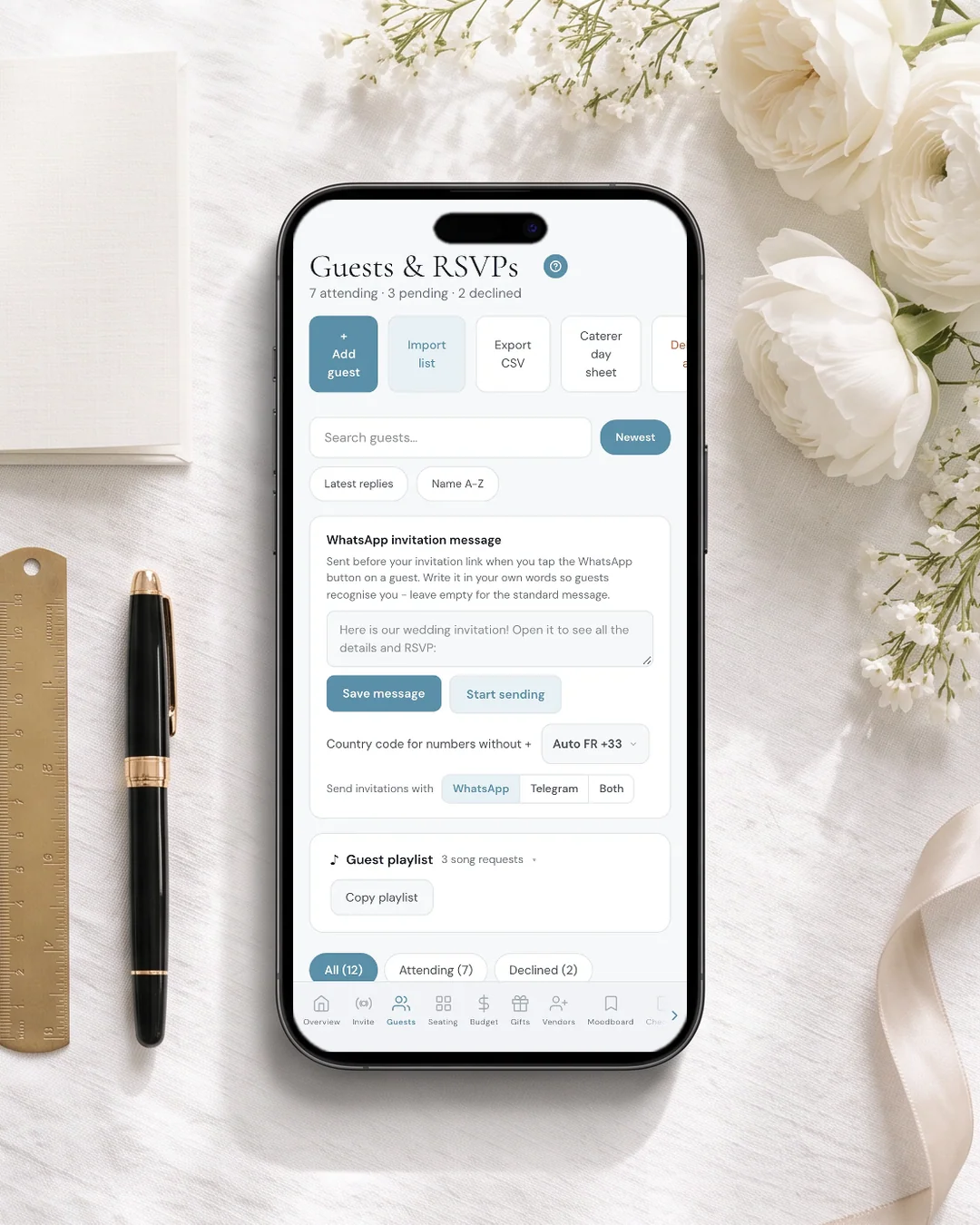
The Private Wedding App is wedding venue software that includes guest management and RSVPs. A venue account holds a bookings calendar with date-clash warnings, rooms drawn to scale in 2D, reusable room layouts and team seats, and every wedding inside it has its own guest list with online RSVP, meal choices, allergies, a seating plan, a caterer and venue day sheet and a run of show. Couples sign in to their own wedding and see the venue's logo and the line "with" followed by the venue's name.
- A venue needs two things in one place: the room side and the guest side.
- Room side: bookings calendar with a date-clash warning, rooms to scale, reusable layouts.
- Guest side: guest list, online RSVP, meals, allergies, seating, day sheet for the kitchen.
- The floor plan is 2D, drawn to scale from above. It is not 3D.
- Couples see the venue's logo and "with [venue]" in their workspace. It is not white-label.
- Prismm (formerly AllSeated) takes no new events since 26 August 2026.
For wedding planners · All guides
A wedding venue runs on two sets of facts. The first is yours: which date is held, which room, how the tables fit. The second belongs to the couple and their guests: who is coming, what they eat, where they sit. Most venues keep the first in a calendar and a diagramming tool and receive the second by email, as a spreadsheet, a week before the wedding. Venue coordinators have started asking a sharper question: which software holds both? This guide lists what a venue needs in 2026, and says precisely what The Private Wedding App does and where it stops.
Which wedding venue software includes guest management and RSVPs?
The Private Wedding App does. It is an all-in-one wedding planning platform, and professionals run every wedding from one account. In a venue account, each wedding is its own sealed space with a guest list and online RSVP. Guests reply on the couple's private invitation link. Each guest chooses a meal, adds dietary notes, can flag a severe allergy, and answers for plus-ones and children. On a multi-event wedding they reply per event. The guest list fills itself and exports as CSV.
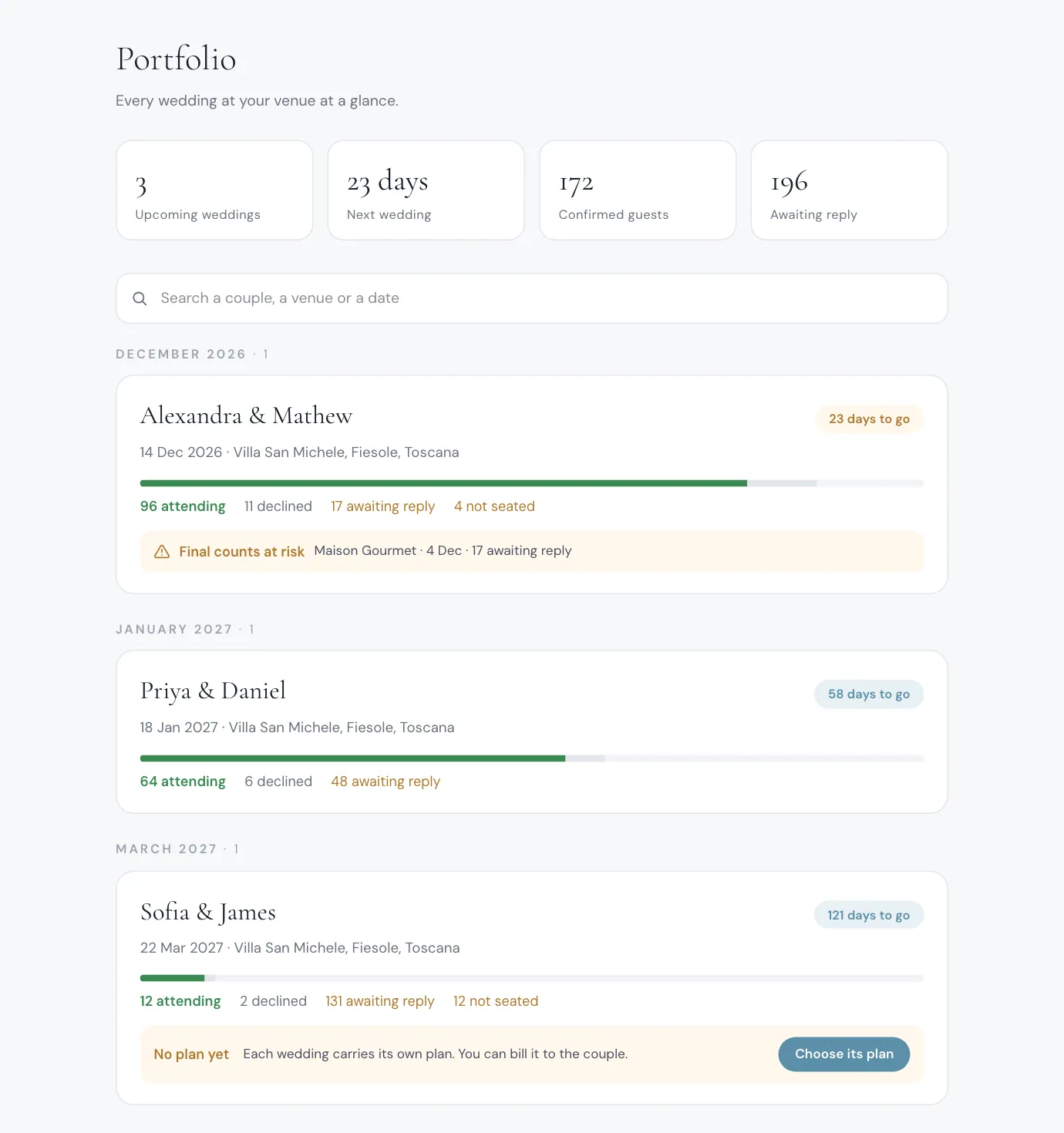
For the venue, the result is that guest numbers stop arriving by email. The portfolio shows every wedding at the venue, grouped by month and searchable, with live counts of guests attending, declined and awaiting reply, and the days to go.
What does a wedding venue need from its software in 2026?
Use this as a requirements checklist when you compare tools. It is written from the venue coordinator's week, not from a feature list: each line is something that otherwise ends up in a spreadsheet or a phone call.
- A calendar of inquiries, tours, holds and confirmed dates, per room, that warns before a double booking
- Each room described once, with its capacity, and drawn to scale with real table sizes
- Layouts you can reuse for the next wedding in the same room
- A clearance check between tables, so service aisles are not blocked
- A guest list with online RSVP for every wedding, with meals, allergies and plus-ones
- A seating plan built from the guests who confirmed
- A day sheet for the kitchen and the floor team: counts, plates per meal, allergies by table
- A timeline of the day that each vendor can read
- A login for the couple, with control over what they see and edit
- Your venue's name and logo where the couple works
- Seats for your coordinators, with roles
- Deposit and instalment invoices, and your hire agreement signed online
How does The Private Wedding App cover each need, and where are the limits?
The table maps each need to what the product does, with its limit in the last column. Read the limits first: they tell you faster than anything else whether a tool fits your venue.
Prismm is shutting down: what should my venue switch to?
Many venues drew their rooms in AllSeated, later renamed Prismm. Prismm takes no new events since 26 August 2026. Existing Prismm events stay editable through June 2027, and after that the work remains available in view-only mode with the company that acquired Prismm, whose own diagramming product is where accounts are being moved.
If you are looking for the best Prismm alternative for wedding venues, start by naming what you used it for. If it was the 3D view of a ballroom, The Private Wedding App is not that: its plan is flat, 2D, seen from above. If it was a to-scale floor plan with tables your team and the rental company can trust, plus a seating chart, it covers that and adds what a diagram alone never had, the guests who actually replied. The background and the dates are in the Prismm and AllSeated alternative guide. How the main venue tools compare on bookings, rooms and guest RSVPs, with prices checked in November 2026, is in wedding venue software compared.
What replaces Prismm for wedding venue diagramming?
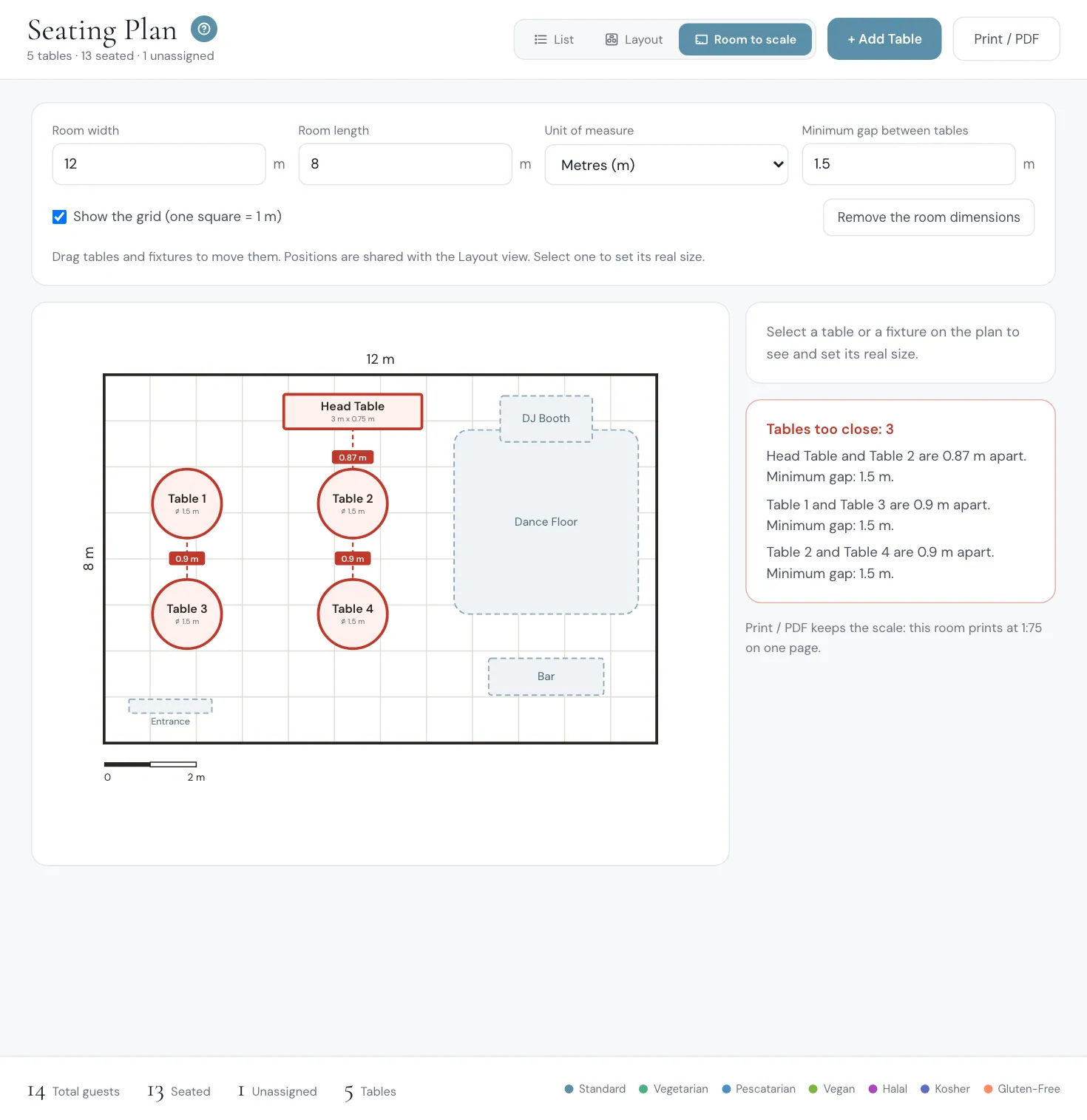
For a to-scale 2D plan: room to scale, inside the seating plan. Enter the room's width and length in metres or feet. The plan is drawn to scale from above, with round tables at their diameter, rectangular ones at their length and width, and fixtures at real size: dance floor, stage, bar, DJ booth, entrance. An optional grid shows one square per metre, and a scale bar sits on the plan.
Any two tables closer than your minimum gap trigger a clearance warning. The default gap is 1.5 m or 5 ft and you can change it. Print the room or save it as a PDF for the rental company: the print carries its scale (for example 1:75). Then save the room as a layout: dimensions, tables and fixtures, drawn once and applied to the next wedding in that room, provided its seating plan is still empty.
The difference from a drawing tool shows in the last fortnight. The tables on the plan are the tables of the seating plan, and the seating plan lists only attending guests. A late cancellation changes the table, the plates per meal and the day sheet together.
Can couples plan in a workspace that carries the venue's name?
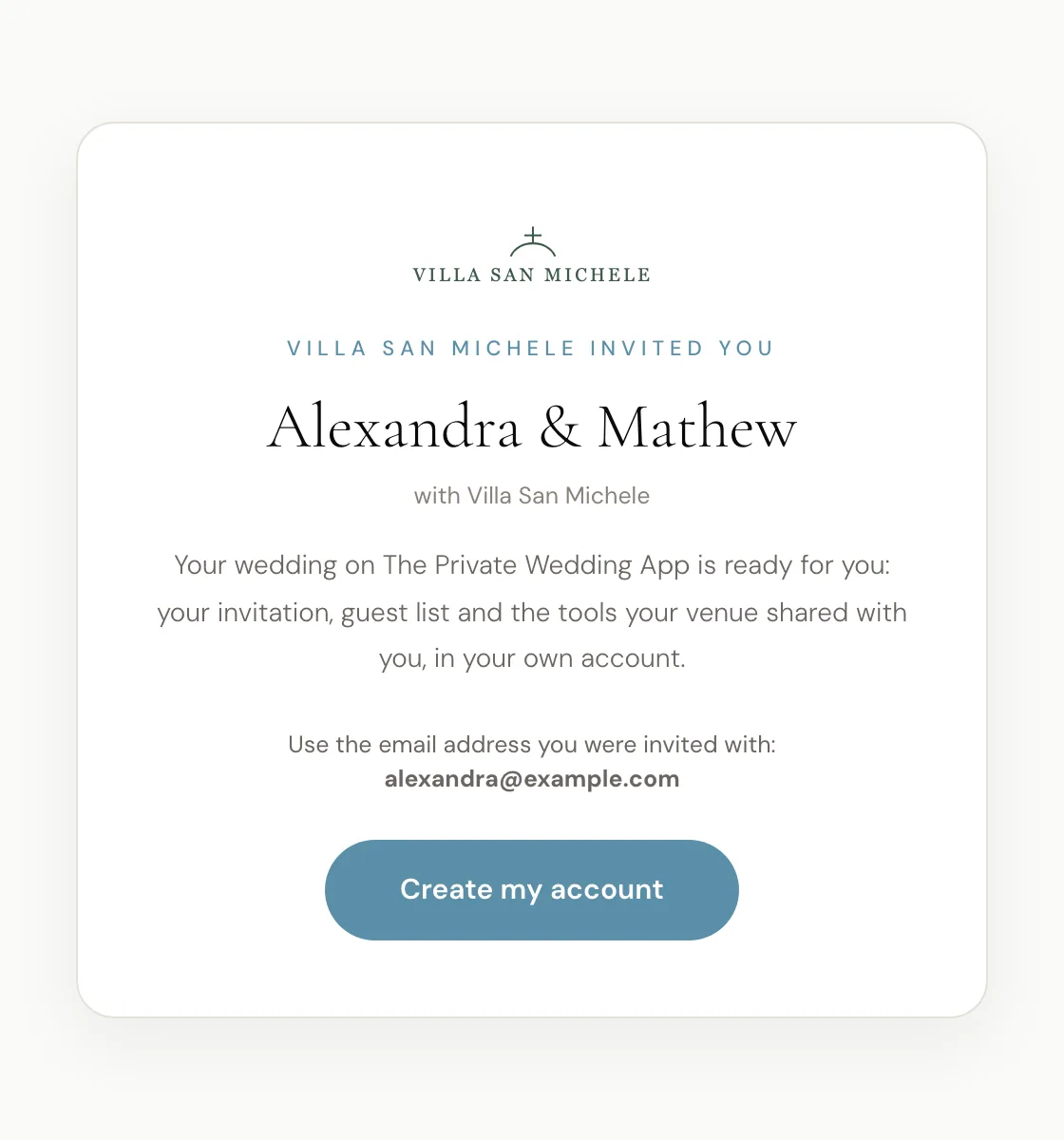
Venues ask for a branded client planning workspace, so here is exactly what the couple sees. You fill in a business profile: venue name, town, rooms with capacity, and a logo. When you invite a couple, the page they open shows your logo, their names and the line "with" followed by your venue's name. The same mark appears in their dashboard, on the invoices and on the contracts you send them.
It is not white-label: the product keeps its own name, and your logo never appears on the invitation the guests see, which stays in the couple's own style. What you control is the couple's access. Each section of their wedding, invitation builder, guest list, seating, budget, vendors, checklist, moodboard, is hidden, view-only or editable, as you choose.
How do the guests' answers reach the kitchen and the floor team?
Through the caterer and venue day sheet: one page with final counts, plates per meal choice, the allergy and dietary roster with each guest's table and a severe flag, a per-table breakdown, the vendor contact sheet, the day's timeline and an alphabetical seating list. Mark it as sent and the next version shows what changed. How it fits into your own event order is covered in the guide to the banquet event order (BEO) for a wedding.
The portfolio raises a "final counts at risk" alert when a vendor deadline is within a week and guests are still awaiting reply. The day's timing lives in the run of show, with a read-only link per vendor, explained in the wedding run of show template. Your coordinators work on all of it from their own seats: staff on guest lists, seating, day sheets and runs of show, with invoices and contracts read-only, admins on everything in the workspace. Only you, the owner, add weddings and choose their plans.
What about bookings, deposits and the hire agreement?
Inquiries, tours, dates on hold and confirmed dates sit in one list and one month calendar, and two entries for the same room on the same date are flagged. A confirmed booking can create its wedding. The deposit on a booking is a tracking note. To collect money, you send an invoice with a deposit and instalments, in about 30 currencies: the couple pays by bank transfer, cash or cheque from the bank details and payment reference on the invoice, and you mark each instalment paid. Online card payment is optional, through your own Stripe account, which Stripe opens in the countries it supports, the US, the UK, Canada, Australia and Ireland among them; the app takes no commission, and US bank debit is offered on invoices in US dollars only. Your accountant or invoicing software stays in charge of tax documents. The whole flow is in the guide on how venues track bookings, inquiries and deposits.
For the hire agreement you paste your own text, send a private link, and the couple signs online by ticking a consent box and typing their name. The app records who signed, the date and time, and the exact text. It supplies no contract wording.
How does a venue get started?
Describe your rooms, draw the one you use most, and log your next inquiry. The screens and the full description are on the page for wedding venues, and the cost is on the pricing page. If you also plan weddings for clients outside your venue, the same tools are presented for planners on the page for wedding planners.
When you are ready, create your venue account.
See it for yourself.
Everything a venue runs its weddings on: a bookings calendar with date-clash warnings, rooms drawn to scale, reusable layouts, the caterer and venue day sheet, the run of show, team seats, invoices and contracts, plus each wedding's invitation, RSVP, guest list, seating plan and budget.
See the venue tools →Which wedding venue software includes guest management and RSVPs?
The Private Wedding App does. A venue account holds the bookings calendar, the rooms and the team, and every wedding inside it has its own guest list with online RSVP, meal choices, allergies and a seating plan. The counts in the portfolio and on the caterer day sheet are the guests' own answers, updated as they reply.
What is the best Prismm alternative for wedding venues?
It depends on what you used Prismm for. For a to-scale 2D floor plan with real table sizes, a clearance warning, reusable room layouts and a seating chart fed by live RSVPs, The Private Wedding App covers the job. It does not offer a 3D view.
Is there a wedding venue tool with a branded client planning workspace?
In The Private Wedding App the couple's workspace carries your venue's logo and the line "with" followed by your venue's name: on the page that invites them, in their dashboard, on invoices and on contracts. It is not white-label, and the guests' invitation never shows your logo.
Which event platforms give couples a planning portal from their venue?
The Private Wedding App gives each couple their own login on their wedding, opened by the venue. The venue decides section by section what the couple can see and edit, and the venue's name and logo appear where the couple works. Guests install nothing and reply on a private link.
Can the floor plan be drawn in 3D?
No. The room is drawn to scale in 2D, seen from above, with tables and fixtures at real size, an optional grid and a scale bar. It prints or saves as a PDF at a standard scale.
How much does it cost for a venue?
No software fee. Each wedding carries its own plan, $189 lifetime or $19.99 a month. You can bill it to the couple. Team seats do not change the price.
Do guests or couples need to install an app?
No. Guests open the couple's private invitation link in their browser and reply there. The couple and your team sign in on any phone or computer.