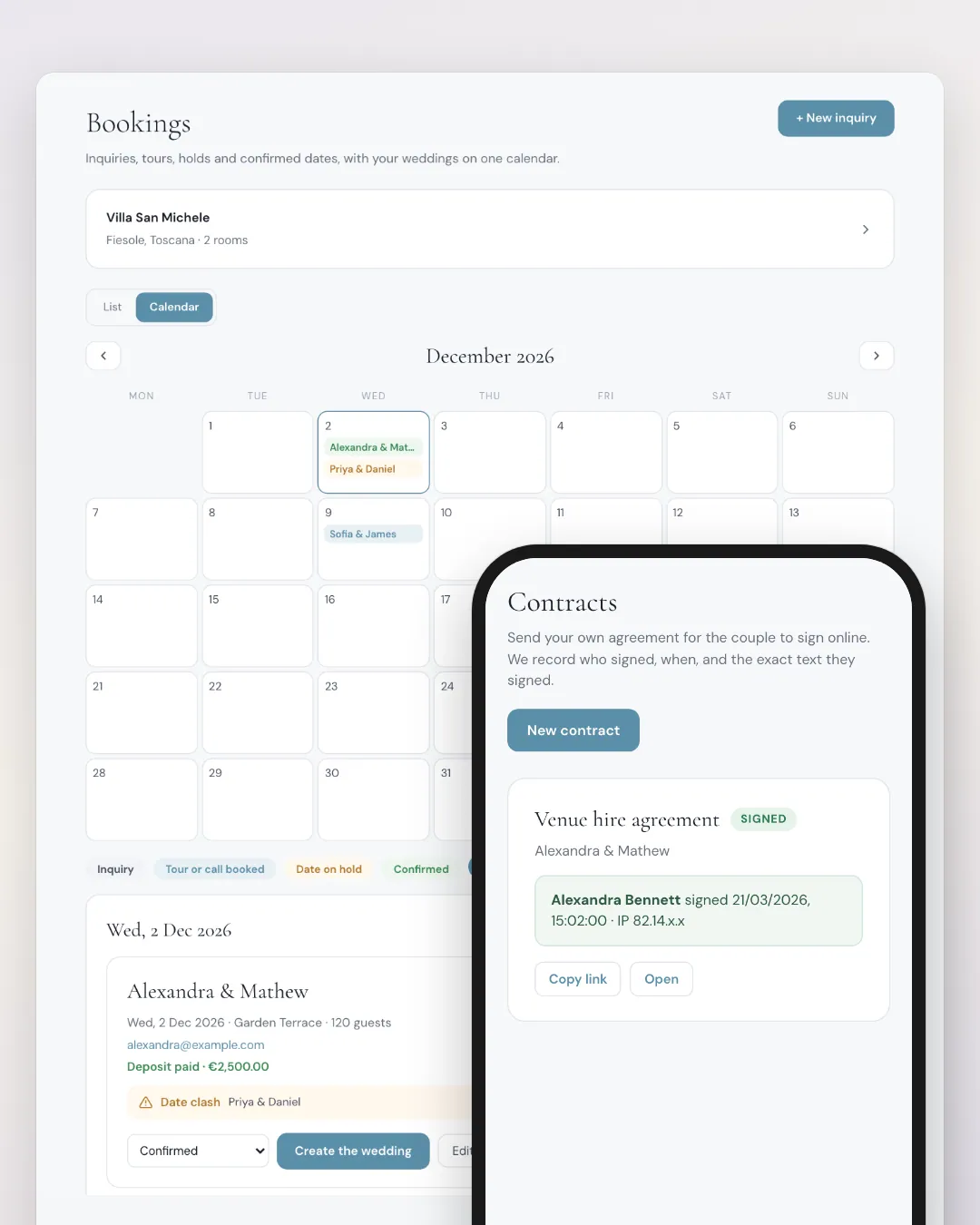
The Private Wedding App is a Prismm alternative for wedding venues that holds bookings with a clash warning and each wedding's RSVPs, meals and allergies. No software fee. Each wedding carries its own plan, $189 lifetime or $19.99 a month. You can bill it to the couple. Tripleseat starts at $375 per venue a month, floor plans extra; Perfect Venue (from $199 a month, billed yearly) and HoneyBook (from $29, billed yearly) list no guest RSVP. Cvent Event Diagramming, where Prismm events go, lists paid plans from $150 a month and no invoicing. Planning Pod and Moposa publish no price. The Private Wedding App's room plan is 2D, not 3D.
- Prismm takes no new events since 26 August 2026: new events go to Cvent Event Diagramming, and existing Prismm events stay editable through June 2027.
- Tripleseat starts at $375 per venue per month; its Floor Plans add-on is priced separately.
- Perfect Venue runs from $199 a month per location billed yearly, in USD or CAD; floor plans come through a Prismm integration, not natively.
- Planning Pod and Moposa publish no price; both list a guest RSVP, Planning Pod with no dedicated allergy field.
- The Private Wedding App holds bookings with a clash warning, rooms to scale in 2D, and per wedding the guest list, RSVP, meals, allergies and a caterer day sheet.
- Its limits: no 3D, no public booking page or availability widget, no lead forms, not white-label.
For wedding planners · All guides
If your venue drew its rooms in Prismm, the clock is set: new events now go to Cvent Event Diagramming, and the old ones go view-only after June 2027. So the question this winter is wider than seating. Do you move the diagrams and keep everything else where it is, or pick one tool for the whole year: the inquiries, the holds, the rooms, the hire agreement, the deposit, and the guest numbers that today arrive by email a week before each wedding? This page compares the venue software you are most likely to meet, on what it does for a wedding venue and where it stops. The requirements checklist sits in the guide to wedding venue software with guest management and RSVPs.
This comparison is written by The Private Wedding App, one of the tools compared. Each tool is described from its own pricing, feature and help pages, read on 23 November 2026, without signing up to any of them. We compared what decides a venue's year: who the tool is built for, the guest list and online RSVP of each wedding, meals and allergies for the kitchen, rooms drawn to scale, the bookings calendar and double bookings, what the couple sees, contracts, deposits and payments, team seats and price. The Sources section links every page.
At a glanceSide-by-side comparison
| Criterion | The Private Wedding App | Tripleseat | Perfect Venue | Planning Pod | Cvent Event Diagramming |
|---|---|---|---|---|---|
| Built for | Wedding venues and planners, own account type | Hospitality venues, with a wedding-venue page | Restaurants, venues, hospitality groups | Venues first, planners welcome | Venue diagramming (ex Prismm, Social Tables) |
| Guest list and online RSVP | Per wedding, on the couple's private link | Guest lists in the Floorplans product; RSVP not listed on pages read | Not listed on its site | RSVP on an event webpage, for guests already added | Attendee tools for seating and meals |
| Meals, allergies, kitchen sheet | Meals, allergies, severe flag; day sheet, not a full BEO | BEOs from event data; dietary fields not listed on pages read | BEOs; dietary questions only via Enterprise questionnaire, per event | BEOs and meal choice; allergy field not listed | Meals in attendee tools; no BEO listed |
| Room to scale | To scale in 2D, clearance warning; not 3D | Floor Plans add-on, 2D and 3D, priced separately | Not native; Prismm integration | To-scale floor plans and seating charts | To scale from DWG, CAD or PDF; 2D and 3D |
| Bookings calendar, double bookings | Clash warning per room, list and month view | Calendar that helps prevent double bookings | Calendar shows leads to avoid double bookings | Notice on a double-booking attempt | Not offered, per its page |
| What the couple sees | Own login; hidden, view or edit per section | Guest portal: review, approve, pay | Guest portal for the booking client | Branded client portal | Not listed on the page read |
| Contracts signed online | Your own text, signed online; no template | Contracts for digital signature | E-sign | Contracts with e-signature | Not offered, per its page |
| Deposits and payments | Instalments by bank transfer, or card via your own Stripe | Deposits and payments | Stripe or Square; USD or CAD | Proposals to invoices, Adyen payments | Not offered, per its page |
| Team | Up to 25 seats, price unchanged | Unlimited users on all plans | Unlimited users | Not listed on the pages read | 1 user below Enterprise |
| Price | $189 once or $19.99/mo per wedding | From $375 per venue per month; add-ons extra | From $199/mo per location, billed yearly | Not published; demo first | Pro $150/mo or $1,500/yr, 12-month term |
Checked on 23 November 2026 on each company's own pages. Prices and plans change; the Sources section links every page.
Tool 01The Private Wedding App
Tool 02Tripleseat
Tool 03Perfect Venue
Tool 04Planning Pod
Tool 05Cvent Event Diagramming
Tool 06HoneyBook
Tool 07Moposa
VerdictWhich tool fits your business?
It depends on how you work:
If you are leaving Prismm and need a to-scale room plan your team can trust, The Private Wedding App draws the room in 2D with real table sizes and a clearance warning, and seats only the guests who replied yes. Cvent Event Diagramming, where Prismm events now go, adds 3D views from $150 a month on a 12-month term and lists no contracts or invoicing. The dates and the seating move are in the Prismm and AllSeated alternative guide.
If your guest numbers still arrive by email a week before each wedding, The Private Wedding App collects them as RSVPs inside the wedding and turns them into the caterer day sheet. Tripleseat (from $375 per venue a month, guest lists through its separately priced floor plan product) and Perfect Venue (from $199 per location a month, billed yearly, with no online guest RSVP listed) build BEOs from event data.
If your venue is in Ireland or the UK, The Private Wedding App publishes its price and draws rooms to scale; Moposa, built there for wedding venues, has a couples' app with RSVP but publishes no price and lists no floor-plan diagramming.
To see the venue account, read the page for wedding venues and the pricing for venues. How bookings, holds and deposits move from inquiry to wedding is in the guide on wedding venue bookings, inquiries and deposits. When you are ready, create your venue account.
01How much does wedding venue software cost, and who publishes prices?
Six of the nine products in the table publish a price; Planning Pod, Moposa and iVvy lead to a demo or publish none. Before you compare numbers, compare units: per venue, per location, per user or per wedding. A venue with two buildings, or a hotel with several outlets, pays very differently under each.
The Private Wedding App charges per wedding: No software fee. Each wedding carries its own plan, $189 lifetime or $19.99 a month. You can bill it to the couple. A client wedding can be set up before its plan is chosen and stays open 5 days without a plan. The details are on the venue pricing section.
02Prismm takes no new events: what is the best Prismm alternative for wedding venues?
The Private Wedding App, if what you used Prismm for was a to-scale 2D plan with a seating chart. It does not offer a 3D view, and new Prismm events already go to Cvent Event Diagramming (per the Prismm FAQ, since 26 August 2026).
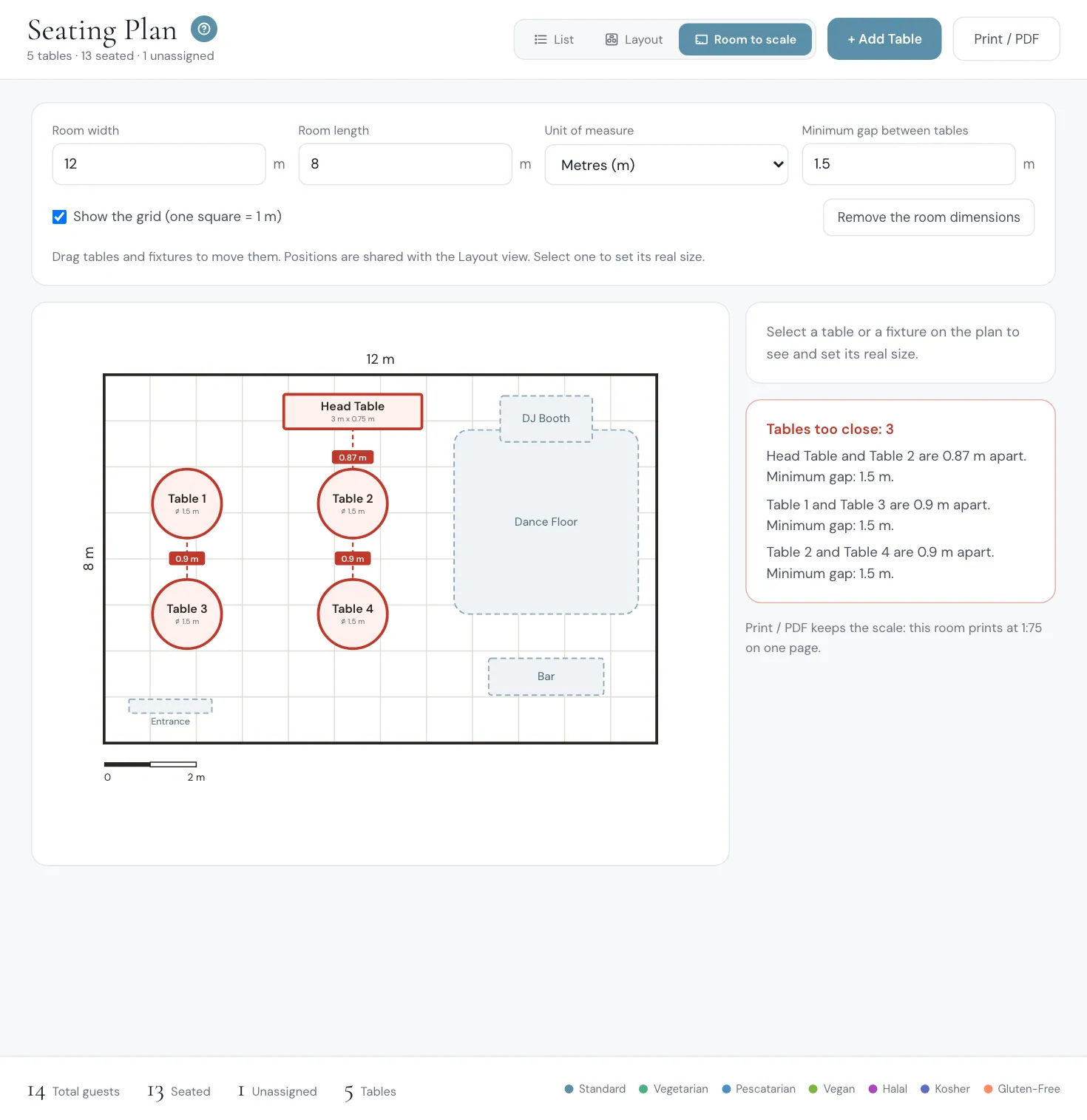
Room to scale works inside each wedding's seating plan. Enter the room's width and length in metres or feet, and tables and fixtures sit at real size, with an optional grid and a scale bar. Tables closer than your minimum gap raise a clearance warning, 1.5 m or 5 ft by default and adjustable. The plan prints or saves as a PDF at a standard scale.
A saved layout applies to the next wedding in that room, provided its seating plan is still empty. The seating plan lists only guests who replied yes, so a late cancellation changes the table, the plates per meal and the day sheet together.
03Which wedding venue software includes guest management and RSVPs?
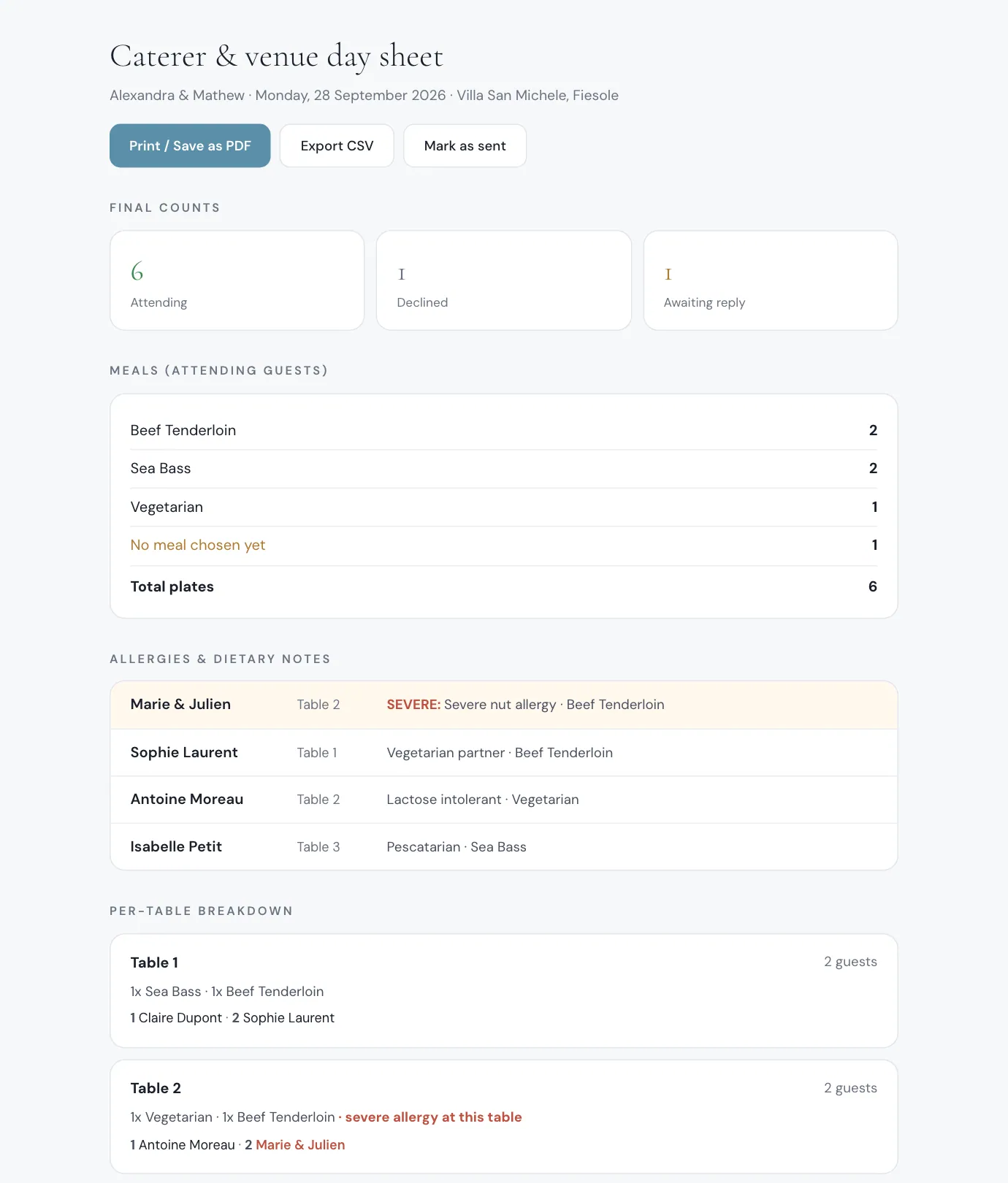
The Private Wedding App does, inside every wedding of the venue account. Guests reply on the couple's private invitation link: a meal choice, dietary notes, a severe-allergy flag, plus-ones, children, and a reply per event on a multi-event wedding. Automatic reminders go by email, at most two per guest. The portfolio shows every wedding at the venue with live attending, declined and awaiting reply counts.
Those answers feed the caterer and venue day sheet: final counts, plates per meal, the allergy roster by table with the severe flag, a per-table breakdown, the vendor contact sheet and an alphabetical seating list, in print, PDF or CSV. Mark it as sent and the next version shows what changed. Final-numbers deadlines are set per vendor, for example caterer 10 days and venue 30, and the portfolio flags final counts at risk. It is not a full BEO: there is no menu pricing or staffing.
Among the others, Planning Pod takes RSVPs only from attendees already added, with no dedicated allergy field; Moposa's couples' app has RSVP and dietary requirements, at a price not published; on Perfect Venue and HoneyBook, an online guest RSVP is not listed on the pages read, and Tripleseat lists guest lists in Floorplans by Tripleseat, from $150 a month. How the day sheet fits into your own event order is covered in the banquet event order (BEO) guide.
04Which venue software holds bookings, holds and the hire agreement?
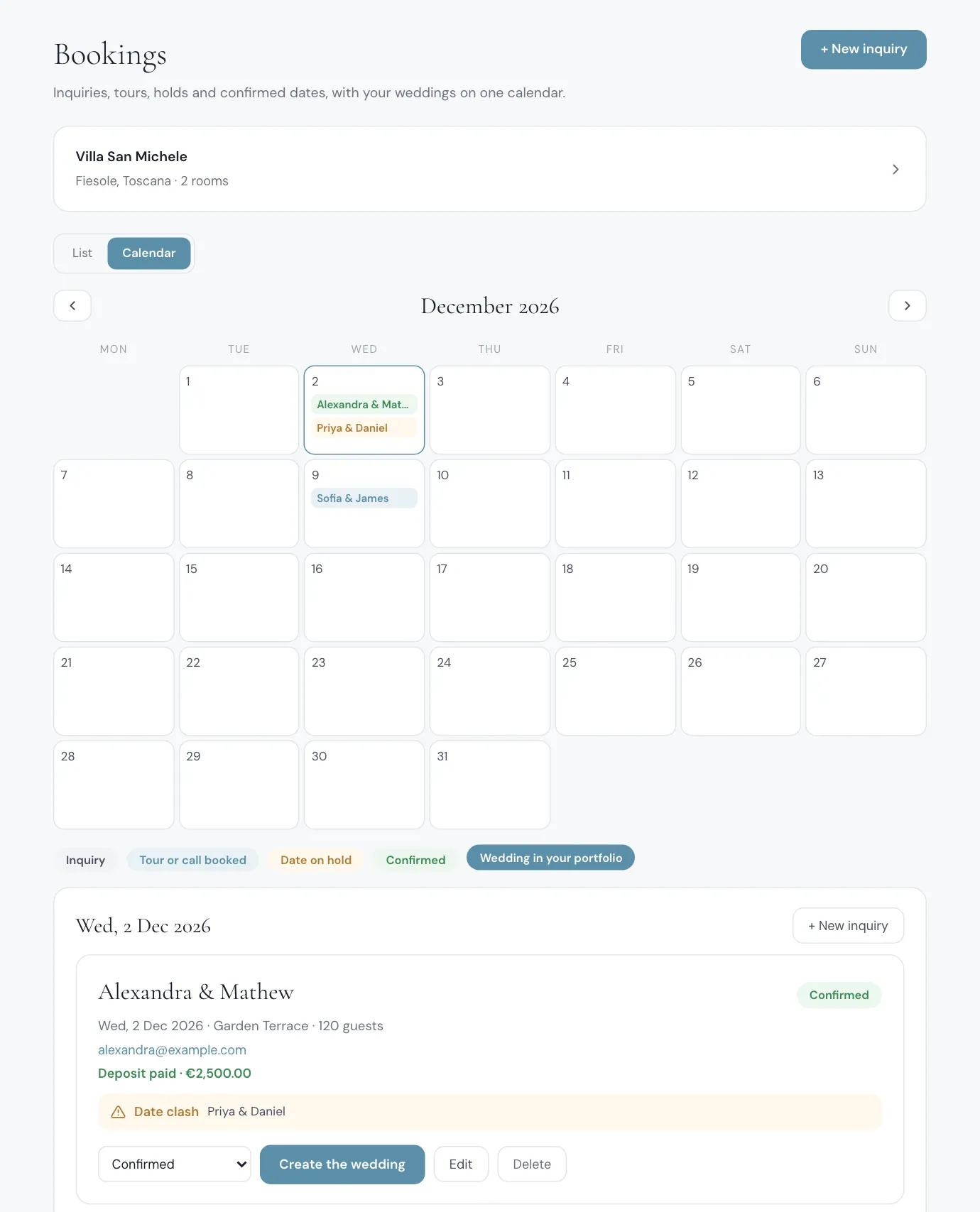
In The Private Wedding App, inquiries, tours or calls, holds and confirmed dates sit in one list and one month calendar. When two entries take the same room on the same date, the calendar shows a clash warning. A confirmed booking can create its wedding. The deposit noted on a booking is a tracking note: money is collected through an invoice with a deposit and instalments.
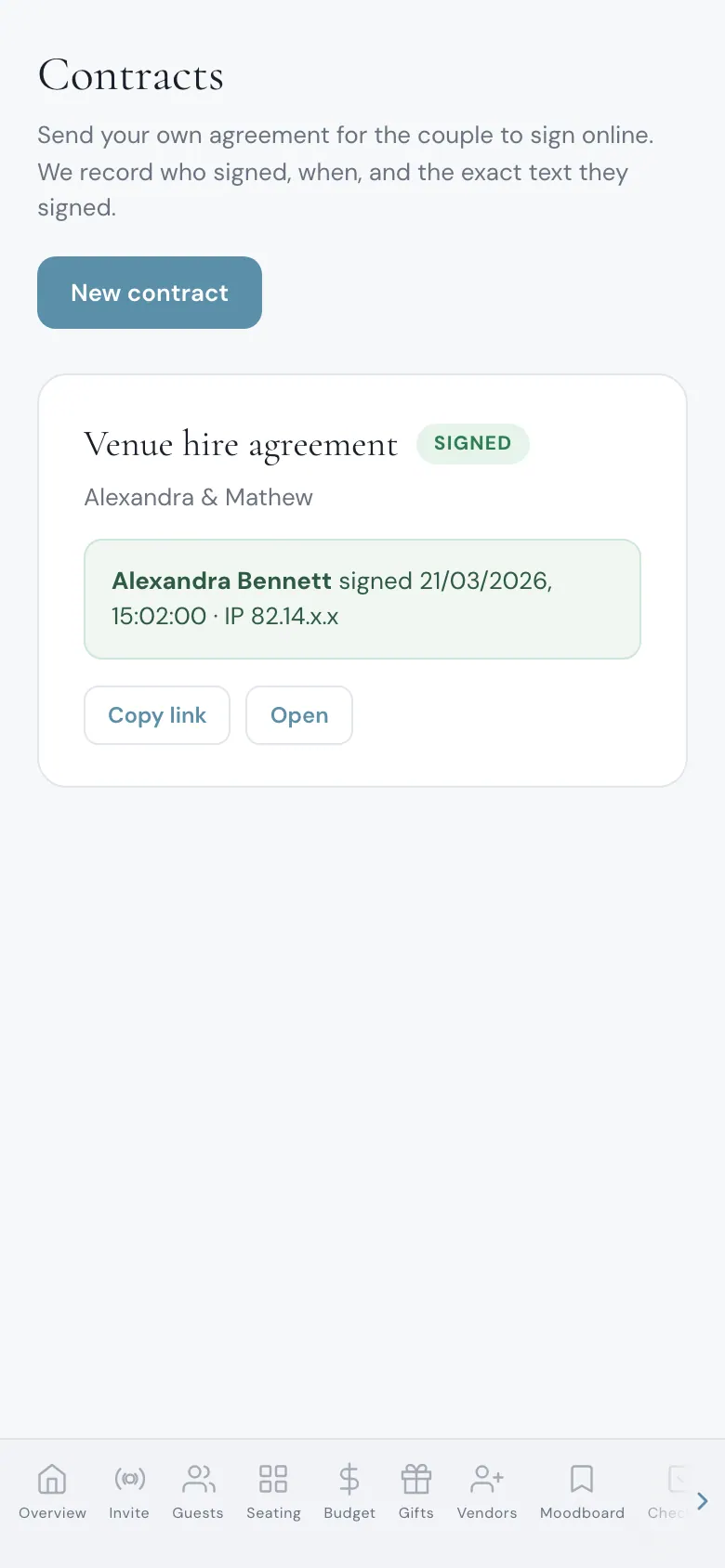
The hire agreement is your own text. You send a private link, the couple ticks a consent box and types their name, and the app records the name, the time, the IP address and a SHA-256 hash of the text. You can void a contract before it is signed. No contract wording is supplied.
Tripleseat, Perfect Venue, Planning Pod and Moposa each list a calendar against double bookings, contracts signed online and payments; of the four, only Planning Pod and Moposa list a guest RSVP, and only Tripleseat and Perfect Venue publish a price. HoneyBook's October 2026 update adds a public availability calendar, while it lists no guest list or RSVP. The Private Wedding App has no public booking page, no availability widget and no lead form: inquiries are entered by you or your team.
05Can couples pay a deposit if card payments are not available where my venue is?
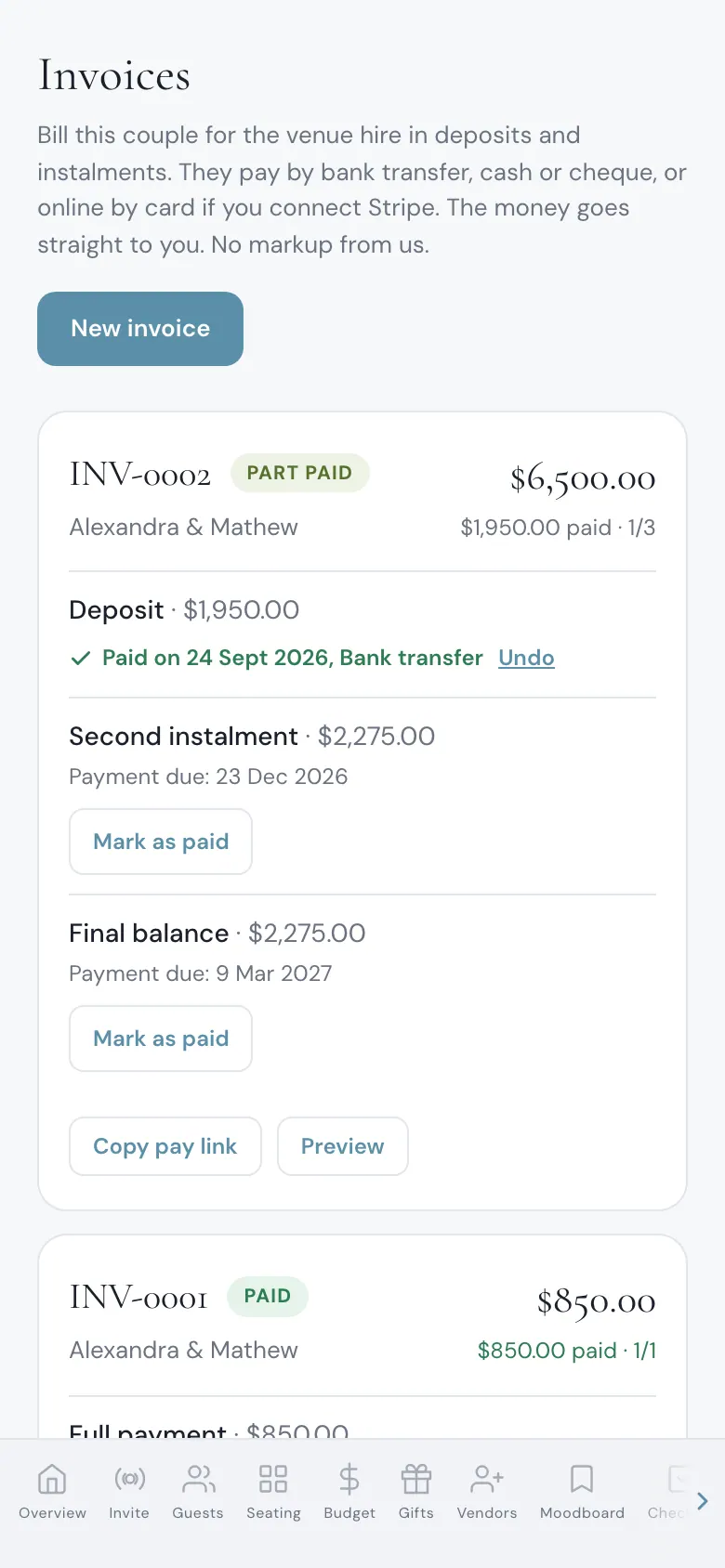
Yes, in The Private Wedding App. A venue can create and send invoices without Stripe: the bank details or payment instructions are printed on the invoice, and you mark each payment as paid, including partial payments, in about 30 currencies. Invoices paid by bank transfer work in every country. Online card payment needs your own Stripe account, where Stripe opens accounts; the money goes to your venue and the app takes no commission. The owner and team admins create invoices; staff read invoices and contracts only.
This matters when you compare: Perfect Venue works in USD or CAD with Stripe or Square, HoneyBook supports professionals only in the U.S., Canada, the UK and Australia, and Moposa takes card payments through Stripe and is built and supported in Ireland and the UK.
Two more points to check before you switch. First, the invoice in The Private Wedding App is not a tax or e-invoicing document: your accountant or invoicing software keeps that role. Second, the language your couples and guests read: the dashboard works in 16 languages, and each couple's invitation can run in up to 3 of 26 guest languages, right-to-left included. Everything works in the browser on any phone or computer.
SourcesEvery fact on this page, with the date it was checked
The Private Wedding App, checked 23 November 2026: page for wedding venues and pricing for venues (price per wedding, features and limits).
Tripleseat, checked 23 November 2026: wedding venues page, packages, platform, inquiry inbox, Floor Plans, Floorplans by Tripleseat for venues, feature highlights article (from $375 per venue per month, add-ons, unlimited users, calendar, BEOs, contracts, payments, guest portal, 2D and 3D floor plans, Floorplans from $150 a month, no native app).
Perfect Venue, checked 23 November 2026: pricing, features, wedding venue page, venue settings help, pre-event questionnaire help, App Store listing (plans and prices, USD or CAD, calendar, BEOs, e-sign, Stripe or Square, guest portal, floor plans through Prismm, Enterprise dietary questionnaire, iOS app).
Planning Pod, checked 23 November 2026: home page, pricing, event and wedding venues, features, floor plan software, RSVP attendee list help (venue-first, demo first, BEOs, e-signature, Adyen payments, client portal, double-booking notice, floor plans, RSVP rules, no allergy field).
Cvent Event Diagramming, checked 23 November 2026: press release on the Prismm acquisition, Prismm migration FAQ, pricing, event diagramming software (acquisition date, Prismm schedule, paid plan prices, 12-month commitment, 1 user below Enterprise, 2D and 3D, attendee tools, no CRM, contracts or invoicing).
HoneyBook, checked 23 November 2026: pricing, venues page, floor plans help, October 2026 product updates, UK and Australia launch post (prices billed annually, team members, trial, four countries, floor plans, AI-filled BEO, availability calendar, no guest tools listed).
Moposa, checked 23 November 2026: home page, features, for couples (wedding venues, built and supported in Ireland and the UK, conflict detection, contracts, invoices, Stripe, function sheets, couples' app paid for by the venue, no public price, no diagramming listed).
iVvy, checked 23 November 2026: venue event management software, FAQ (hotels and function centres, function diary, contracts, invoicing, BEOs, no public price, 15 countries).
Spotted a fact that has changed? Tell us through the contact page and it will be re-checked and re-dated.
See it for yourself.
Everything a venue runs its weddings on: a bookings calendar with date-clash warnings, rooms drawn to scale, reusable layouts, the caterer and venue day sheet, the run of show, team seats, invoices and contracts, plus each wedding's invitation, RSVP, guest list, seating plan and budget.
See the venue tools →What is the best Prismm alternative for wedding venues?
The Private Wedding App, if you used Prismm for a to-scale floor plan and a seating chart. It draws rooms to scale in 2D with real table sizes, a clearance warning and reusable layouts, and seats only guests who replied yes. It does not offer 3D. Per the Prismm FAQ, new events go to Cvent Event Diagramming since 26 August 2026, which lists 2D and 3D views and no contracts or invoicing.
Which wedding venue software includes guest management and RSVPs?
The Private Wedding App includes them in every wedding of a venue account: online RSVP on the couple's private link, meals, dietary notes, a severe-allergy flag and plus-ones, feeding the caterer and venue day sheet. Planning Pod lists RSVP with meal choice for attendees already added, with no dedicated allergy field. Moposa lists a couples' app with RSVP, with no public price.
How much does Tripleseat cost?
Tripleseat states it starts at $375 per venue per month, with add-ons such as Floor Plans priced individually (checked 23 November 2026). Its guest lists sit in Floorplans by Tripleseat, from $150 a month for venues. In The Private Wedding App: No software fee. Each wedding carries its own plan, $189 lifetime or $19.99 a month. You can bill it to the couple.
How much does Perfect Venue cost?
Perfect Venue lists Professional at $199 a month per location billed annually or $239 monthly, and Premium at $299 or $339, in USD or CAD (checked 23 November 2026). No guest list or RSVP was found on its pages. In The Private Wedding App: No software fee. Each wedding carries its own plan, $189 lifetime or $19.99 a month. You can bill it to the couple.
How much does Cvent Event Diagramming cost for a venue?
Cvent lists Pro at $150 a month or $1,500 a year and Premium at $320 a month or $3,500 a year, with a 12-month commitment and 1 user below Enterprise (checked 23 November 2026). It lists no CRM, contracts or invoicing. In The Private Wedding App: No software fee. Each wedding carries its own plan, $189 lifetime or $19.99 a month. You can bill it to the couple.
Does HoneyBook work for wedding venues, and what does it cost?
HoneyBook has a venues page and lists Starter $29, Essentials $49 and Premium $109 a month billed annually, in the U.S., Canada, the UK and Australia (checked 23 November 2026). Floor plans start at Essentials and are created on desktop only, and no guest list or RSVP tool is listed. In The Private Wedding App: No software fee. Each wedding carries its own plan, $189 lifetime or $19.99 a month. You can bill it to the couple.
Do Planning Pod, Moposa or iVvy publish their prices?
No. On 23 November 2026, Planning Pod showed a demo first, Moposa led to a demo, and iVvy, built for hotels and function centres in 15 countries, published no price. The Private Wedding App publishes its price on the venue pricing section: No software fee. Each wedding carries its own plan, $189 lifetime or $19.99 a month. You can bill it to the couple.
Can couples book my venue online or fill a lead form?
Not in The Private Wedding App. It has no public booking page, no availability widget and no lead form for your website. You or your team enter inquiries, tours, holds and confirmed dates, and the bookings calendar warns when two entries take the same room on the same date. The AI assistant is not a receptionist either: it does not answer prospects' inquiries, calls or emails.
Can couples pay the deposit without Stripe?
Yes. In The Private Wedding App you send an invoice with a deposit and instalments, with your bank details or payment instructions printed on it, and mark each payment as paid, partial payments included, in about 30 currencies. Bank transfer works in every country. Card payment needs your own Stripe account where Stripe opens accounts, and the app takes no commission.
Is the invoice a tax invoice?
No. The invoice in The Private Wedding App tracks the deposit and instalments the couple owes your venue, but it is not a tax or e-invoicing document: your accountant or invoicing software keeps that role. To set up your venue, create your venue account.