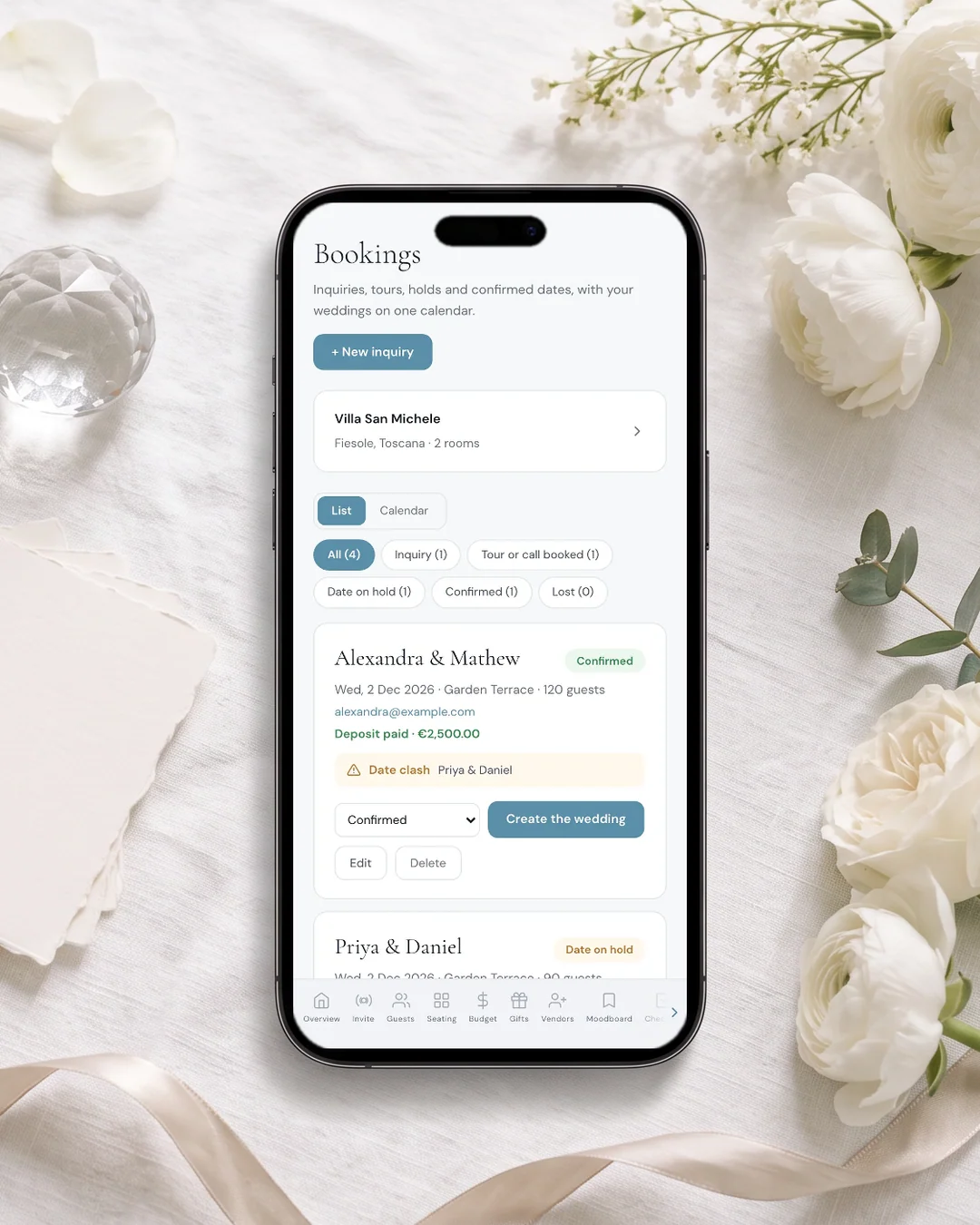
Wedding venues track bookings, inquiries and deposits without spreadsheets by giving every inquiry one entry that moves through five stages: inquiry, tour or call booked, date on hold, confirmed, lost. In The Private Wedding App each entry holds the couple, the date, the room, a guest estimate and a deposit note, appears in a list and on a month calendar, and is flagged with a date clash when two entries take the same room on the same date. The deposit on a booking is a tracking note. Payment is collected through a separate invoice with a deposit and instalments: the couple pays by bank transfer, cash or cheque from the bank details on the invoice and the venue marks each instalment paid, or online by card if the venue connects its own Stripe account.
- One entry per inquiry, from first email to signed agreement, instead of rows in three files.
- Five stages: inquiry, tour or call booked, date on hold, confirmed, lost.
- A double booking is prevented per room and per date, and holds count as much as confirmed dates.
- The deposit on a booking is a note: amount, paid or not. No payment is taken there.
- Invoices with a deposit and instalments are a separate page: paid by bank transfer, cash or cheque and marked paid by you, or by card if you connect your own Stripe account.
- A confirmed booking can create its wedding, with guest list, RSVPs and day sheet.
For wedding planners · All guides
It starts with one spreadsheet. Then a second tab for tours, a shared calendar for holds, a column someone added for deposits, and a colour code only one person understands. The spreadsheet does not fail on a quiet Tuesday. It fails on the Saturday when two coordinators each promise the terrace for the same date in June, or when nobody can say whether the couple in row 48 ever paid their deposit. This guide sets out a booking pipeline a wedding venue can run without spreadsheets: what to record at each stage, what happens next, and how to rule out a double booking.
How do wedding venues track bookings, inquiries and deposits without spreadsheets?
By tracking the couple, not the cell. An inquiry, a tour, a hold and a confirmed date are the same record at four moments of its life. When they live in four places, the venue's real availability is whatever the last person remembered to update.
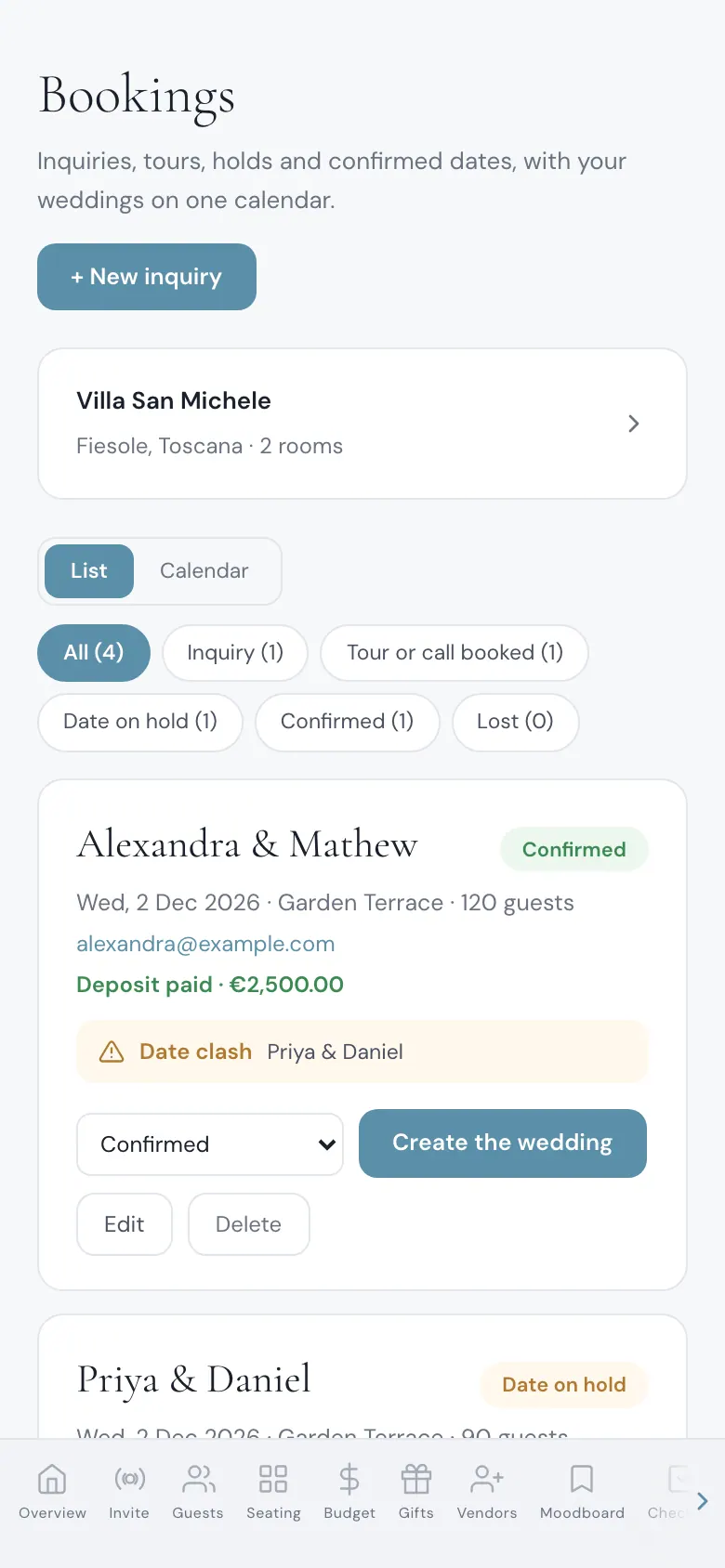
In The Private Wedding App a venue account has a Bookings page. Each entry is one couple with a date, a room, a status and a deposit note, and the same entries appear in a list and on a month calendar. The status moves forward as the conversation does. Nothing is copied from one file to another, which is where spreadsheets lose bookings.
What should a venue record on every wedding inquiry?
Record the same fields every time, on the first contact, even when the couple is only asking for a brochure. A half-filled inquiry is the one you cannot answer when they call back in three weeks. In The Private Wedding App a booking has its own fields for the names, the contact, the date or tentative date, the room, the guest estimate, the status and the deposit. The other lines of the checklist go in the booking's notes.
- Both names, and one email or phone number that reaches them
- The date they want, or a tentative date and how flexible they are
- The room or space, even as a first guess
- A guest estimate, to check against the room's capacity
- Where the inquiry came from: referral, planner, listing, social media
- Whether a planner is involved, and the planner's contact
- The status today, and the date of the next step
- The deposit quoted, as a note, and whether it has been paid
What does a wedding venue booking pipeline look like, stage by stage?
The Private Wedding App uses five statuses. The table shows what to record at each one and what should happen next. The last two rows are not statuses but house rules worth writing down, to adapt to your own terms and your hire agreement.
How do you prevent a double booking on a wedding venue booking calendar?
A double booking is rarely two confirmed weddings. It is a hold nobody wrote down against a tour that went well. The rule that prevents it is simple to state and hard to keep in a spreadsheet: every entry that takes a room on a date counts, whatever its status.
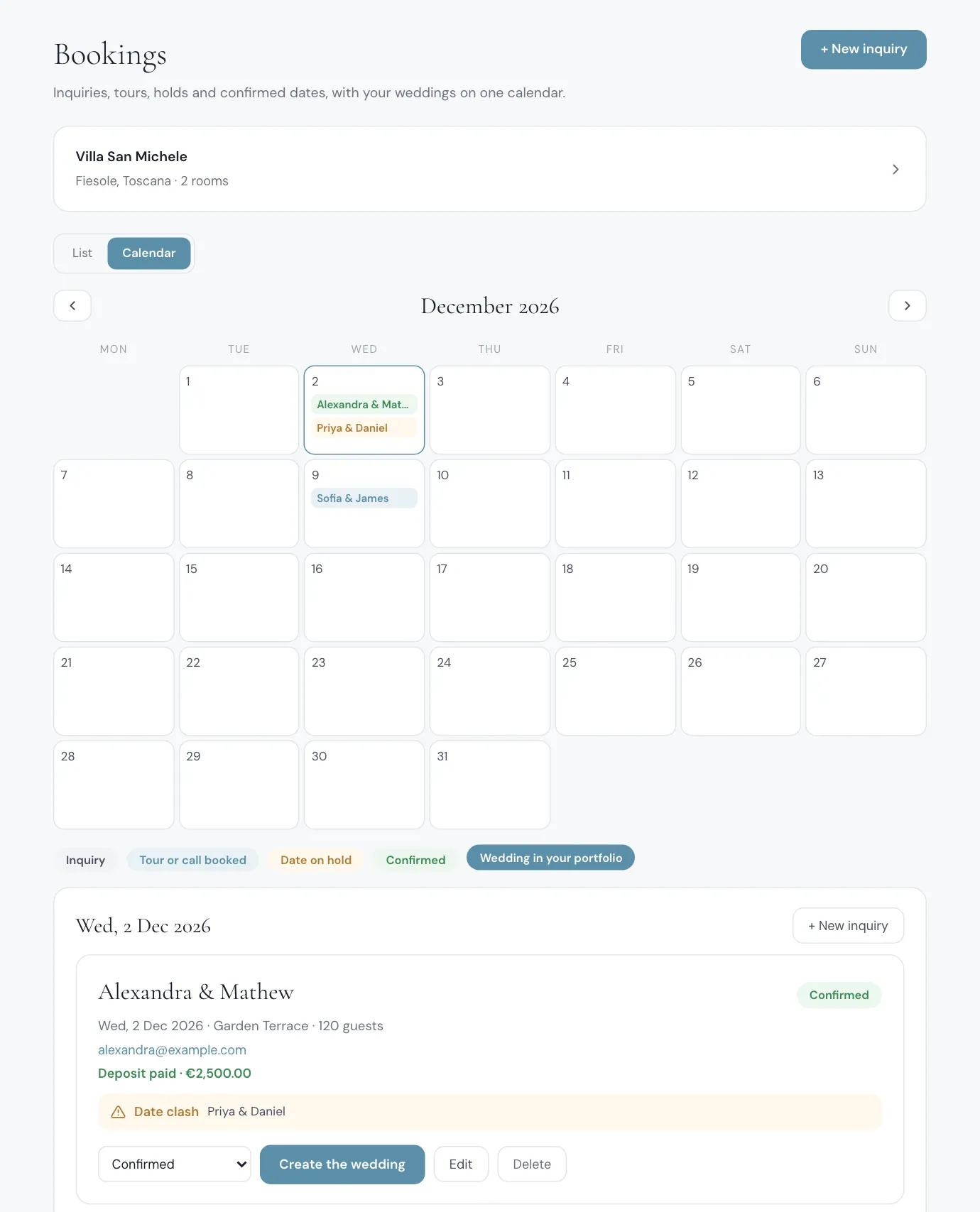
On the Bookings page, when two entries take the same room on the same date, both show a date-clash warning, in the list and on the month calendar. The warning is per room, so a ceremony in the Orangery and a dinner on the Garden Terrace on the same day do not trigger it. An entry with no room named takes the whole date, so it clashes with every other entry that day, and a booking marked lost never clashes. Use the checklist as a house rule for your team.
- Every room is listed in the business profile with its capacity, and every booking names its room
- A date is entered the moment it is discussed, even as tentative
- A hold is entered as a hold, with the day it ends, before you tell the couple it is theirs
- Nobody confirms a date by phone or email before opening the calendar
- A clash warning is resolved the same day: one entry moves room, moves date or is released
- Expired holds are released each week, so the calendar shows real availability
- Each coordinator has their own seat, so the calendar is one shared record: admins change bookings, staff read them
How long should a venue hold a date, and what do you tell the couple?
There is no single practice. Many venues hold a date for a short, fixed period after a tour, and say so in writing: the date is held until a given day, and it is released if the agreement and the deposit have not arrived. What matters for tracking is that the end of the hold is written on the booking, not kept in someone's head.
Tell a second couple the truth about a held date. "Another couple has first option until Friday" keeps them interested and keeps you out of a promise you cannot keep. Enter them as an inquiry for the same date and room. The clash warning on both entries is then doing its job: it reminds you that one of the two has to be resolved.
How do you track deposits: a note on the booking or an invoice?
Both, for two different purposes. On a booking, the deposit is a tracking note: the amount and whether it is paid. It answers the coordinator's question, "has this couple paid to secure the date?", at a glance in the list. No payment is taken on the booking.
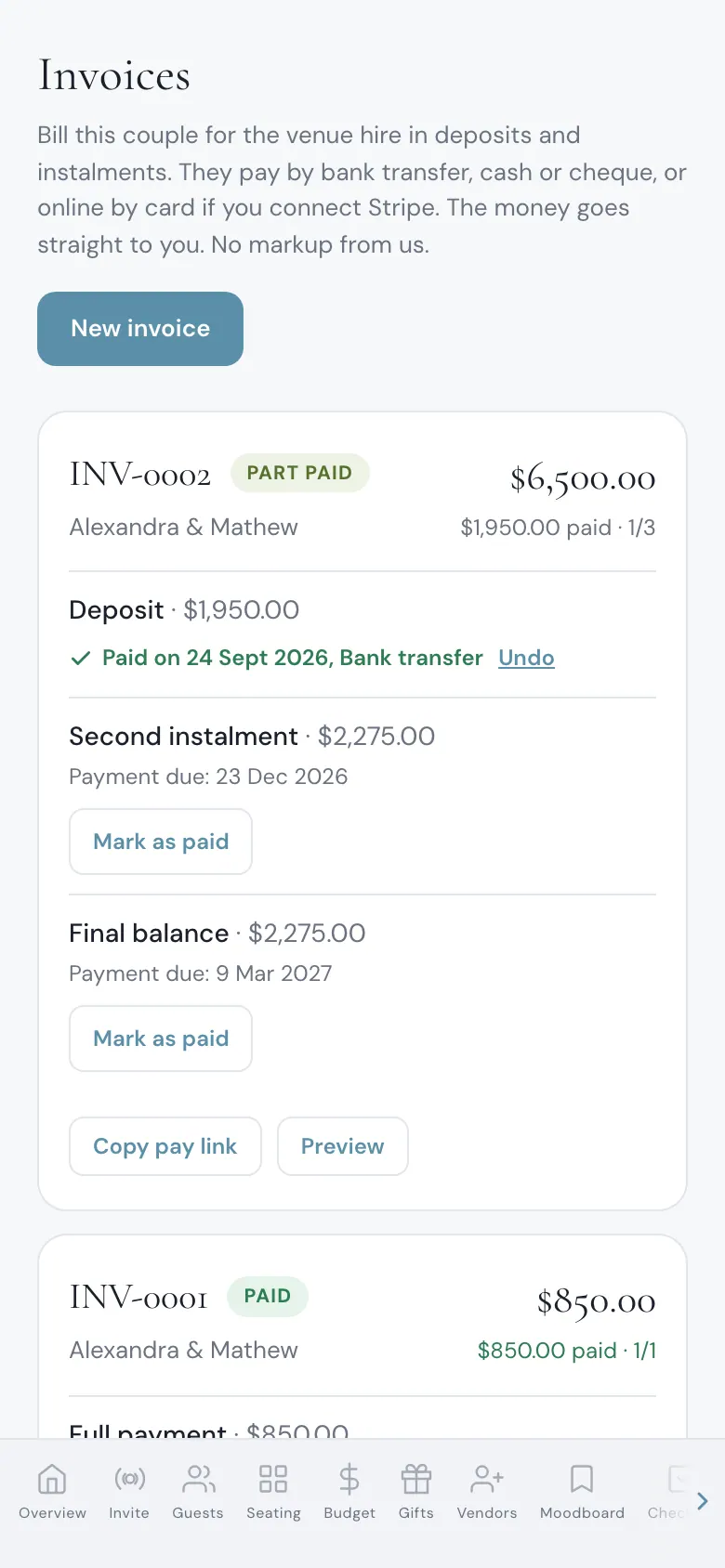
Collecting the money is the job of the Invoices page. An invoice scaffolds a deposit, a second instalment and a final balance from the wedding date, all editable, with line items you type or import from the budget. You bill in your own currency, about 30 of them, US dollars, pounds, euros, Canadian and Australian dollars included, and no Stripe account is needed. The invoice shows your bank details and a payment reference; the couple opens it from a private link and pays by bank transfer, cash or cheque, and you record each payment with Mark as paid, in full or in part. Card payment online is optional: connect your own Stripe account and an instalment paid by card is marked paid automatically, the money goes to you and the app takes no commission. Stripe opens accounts in the countries it supports, the US, the UK, Canada, Australia and Ireland among them, and US bank debit is offered on invoices in US dollars only.
Two limits to know. A bank transfer, cash or a cheque is not detected by the app: the instalment stays due until you mark it paid, and the list of payments exports as a CSV file. And the invoice carries your business details and a tax rate line, but your accountant or invoicing software stays in charge of tax documents. Planners use the same invoices, and the planner version of this workflow is in the guide on taking deposits and payment plans from wedding clients.
How does the hire agreement get signed before the hold runs out?
Send it the day the hold starts. In The Private Wedding App you paste or write your own agreement, choose "Save & get sign link" and send the private link. The couple reads the text, ticks a consent box, types their name and signs online, from a phone if they like. The app records who signed, the date and time, and the exact text they signed. A contract can be voided before it is signed if the terms change.
The wording is yours: the app supplies no contract template, so have a local lawyer review your contract. For what such an agreement usually covers on the planner's side, see what to include in a wedding planner contract.
What happens after a booking is confirmed?
A confirmed booking can create its wedding. From there the couple gets their own login, sends their invitation, and guests reply online with meals and allergies. Your portfolio shows every wedding at the venue with live RSVP counts and the days to go, which is the subject of the guide to wedding venue software with guest management and RSVPs.
Closer to the day, the guests' answers become the caterer and venue day sheet, explained in the guide to the banquet event order (BEO) for a wedding, and the timings go into the run of show, with a link per vendor, as shown in the wedding run of show template.
How do you move your venue off the spreadsheet?
Do it in one sitting. Add your rooms and capacities to the business profile. Enter every confirmed date for the next twelve months, then every hold, then the open inquiries. The clash warnings you see at that point are the ones your spreadsheet was hiding. Invite your coordinators by email with the admin or staff role, and retire the old file the same day, so there is one calendar. If you are still choosing the tool, wedding venue software compared sets the main venue tools side by side on bookings, rooms and guest RSVPs, with prices checked in November 2026.
The screens are on the page for wedding venues and the cost is on the pricing page. If you are a planner who also tracks inquiries, the same Bookings page comes with a planner account, see the page for wedding planners. To log your first inquiry today, create your venue account.
See it for yourself.
Everything a venue runs its weddings on: a bookings calendar with date-clash warnings, rooms drawn to scale, reusable layouts, the caterer and venue day sheet, the run of show, team seats, invoices and contracts, plus each wedding's invitation, RSVP, guest list, seating plan and budget.
See the venue tools →How do wedding venues track bookings, inquiries and deposits without spreadsheets?
With one entry per couple that moves from inquiry to tour, hold and confirmed, shown in a list and on a calendar. In The Private Wedding App each entry holds the couple, the date, the room, a guest estimate, a status and a deposit note, and two entries for the same room on the same date are flagged as a date clash.
Can couples book or check availability online themselves?
No. The Bookings page is your internal record. There is no public booking page, no availability widget and no inquiry form for your website: you enter each inquiry yourself when it arrives.
Does the app take the deposit when I mark a booking as confirmed?
No. The deposit on a booking is a note with an amount and a paid or unpaid mark. To be paid, send the couple an invoice: they pay each instalment by bank transfer, cash or cheque and you mark it paid, or online by card if you have connected your own Stripe account, in which case the instalment is marked paid automatically.
What stops two coordinators from booking the same room on the same day?
Both bookings show a date-clash warning in the list and on the calendar as soon as they share a room and a date, whatever their status. The warning does not block the entry, so the team rule still matters: resolve a clash the same day.
How much does it cost for a venue?
No software fee. Each wedding carries its own plan, $189 lifetime or $19.99 a month. You can bill it to the couple. The bookings calendar, the business profile and team seats come with the venue account.
Can my team see the bookings and the deposits?
Team members with the admin role work on everything in the workspace, including bookings, invoices and contracts. Only you, the owner, add weddings and choose their plans. Staff read the bookings without changing them, work on each wedding's guest list, seating plan, day sheet and run of show, and read invoices and contracts.
What happens to a booking that is lost?
Mark it lost and it stops counting against the date. Keep a few words on the reason: a season of lost bookings read together tells you whether couples leave over the date, the price or the room.