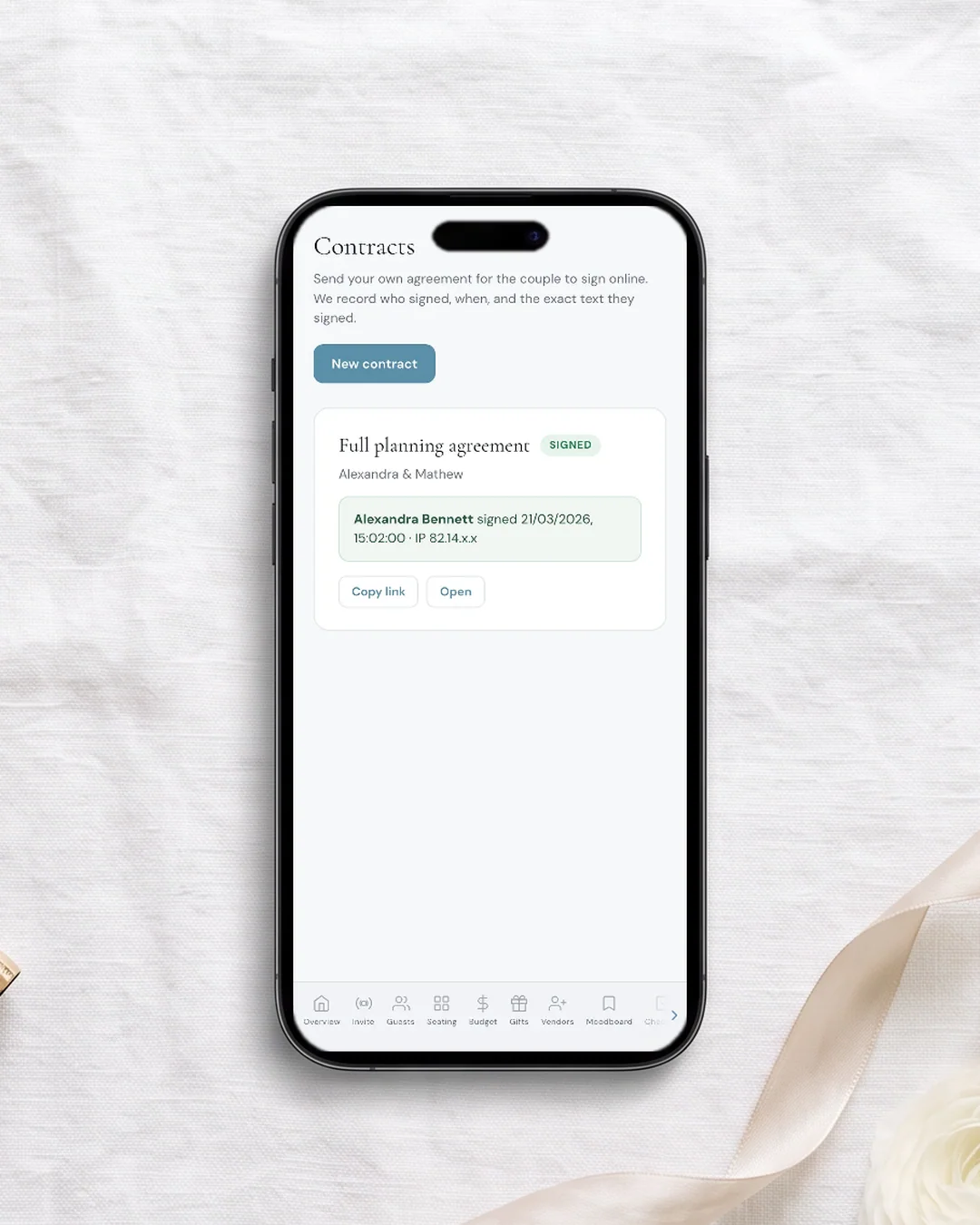
To get a wedding planner contract signed online, paste your own agreement into The Private Wedding App, choose Save and get sign link, and send the couple the private link: they read it, tick a consent box, type their name and sign from their phone, and the app records who signed, the date and time, and the exact text they signed, on the same wedding that holds their guest list and payments. The app supplies no contract template and no legal wording, so the template this guide offers is a clause checklist for your own wedding planner agreement: the parties and the wedding, the scope of your services, the fee and payment schedule, cancellation and postponement terms, liability limits, vendor coordination, a photo release and the governing law. Write the wording yourself or with your lawyer. The whole platform is $189 paid once with nothing to renew, or $19.99/month.
For wedding planners · All guides
A contract is the thing that turns a warm conversation into a booking you can rely on, and the thing you reach for when a date moves, a payment is late, or a couple expects work that was never in scope. Yet plenty of planners still run on a downloaded template they half understand, or on nothing at all. This guide covers what a wedding planner contract should actually include, why each part is there, and how to get the couple to sign it online from their phone, using your own wording rather than a generic form.
Why you need a contract at all
A wedding planner contract does three jobs: it defines exactly what you are being paid to do, so a couple cannot quietly expand the work; it sets the money, so the deposit and instalments are agreed rather than argued; and it protects you when something goes wrong, a postponement, a supplier failing, a cancellation. Without it, every one of those becomes a conversation with no reference point, at the worst possible time.
You do not need it to be long or intimidating. You need it to be clear, agreed, and signed before you start work.
Wedding planner agreement template: the clause checklist
This checklist is the template this guide offers: the structure of a wedding planner agreement, clause by clause, without the wording. The Private Wedding App supplies no contract text, and this is not legal advice. Write each clause in your own words or your lawyer's, and check that your wedding planner contract gives a clear answer to every point below.
- Parties and the wedding: your business, the couple, the date and venue
- Scope of services: exactly what you will and will not do, so extra work is visible
- Fee and payment schedule: the total, the deposit, instalment dates and how to pay
- Cancellation and refunds: what happens if the couple cancels, and what is non-refundable
- Postponement and force majeure: how a date change or an event outside anyone's control is handled
- Liability: a cap on your liability and what you are not responsible for
- Vendor coordination: that you coordinate suppliers but do not control their work or contracts
- Photo and model release: whether you may use images of the wedding to promote your work
- Governing law: which country or state's law applies
How to get the wedding planner contract signed online
Once the wording is yours, signing should take a couple of minutes, not a printer. In The Private Wedding App you paste or write your own contract text and choose Save and get sign link. The couple opens the private link, reads the agreement, ticks a consent box, types their name and signs from their phone. You keep a dated record of who signed and when, and a record of the exact text they signed. A contract can be voided before it is signed, so a corrected version replaces the first one cleanly.
The platform hosts the signing, not the wording. The Private Wedding App provides no contract template and no legal wording, because your agreement is yours or your lawyer's to own.
What the online signature records
The signing captures a consent step, the signer's typed name, the date and time, and a record of the exact text that was signed, and shows them back to you beside the contract. The Private Wedding App makes no claim about how a typed signature is treated under the law of your country: that depends on where you and the couple are and on the kind of agreement.
This is general information rather than legal advice. If your weddings cross borders or your contracts carry unusual terms, have a lawyer review your agreement, then use the signing to get it agreed.
Keep the signed contract with the wedding
A signed contract is only useful if you can find it when you need it. Because the contract sits on the wedding in your portfolio, it lives beside that couple's invoice, guest list and timeline rather than in an inbox or a separate signing app. When a question comes up months later, the agreed terms and the payment plan are in the same place as the wedding they belong to.
See how the planner tools fit together on the wedding planners page, or read how to take deposits and set up payment plans that match the terms in your contract.
Comparing tools before you choose where your contracts live? See Aisle Planner alternatives, which sets Aisle Planner, HoneyBook, Dubsado and WeddingFlow side by side, and what the couple sees in each client portal.
Everything you need, in one place
See it for yourself.
Everything a planner runs client weddings on: a portfolio of your season, the caterer day sheet, the run of show with per-vendor links, studio templates, couple access, client invoicing with deposits and contracts your couple signs online - plus each wedding's invitation, RSVP, guest list, seating, budget, vendors and AI planner.
See the planner tools →Do I need a contract as a wedding planner?
Yes. A contract defines the scope of your services so the work cannot quietly expand, sets the deposit and payment schedule so the money is agreed, and protects you when a date moves or a couple cancels. Running without one turns every one of those into an argument with no reference point. It does not need to be long, only clear, agreed and signed before you start.
What should a wedding planner contract include?
At a minimum: the parties and the wedding details, the scope of your services, the fee and payment schedule, cancellation and refund terms, postponement and force majeure, a liability cap, how vendor coordination is handled, a photo and model release, and the governing law. Use this checklist as the template for the structure of your own agreement, write the wording yourself, and have a local lawyer review your contract.
Is there a wedding planner contract template I can use?
This guide gives you the template as a clause checklist: parties and wedding details, scope of services, fee and payment schedule, cancellation and refunds, postponement and force majeure, liability, vendor coordination, photo release and governing law. It does not give you wording, and The Private Wedding App supplies no contract text either. You write the wedding planner agreement in your own words or with your lawyer, then paste it into the app to have it signed online.
How do I get a wedding client to sign a contract online?
Paste your own contract text into The Private Wedding App, choose Save and get sign link, and send the couple the private link. They read it, tick a consent box, type their name and sign from their phone, and you keep a dated record of who signed and of the exact text. The signing sits on the same wedding as the couple's invoice and guest list.
How do I handle wedding client contracts digitally, with e-sign?
Keep one contract per client wedding and have it signed through a link, not a printed copy. In The Private Wedding App each wedding holds its own contract: your text, the sign link, and once the couple has signed, the signer's typed name, the date and time and the exact text signed. A contract can be voided before signature if the terms change, and the signed one stays with that wedding beside the invoice and the payment schedule.
What does the online signature on a wedding contract record?
The signer's typed name, the date and time of signing, their agreement to sign electronically and a record of the exact text signed, kept with the contract on that wedding. The Private Wedding App makes no claim about how a typed signature is treated under the law of your country, so ask your lawyer if you need a particular form of signature. This is general information, not legal advice.
Can I use my own contract wording?
Yes, and you should. The Private Wedding App deliberately does not provide contract templates: you paste your own agreement or your lawyer's, and the platform only hosts the signing, so the wording stays yours.