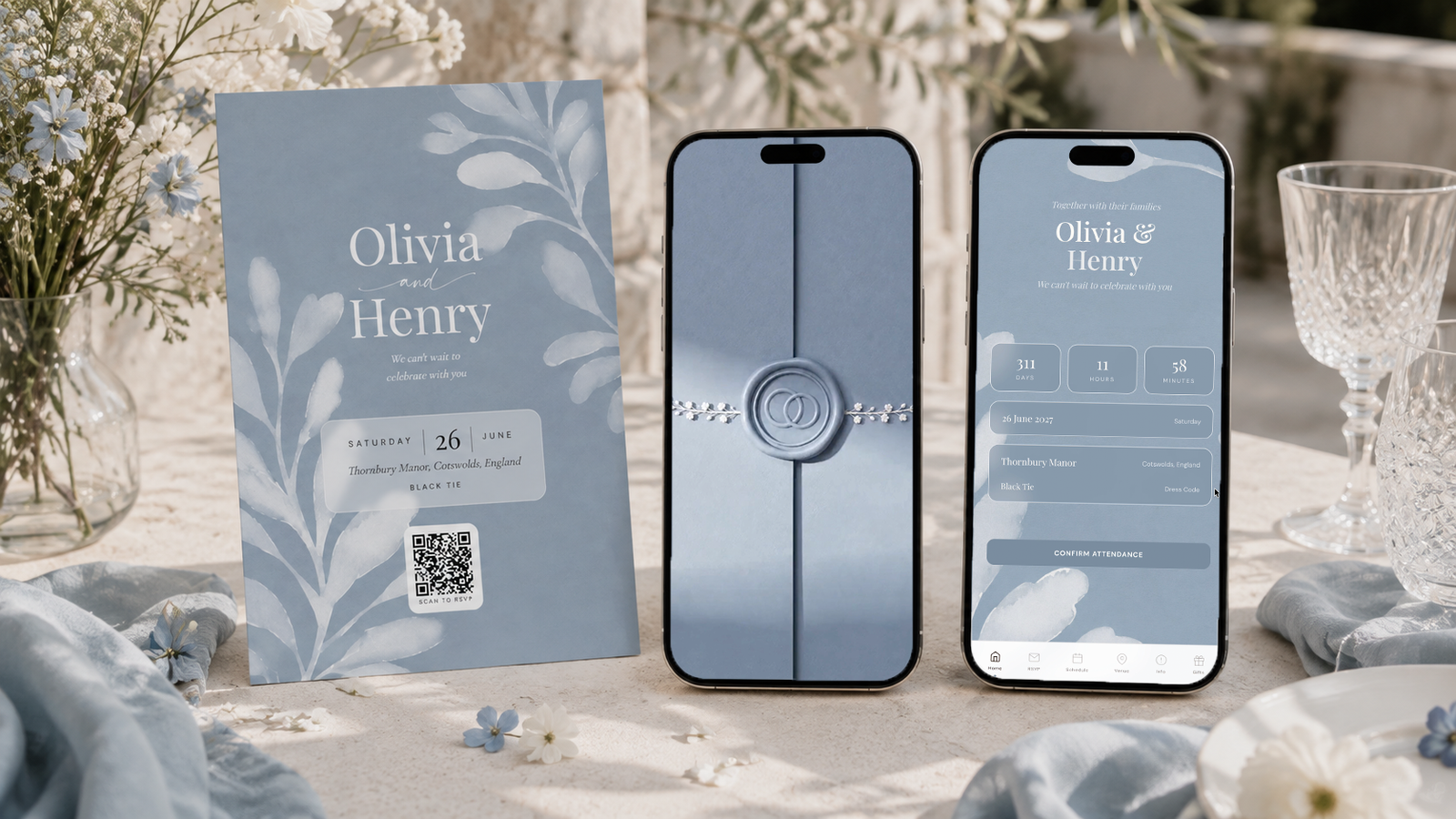
Send paper to the guests who want paper and a link to everyone else, but make both lead to the same RSVP. With The Private Wedding App, an all-in-one wedding planning platform, you print a 5x7 invitation card, an insert card for your stationer's invitations, or a sheet of QR stickers from the QR Print Card tab: the code opens your online invitation, and a reply sent from it lands in the same guest list as the WhatsApp, email and text replies. A grandparent who answers by phone or by post is entered by you in seconds: their status, their meal and their allergy, on their row. One list, one count per event, one caterer sheet. $189 once for lifetime access, or $19.99 a month. 3-day free trial.
$19.99 a month
3 days free, then $19.99/month. No commitment, stop whenever you want.
Try it free for 3 days →Your grandmother keeps every invitation she receives on the fridge, and she will never tap a link in a group chat. Your friends lose paper the day it arrives and answer everything on their phone. Most couples end up doing both: a printed card for the older guests, a link for the rest. The hard part is not the printing, it is the replies, which arrive by post, by phone, by WhatsApp and by email, and somehow have to become one headcount for the caterer. Here is how to set it up so they do.
Decide who gets paper, then print only for them
Go through your list once and mark the guests who should get paper: grandparents, great-aunts, a godmother who does not use WhatsApp, anyone who would feel left out by a link. For most couples that is ten to thirty households, not the whole list, so the printing bill stays small.
In the builder, the QR Print Card tab gives you three formats. A 5x7 invitation card (12.7 x 17.8 cm) with your photo, your names, the date, the venue and the QR code. A 10 x 7 cm insert card to slip into invitations you ordered from a stationer. And a sheet of twelve 5 cm QR stickers, if you are making your own invitations and only need the code. Download the PNG for a print shop, or print directly at 100% scale with background graphics on.
The card is printed in the language you choose among your invitation's languages, so the English card goes to one side of the family and the Spanish or French one to the other.
See how the printable QR code RSVP card works.
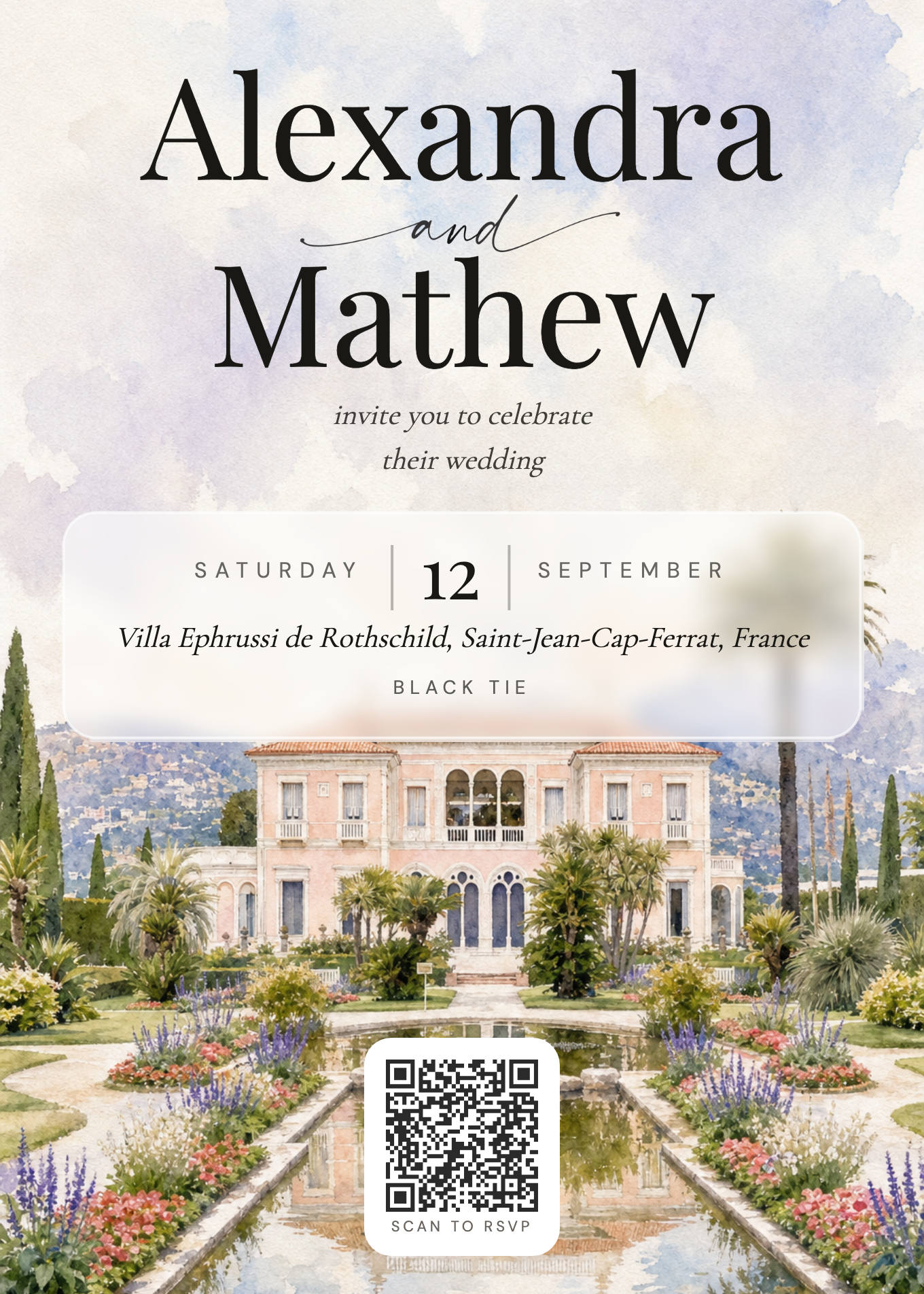
What happens when a grandparent scans the code
The camera opens your invitation in the phone's browser, with no app to download and no account. The guest picks their language once, reads the schedule and the venue, and taps the RSVP. If a grandchild is sitting next to them, it takes two minutes.
Their reply goes into your guest list like any other: coming or not, their meal, their allergy, the people with them. If you already added them to the list, the reply updates their row instead of creating a second one, even when they type "Matt" for "Matthew" or put the surname first. When a match is not certain, the app shows the pair under Possible duplicates and lets you decide.
Because the code opens the live invitation, a change after printing still reaches them: a new start time or a shuttle added in the info sections shows the next time the code is scanned. The printed text on the card stays as printed, so keep the card itself to the essentials.
The guests who will never scan: enter their reply yourself
Some guests will call your mother, or post back a handwritten note. That is fine: the reply still belongs in the list. On the Guests page every row has a status menu, Attending, Declined or Pending, that you change by hand, and a pencil that opens the rest: the meal (one dish per course if you use courses), the dietary note, the severe-allergy flag, and one answer per event if your wedding has several.
A guest who is not on the list yet takes one line with "+ Add guest": first name, last name, and a phone number if you have it. Their partner goes in with "Add a +1" under their name.
From then on that reply counts exactly like an online one: in the totals, in the meal count, in the allergy list for the kitchen and in the seating plan, where only the guests marked attending appear.
See the guest list tracker and the meal and allergy tracker.
- Status: Attending, Declined or Pending, from the menu on the row
- Meal and allergy: with the pencil on the row
- Several events: one answer per event, with the same pencil
- Companions: "Add a +1" under the guest
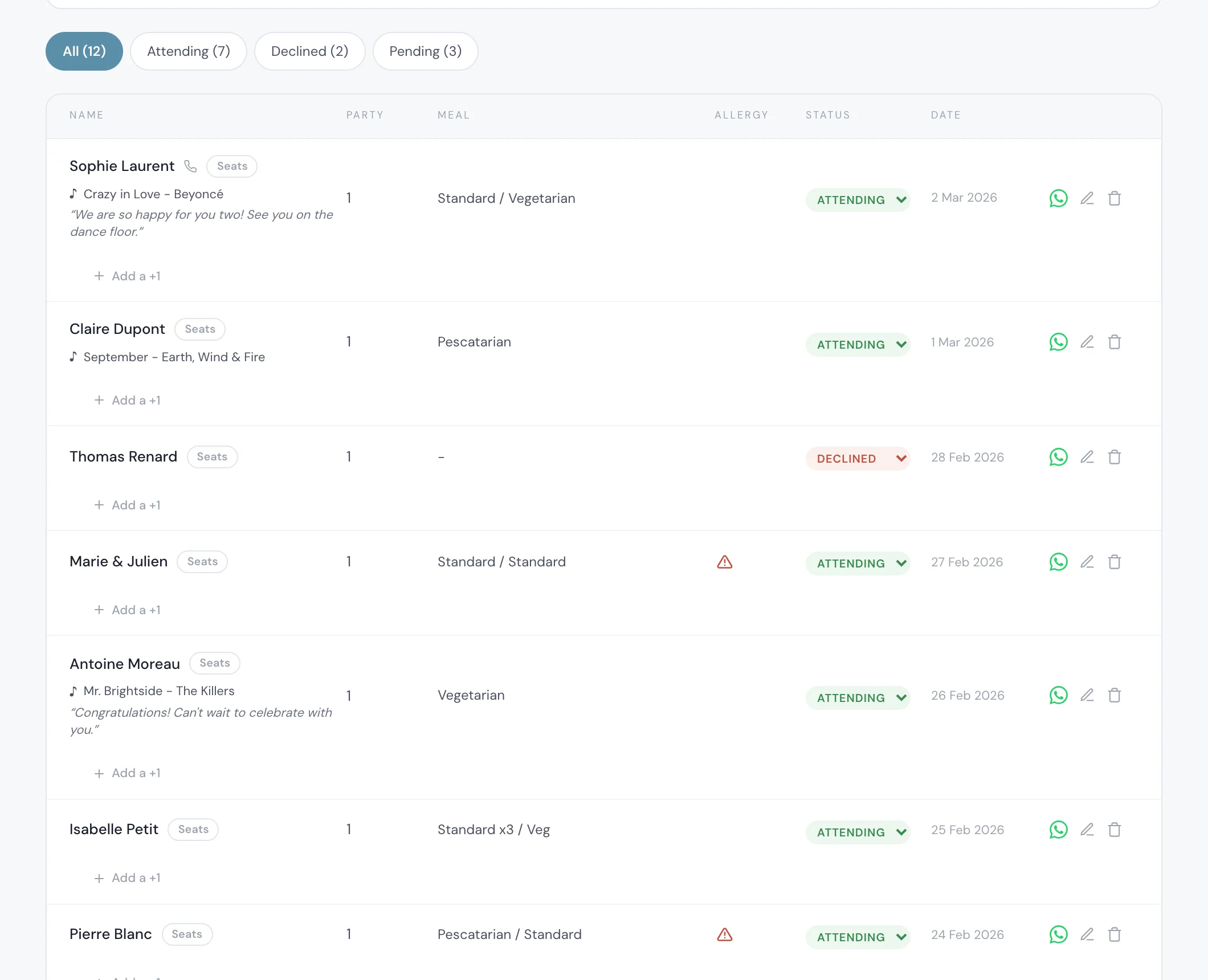

Everyone else gets the link the way they read
The rest of the list gets the same invitation as a link. Each guest row has a WhatsApp button that opens their chat with your message and their link already typed, sent from your own number. Guests who live in their inbox get it through "Email the invitation", one personal email each, in one go.
For guests who text, choose "Text message" under "Send invitations with": each tap opens a text from your own phone, and on an iPhone you can send to everyone at once with Apple's free Shortcuts app. The paid bulk text pack is not open for US and Canadian numbers yet.
Reminder emails, if you switch them on, reach only guests with an email address. The paper guests are reached the old way, by a call, which the Pending filter makes short.
See WhatsApp wedding invitations and text message invitations.
One list, one count, one sheet for the caterer
Two weeks before the wedding, filter the list on Pending: what remains is the people to call, paper guests and link guests together. Sort by "Latest replies" to see what came in since your last look, with the date and time of each answer.
When the count is final, the caterer day sheet gives the venue the attending total, the plates per dish and the allergy roster with each guest's table, from the same list where your grandmother's phone reply sits next to your best friend's WhatsApp one.
If you turn on Private access so that only invited people can open the link, every guest who scans or taps has to enter an email or a phone number that is on your list. Add your grandparents' phone numbers to their rows before you post the cards, or leave Private access off.
Build the plan in the seating chart.
Paper only, link only, or both: an honest comparison
None of the three is wrong. The question is who does the counting, and how many guests you are willing to chase by phone.
If your printed card is the only invitation some guests receive, what to print on the QR card lists what has to be on it.
The rest of the wedding sits behind the same list
The invitation is one part of the planner. The same answers feed the seating plan, the budget tracker's catering line and the checklist, and the AI assistant can read your guest list to tell you who has not answered yet.
$189 once for lifetime access, or $19.99 a month. Try it with a few real names: print one card, scan it yourself, and enter one reply by hand to see both land in the same list. Start on the pricing page.
Everything you need, in one place
Planning your own wedding without a planner is entirely achievable.
See it for yourself.
Explore the whole platform: cinematic invitation, RSVP with meals and allergies, guest list, seating chart, budget, vendors, checklist, moodboard, guest photo and video sharing and the AI planner. No account needed.
Try the full planner →How do we send paper invitations to some guests and digital ones to others, and keep the replies in one list?
Print a card with an RSVP QR code for the paper guests and send the link to the others, both pointing to the same online RSVP. In The Private Wedding App the QR Print Card tab prints a 5x7 invitation, an insert card or a sheet of QR stickers, replies from the code and from the link land in one guest list, and replies by phone or post are entered by you with the status menu and the pencil on the guest's row.
Will older guests be able to use a QR code?
Many will, with the phone camera, and the invitation opens in the browser with no app or account. For those who will not, keep the paper and take their answer by phone: you set their status, meal and allergy yourself, and they count like everyone else.
Can I add a QR code to invitations I ordered from a stationer?
Yes. Use the 10 x 7 cm insert card in the envelope, or print the sheet of twelve 5 cm QR stickers and stick one on each invitation. Both open your online invitation and RSVP.
What if a grandparent RSVPs by phone?
Open the Guests page, change their status from the menu on their row, and use the pencil for their meal, their allergy and, if you have several events, one answer per event. Their reply then counts in the totals, the meal count and the seating plan.
Will a guest who scans the code create a duplicate?
Not if they are already on your list under a matching name: the reply updates their row, even with a nickname or the surname first. Uncertain pairs appear under Possible duplicates for you to merge or keep apart; nothing is merged automatically.
Can the printed card be in another language?
Yes. The card is exported in any of your invitation's languages, up to three, so each side of the family gets a card it can read, and the invitation behind the code opens in the language the guest picks.
What if the time changes after the cards are printed?
The QR code opens the live invitation, so the new time shows online the next time it is scanned. The printed text does not change, so call the paper guests who will not scan.
How much does it cost?
$189 once for lifetime access, or $19.99 a month. Both include the printable QR cards, the online invitation and RSVP, the guest list, the seating plan, the budget tracker, the checklist and the AI assistant. 3-day free trial.