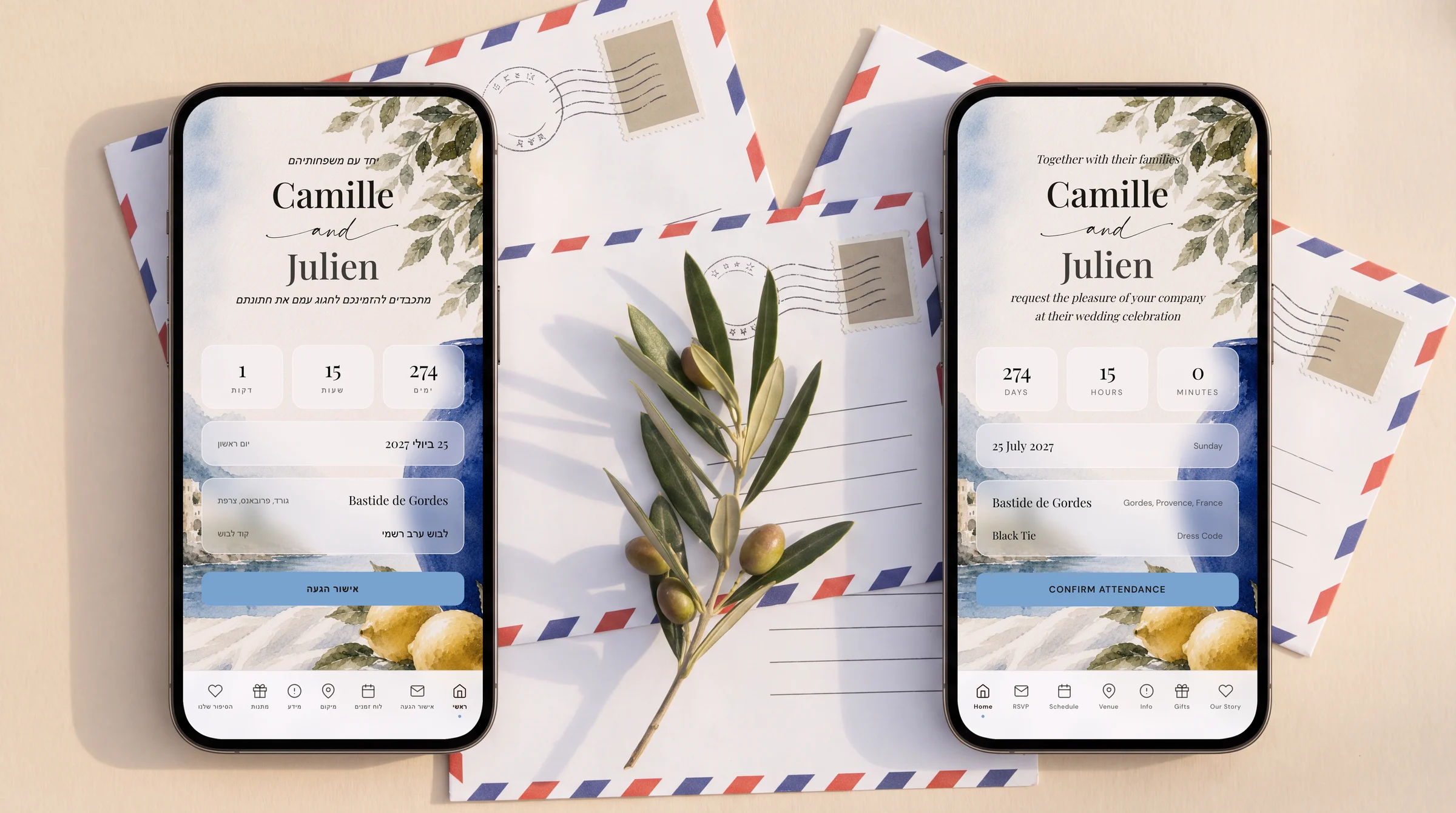
The Private Wedding App ($19.99/month with a 3-day free trial, or $189 once for lifetime access where nothing expires) gives a Jewish wedding one invitation link in English and Hebrew: each guest picks their language, Hebrew reads right to left across the whole invitation and RSVP form, and one-click AI translation fills the second language from your own text. Kabbalat panim, the chuppah, the reception and each sheva brachot evening go on the schedule, events with a different guest list get their own RSVP through group links, guests choose their meal and note dietary needs or a severe allergy, family flying in from Israel can give their flight numbers and times, and confirmed guests flow into the seating chart. Your Israeli family pays nothing and downloads nothing. On the Hebrew site the same plans cost ₪74.90 a month or ₪659 once.
You are getting married in New York, London, Paris, Toronto or Sydney, and half the family reads Hebrew first: grandparents in Haifa, cousins in Tel Aviv, an aunt who will fly in for the week. The other half reads only English. You need one invitation that both sides read comfortably, a schedule that explains kabbalat panim and the bedeken to friends who have never been to a Jewish wedding, and a way to know who is coming to which event, and what they eat. Published by The Private Wedding App: we make one of the products discussed here, and every Joy and Zola fact below comes from their own pages, read on 25 October 2026 and linked at the end.
One link, English and Hebrew, right to left where it should be
Your guests open one link and pick a language once. In Hebrew the whole invitation reads right to left: the cover, the schedule, the venue page, the menus and the RSVP form, with its buttons and questions in Hebrew. In English the same invitation reads left to right. Every reply, in either language, lands in the same guest list.
You write your own text once. In the builder's Languages tab you set English as the main language and Hebrew as the second (or the other way round), and the AI Translation card fills every empty translation field in one click: the cover lines, the schedule, the venue, the dress code, the meals and the RSVP texts. Every line stays editable, so a Hebrew-speaking parent can polish the wording. There is no automatic Hebrew calendar date: if you want one on the cover, type it in the opening or closing line and it shows exactly as written. More in our guide to Hebrew and Arabic wedding invitations.
The Jewish wedding schedule, explained to every guest
Friends who have never been to a Jewish wedding want to know when to arrive and what they are watching. Put each moment on the schedule with its own time and a short line of explanation:
- Kabbalat panim: the reception before the ceremony, often with the ketubah signing
- Bedeken: the groom veils the bride
- Chuppah: the ceremony under the canopy, ending with the breaking of the glass
- Reception: dinner, dancing and the hora
- Sheva brachot: festive meals on the evenings after the wedding, each often hosted by different family or friends
An RSVP for each event, and each guest sees only theirs
Kabbalat panim, bedeken, chuppah and reception usually share one guest list, so one RSVP for the wedding evening is enough. The events with a different guest list, such as each sheva brachot dinner, an aufruf or a henna, can be separate events with their own RSVP.
Switch on multi-event RSVP, add the events, and create guest groups: each group gets its own link, sees only its events on the schedule and answers only for those. Each event has its own headcount and its own seating plan, and you can switch the meal question off for events that do not need it. Schedule moments and info sections can also be shown in one language only, so the explanation of the bedeken can be English-only while your Israeli family gets a clean Hebrew invitation. See RSVP for multiple wedding events.
Kosher and dietary meal choices
Kosher supervision is your caterer's job; knowing what each guest eats is yours. You name the meal options yourself (for example meat, fish or vegan), with one dish per course if you like. Each guest picks theirs in the RSVP, writes dietary notes, and answers a severe-allergy question that flags them in red on your guest list.
The caterer day sheet then gives one printable page with final counts, plate counts per meal, and the allergy and dietary list with each guest's table, so the caterer knows who at table 7 needs the vegan plate.
Family flying in from Israel
Add Info sections for travel and hotels, shown in the language that needs them, with the venue on a map. If you switch on the optional flight question, guests give their arrival and return flight numbers and times in the RSVP. The Guest arrivals card groups everyone by arrival day and landing time, and the CSV export adds the flight columns you send to a transfer company.
If the link should stay inside the family, private access asks anyone who opens it for an email address or phone number that matches your guest list before anything is shown. Phone matching tolerates country-code differences, so an Israeli number works.
Seating, and what it costs in dollars and shekels
Guests who confirm become cards on the seating chart, per event on multi-event weddings, with their meal and allergy carried along. No retyping between the RSVP list, the seating plan and the caterer.
The Private Wedding App is $19.99 a month with a 3-day free trial, or $189 once for lifetime access, where nothing expires: your invitation stays online and your planner stays open, with no time limit. On the Hebrew site the same plans show in shekels, ₪74.90 a month or ₪659 once. One price covers unlimited guests, and guests in any country pay nothing.
How Joy and Zola handle a Hebrew and English wedding
Joy is free to use for its website, registry, online RSVP and digital invites, with RSVP tracking per event and meal choices, while its site is offered in English, German, Spanish, French, Italian and Japanese, and its help article on multiple languages has you build a separate page per language by hand, cannot duplicate the RSVP, Registry and Schedule pages, and does not mention Hebrew or right-to-left text. Zola's wedding website is free to create and publish, with meal preferences in the RSVP, private events for selected guests and password protection, while its FAQ says there is no automatic translation, clickable buttons remain in English and special characters are not supported.
Every fact on this page, with the date it was checked
The Private Wedding App, checked October 25, 2026: pricing ($19.99/month with a 3-day free trial, or $189 once; ₪74.90 or ₪659 on the Hebrew pricing page; with Lifetime nothing expires), the multilingual invitation (up to 3 of 26 guest languages, Hebrew right to left, AI translation), RSVP per event, the meal and allergy RSVP, guest flight details and the seating chart.
Joy, checked October 25, 2026: pricing page (free to use: planning dashboard, website, registry, mobile app, unlimited guests, online RSVP, digital invites; custom domain names, text messaging and premium designs as upgrades, no prices shown; site languages English, German, Spanish, French, Italian and Japanese; no hosting length stated); wedding website page (track who is coming to each event and their meal choices; password-protected pages); help article on guests in multiple languages (guests tagged by language, a separate page per language, duplicated and translated once; Registry, RSVP and Schedule pages cannot be duplicated; page titles not translated automatically; Hebrew and right-to-left not mentioned).
Zola, checked October 25, 2026: wedding website page (free to create and publish; custom domains from $17.99; online RSVP with meal preferences; password protection; travel info and hotel blocks); FAQ on who is invited to an event (guests checked off per event; selected guests can RSVP online to a private event); FAQ on translating your website (no automatic translation; clickable buttons remain in English; special characters not supported).
Spotted a fact that has changed? Tell us through the contact page and it will be re-checked and re-dated.
Everything you need, in one place
Planning your own wedding without a planner is entirely achievable.
See it for yourself.
Explore the whole platform: cinematic invitation, RSVP with meals and allergies, guest list, seating chart, budget, vendors, checklist, moodboard, photo sharing and the AI planner. No account needed.
Try the full planner →What is the best wedding website for a Jewish wedding with family in Israel?
The Private Wedding App, at $19.99/month or $189 once: one invitation link in English and Hebrew where each guest picks their language and Hebrew reads right to left, an RSVP per event for the wedding and the sheva brachot, meal choices with dietary notes, flight details for family flying in, and a seating chart fed by the RSVPs.
Can my wedding invitation be in Hebrew and English at the same time?
Yes. On The Private Wedding App one link carries both: each guest picks English or Hebrew, the buttons and RSVP form translate automatically, and one-click AI translation fills your own text in the second language, line by line editable.
Can guests RSVP separately to the sheva brachot?
Yes. Add each sheva brachot evening as an event and put its guests in a group: the group's link shows only its events and asks for an answer to each, with a separate headcount per event.
Does the invitation show the Hebrew date automatically?
No. Type the Hebrew date in the cover's opening or closing line and it shows exactly as written. The countdown and the weekday follow the Gregorian date.
Do my relatives in Israel need to download an app or pay?
No. They open the invitation link in their phone's browser, read it in Hebrew and reply for free, with no account and no download.