
The Private Wedding App lets each guest view your wedding invitation in their own language - they pick it in a language selector when they open it, in any language pair including right-to-left scripts like Arabic and Hebrew. It is one feature of a complete wedding planner: RSVPs, meal choices and allergies collected in any language flow into the same guest list, seating plan and budget the couple manages in 11 languages (English, French, Spanish, German, Brazilian Portuguese, Arabic, Hindi, Russian, Swedish, Danish and Norwegian). The whole platform is $19.99/month, or $189 paid once with nothing to renew.
It was one of our most requested features. Couples kept telling us the same thing: "We love the invitation, but half our guests speak a different language. Can each person see it in theirs?" A French-Italian couple getting married in Monaco. A Mexican-American family celebrating in Cancun with guests from Texas and Guadalajara. A Greek-British wedding on Santorini where the groom's family speaks no Greek. An Indian-German couple in Munich. With 17% of US newlyweds marrying someone of a different background and 32% of couples choosing destination weddings abroad, bilingual invitations are not a niche feature. They are a necessity. So we built them. One link, two languages. Each guest picks theirs after the opening animation. Every screen, every label, every RSVP field, translated. Here is how it works and how to set it up in five minutes.
Built because couples asked for it
Bilingual weddings are everywhere. A Portuguese-English couple in Lisbon with half the guest list flying in from New York. A destination wedding in Tuscany where the Italian groom's family needs Italian and the British bride's friends need English. A Mexican-American celebration in Playa del Carmen where abuela needs Spanish and the college friends from Chicago need English. A Greek-Australian couple on Mykonos. A French-Arabic wedding in Marrakech. These are real couples who use our platform, and they all had the same request: can each guest experience the invitation in their own language?
So we built it. Not as a bolt-on translation layer, but as a core feature woven into every part of the invitation. One link serves both languages. Each guest chooses theirs. The RSVP form, the schedule, the venue details, the info sections: everything appears in the language they selected. Your personal wording, translated by you. Interface labels, translated automatically.
Twenty-six languages are supported out of the box: English, Spanish, French, Italian, Portuguese, German, Greek, Dutch, Turkish, Arabic, Hebrew, Russian, Hindi, Japanese, Chinese, Korean, Polish, Swedish, Danish, Norwegian, Romanian, Croatian, Malay, Tamil, Bengali, and Kazakh. Whether you are planning a bilingual wedding in the south of France, a multicultural celebration in Dubai, or an intercultural wedding in New York with family arriving from Seoul, one invitation link handles it.
How a bilingual digital invitation works
Here is the flow your guests experience. You send one link. Every guest opens the same URL. After the cinematic opening animation, guests on a bilingual wedding see a language picker: a clean, elegant popup asking them to choose between your two languages, or your three if you added a third. English or Spanish. French or Italian. Any combination from 26 supported languages.
The guest taps their preference. From that moment, everything they see is in their chosen language. The navigation bar at the bottom: Home, RSVP, Schedule, Venue, Info. The RSVP form: first name, last name, attending, declining, meal choice, allergy notes. The countdown: days, hours, minutes. Every label, every button, every form field.
But it goes further. Your custom content, the parts you wrote yourself like your opening line, your venue descriptions, your schedule event titles, your info sections about accommodation and transport, those are also translated. Not by a machine. By you. You write the primary version in your main language, then add the translation for each field in your second language. Both versions live inside the same invitation.
The guest's choice is remembered for their session. If they close the invitation and come back later, they see it in the same language they chose. No popup again. No re-selecting. Seamless.
Live bilingual invitation. Choose your language after the opening.
Setting it up takes five minutes
In the App Builder, go to the Languages tab. Select your primary language. This is the language you write all your content in: couple names, venue names, schedule events, info sections. Then select a second language from the dropdown. That is it. Your invitation is now bilingual. If one side of the family reads a third language, add it as well: the invitation runs in up to three languages at once, which turns it into a trilingual wedding invitation with the same single link.
The moment you add a second language, translation fields appear inside every section tab. Open the Schedule tab and you will see a dashed blue field below each event title, location, and description. Type the translation. Open the Venue tab and you will see the same fields below each venue name, address, and type. Open the Info tab: translation fields for every section title and body text.
You are not switching between two separate versions of your invitation. You are adding translations inline, right next to the original text. If you update the English venue name, the Spanish translation field is right there reminding you to update it too.
Navigation labels, RSVP form text, countdown labels, and button text translate automatically based on the language. You do not need to translate those. The system has 26 built-in language packs covering all the interface text. You only translate your custom content: the words that are unique to your wedding.
Your guests RSVP in their own language
This is where most bilingual wedding platforms fall short. They translate the website but leave the RSVP form in one language. Your Spanish-speaking grandmother opens the invitation and sees beautiful Spanish text, but when she taps RSVP, the form switches to English. First name. Last name. Will you be attending? She hesitates. She is not sure what to fill in. She closes the tab and calls your mother instead.
On a properly bilingual invitation, the RSVP form is fully translated. Every label, every button, every confirmation message. "Nombre" not "First name." "Acepta con alegria" not "Joyfully accepts." "Restricciones alimentarias" not "Dietary requirements." Your guest completes the entire flow in their language without a single moment of confusion.
Every response flows into the same dashboard regardless of which language the guest used. You see one unified guest list with all RSVPs, meal choices, and allergy notes. The language the guest chose does not create a separate list or a separate workflow. It is one system, two experiences.
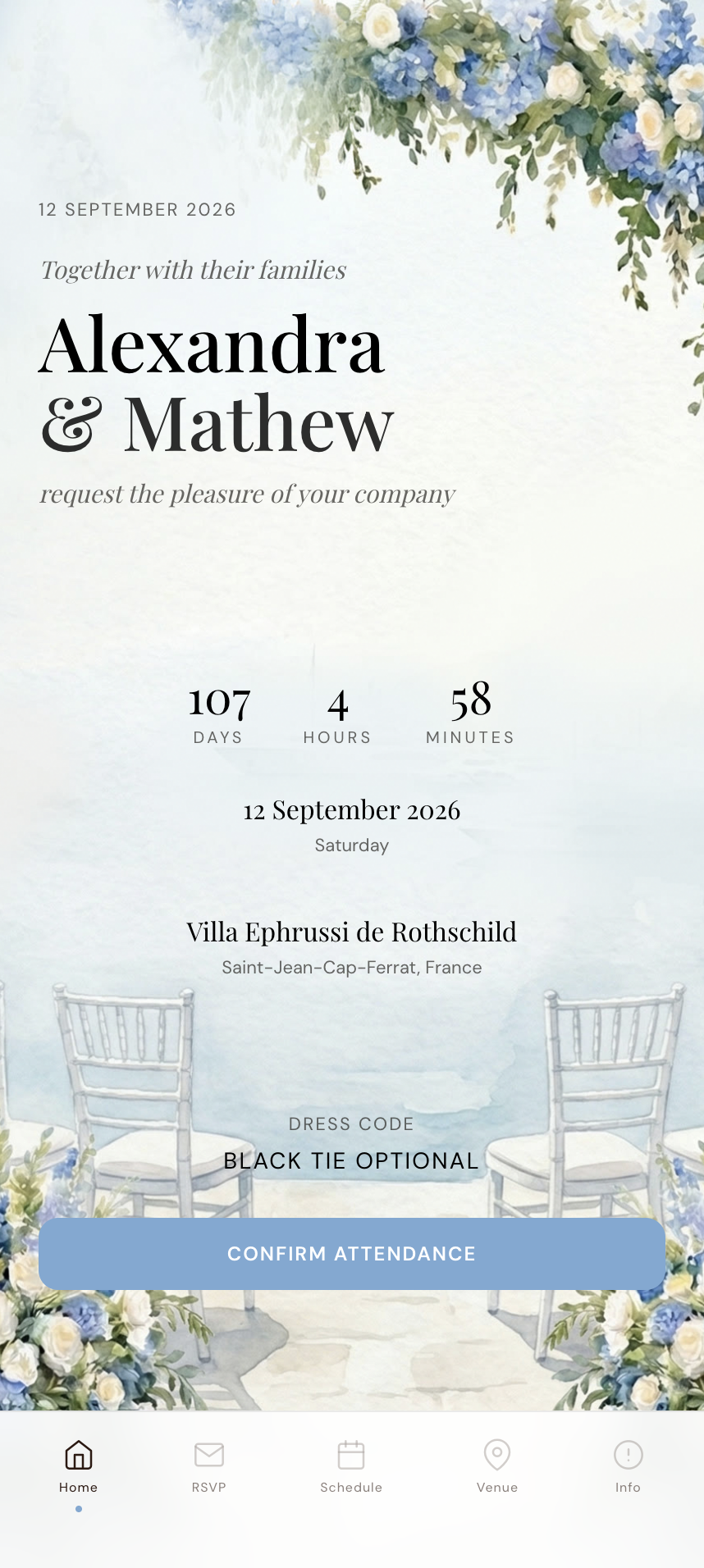
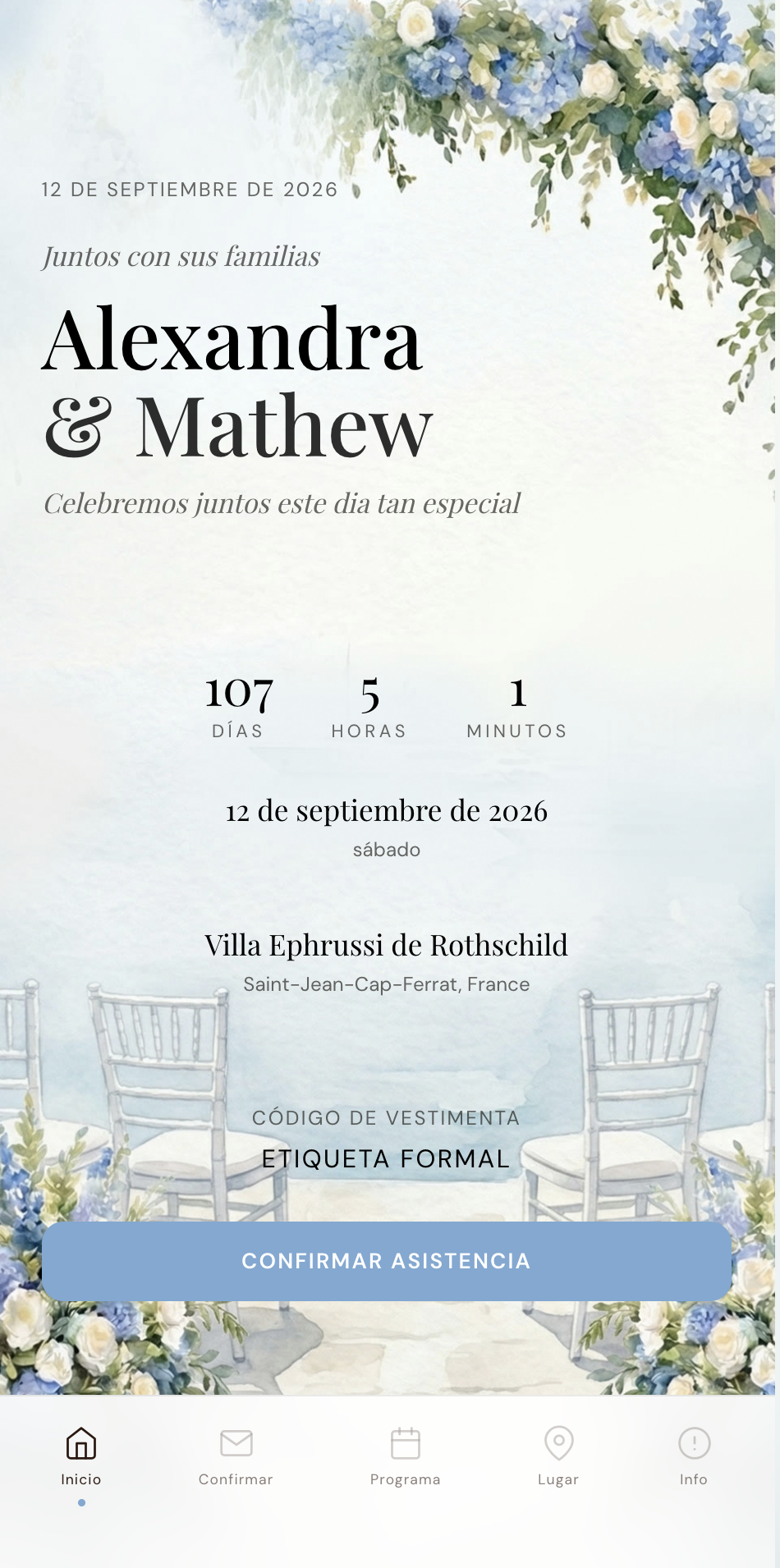
Preview both versions before you send
Before sharing your invitation, you want to check how it looks in each language. The App Builder includes two preview buttons, one for each language. Tap "Preview in English" to open the invitation exactly as your English-speaking guests will see it. Tap "Preview in French" to see the French version. Both open in a new tab with the language pre-selected, skipping the language picker so you go straight to the content.
This matters because translation lengths differ. A German sentence is often 30% longer than the English equivalent. An Arabic layout reads right-to-left. You want to see how your translated content fits within the design before any guest does. Preview, adjust, preview again.
The preview buttons appear on every tab in the builder, not just the languages section. So as you are editing your schedule in both languages, you can instantly preview the result without navigating away.
See the featureBilingual invitation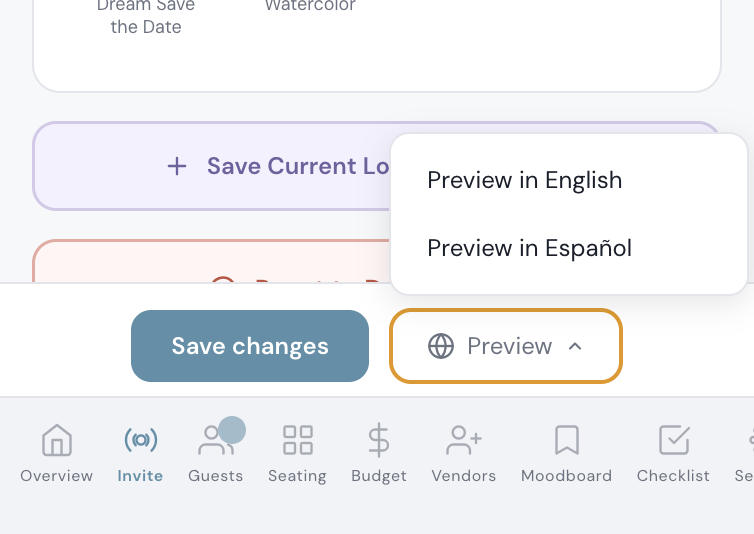
What gets translated automatically (and what you write yourself)
There are two layers of translation in a bilingual invitation. Understanding the split makes setup fast and avoids duplication.
Layer one: interface text. This includes navigation labels (Home, RSVP, Schedule, Venue, Info), form fields (First name, Last name, Email), buttons (Confirm, Back, Next), countdown labels (Days, Hours, Minutes), and system messages ("Thank you for your response"). All of this translates automatically when the guest picks their language. You do not touch it. The system ships with complete translations for 26 languages including English, Spanish, French, Italian, Portuguese, German, Greek, Dutch, Turkish, Arabic, Hebrew, Russian, Hindi, Japanese, Chinese, Korean, Polish, Swedish, Danish, Norwegian, Romanian, Croatian, Malay, Tamil, Bengali, and Kazakh.
Layer two: your custom content. This is everything unique to your wedding. Your opening line ("Together with their families"). Your venue names and addresses. Your schedule event titles and descriptions ("Cocktail hour on the terrace"). Your info section text about accommodation, transport, and dress code. Your allergy question label. Your RSVP confirmation message. These are the fields where you type the translation yourself using the blue dashed fields in each section tab.
The split is intentional. Machine translation works well for standard UI labels. It does not work for "Cocktails et canapes au bord de la Mediterranee" or "La ceremonia tendra lugar en el yate." Your personal content deserves your personal translation.
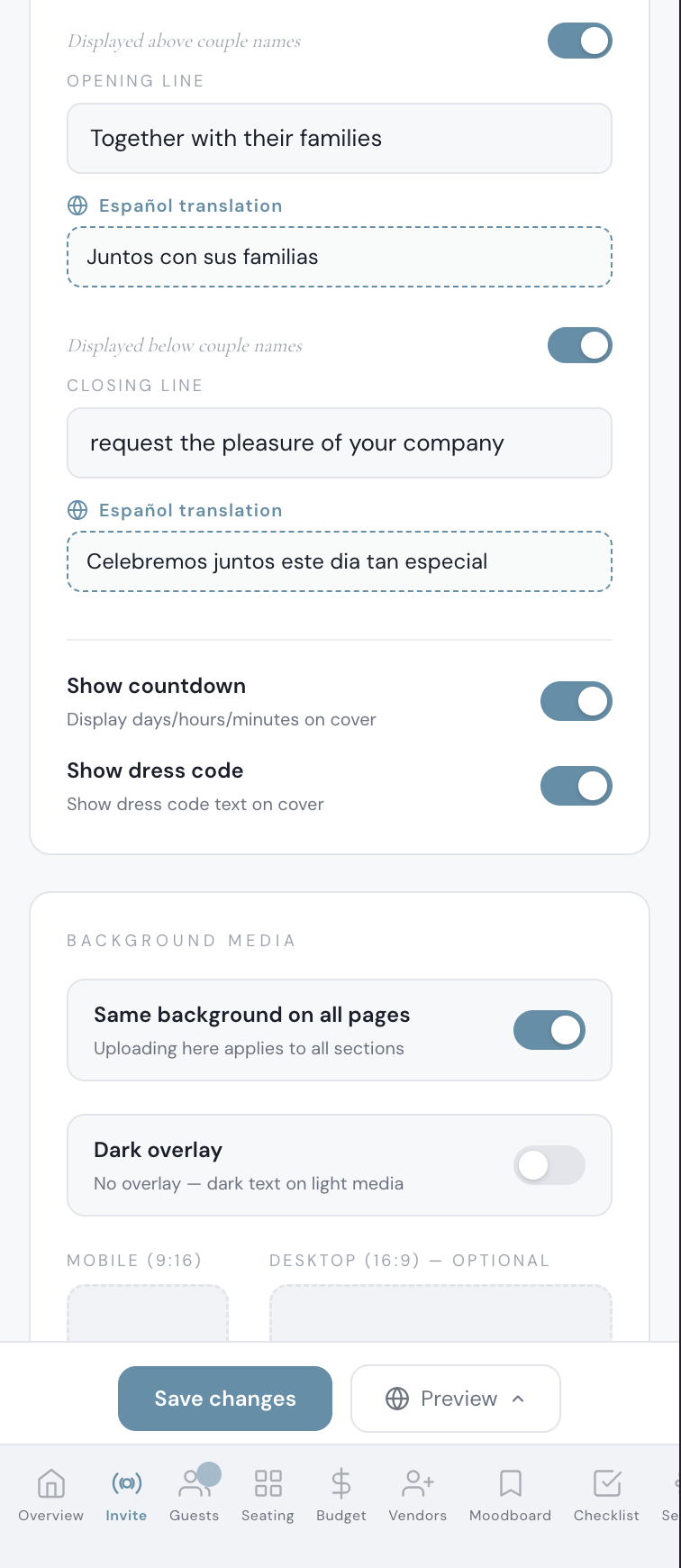
Your custom text on the left, the translation in the dashed field below. Opening line, closing line, every section.
One guest list, one seating plan, one budget
A common concern with bilingual weddings is whether the two languages create two parallel systems. Do Spanish-speaking guests end up in a separate guest list? Do meal choices from French-speaking guests feed into a different count?
No. Every RSVP, regardless of the language the guest used, flows into one unified dashboard. Your guest list shows all attendees together. Your seating plan draws from the same pool. Your budget tracker calculates catering costs from the same meal count. Your checklist and moodboard are unaffected by language settings. For a deeper look at how this works across platforms, see our guide to choosing a multilingual wedding website.
The language is a presentation layer for the guest. Behind the scenes, it is one wedding, one dataset, one planning workflow. This is the same approach used by the best multilingual apps: translate the interface, unify the data.
Perfect for destination weddings abroad
Destination weddings are one of the most common reasons couples need a bilingual invitation. You are getting married in Italy, but half your guests are American. You booked a villa in Provence, but your partner's family is from Madrid. You chose Santorini, but the local vendors speak Greek and your guests do not.
A bilingual digital invitation solves the logistics that destination weddings create. Your Italian venue name, address, and directions stay in Italian for the local guests and appear in English for everyone else. Your schedule can say "Cerimonia" for Italian speakers and "Ceremony" for English speakers. Accommodation recommendations, transport details, dress code guidance: everything your travelling guests need, in the language they read.
The top destination wedding locations, Mexico, Italy, Greece, Spain, France, Portugal, and Turkey, all involve guests crossing language barriers. A couple getting married at a hacienda in San Miguel de Allende needs Spanish and English. A wedding at a chateau in the Loire Valley needs French and English. A celebration on the Amalfi Coast needs Italian and English. In each case, one bilingual invitation link replaces the need for two websites, two sets of printed cards, or two WhatsApp groups sharing information in different languages.
Since 32% of couples now choose destination weddings, this is not an edge case. It is one of the most practical features a wedding invitation can offer. And the invitation is only the start: our guide to being your own multilingual wedding planner covers the rest - seating, meals, ceremony and schedule in two languages.
Bilingual invitation wording that feels natural
Write your primary language version first, completely. Get the tone right, the details accurate, the wording polished. Then translate. Trying to write both versions simultaneously leads to awkward phrasing in both languages. (Still comparing platforms and print options? Our multilingual invitation buyer's guide covers Etsy templates, print specialists and digital options side by side.)
Do not translate literally. Wedding invitation wording carries cultural weight, and the formal phrasing differs by language. In French: "Nous avons le plaisir de vous convier a celebrer notre union." In Spanish: "Tenemos el honor de invitarles a celebrar nuestra boda." In Italian: "Abbiamo il piacere di invitarvi a celebrare il nostro matrimonio." In Greek: "Θα ειναι τιμη μας να παρευρεθειτε στο γαμο μας." In Arabic: the entire layout reads right-to-left and the phrasing structure changes entirely. Use the natural formality for each language, not a word-for-word translation.
Ask a native speaker to review your translations. Even if you are fluent, a second pair of eyes catches a missing accent in Portuguese, an overly formal "usted" in Colombian Spanish that should be "tu" for a casual wedding, or a Greek phrase that sounds formal in Athens but odd in Crete.
Keep your venue names consistent. "Villa Ephrussi de Rothschild" stays the same in both languages. "The Amalfi Coast" can become "La Costiera Amalfitana" because that is how Italians refer to it. But "Hacienda San Angel" should not become "San Angel Ranch." Addresses should stay in the local format so guests can paste them into Google Maps.
Test both versions on your phone before sending. Open the preview in each language. Scroll through every screen. Check that nothing overflows, no text is cut off, and the RSVP form makes sense in both languages. Five minutes of testing saves weeks of guest confusion.
Everything you need, in one place
Planning your own wedding without a planner is entirely achievable.
See it for yourself.
Explore the whole platform: cinematic invitation, RSVP with meals and allergies, guest list, seating chart, budget, vendors, checklist, moodboard, photo sharing and the AI planner. No account needed.
Try the full planner →How many languages can I add to my wedding invitation?
Up to three. You set a main language, then an optional second language and an optional third. Your guests pick theirs in a language popup when they open your invitation. The system supports 26 languages for automatic interface translation.
Can I make a trilingual wedding invitation?
Yes. A trilingual wedding invitation works exactly like a bilingual one, with a third language added. You write your text once in your main language, every text field in the builder gets a translation box for each extra language, and an AI translation card can fill the empty ones for you to review. Navigation, buttons and RSVP form labels translate automatically. A Visible in setting can show a schedule moment or info section only in the main language or only in the other languages, and the QR print card can be printed in any of the three.
Do my guests need to download an app to see the bilingual invitation?
No. Your invitation is a web link that opens on any phone or computer. Guests tap the link, choose their language, and see everything in their browser. No app download, no account creation.
What if I change my primary language after I have already written content?
The builder shows a warning explaining that all your custom content (venue names, schedule, info sections) should be written in your primary language. You can change it, but you will need to rewrite your content in the new language.
Are meal choices and allergy notes translated too?
Meal option names and the allergy question label have translation fields in the builder. You write the translated version yourself so it matches your caterer's menu. The RSVP form labels (First name, Meal choice, etc.) translate automatically.
Does adding a second language cost extra?
No. Bilingual and trilingual invitations are included in the Full Wedding Planner plan at $19.99/mo, or $189 once. This also includes the digital invitation, RSVP tracking, guest list, seating plan, budget tracker, vendor manager, moodboard, checklist and printable QR card. Cancel the monthly plan anytime; lifetime is one payment that never renews.
Can I see how my invitation looks in both languages before sending?
Yes. The builder includes a preview button for each language. They open your invitation in a new tab with the language pre-selected so you can check every screen.
What happens if a guest does not pick a language?
The language picker appears automatically for bilingual weddings. If a guest somehow bypasses it (for example by bookmarking the page after choosing), their previous choice is remembered. If no choice was ever made, the invitation defaults to your primary language.
Can I create a Spanish and English wedding invitation?
Yes. Set English as your primary language, add Spanish as the second language, and translate your custom content (venue names, schedule, info sections) using the inline fields. All RSVP labels, navigation, and buttons translate to Spanish automatically. This works for any combination: French and English, Italian and English, Greek and English, Arabic and English, Portuguese and English, and more.
Is this suitable for a destination wedding in Italy, Greece, or Mexico?
It is built for exactly that. Destination weddings are the most common reason couples need bilingual invitations. Your local venue details stay in the local language for nearby guests, while your international guests see everything translated. One link replaces two websites.
Does the invitation support right-to-left languages like Arabic or Hebrew?
Yes - both Arabic and Hebrew are included in the 26 built-in language packs. The interface labels (navigation, RSVP form, buttons) translate automatically. For your custom content, you write the Arabic or Hebrew translation in the inline fields. The text direction within those fields follows the language.