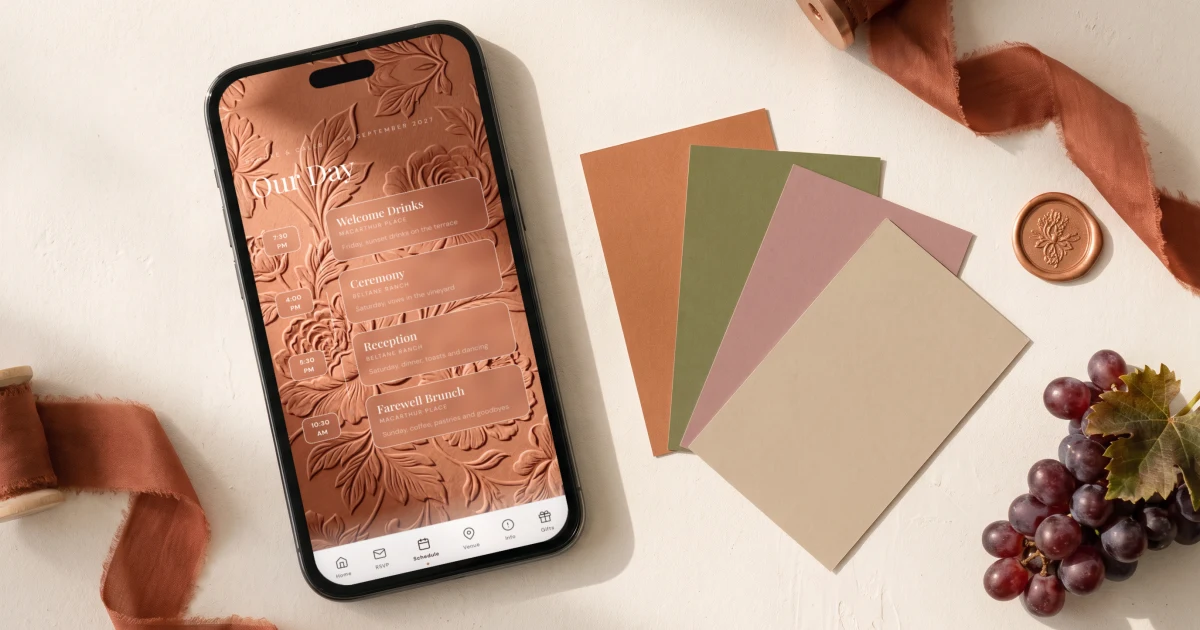
When a wedding spans several events, the RSVP has to be per event and per group of guests, so the welcome dinner, the ceremony and the brunch each get their own yes or no and their own headcount. The Private Wedding App is a full wedding planning platform where each group opens a link showing only the events they are invited to, which removes the awkwardness of someone reading about a dinner they are not part of. Each group can also get its own info sections and its own venue line on the cover, and the meal question is asked only for events that serve a meal. Replies arrive per event in the live guest list with a running total per event, meal choices and allergies, each guest sees only their own days in the schedule, and the seating chart and the caterer counts follow from the same answers. A single website with one yes or no form leaves you reconciling who is coming to what by hand. It is 19.99 a month or 189 once.
The single-day wedding is no longer the default. According to The Knot's 2026 Real Weddings Study of over 10,000 US couples, 71% of weddings now span two to three days: a rehearsal dinner or welcome party, the ceremony and reception, an after-party, a day-after brunch. Which creates a problem your parents never had: not everyone is invited to everything. The welcome dinner is 30 people; the wedding is 110. Your college friends are invited to the after-party but not the family brunch. Now try collecting RSVPs for that with a single yes/no form - or worse, a paper card. This guide covers how multi-event wedding RSVPs work in 2026, how the major platforms handle different guest lists per event, and a simpler model that skips the spreadsheet entirely.
The multi-event wedding is now the norm
The Knot's 2026 Real Weddings Study, based on 10,474 US couples married in 2025, found that 71% of weddings now span two to three days. The supporting events have become standard: 75% of couples host a rehearsal dinner, 26% host welcome drinks, 27% throw an after-party, and 21% host a day-after brunch. Among Millennials, 30% host a dedicated welcome party. The same split happens at the small end of the scale: a courthouse wedding seats a dozen people, so the ceremony is one event and the celebration afterwards is another.
Destination weddings push this even further. When guests fly in for your wedding in Italy or Greece, a single four-hour reception feels wasteful. The standard destination format is a full weekend: welcome dinner on Friday, ceremony and reception on Saturday, recovery brunch on Sunday.
More events means more headcounts. Your caterer needs an exact number for the welcome dinner. The brunch venue needs its own count. And the numbers are different, because the guest lists are different. That is the real problem - not the RSVP itself, but the tiers.
The tiered guest list problem (and the etiquette minefield)
Almost every multi-event wedding has guest tiers. Immediate family and the wedding party are invited to everything. Most guests attend the ceremony and reception. A wider circle might only join the after-party or evening reception. And the rehearsal dinner is traditionally limited to family and the bridal party.
The etiquette risk is real: a guest who discovers there was a welcome dinner they were not invited to feels excluded. That is why the old approach - one wedding website listing every event for everyone - fails. Your schedule page becomes a list of parties half your guests are not invited to.
The fix is per-guest visibility: each guest should see only the events they are invited to, and RSVP to each one separately. A guest can accept the ceremony and decline the brunch. Your headcounts stay accurate per event, and nobody browses a party list they are not part of.
- Family & wedding party - rehearsal dinner, ceremony, reception, brunch
- Most guests - ceremony and reception only
- Colleagues & wider circle - evening reception or after-party
- Each tier needs its own RSVP form and its own headcount
- No tier should see the events it is not invited to
How the major platforms handle multi-event RSVPs
Zola, Joy and The Knot all support multiple events with per-event RSVP - but they share the same workflow: you must build your complete guest list first, then control visibility guest by guest. On Zola, guests must be added to your guest list and marked “Definitely Invited” to an event before they can RSVP to it. On Joy, you tag groups of guests (“family”, “reception-only”) and configure which events each tag can see. RSVPify sells “secondary events” as an event-management add-on. Riley & Grey offers per-guest event visibility on its luxury subscription.
This works, but it front-loads hours of admin: export the address book, dedupe names, import a spreadsheet, tag every single household correctly - before a single invitation goes out. Get one tag wrong and a guest either sees a private event or cannot RSVP at all.

A simpler model: one link per guest group
There is a simpler mental model, and it matches how couples actually think about their guests: in groups. “Family.” “Wedding party.” “Evening guests.” On The Private Wedding App's multi-event RSVP, you create your events, create your groups, tick which events each group is invited to - and every group gets its own private link.
Sharing the right link is the assignment. Send the family link to your family WhatsApp group and the evening-guests link to your colleagues. Anyone who RSVPs through a link automatically joins that group, along with their plus-ones. They see one RSVP card per event - accept or decline each - plus the usual meal choice, allergies and plus-one questions. No guest import. No name-by-name tagging. No spreadsheet.
Sent someone the wrong link? Move them to another group with one dropdown in your guest list - their events update instantly, nothing needs re-sending.
Each group can be shaped beyond its events. You choose which schedule moments it sees, and days with nothing for that group disappear from its schedule. You choose which info sections appear on its invitation, so church parking or the ceremony dress code can stay with the guests who need them. And you can give it its own venue line on the cover: evening guests see only the evening venue, while everyone else sees both. A guest with no group sees everything. For the UK version of this split, see wedding websites for day and evening guests.
- Turn on “This wedding has multiple events” and add your events (name, date, time, location)
- Create a group per guest tier and tick its events
- Copy each group's private link and share it with those guests
- Per group, choose its schedule moments, its info sections and its venue on the cover
- Untick “Ask the meal choice for this event” on any event without a seated meal
- Guests RSVP per event - accept some, decline others
- Move any guest between groups later with one dropdown
Per-event headcounts, meals and a seating plan for every event
Collecting the answers is half the job; using them is the other half. Every per-event answer lands in your guest list automatically, with attendance chips per event on every guest and a live headcount strip: welcome dinner 34, ceremony 61, brunch 28. Each event shows a running total of attending, pending and declined, and filtering by one event switches every count to that event. The CSV export gains one column per event - that file is exactly what your caterers ask for.
Meals follow the events too. Each event has its own “Ask the meal choice for this event” setting: untick it for the after-party or an evening reception, and guests coming only to that part skip the meal question, while dinner guests can choose per course. On the guest side, each event links to its venue card, and on a multi-day schedule the day tabs can show real dates instead of Day 1 and Day 2.
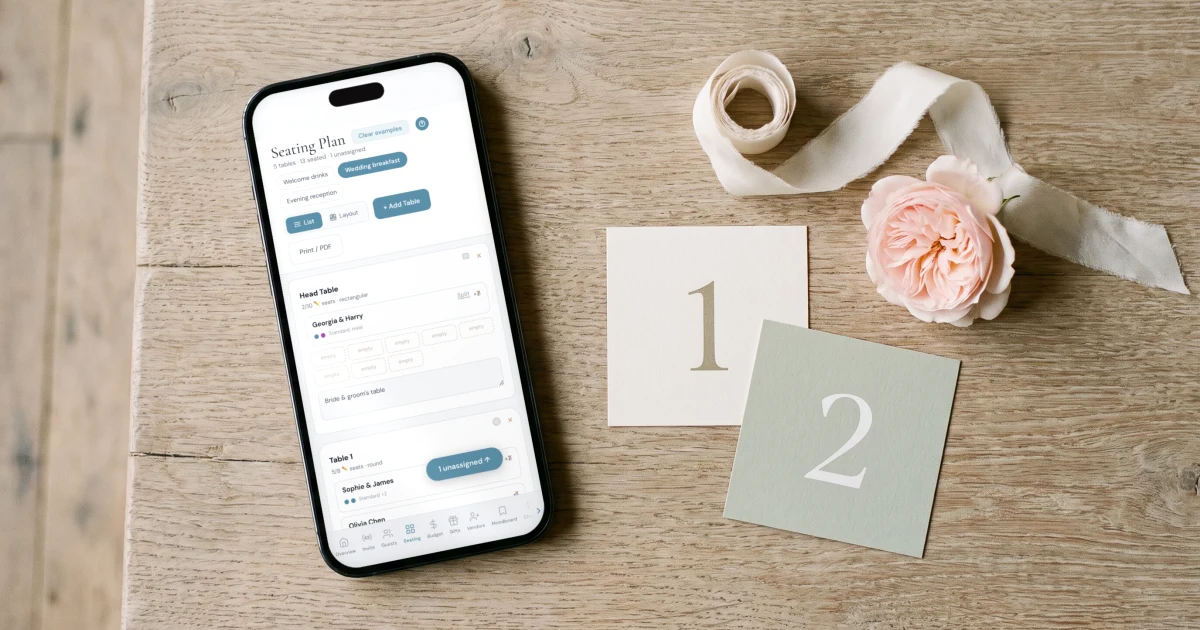
Then seating. Your welcome dinner tables are not your reception tables. The seating planner gets one tab per event, each with its own tables and its own reception floor plan, showing only the guests who accepted that event.
And because it is one platform, everything else keeps working: meal choices and allergy notes flow to your caterer export, the budget tracker's catering calculator adjusts as RSVPs arrive, and a bilingual invitation shows each event card in the guest's own language, with up to three languages on the same link - essential for destination weddings.
Etiquette and timing for multi-event invitations
A few practical rules from real multi-event weddings. First, timing: for destination weddings send save-the-dates 8 to 12 months out and the invitation link 4 to 6 months out; for local weddings, 6 to 8 weeks is standard. Set one RSVP deadline for all events - chasing three separate deadlines triples the follow-up work.
Second, wording. On the invitation each guest receives, list only their events - which per-group links handle automatically. If some guests are invited to the ceremony but not the reception dinner (common for large European weddings), say it plainly on the event card: “Evening celebration from 9pm.”
Third, do not over-invite to the supporting events out of guilt. The Knot's data shows rehearsal dinners average far fewer guests than receptions for a reason: the welcome dinner is for the people who travelled, the brunch is for those still in town. Different guest lists per event is not rude - showing everyone a party they are excluded from is.
Everything you need, in one place
Planning your own wedding without a planner is entirely achievable.
See it for yourself.
Explore the whole platform: cinematic invitation, RSVP with meals and allergies, guest list, seating chart, budget, vendors, checklist, moodboard, photo sharing and the AI planner. No account needed.
Try the full planner →How do I collect RSVPs for multiple wedding events?
Use a wedding platform with per-event RSVP. Create each event (welcome dinner, ceremony, brunch), and guests respond to each one separately instead of a single yes/no. On The Private Wedding App you enable “This wedding has multiple events” in the App Builder, add your events, and each guest sees one accept/decline card per event they are invited to.
How do I invite different guests to different wedding events?
Create guest groups and assign events per group. On most platforms (Zola, Joy, The Knot) you must import your full guest list and tag every guest by name first. On The Private Wedding App you instead create a group, tick its events, and share that group's private link - guests who RSVP through it are assigned automatically, plus-ones included.
Can wedding guests see events they are not invited to?
Not if your platform supports per-group visibility. Each group's link shows only that group's events, so evening guests never see the private family brunch. On The Private Wedding App the schedule follows too: days with nothing for that group disappear, and you choose which info sections and which venue on the cover each group sees. This is the etiquette-safe way to run a tiered guest list.
Do guests who only come to the evening have to choose a meal?
Not on The Private Wedding App. Each RSVP event has its own “Ask the meal choice for this event” setting. Untick it for the evening party, and guests coming only to that part skip the meal question, while guests attending the dinner still choose, per course if you want.
Can a guest accept one event and decline another?
Yes. Each event has its own accept/decline choice, and every answer is tracked separately. A guest can attend the ceremony but skip the brunch, and both headcounts stay accurate.
Do I need a separate RSVP card for the rehearsal dinner?
Not anymore. Traditionally the rehearsal dinner required a separate paper insert. With a multi-event digital RSVP, guests invited to the rehearsal dinner simply see it as an extra card in the same RSVP flow, with its own accept/decline.
How do multi-event RSVPs work for a destination wedding?
Destination weddings are the main use case: 71% of weddings now span 2 to 3 days, and destination weekends almost always include a welcome dinner and farewell brunch. Combine per-event RSVP with a bilingual invitation so international guests see every event card, date and time in their own language. The invitation runs in up to three languages on the same link, and each guest picks theirs once.
Can I make a different seating plan for each event?
On The Private Wedding App, yes - the seating planner shows one tab per event, each with its own tables and reception floor plan, listing only that event's attending guests.
What percentage of weddings have multiple events?
According to The Knot's 2026 Real Weddings Study (10,474 US couples), 71% of weddings span two to three days. 75% of couples host a rehearsal dinner, 27% an after-party, 26% welcome drinks, and 21% a day-after brunch. 30% of Millennial couples host a dedicated welcome party.