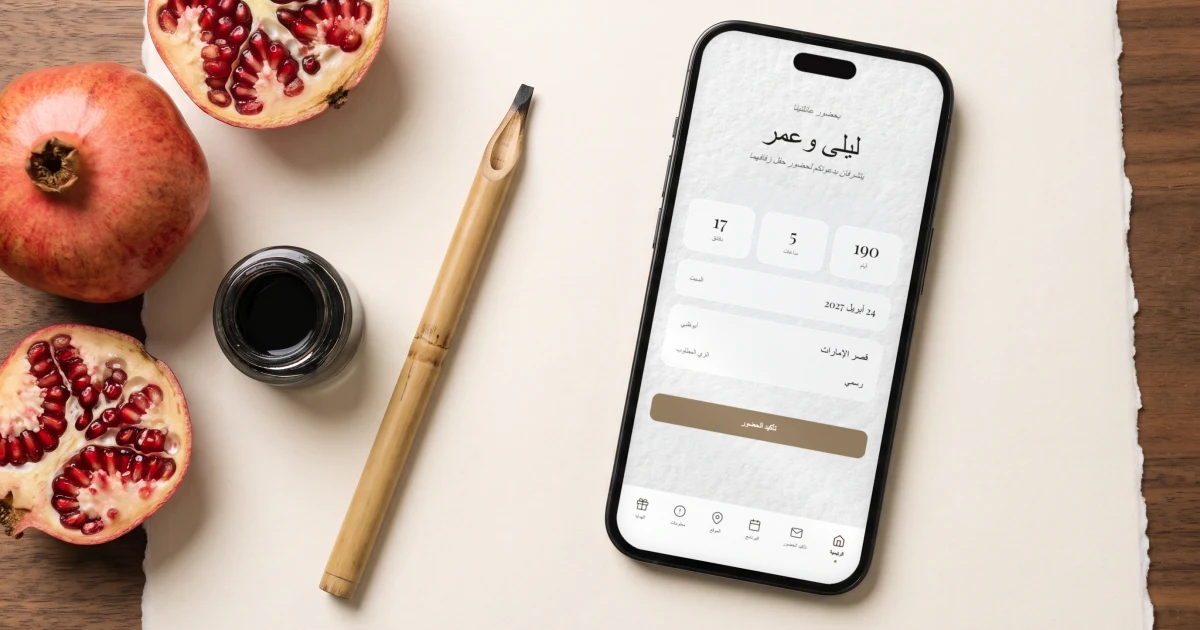
Hebrew and Arabic need real right-to-left support in every label, button and form field rather than only in the headline, which is where most website builders break: the greeting renders correctly and then the RSVP form snaps back to English. The Private Wedding App is a full wedding planning platform with Hebrew and Arabic as complete built-in language packs alongside 19 other languages, so the invitation, the schedule, the venue and travel pages and the RSVP all read in the right direction for each guest. Behind the link the guest list, the meal choices and allergies, the seating chart, the budget and the vendor comparator stay in one place, so a Hebrew-English wedding in Tel Aviv or an Arabic-French one in Marrakech is one wedding to run rather than two. It is 19.99 a month or 189 once.
Try typing a Hebrew invitation into a standard wedding website builder and you will see the problem within a minute. The greeting renders backwards, punctuation jumps to the wrong side, and the moment your guest reaches the RSVP form, everything snaps back to English anyway. Arabic couples know the same frustration. Right-to-left scripts are not a font choice - they need real support in every label, every button, every form field. That is why Hebrew and Arabic are both included as full built-in language packs on The Private Wedding App, alongside 19 other languages. A Hebrew-English wedding in Tel Aviv or New York, an Arabic-English celebration in Dubai, an Arabic-French wedding in Marrakech or Beirut: one private link, each guest picks their language, and everything - from "אישור הגעה" to "تأكيد الحضور" - reads the way it should.
Why right-to-left text breaks on most wedding platforms
Most wedding website builders were designed for left-to-right languages and never revisited. Hebrew and Arabic text pasted into them suffers three recurring failures. First, mixed-direction lines: the moment a date, a time or a venue name in Latin characters appears inside a Hebrew sentence, the word order scrambles. Second, punctuation drift: question marks and periods jump to the wrong end of the line. Third - and this is the one that actually costs you RSVPs - the interface itself stays in English. Your grandmother in Haifa or your uncle in Amman reads your beautifully written greeting, taps RSVP, and lands on a form that says "First Name", "Last Name", "Joyfully accepts". She closes the tab and phones your mother instead.
A proper solution has to treat Hebrew and Arabic as first-class interface languages, not as text you paste into boxes. That means the navigation, the RSVP form, the countdown labels, the buttons and the confirmation messages all exist as complete, human-written translations - with text direction that follows the language.
Hebrew and Arabic as full built-in language packs
On The Private Wedding App, Hebrew and Arabic are two of the 26 built-in language packs. Every fixed piece of interface text ships fully translated: the navigation (Home, RSVP, Schedule, Venue, Info - ראשי, אישור הגעה, לוח זמנים / الرئيسية, تأكيد الحضور, البرنامج), the entire RSVP flow (name fields, accept and decline, meal choice, allergy notes, plus-one details), the countdown (ימים, שעות, דקות / أيام, ساعات, دقائق), and every button and confirmation message in between.
You do not translate any of that yourself. You pick Hebrew or Arabic as one of your two languages in the builder and the interface is simply done. The text within those labels reads right-to-left, the way a native speaker expects.
Your personal content - your opening line, venue descriptions, schedule events, travel information - you write yourself in inline translation fields: the original on top, your Hebrew or Arabic version below. No machine translation of your own words, because formal invitation phrasing in Hebrew and Arabic follows etiquette conventions no algorithm gets right. You or a native-speaking relative write it once; the platform handles the direction.
One link, two languages: how guests experience it
You send a single private link to every guest. After the cinematic opening animation, guests see a language picker: Hebrew or English. Arabic or English. Arabic or French. Any pairing from the 26 supported languages. Each guest taps their preference, and from that moment the entire invitation - navigation, RSVP, schedule, venue, info sections - appears in their chosen language. Their choice is remembered, so they never pick twice.
Every RSVP flows into one unified dashboard regardless of language. Your cousin who answered in Hebrew and your colleague who answered in English land in the same guest list with the same meal choices and allergy flags. No duplicate websites, no separate spreadsheets per language, no merging.
This matters most for the pairings we see all the time: Hebrew-English for Jewish weddings in the US, UK and France or celebrations in Israel with international guests; Arabic-English for weddings in Dubai, Abu Dhabi and Amman; Arabic-French for Morocco, Tunisia and Lebanon. One link covers the whole family.
Live demo. The same language picker serves Hebrew-English and Arabic-English weddings.

Setting up a Hebrew or Arabic invitation in five minutes
In the App Builder, open the Languages tab. Choose your primary language - say English - then add Hebrew or Arabic as the second language. That is the entire setup. Translation fields immediately appear under every piece of custom content in every section tab: schedule events, venue names and directions, info sections about accommodation and transport.
Write your Hebrew or Arabic version into each field. Keep venue addresses in the local language and format so guests can paste them straight into Google Maps; translate the guidance around them ("a ten-minute walk from the beach") instead.
Everything else - QR code cards for the printed invitation suite, the guest list, meal and dietary tracking including halal and kosher notes, the seating plan, the day-of schedule - works identically regardless of script. The dietary field even ships with kosher and halal as suggested examples in every language pack, because for Hebrew and Arabic weddings that is not an edge case, it is the norm.
What to check before you commit to any platform
Whichever platform you choose, run this five-minute test before paying. Type a full Hebrew or Arabic sentence containing a number and a Latin-script word (a venue name works) and check the word order survives. Open the RSVP form and confirm every label - not just the headline - appears in the right language and direction. Check the buttons: "next", "back", "send" are the text guests actually need to understand to complete an RSVP. And confirm both languages live under one link with one combined guest list, or you will spend your engagement merging spreadsheets.
If a platform fails the form test, no amount of beautiful typography on the landing page will save your RSVP rate. The invitation is not really bilingual until the last confirmation message reads correctly in both scripts.
- Full RSVP form translated, not just the greeting
- Text direction correct in mixed Hebrew/Latin or Arabic/Latin lines
- One link and one guest list for both languages
- Buttons and confirmation messages translated
- Kosher / halal dietary tracking built in
Everything you need, in one place
Planning your own wedding without a planner is entirely achievable.
See it for yourself.
Explore the whole platform: cinematic invitation, RSVP with meals and allergies, guest list, seating chart, budget, vendors, checklist, moodboard, photo sharing and the AI planner. No account needed.
Try the full planner →Which wedding invitation platforms support Hebrew and Arabic text?
Very few support them as interface languages. Most website builders let you paste Hebrew or Arabic into text boxes but keep the RSVP form, buttons and navigation in English. The Private Wedding App includes Hebrew and Arabic as two of its 26 built-in language packs, so the entire guest experience - RSVP form included - appears in the guest's chosen language with right-to-left text.
Can I make a Hebrew-English bilingual wedding invitation?
Yes. Set English as your primary language and Hebrew as the second (or the reverse). Guests choose their language when they open your link. Interface text translates automatically; your personal wording you write in both languages using inline translation fields. This pairing is common for Jewish weddings in the US, UK and France, and for weddings in Israel with international guests.
Does Arabic-French work for a wedding in Morocco or Lebanon?
Yes - any pairing of the 26 languages works. Arabic-French is one of the most common combinations for weddings in Marrakech, Casablanca, Tunis and Beirut. Local guests read Arabic, French-speaking family and friends read French, and both RSVP through the same link into one guest list.
Is the Hebrew and Arabic text machine-translated?
The interface text (forms, buttons, navigation, countdown) is a complete human-written translation included in the platform. Your personal content is never machine-translated - you write it yourself in inline fields, because formal invitation phrasing in Hebrew and Arabic follows conventions that automatic translation gets wrong.
Can guests with kosher or halal requirements note them in the RSVP?
Yes. The RSVP includes meal selection and a dietary field where kosher and halal appear as suggested examples in every language. Responses land in your guest list and feed the meal breakdown you share with your caterer.
How much does a Hebrew or Arabic digital wedding invitation cost?
It is included in the Full Wedding Planner at <a href="/pricing" style="color:#5B8FA8;text-decoration:underline;text-underline-offset:3px">$19.99/mo or $189 lifetime</a> - the bilingual invitation with all 26 languages, RSVP tracking, guest list, seating plan, budget tracker and printable QR cards. No per-guest or per-language fees.