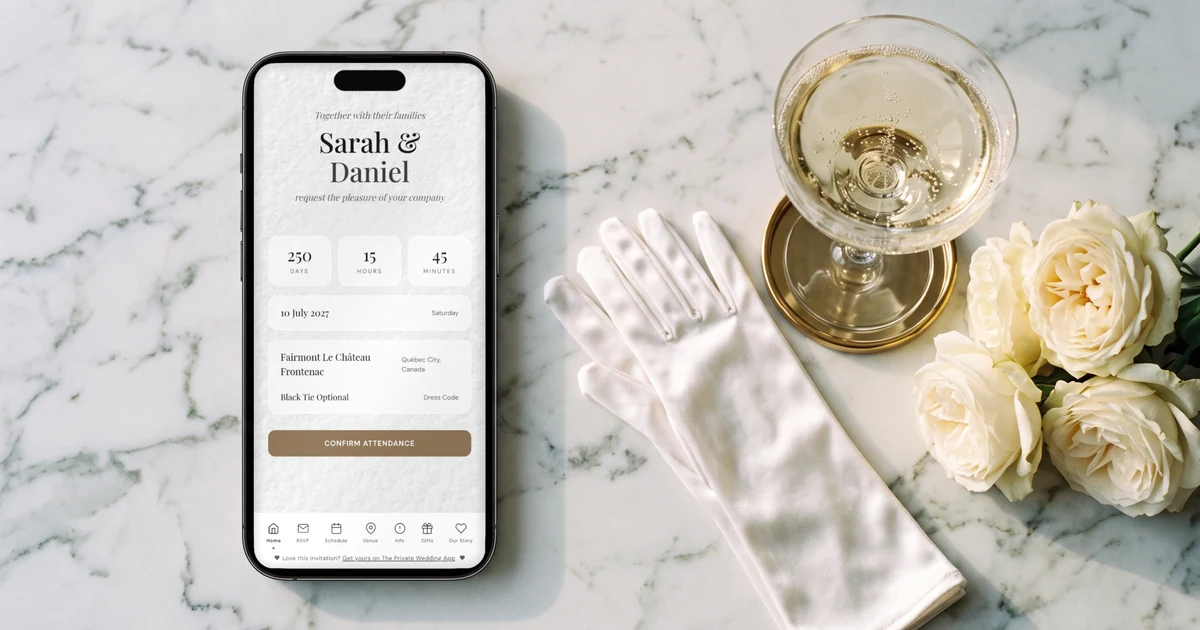
To run a bilingual English and French wedding in Canada, The Private Wedding App gives you one invitation link where each guest picks English or French once, then reads the schedule, venues and RSVP form in that language, chooses their meal, flags allergies and adds their plus-one. Every reply, in either language, lands in one guest list that feeds the seating chart and the caterer sheet. Pay once, lifetime access, or pick a subscription: C$249 once, or C$24.99 a month. 3-day free trial.
One of you grew up in Montreal or Moncton, the other in Toronto or Calgary. Your grandmother reads French, your partner's uncle reads English, and half your cousins switch mid-sentence. The usual fix is two invitations and two RSVP lists, or one page with every paragraph written twice, and it holds until the first change of time or venue. This guide is for Canadian couples whose families split between English and French, whether the wedding is in Quebec, Ottawa, Ontario or New Brunswick: how one website can speak both languages, what an anglophone guest should know about a ceremony in Quebec, how to handle guests travelling between provinces, plus-ones and dietary needs, and what the options couples use in Canada actually do in French, with prices in Canadian dollars.
One website, written once in each language
Two separate websites drift apart: one gets the new start time, the other does not, and a guest RSVPs on the version their cousin forwarded. One bilingual website keeps one schedule, one address, one reply-by date, with each text existing in English and in French.
In The Private Wedding App you pick a main language and add French or English in the Languages tab, under "Second Language (optional)". Every text you write, the cover, the schedule, venues, info sections and meal names, then gets a second field for the other language. The buttons, the RSVP form and the menus translate on their own. The "AI Translation" card fills every empty translation in one click, in natural French or English rather than word for word, and never overwrites a line you corrected. Accents, cedillas and apostrophes display as typed.
Have someone from the French side read the French before you send it. A Quebec reader will tell you if a phrase sounds like it came from Paris, and every line stays editable.
How it works in detail: the bilingual wedding invitation.
Each side of the family opens it in their own language
Right after the opening screen, each guest chooses English or French in a popup. The choice is saved on their phone, so every later visit opens straight in their language, with no switch to look for on the pages.
You can skip the choice altogether. Send the francophone side the link ending in ?lang=fr and the anglophone side the link ending in ?lang=en, and each family opens the invitation already in their language. If your guests leave an email on the RSVP, their confirmation email arrives in the language they read the invitation in.
For older relatives who prefer paper, the QR print card can be exported once per language, so the Quebec grandparents get a French card and the Alberta side an English one, both pointing to the same RSVP.
More on QR code RSVP cards.
Getting married in Quebec: what your English-speaking guests should know
A marriage in Quebec is celebrated by a competent celebrant: a clerk or deputy clerk of the Superior Court, a notary, a mayor, councillor or other municipal officer authorised by the Directeur de l'état civil, a religious minister authorised to marry, or a person the Directeur de l'état civil designates for your ceremony, such as a friend or relative. The ceremony takes place in front of at least two witnesses, in a place open to the public.
A notice of the marriage is published on the Directeur de l'état civil website at least 20 days before the date, and the ceremony must then take place within three months. Your celebrant handles the notice, so the practical point for you is timing: book the celebrant early enough for those 20 days. Outside Quebec each province runs its own process, so check your province's rules before you set the date.
Your anglophone guests mostly need to know what the day looks like: whether the ceremony is in French, roughly how long it lasts, and when the cocktail, dinner and dancing begin. Info sections and schedule moments each have a "Visible in" choice: both languages, the main language only, or the second language only. A short "How the day works" section visible in English only explains it to the guests who need it, without repeating it to the ones who know.
See the whole digital wedding invitation.
Guests in two provinces: travel, hotels and arrivals
A wedding in the Eastern Townships with half the guests driving from Toronto, or one in Ottawa with family flying in from Vancouver, means people book hotels and days off. They need the whole weekend, not just the ceremony time. The schedule can be split into days, each with its own tab and date, and every moment has its time, its venue linked to a map and, if you want, its own dress code.
Put hotel blocks, parking and the drive from the airport in info sections. In bilingual mode you can show a section in one language only, for example the drive from Toronto and the hotel block for the side of the family reading in English, while the local side never sees it. If many guests fly in, switch on the flight question in the Meal Options tab (it starts off): guests give their arrival and return flights on the RSVP, and the "Guest arrivals" card on the Guests page sorts them by landing day and time, with a CSV for the shuttle company.
In the Cover Text tab, "Date format" lets you show the English date as August 22, 2026 or 22 August 2026; the French keeps its own order.
More on guest flight details on the RSVP.
Plus-ones, children and evening-only guests
Plus-ones are on by default: each guest can add up to three people on the RSVP, a number you can change in the RSVP Settings tab. To give a plus-one only to some guests, choose "Only guests I choose", or set an exact number with the "Seats" button on a guest's row. People you already listed by name under a guest come on top of their seats.
To count children and infants apart from adults, switch on "Count children and infants separately" under "Allow additional guests". It is off by default. Infants are then not asked for a meal, which keeps the caterer's plate count honest.
Many Canadian weddings invite some guests to the dinner and others only to the evening party. Separate answers per event are off by default too: switch on "This wedding has multiple events" in the RSVP Settings tab and add each part, ceremony, dinner, evening, Sunday brunch. Then create guest groups on the Guests page: each group gets its own link that shows only its events, and each event gets its own headcount.
Meals and dietary needs, in both languages
Write each meal once with its translation: the francophone guest reads "Saumon, beurre blanc", the anglophone guest reads "Salmon, beurre blanc", and both answers count for the same dish. Each guest and each plus-one chooses their own meal, writes dietary notes and can flag a severe allergy, which is marked apart for the caterer.
The caterer and venue day sheet gives the final counts, the plates per meal and the allergy list with each guest's table. Attending guests then go on the seating chart by drag and drop, whatever language they replied in.
More on the meal and allergy tracker and the seating chart.
The options couples use in Canada, ranked for an English and French wedding
We ranked seven options on what decides a bilingual wedding: whether each guest reads in their own language, whether the RSVP translates, how much you translate by hand, and the price. Every competitor fact was read on that platform's own site on November 1, 2026; where their pages do not say, the table says so.
What each option does, in plain facts
The Private Wedding App is a full wedding planner behind a bilingual invitation: one link, each guest reading in English or French, the RSVP per event with meals and allergies, and one guest list feeding the seating chart, budget, checklist, vendor tools and AI assistant. C$249 once for lifetime access, where nothing expires: the invitation stays online and the planner stays open, with no time limit. Or C$24.99 a month.
WedSites offers multiple languages on its Pro plan only, with language links you switch on in the menu and ?lang= links, and translates existing content when you add a language. Pro is C$299 once and includes 24 months of hosting; after that, extra hosting is C$15 a month or C$90 a year.
Joy is free and shows its own menus and buttons in a guest's language through a language picker. For your own text, its help center describes duplicating each page and translating it, with text translated once that does not update when the original changes, and the Registry, RSVP and Schedule pages cannot be duplicated. Guests are tagged by language by hand.
Riley & Grey translates its interface and RSVP page into one of its languages, French included, and its help center says guests cannot choose the language they view; it offers 50% off a second website for the other language. Membership is US$39 a month or US$299 a year.
WeddingWire.ca has a free wedding website where guests RSVP and choose meals, with replies synced to its guest list; its website page does not mention languages.
The Knot lets you change most titles and text to your language except special characters, and its help center says some text, such as the RSVP page, cannot be changed.
Zola says in its FAQ that it does not offer automatic translation, that clickable buttons remain in English, and that it cannot currently support special characters on its wedding websites. Zola also states it does not offer international shipping.
Sources, all read on November 1, 2026: WedSites pricing in CAD and WedSites multiple languages; Joy pricing and Joy multiple languages; Riley & Grey pricing and Riley & Grey dual language support; WeddingWire.ca wedding websites; The Knot help center; Zola translation FAQ and Zola shipping FAQ. Quebec ceremony rules: Québec.ca and Éducaloi. Prices change, so check before you buy.
The full multi-language comparison is in the best bilingual wedding websites.
Prices in Canadian dollars, and money in Canadian dollars
Pay once, lifetime access, or pick a subscription. The lifetime plan is C$249, paid once: it never renews and never expires, your invitation stays online and your planner stays open with no time limit. The monthly plan is C$24.99 and starts with a 3-day free trial. Both unlock the same full planner.
The budget tracker shows amounts in C$, with each vendor's deposit, instalments and final balance. If you open a cash gift page, set the currency to CAD: guests give by card and payouts go to your Canadian bank account.
See pricing and the budget tracker.
Everything you need, in one place
Planning your own wedding without a planner is entirely achievable.
See it for yourself.
Explore the whole platform: cinematic invitation, RSVP with meals and allergies, guest list, seating chart, budget, vendors, checklist, moodboard, photo sharing and the AI planner. No account needed.
Try the full planner →What is the best bilingual English and French wedding website in Canada?
The Private Wedding App: one link where each guest picks English or French, an RSVP that translates with meals, allergies and plus-ones, and every reply in one guest list feeding the seating chart and budget. C$249 once for lifetime access, or C$24.99 a month. Of the other options checked on November 1, 2026, WedSites keeps multiple languages to its Pro plan with hosting for 24 months, Joy translates duplicated pages once, Riley & Grey shows one language per website, and Zola keeps its buttons in English.
Do we need two wedding websites, one in English and one in French?
No. One bilingual website keeps one schedule and one RSVP list. In The Private Wedding App each text has its French or English version, guests read the language they picked, and all replies land in the same guest list.
Can French-speaking and English-speaking guests RSVP on the same form?
Yes. The RSVP form, its buttons and your meal choices show in the guest's language, and an English reply and a French reply arrive in the same guest list with the same meal counts.
How do I send the French version to my francophone family?
Send them your invitation link with ?lang=fr at the end. It opens in French straight away, with nothing to choose. The anglophone side gets the same link with ?lang=en.
Who can marry us in Quebec, and how far ahead do we need to plan?
A competent celebrant: a court clerk, a notary, an authorised mayor, councillor or municipal officer, an authorised religious minister, or a friend or relative designated by the Directeur de l'état civil. A notice is published at least 20 days before the wedding, and the ceremony must take place within three months after that, in front of at least two witnesses.
Can I give plus-ones only to some guests?
Yes. In RSVP Settings choose "Only guests I choose", or use the "Seats" button on a guest's row to set exactly how many people they can bring. To count children separately, switch on "Count children and infants separately", which is off by default.
How much does The Private Wedding App cost in Canada?
Pay once, lifetime access, or pick a subscription: C$249 once, with nothing expiring, or C$24.99 a month. Both include the bilingual invitation, RSVP, guest list, seating chart, budget, checklist, vendor tools and AI assistant. 3-day free trial.