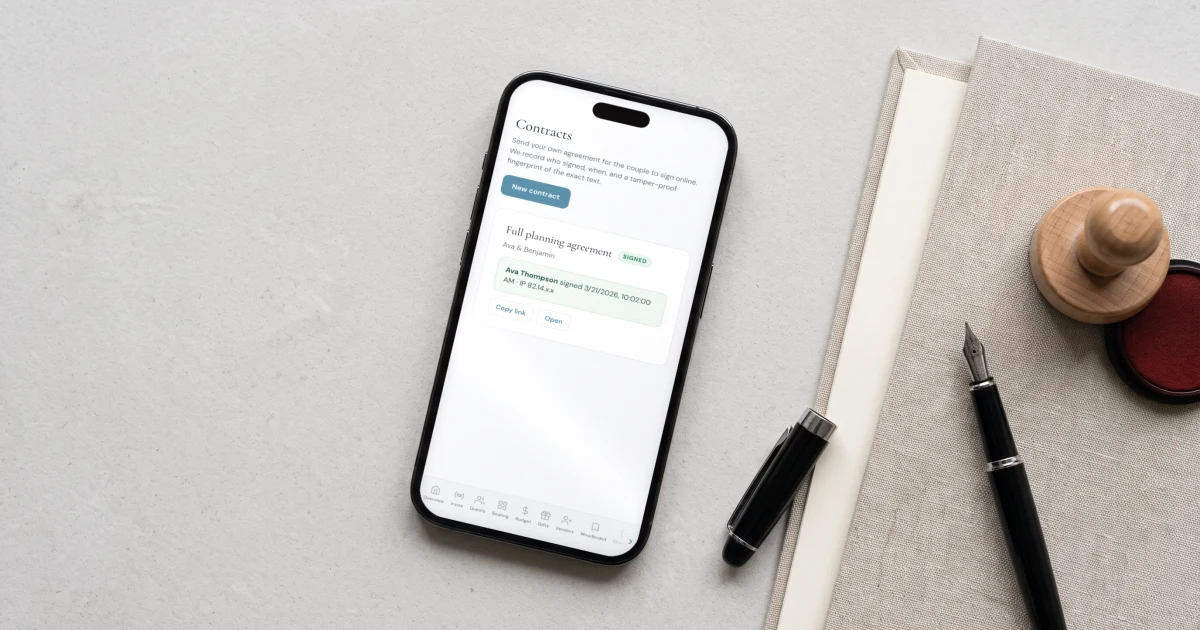
A wedding planner contract should cover the scope of your services, the fee and payment schedule, cancellation and postponement terms, liability limits, and how vendor coordination is handled. It does not need to be a downloaded template: use your own wording or your lawyer's. The Private Wedding App lets you paste your own agreement and send it for the couple to sign online, with a typed signature and a dated, tamper-proof audit trail, on the same wedding that holds their guest list and payments. Electronic signatures are legally binding in the US under the E-SIGN Act and in the UK and EU under eIDAS. The whole platform is $19.99/month, or $189 paid once with nothing to renew.
A contract is the thing that turns a warm conversation into a booking you can rely on, and the thing you reach for when a date moves, a payment is late, or a couple expects work that was never in scope. Yet plenty of planners still run on a downloaded template they half understand, or on nothing at all. This guide covers what a wedding planner contract should actually include, why each part is there, and how to get the couple to sign it online in a way that holds up, using your own wording rather than a generic form.
Why you need a contract at all
A wedding planner contract does three jobs: it defines exactly what you are being paid to do, so a couple cannot quietly expand the work; it sets the money, so the deposit and instalments are agreed rather than argued; and it protects you when something goes wrong, a postponement, a supplier failing, a cancellation. Without it, every one of those becomes a conversation with no reference point, at the worst possible time.
You do not need it to be long or intimidating. You need it to be clear, agreed, and signed before you start work.
What a wedding planner contract should include
Use this as a checklist against your own agreement. It is not a template to copy, and it is not legal advice, the wording should be yours or your lawyer's, but every wedding planner contract should give a clear answer to each of these points.
- Parties and the wedding: your business, the couple, the date and venue
- Scope of services: exactly what you will and will not do, so extra work is visible
- Fee and payment schedule: the total, the deposit, instalment dates and how to pay
- Cancellation and refunds: what happens if the couple cancels, and what is non-refundable
- Postponement and force majeure: how a date change or an event outside anyone's control is handled
- Liability: a cap on your liability and what you are not responsible for
- Vendor coordination: that you coordinate suppliers but do not control their work or contracts
- Photo and model release: whether you may use images of the wedding to promote your work
- Governing law: which country or state's law applies
How to get the couple to sign it online
Once the wording is yours, signing should take a couple of minutes, not a printer. In The Private Wedding App you paste your own contract text, send the couple a private link, and they read it and sign from their phone with a typed signature after confirming they agree to sign electronically. You keep a dated record of who signed and when, and a tamper-proof fingerprint of the exact text they signed, so the signed version cannot be quietly altered afterward.
The platform hosts the signing, not the wording. We deliberately do not provide contract templates, because your agreement is yours or your lawyer's to own, and a generic form is exactly what gets a planner into trouble.

Are electronic signatures legally binding?
Yes. In the United States, the federal E-SIGN Act of 2000 and state UETA law give an electronic signature the same legal standing as a handwritten one. In the United Kingdom and the European Union, eIDAS does the same. What matters in practice is proof: that the person intended to sign, agreed to do so electronically, and that the document has not changed since. That is why the signing captures a consent step, the signer's name, the time, and a fingerprint of the exact text.
This is general information rather than legal advice. If your weddings cross borders or your contracts carry unusual terms, have a lawyer review your agreement, then use the signing to get it agreed.
Keep the signed contract with the wedding
A signed contract is only useful if you can find it when you need it. Because the contract sits on the wedding in your portfolio, it lives beside that couple's invoice, guest list and timeline rather than in an inbox or a separate signing app. When a question comes up months later, the agreed terms and the payment plan are in the same place as the wedding they belong to.
See how the planner tools fit together on the wedding planners page, or read how to take deposits and set up payment plans that match the terms in your contract.
Everything you need, in one place
Planning your own wedding without a planner is entirely achievable.
See it for yourself.
Everything a planner runs client weddings on: a portfolio of your season, the caterer day sheet, the run of show with per-vendor links, studio templates, couple access, client invoicing with deposits and contracts your couple signs online - plus each wedding's invitation, RSVP, guest list, seating, budget, vendors and AI planner.
See the planner tools →Do I need a contract as a wedding planner?
Yes. A contract defines the scope of your services so the work cannot quietly expand, sets the deposit and payment schedule so the money is agreed, and protects you when a date moves or a couple cancels. Running without one turns every one of those into an argument with no reference point. It does not need to be long, only clear, agreed and signed before you start.
What should a wedding planner contract include?
At a minimum: the parties and the wedding details, the scope of your services, the fee and payment schedule, cancellation and refund terms, postponement and force majeure, a liability cap, how vendor coordination is handled, a photo and model release, and the governing law. Use this as a checklist against your own agreement rather than a template to copy, and have a lawyer review it if your terms are unusual.
How do I get a wedding client to sign a contract online?
Paste your own contract text into The Private Wedding App and send the couple a private link. They read it and sign from their phone with a typed signature after agreeing to sign electronically, and you keep a dated record of who signed and a fingerprint of the exact text. The signing sits on the same wedding as the couple's invoice and guest list.
Are electronic signatures legally binding for wedding contracts?
Yes. In the US the E-SIGN Act of 2000 and state UETA law give electronic signatures the same standing as handwritten ones, and in the UK and EU eIDAS does the same. What matters is proof of intent, consent to sign electronically, and that the document has not changed, which is why the signing records a consent step, the signer, the time and a fingerprint of the text. This is general information, not legal advice.
Can I use my own contract wording?
Yes, and you should. The Private Wedding App deliberately does not provide contract templates: you paste your own agreement or your lawyer's, and the platform only hosts the signing. A generic downloaded form is exactly what gets a planner into trouble, so the wording stays yours.