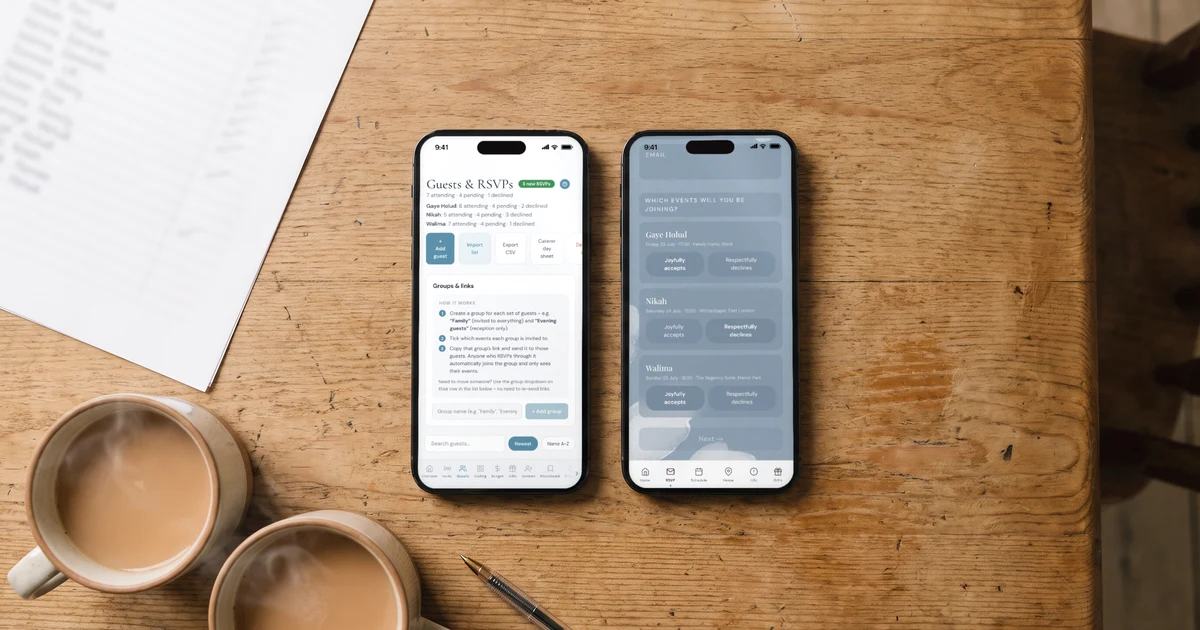
To manage a big British-Bangladeshi guest list, keep one list with each household's phone number in international format, invite each household with a WhatsApp link that collects the RSVP, and count each event separately. The Private Wedding App (£17.99/month or £159 once for lifetime access, $19.99/month or $189 in the US) does exactly this: paste the list from Excel, tap the WhatsApp button next to each guest to send your message and their group's link from your own number, and every answer lands in the list with party size, meals and a separate count for the holud, nikah, walima and reception. 3-day free trial.
British-Bangladeshi guest lists are big, and they are built by committee. Your mum has a list, your dad's side has a list, the masjid committee and the family friends from Bangladesh need an answer, and then there is everyone your cousins say will be offended if left out. The invitations go out on WhatsApp, the answers come back on WhatsApp, and somewhere around the fourth family group chat nobody knows the real number. This guide shows how to run it from one list instead: one place for every household, one tap to invite each one, and a separate count for every event.
How do I build one guest list from everyone's lists?
Collect every list into one spreadsheet first, one row per household, with the main name and a phone number. Write numbers in international format: +44 for the UK, +880 for Bangladesh, +1 for the US. That single habit is what makes one-tap WhatsApp sending work later.
Then decide households, not individuals: who is the main guest, and how many seats the household gets. "Shopna Begum, 2 adults and 3 children" is clearer for everyone than a dawat "with family" that becomes nine people at the door.
In the app: copy the columns from Excel or Google Sheets and paste them into "Import list" on the guest list; names, emails and phone numbers are detected. Then use "Seats" on each household to set adults, children and infants.
- One row per household, main guest first
- Phone numbers with +44, +880 or +1
- Seats per household: adults, children, infants
- Which events each household is invited to
- Who sends to whom: bride's side or groom's side
How do I invite different guests to different events?
Sort households into groups: close family (every event), cousins and friends (holud and reception), community and colleagues (walima only). Each group gets its own invitation link that shows only its events, its schedule and its venues.
In the app: create the groups in "Groups & links" on the guest list and tick the events each one sees; this is the per-event RSVP.
How do I send hundreds of WhatsApp invitations without losing track?
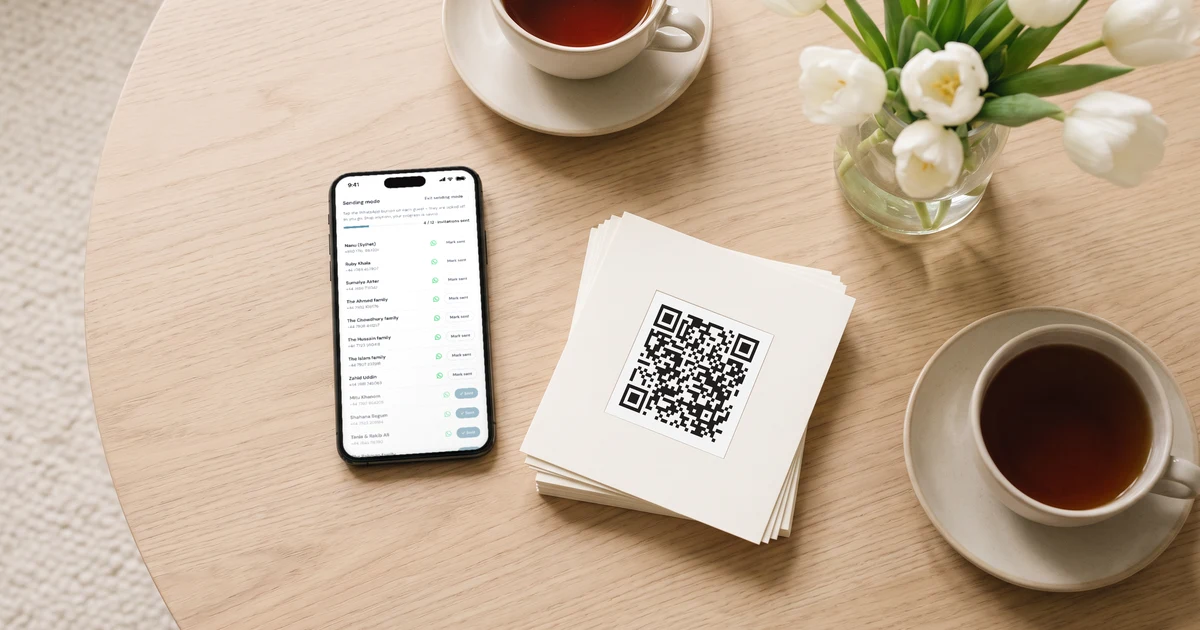
WhatsApp does not let any app bulk-send from a personal number, so the trick is to make one-by-one fast. Write your message once ("Assalamu alaikum, it's Nusrat and Tanvir, here is our wedding invitation, please let us know who is coming"), then go down the list. For contacts already saved on your phone, a WhatsApp broadcast list per group works too, with that group's link pasted in.
Split the sending between the two families: each side sends to its own guests, from its own phone, in its own words. Elders answer an aunty they know much faster than an unknown number.
In the app: "Start sending" opens a focused list with a progress bar; tapping a guest's WhatsApp button opens their chat with your message and their group's link, and ticks them off. Progress is saved, so 50 tonight and the rest tomorrow. "Share your wedding" gives your mum or brother their own login to help.

How do I count each event and seat the walima?
Under the overall totals, the guest list shows one line per event: attending, declined, awaiting reply. Click an event to switch the whole page to it. The holud caterer gets one number, the walima hall another.
Seating is per event too. If your walima has separate men's and women's areas, name the tables freely ("Ladies 1", "Gents 1"), drag households onto them and keep families together; guests with a severe allergy are flagged at their table.
In the app: the seating chart uses only the guests who said yes to that event, and prints to PDF for the hall.
How do I give the caterer and the budget the real number?
A week or so before, the caterer wants the final count: how many plates, which dishes, which allergies at which table. Infants do not need a plate, children may need a kids' dish.
In the app: the caterer day sheet prints the counts, plates per meal and the allergy roster with tables, and the budget's catering calculator multiplies your price per plate by the RSVPs, in pounds. Start on the free trial, then £17.99 a month or £159 once. 3-day free trial.
Everything you need, in one place
Planning your own wedding without a planner is entirely achievable.
See it for yourself.
Explore the whole platform: cinematic invitation, RSVP with meals and allergies, guest list, seating chart, budget, vendors, checklist, moodboard, photo sharing and the AI planner. No account needed.
Try the full planner →How do I manage a large Bangladeshi wedding guest list?
Keep one list with one row per household, phone numbers in international format, seats per household and the events each one is invited to. The Private Wedding App (£17.99/month or £159 once for lifetime access, $19.99/month or $189 in the US) holds that list, sends each household its WhatsApp link in one tap, and counts every event separately as answers arrive.
Can I send wedding invitations to everyone on WhatsApp at once?
WhatsApp does not allow any app to bulk-send from a personal number. Use a WhatsApp broadcast list per guest group for saved contacts, and the app's sending mode for the rest, which shows who has already been sent their invitation.
How do I invite a whole family without knowing every name?
Give the main guest seats, for example 2 adults and 3 children. They type the names on the RSVP, and the numbers stay the ones you set.
Can family members help manage the list?
Yes. With "Share your wedding" you invite your mum, sister or brother by email, choose what each one can view or edit, and they get their own login at no extra cost.
What about guests in Bangladesh?
Save their numbers with +880 and the WhatsApp button opens their chat directly, the same as for UK numbers. The invitation link works on any phone.
How much does it cost?
£17.99 a month or £159 once for lifetime access, with unlimited guests. In the US, $19.99 a month or $189 once. 3-day free trial.