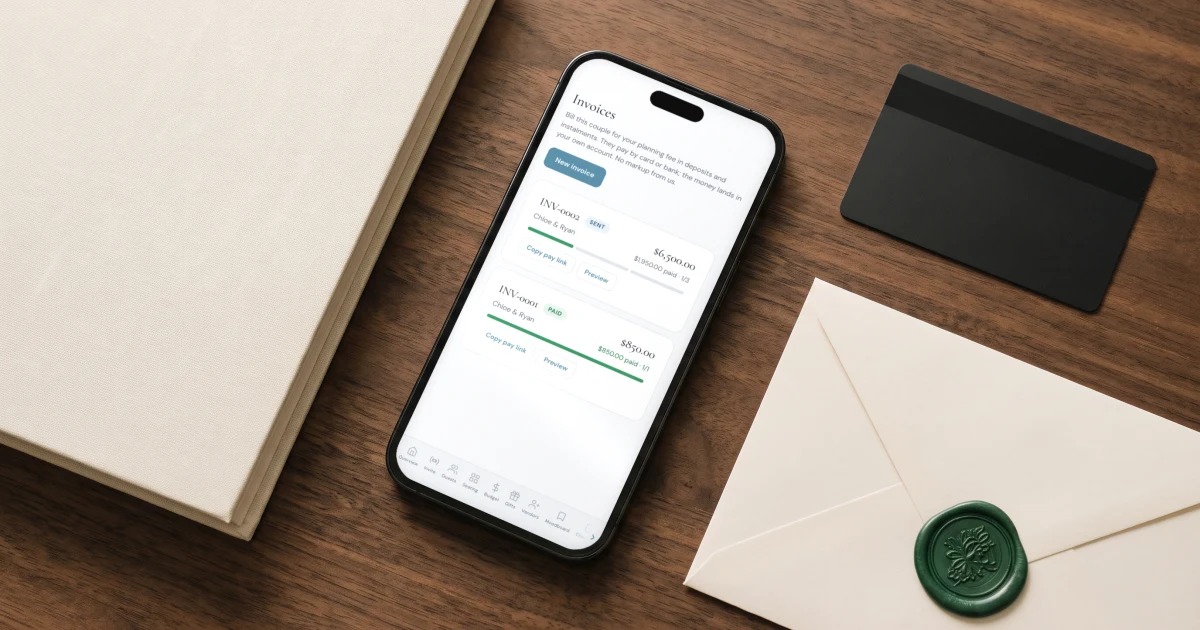
The simplest way to take a deposit from a wedding client is to send an invoice with the deposit as its first instalment. In The Private Wedding App you create the couple's invoice on the wedding you are already managing, split it into a deposit, staged instalments and a final balance dated from the wedding day, and the couple pays each one by card or bank straight into your own account. You keep the full fee, because the platform adds no markup, and every payment tracks against that couple's guest list and budget instead of a separate billing app. The Private Wedding App costs $19.99/month or $189 once for lifetime access, no subscription.
Most wedding planners hit the same friction in the first week of a booking: the couple is ready to commit, and you need money to hold the date, but the deposit, the instalments and the final balance live in a different tool from everything else about the wedding. So you juggle an invoicing app, a spreadsheet of who paid what, and a separate reminder to chase the balance a fortnight before the day. This guide walks through how to take a deposit properly, how to build a payment plan that dates itself from the wedding, and how to collect it so the fee lands in your own account and the payments track against the same wedding that holds the guest list, seating and budget.
Decide the deposit and when the balance is due
Before any tool, settle the shape of the money. A deposit exists to hold the date and cover the work you do up front, so it is usually taken as a non-refundable retainer and stated plainly in your contract. Most planners take somewhere between a quarter and a half of the fee to book, then stage the rest across the engagement, with the final balance falling due a week or two before the wedding so no money is outstanding on the day itself.
Whatever structure you choose, write it into your agreement before you invoice, so the deposit, the instalment dates and the refund position are agreed rather than assumed. The schedule below is a common starting point you can adjust to the fee and the length of the engagement.
Build the payment plan from the wedding date
A payment plan is just an invoice split into instalments with dates attached. The tedious part is doing the date arithmetic by hand for every client. In The Private Wedding App, when you create the couple's invoice it scaffolds a deposit, a second instalment and a final balance already dated from the wedding day, so ninety days out and fourteen days out land on the right calendar dates for that specific wedding. You adjust the amounts, or split the total across the instalments in one tap, and rename or add stages to fit the booking.
Because the invoice is created on the wedding you already manage, the couple's name is filled in for you and the plan sits beside their guest list, seating and budget rather than in a separate billing tool you have to reconcile later.
- Set the deposit as the first instalment, due on booking
- Stage the middle payments against the wedding date, not fixed calendar dates
- Put the final balance a week or two before the wedding, never on the day
- Match the plan to the fee and payment terms already in your signed contract
Send the invoice and let the couple pay by card or bank
Send the couple a private link to their invoice and they pay each instalment when it falls due, by card or by bank transfer, from their phone. The money lands directly in your own bank account on a rolling schedule you control, because you are the merchant of record, not the platform. The Private Wedding App takes no cut of the payment, so you keep the full fee.
Card and bank cost differently, and the invoice shows you exactly what you will net on each before you send it, so you can price accordingly. Bank transfer carries a much smaller fee than card on a wedding-sized instalment, so nudging couples toward bank for the larger payments protects your margin. If you would rather absorb nothing at all, you can pass the card fee to the couple so you receive the full amount.

Track what is paid without chasing
The reason planners dread payment plans is the chasing. Here each instalment shows paid or due at a glance on the invoice, and the invoice sits on the wedding in your portfolio, so an overdue deposit is visible where you already work rather than buried in a billing app you open once a month. You always know which couples are current and which owe you money, without opening a second system or a spreadsheet.
Keep the money on the same wedding as everything else
This is the difference that matters over a season. Business tools that handle invoicing hold none of the wedding: no guest list, no RSVPs, no meals, no seating, no day-of timeline. So the couple's payments live in one place and the wedding lives in another, and you are the integration between them. Running the invoice on the same wedding that already holds the guest list and budget means one couple, one place, from the deposit to the final headcount.
See what each client wedding includes on the wedding planners page, or view the planner pricing, one plan per wedding, billed through to the couple.
Everything you need, in one place
Planning your own wedding without a planner is entirely achievable.
See it for yourself.
Everything a planner runs client weddings on: a portfolio of your season, the caterer day sheet, the run of show with per-vendor links, studio templates, couple access, client invoicing with deposits and contracts your couple signs online - plus each wedding's invitation, RSVP, guest list, seating, budget, vendors and AI planner.
See the planner tools →How do I take a deposit from a wedding client?
Send the couple an invoice with the deposit as its first instalment. In The Private Wedding App you create the invoice on the wedding you are already managing, set the deposit amount, and the couple pays it by card or bank from a private link. The money lands straight in your own account and the date is held. Because a deposit is usually a non-refundable retainer, state the amount and the refund position in your contract before you invoice.
How do I set up a payment plan for a wedding client?
Split the invoice total into instalments: a deposit on booking, one or more staged payments, and the final balance before the wedding. In The Private Wedding App the instalment dates scaffold automatically from the wedding date, and you can split the total across the stages in one tap. Each instalment is paid separately by card or bank into your own account, and paid versus due shows on the invoice.
When should a wedding planner's final payment be due?
Most planners set the final balance a week or two before the wedding, so nothing is outstanding on the day itself. Building the schedule from the wedding date, rather than fixed calendar dates, keeps that final payment correctly placed for every client without recalculating it by hand.
Is a wedding planner deposit refundable?
Deposits are commonly taken as non-refundable retainers, because they hold the date and cover the work done up front, but the refund position is whatever your contract says. Set it out clearly in your agreement before you take the deposit. This is general information, not legal advice, so use your own contract terms or your lawyer's.
How do wedding planners collect payments from couples?
The cleanest way is an invoice the couple pays online by card or bank. With The Private Wedding App the payment runs as a direct charge into the planner's own bank account, so the planner is the merchant of record and keeps the full fee with no markup from the platform. The invoice sits on the wedding, so payments track against the same client whose guest list and budget you already manage.
Can I take card payments from wedding clients?
Yes. Couples can pay each instalment by card or by bank transfer. Card carries the standard processing fee and bank transfer is much cheaper on a large instalment, and the invoice shows exactly what you will net on each before you send it. You can also pass the card fee to the couple so you receive the full amount.