
The Private Wedding App, an all-in-one wedding planning platform, includes a seating chart built from the RSVP guest list: only the guests who said yes appear on it, event by event, with each person's meal and allergies on their seat, for $189 once for lifetime access or $19.99 a month. You track RSVPs, dietary restrictions and seating in one tool because the invitation, the guest list and the seating plan all read the same list, and you can open any table to put a name on every numbered seat. The same price covers the budget tracker, the checklist and the AI assistant. 3-day free trial.
$19.99 a month
3 days free, then $19.99/month. No commitment, stop whenever you want.
Try it free for 3 days →Most couples end up with three lists: the replies in the invitation tool, the meals and allergies in a spreadsheet, and the names retyped into a seating chart maker. Every late cancellation then has to be fixed three times. Here is what changes when the invitation, the RSVPs and the seating chart are one tool, and what to check before you choose.
How a reply becomes a guest on your seating chart
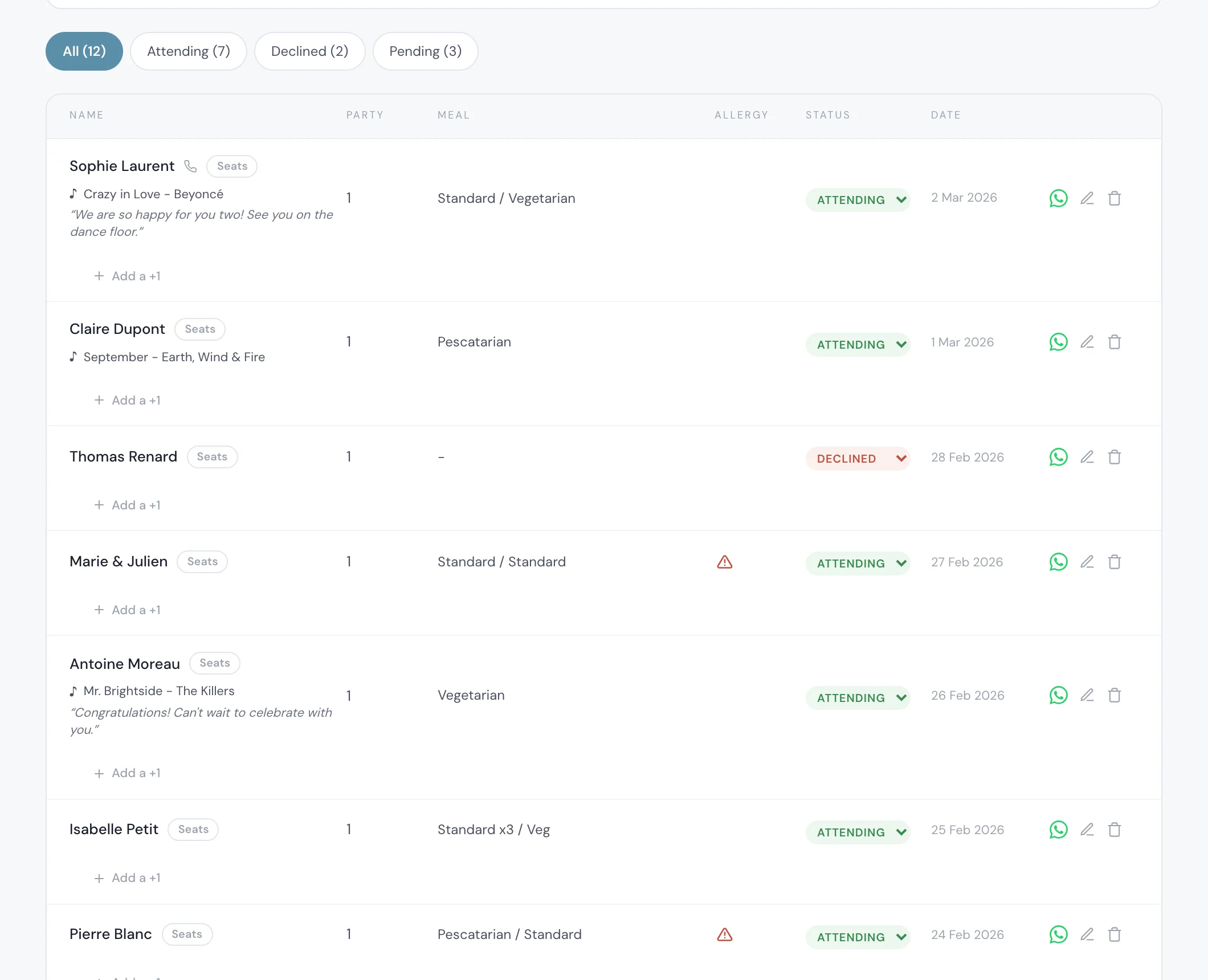
Your guest opens the invitation link on their phone, with no app to download, and answers the RSVP: coming or not coming, a meal for each person in the household, and the allergy question, with a separate flag for a severe allergy.
That reply lands in your guest list with its status, meal and allergies. Nothing is exported or copied: the seating plan reads that same list, so a guest who says yes is already waiting to be seated, with their meal next to their name.
See the guest list tracker.
Only the guests who said yes, and what happens when someone cancels
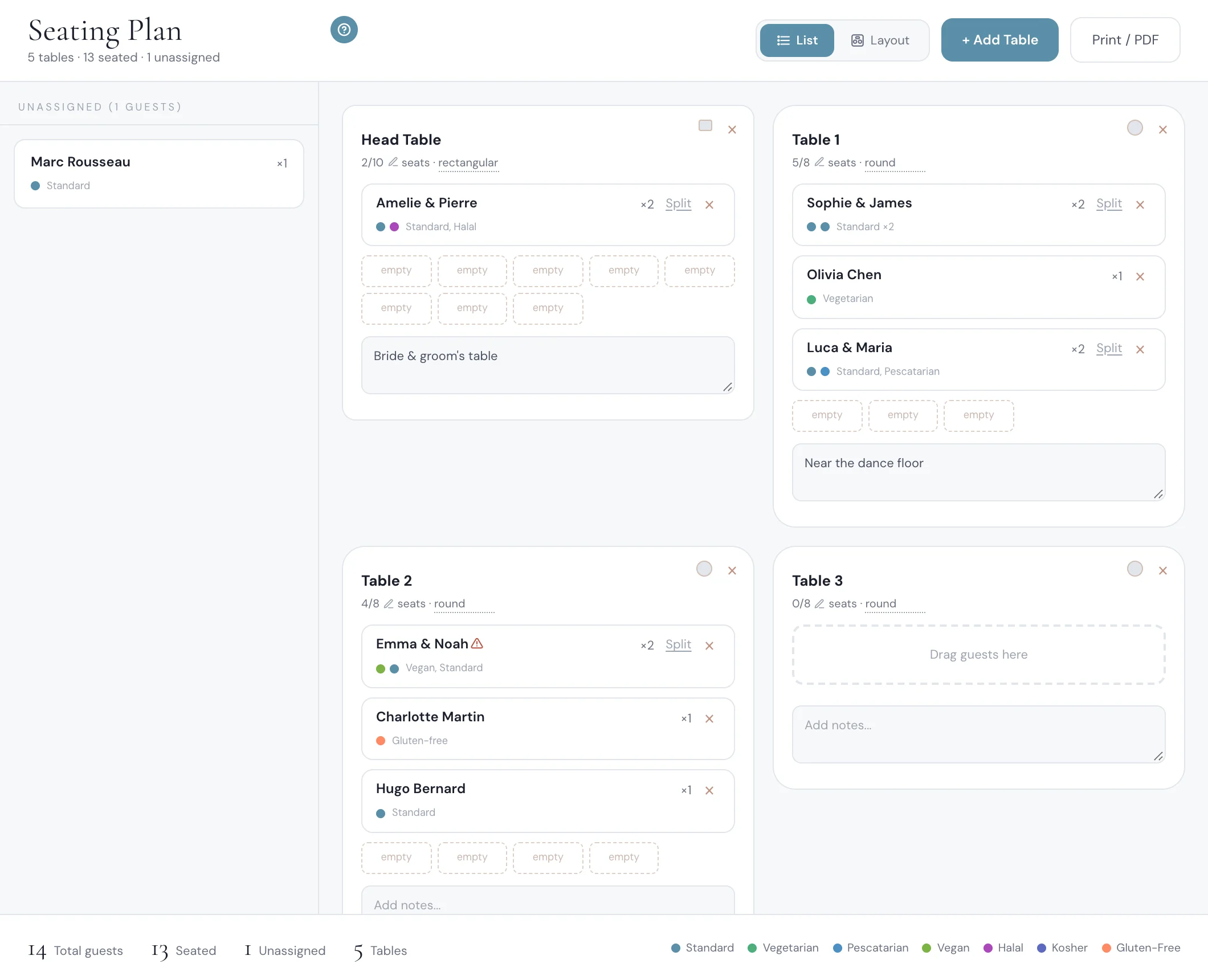
The seating plan shows only guests whose reply is 'attending'. Guests who declined or have not answered are not on it, so you never seat someone who is not coming. A household that replied together arrives as one card, and you can split it if the cousins sit at another table.
If a seated guest changes their answer to 'not coming', they are no longer on the plan the next time you open it: their seat is free and the table count goes down. You do not delete them from a second list.
You drag each card onto a table, or tap a guest and then a table on a phone. Tables are round, square or long, each with its own number of seats.
See the wedding seating chart.
RSVPs, dietary restrictions and seating in one tool
Because the meal and the allergy answer travel with the guest, they are on the seating plan without any retyping. Each seat takes the colour of that guest's diet (vegetarian, vegan, pescatarian, halal, kosher, gluten-free), with a legend under the plan.
A guest flagged with a severe allergy carries a red warning mark on their card and on their seat, so you see at a glance which table the kitchen must watch.
See the meal and allergy tracker.

A name on every numbered seat
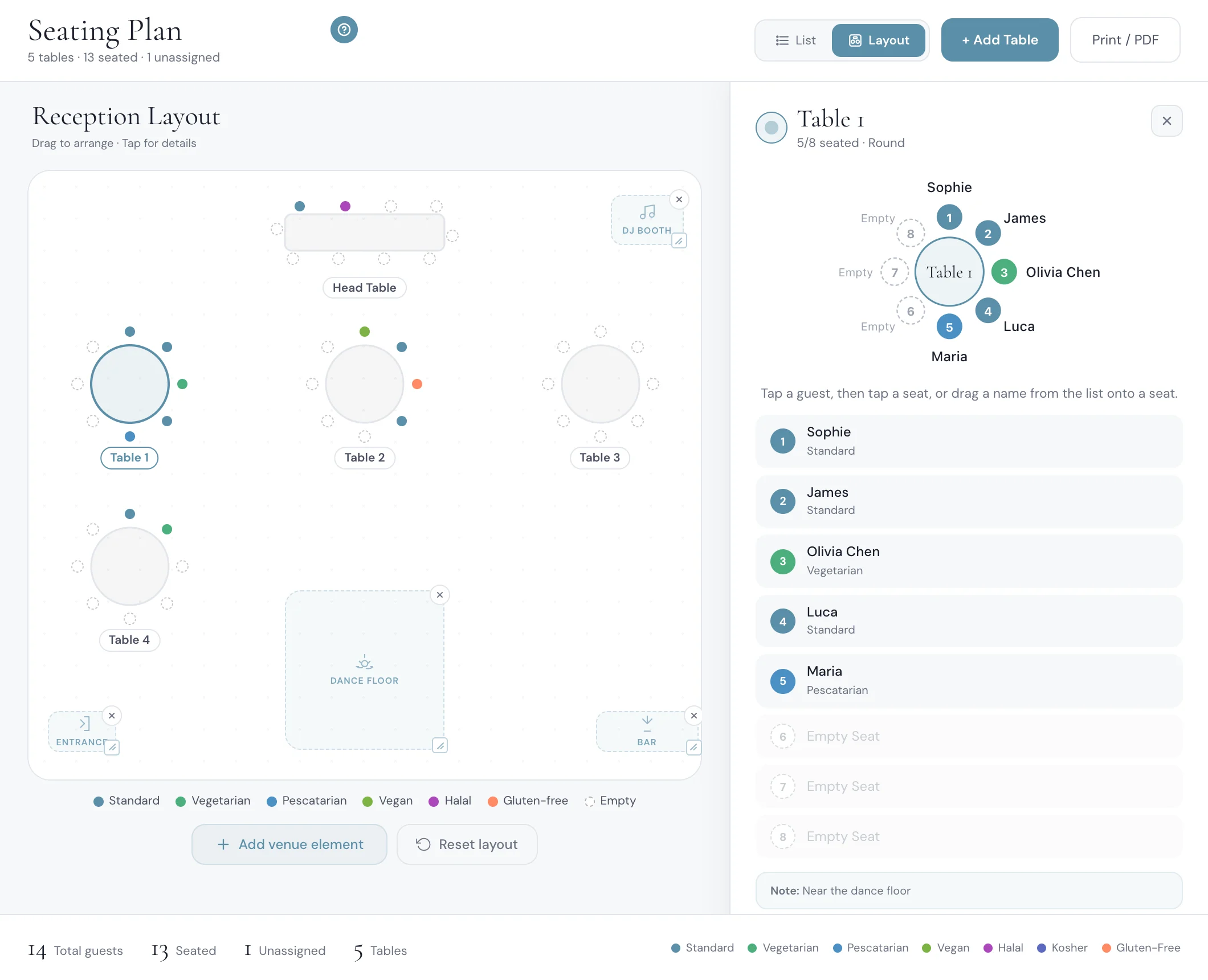
Placing guests at tables is half of the job. Open a table and it is drawn large, with every guest's name beside a numbered seat. Seat 1 is at the top of the table and the numbers run clockwise.
To choose who sits where, tap a guest and then tap a seat. On a computer you can also drag a name onto a seat. If the seat is taken, the two guests swap. That is how you put a grandmother next to the aisle, or keep two friends who have not spoken for years on opposite sides.
When you are done, 'Print / PDF' gives you a printable plan for the venue.
See named seats in the seating chart.
Several events: one seating plan each
With a rehearsal dinner, a reception and a brunch, guests answer each event separately. Each event then has its own seating plan, with its own tables, and only the guests who said yes to that event.
See how multi-event RSVP keeps a count for each event.
What the caterer gets, and what your guests see
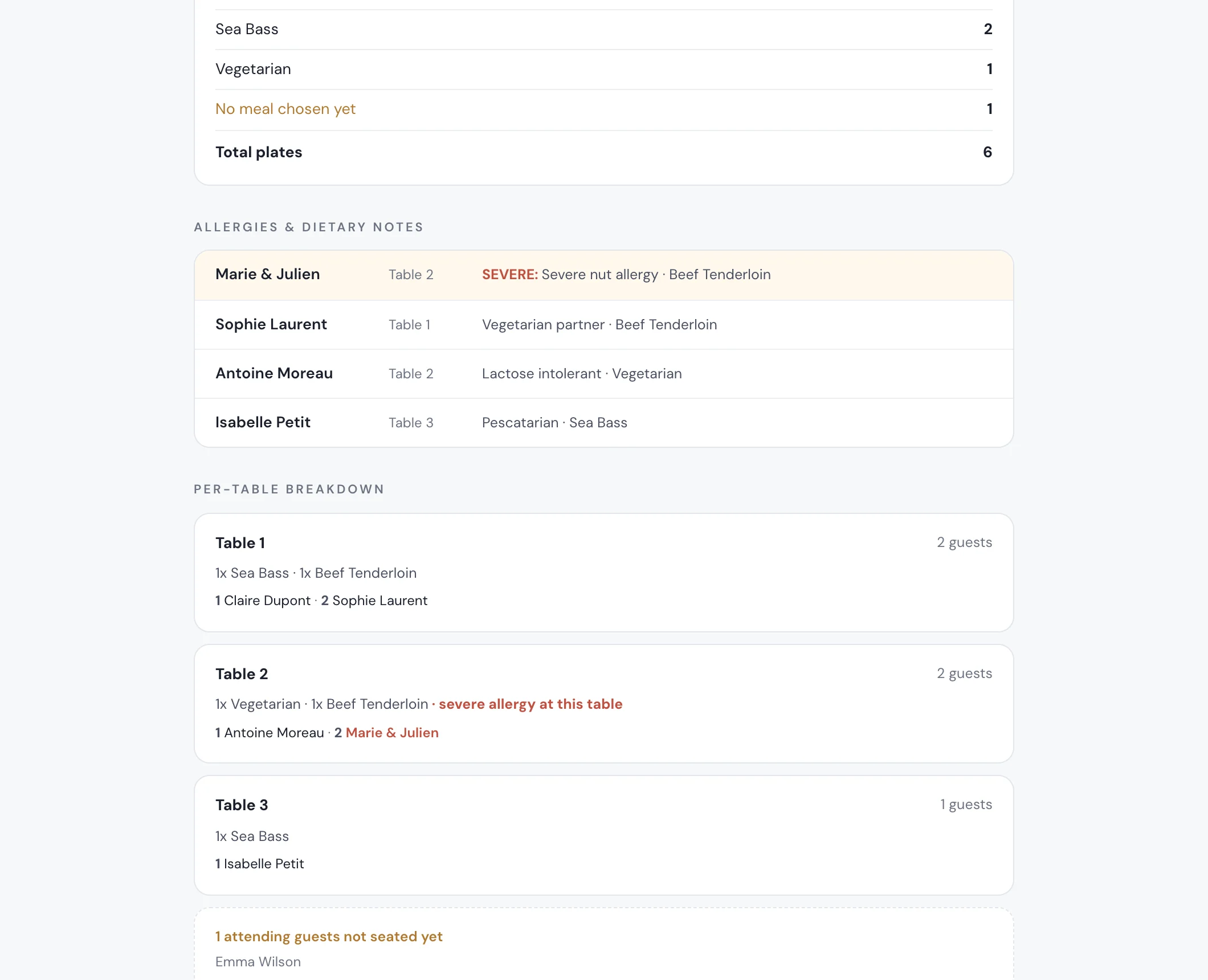
The caterer day sheet is built from the same list: the number of plates per meal, the allergy and dietary roster with each guest's table, and every table with its guests in seat order. You open it from the guest list and print it or save it as a PDF.
For your guests, you can switch on 'Let guests look up their table' when the plan is ready: a 'Find your table' card on the RSVP page of the invitation shows each guest their own table when they type their name. Showing the seat number as well is a second switch. Both are off until you turn them on.
What a standalone seating chart maker leaves you to do
Seating-only tools draw good plans, and they all begin the same way: you bring the guest list to them. SeatPlan.io is free and needs no sign-up, and its chart starts from a list you type or import, so it does not change when a guest cancels. Magic Table Planner imports your Excel file, which means a new import each time the replies move. TopTablePlanner starts at about $20 and also works from a list you bring. Smarter Seating is free and keeps the plan in your browser, with no RSVP feed, so the counts are retyped by hand.
None of that is hard on day one. It is the last three weeks that cost you, when ten replies change and the chart, the meal count and the allergy list each need the same correction.
For a tool-by-tool view, read the seating chart makers compared.
The rest of the wedding, in the same place
The seating chart is one part of the planner. The guest list holds every reply, phone number and group. The budget tracker holds each vendor, deposit and due date, and shows your catering cost per confirmed guest. The checklist keeps the tasks in order, and the AI assistant answers questions about your own wedding and can seat a guest at a table for you once you confirm.
See the budget tracker, the wedding checklist and the AI wedding planner.
Planning in Spanish? The same answer is written in Spanish: qué app de invitaciones arma el acomodo de mesas desde las confirmaciones.
Start the 3-day free trial on the pricing page: add a few real names, send yourself the invitation, reply as a guest with a meal and an allergy, then open the seating plan and find yourself there.
Everything you need, in one place
Planning your own wedding without a planner is entirely achievable.
See it for yourself.
Explore the whole platform: cinematic invitation, RSVP with meals and allergies, guest list, seating chart, budget, vendors, checklist, moodboard, guest photo and video sharing and the AI planner. No account needed.
Try the full planner →Which invitation platforms include a seating chart built from the RSVP guest list?
The Private Wedding App does: the invitation, the RSVP guest list and the seating chart are one tool, so only the guests who said yes appear on the plan, per event, with their meal and allergies. Seating-only tools start from a list you import, so the chart does not follow a cancellation.
How do I track RSVPs, dietary restrictions and seating all in one tool for my wedding?
Use a platform where the RSVP form asks for the meal and the allergies and the seating plan reads the same guest list. In The Private Wedding App each reply lands in the guest list with its meal and allergy answer, and each seat on the plan takes the colour of that guest's diet, with a mark for severe allergies.
Is there an app that combines guest list, seating chart and budget all in one place for wedding planning?
Yes. The Private Wedding App holds the guest list with RSVPs, the seating chart, the budget tracker with your catering cost per confirmed guest, the checklist and an AI assistant, with the invitation your guests reply to.
What happens to the seating chart when a guest cancels?
The plan only shows guests whose reply is 'attending'. A seated guest who changes to 'not coming' is no longer on the plan the next time you open it, and their seat is free. The caterer day sheet follows the same rule.
Can I assign guests to specific seats, not just tables?
Yes. Open a table and each guest's name sits beside a numbered seat. Tap a guest, then tap a seat, or drag a name onto a seat on a computer. A seat that is already taken swaps the two guests.
Is it a drag and drop seating chart?
Yes. You drag guests onto tables and drag tables around the floor plan. On a phone you tap a guest and then a table. Tables can be round, square or long.
Does each wedding event get its own seating chart?
Yes. With RSVP per event switched on, each event has its own seating plan and tables, and only the guests who said yes to that event appear on it.
Can guests look up their own table?
Yes, if you switch it on. 'Find your table' shows a guest their table when they type their name on the invitation. Showing the seat number too is a separate switch, and both are off by default.
How much does it cost, and what is included?
$189 once for lifetime access, or $19.99 a month. Both include the invitation with RSVP, meals and allergies, the guest list, the seating chart with named seats, the caterer day sheet, the budget tracker, the checklist and the AI assistant. 3-day free trial.