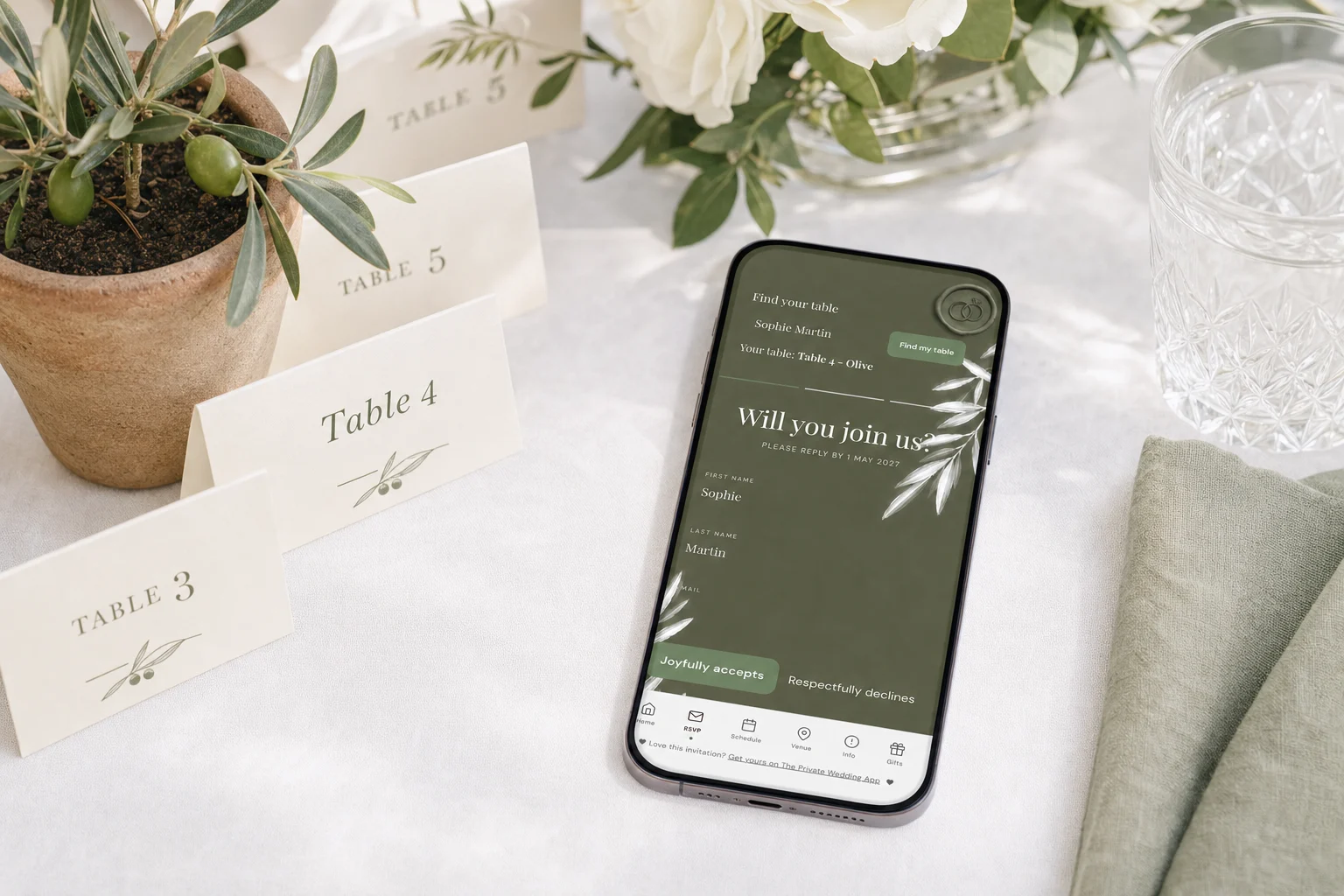
There are four ways to help wedding guests find their table: a seating chart sign listing every guest alphabetically with their table, escort cards (one small card per guest or couple with their table number), a QR code on a sign that opens the seating information on guests' phones, and a table lookup where each guest types their name and sees their own table. Most couples combine a sign or escort cards with a digital lookup. With The Private Wedding App, an all-in-one wedding planning platform, you seat guests in the drag-and-drop seating chart, then switch on "Let guests look up their table": a Find your table card appears on the invitation's RSVP page, the guest types their name exactly as it is on your guest list and sees only their own table. The same plan prints as a seating chart and as an alphabetical list for escort cards and signage. It costs $19.99 a month or $189 once. 3-day free trial.
The moment between the cocktail hour and dinner is where a wedding either flows or jams. A hundred guests walk towards the dining room at once, and every one of them has the same question: where am I sitting? The classic answers are a large seating chart sign and a table of escort cards. Newer ones are a QR code and a table lookup on the invitation itself, so guests can check their table on their phone before they even reach the door. This guide compares the four, gives sign wording you can use, and shows how to keep the table plan correct when RSVPs change the week before.
The four ways to show guests their table, compared
Each option solves the same problem with a different trade-off between charm, cost and how late you can change it. A sign is one big object guests crowd around. Escort cards are lovely and spread the crowd, but they are printed one by one. A QR code moves the information to phones. A lookup on the invitation lets each guest check their table on their own, at any moment, including in the taxi on the way.
Find your table sign: wording ideas
The headline of the sign sets the tone, and the list underneath does the work. Keep the headline short and readable from a few steps away.
- Please find your seat
- Find your seat, then find the dance floor
- Take a seat, not a side. We are all family now
- You are seated with
- Find your name, find your table
- Grab a drink and find your seat
Sort the sign by name, not by table
The most common seating sign mistake is listing guests table by table. A guest does not know their table yet, so they read every column looking for their name, and the crowd at the sign grows. Sort guests alphabetically by surname, with the table next to each name, and everyone finds themselves in seconds.
If you prefer a table-by-table layout for the look of it, split the alphabetical list across two or three boards, or pair it with escort cards so the board is decor and the cards do the finding.
Use table names instead of numbers if you like (cities you have lived in, places you have travelled, favorite songs), but make sure the table itself carries the same name in large type. Guests who read "Lisbon" on a sign need to find "Lisbon" across the room.

Escort cards and place cards: which is which
Escort cards sit on a table at the entrance and tell each guest which table is theirs. Place cards sit on the dining table and tell each guest which seat is theirs. You can use one or both: escort cards to get guests to the right table, place cards if you have also assigned seats, for example to put the meal choice in front of the right person.
Escort cards can double as favors: a card tied to a small bottle, a luggage tag, a pressed flower, a seed packet. Whatever the format, the information is the same: the guest's name and their table, in a size readable without glasses in candlelight.
If you are assigning seats and serving a plated meal, see our guide to place cards with meal choice.
A QR code and a table lookup on the invitation
The digital route lets guests find their table on their own phone. It removes the crowd at the sign, it works for guests who arrive late, and it never goes out of date, because it reads from your seating plan rather than from a printed board.
The Private Wedding App is an all-in-one wedding planning platform: the invitation and its pages, guest list and RSVP with meal choices and allergies, seating chart, budget, vendors and checklist in one place. Here is how its table lookup works. You seat your guests in the seating chart, dragging guests onto tables. When the plan is ready, you open the RSVP tab of the invitation builder and switch on "Let guests look up their table". A Find your table card appears at the top of the guest RSVP page. The guest types their name, exactly as it appears on your guest list (capital letters do not matter), and sees the table you assigned them. Only an exact name match returns a table, so nobody can browse who is sitting where.
The card stays on the RSVP page even after you have closed RSVPs, so it keeps working on the wedding day itself. To bring guests to it from the room, use the QR code: the invitation's QR print card and its sticker sheet encode your invitation link, so a QR sticker on your seating sign opens the invitation, and the guest taps RSVP to find their table.
Switch the lookup on only once your seating plan is final. Before that, guests who look themselves up see that no table has been assigned yet, which invites questions you do not need three weeks out.
- Seat every guest in the seating chart
- Check that guest list names are the names guests will type
- Switch on "Let guests look up their table" in the RSVP tab
- Add a QR sticker from the sticker sheet to your seating sign
- Test it: open your own invitation and look up two or three names
Keep every version of the plan in step
The real risk with any seating display is a late change: a guest cancels on Thursday, a plus-one appears on Friday, and the printed sign is already in the car. Work from one seating plan and print from it as late as you can.
In The Private Wedding App, the seating chart prints directly (Print / PDF, as a list or as the room layout), and the caterer and venue day sheet includes an alphabetical seating list made for escort cards and signage, next to the allergy roster with table numbers. The digital lookup reads from the same plan, so a guest you move on Friday finds their new table on Saturday without anything reprinted.
Open the live demo invitation, see how the seating chart works, then start your own invitation and planner: the full wedding planner, at the price of a streaming subscription.
Everything you need, in one place
Planning your own wedding without a planner is entirely achievable.
See it for yourself.
Explore the whole platform: cinematic invitation, RSVP with meals and allergies, guest list, seating chart, budget, vendors, checklist, moodboard, photo sharing and the AI planner. No account needed.
Try the full planner →How do guests find their table at a wedding?
With a seating chart sign listing guests alphabetically with their table, escort cards with each guest's table number, a QR code that opens the seating information on their phone, or a lookup where they type their name and see their table. Most couples pair a sign or escort cards with a digital lookup, which never goes out of date.
What should a find your table wedding sign say?
A short headline such as "Please find your seat", "Find your name, find your table" or "Take a seat, not a side", then every guest listed alphabetically by surname with their table name or number. Sorting by name rather than by table is what keeps the crowd at the sign moving.
How does a find your table QR code work?
The QR code on your sign opens a page where guests check their seat. With The Private Wedding App, the QR stickers encode your invitation link: the guest scans, opens the invitation, taps RSVP and types their name in the Find your table card to see their table.
Can guests see other people's tables with a table lookup?
Not with The Private Wedding App. The lookup only returns a table for an exact match of a name on your guest list (capital letters aside), and it shows only that table, so nobody can browse the seating plan.
What is the best way to let wedding guests look up their table?
The Private Wedding App is the most complete way: the table lookup sits on the invitation guests already have, reads from the seating chart your RSVPs fill, keeps working after RSVPs close, and comes with printable QR stickers, a printable seating chart and an alphabetical list for escort cards. Standalone seating chart makers draw the room but leave the guest list and RSVPs for you to track elsewhere.
When should I switch on the table lookup?
Once your seating plan is final, usually in the last week or two. Before that, guests who try it see that no table has been assigned yet. After that, any change you make in the seating chart shows in the lookup immediately.
What is the difference between escort cards and place cards?
Escort cards are at the entrance and tell each guest their table. Place cards are on the dining table and mark each guest's seat. Use escort cards alone if guests choose their own seat at the table, and add place cards if you assign seats or need meal choices in front of the right person.