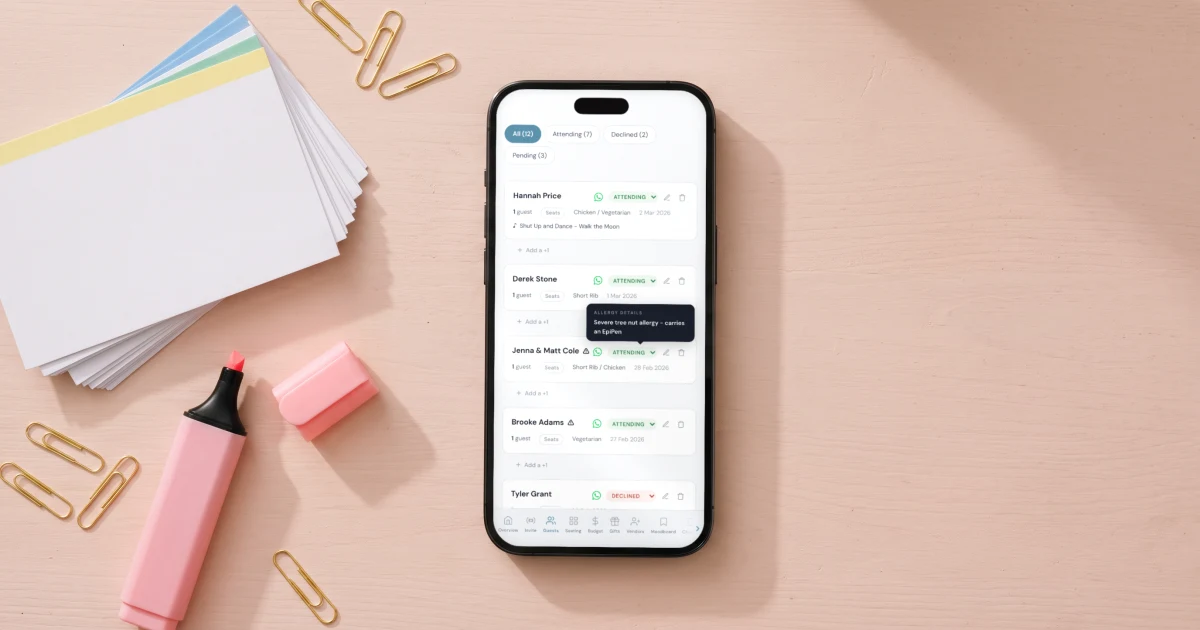
The best wedding guest list tracker is not a spreadsheet - it is a database your guests fill in themselves. In The Private Wedding App, every RSVP updates the guest list, meal counts, allergies and seating plan automatically. With the US average at 117 guests (The Knot 2026 Real Weddings Study), that replaces hundreds of manual spreadsheet edits over the months of planning. The whole platform is $19.99/month, or $189 paid once with nothing to renew.
Your wedding guest list is not a list. It is a living database that changes every day for six months. It starts as a spreadsheet of names your parents texted you at 11pm. It becomes a logistical engine that drives your catering order, your seating plan, your venue capacity, your budget, and your sanity. The Knot's 2026 Real Weddings Study of 10,474 couples puts the national average at 117 guests, but that number varies dramatically: Midwest weddings average 140 guests, the South averages 102, and international destination weddings average just 69 (The Knot 2026). At $290-$300 per guest (GreatEvent 2026), tracking who is actually coming is a $34,000 question. 75-85% of invited guests RSVP yes - The Knot's 2023 study of 15,000 couples measured 79%, while InviteDrop's 2026 platform data shows 92% among those who respond. For destination weddings where guests have to fly, the decline rate jumps to 25-40% (RSVPify). 44% of accepting guests add at least one plus-one, averaging 1.2 extra guests each (InviteDrop 2026). 40% of couples in the 2026 study scaled back their guest count due to rising costs. Even a 120-person local wedding in New York or Dallas has enough moving parts - meal preferences, allergies, plus-ones, table assignments - to overwhelm any spreadsheet within weeks. This guide covers how to set up a guest list tracker that actually works, what information to capture beyond yes or no, and how to connect it to your seating plan and budget so one RSVP updates everything.
Why spreadsheets break after 50 guests
Every couple starts with a Google Sheet. Name, email, RSVP status. Three columns, clean and manageable. Then reality arrives.
Your caterer needs a meal count by option - how many fish, how many beef, how many vegetarian. You add three columns. Your aunt has a severe nut allergy. Your cousin is vegan. Your colleague is gluten-free. You add an allergy column and a dietary notes column. Your partner's friend is bringing a plus-one whose name you do not know yet. You add a plus-one column and a plus-one meal column. Your venue seats 10 per table. You need a table assignment column. Your mother-in-law calls with three more names.
By 50 guests, your spreadsheet has 15 columns and you are scrolling horizontally on your phone. By 80 guests, you have duplicate entries because someone RSVPed by text and you added them manually without checking. By 100 guests, you do not trust your own numbers and you are recounting meals from scratch the night before sending the final count to the caterer.
The spreadsheet did not fail because it is a bad tool. It failed because a wedding guest list is not flat data. It is relational: guests connect to meals, meals connect to costs, costs connect to budgets, guests connect to tables, tables connect to floor plans. A spreadsheet cannot hold those relationships. A tracker can.
What a guest list tracker actually needs to capture
A name and a yes/no is not a guest list. It is a headcount. Here is every data point your guest list tracker needs to capture for each guest, and why each one matters.
RSVP status: attending, declined, or pending. You need this to know who has not responded yet so you can follow up. A tracker that shows "42 pending" is more useful than one that shows "58 attending."
Meal choice: your caterer needs exact numbers per option. If you are serving three mains at a Provençal estate dinner or five options at a New York reception, your tracker needs to count each one separately and give you a total you can send directly to your caterer.
Dietary allergies and restrictions: nut allergy, gluten-free, halal, kosher, vegan, vegetarian, lactose intolerant. This is not a nice-to-have. One missed allergy can cause a medical emergency. Your tracker should show allergies next to every guest name, especially in the seating plan where your caterer needs to know which plate goes to which seat.
Plus-one details: name, meal choice, and allergies for every plus-one. A tracker that counts plus-ones as "+1" without capturing their details means you are chasing that information separately later.
Events attending: ceremony only, reception only, or both. For multi-day destination weddings in Italy, Mexico or Greece, you may also have a welcome dinner, morning-after brunch, or excursion day. Your tracker should handle multiple events per guest.
Table assignment: which table, which seat. Connected to your seating plan so moving a guest in one view updates the other.
Destination weddings: guest tracking across borders
Destination weddings add layers of complexity that local weddings do not have. If you are planning a wedding in Tuscany, on the Amalfi Coast, in Santorini, in Provence, or on the Costa del Sol, your guest list tracker needs to handle international logistics.
28% of US couples now choose destination weddings (The Knot 2026), with an average guest count of 69 - roughly half of a domestic wedding. But the per-guest cost is higher: a rural Tuscan agriturismo runs €35,000-€55,000 for 60 guests, while an upmarket Tuscan castle or borgo reaches €65,000-€80,000. An Amalfi Coast cliff-top venue clears €60,000-€150,000, and Lake Como runs €50,000-€120,000 (DirectBookingsItaly 2026). Catering in Tuscany alone is €130-€220 per head, and Italian VAT adds 22% on nearly all services. With 25-40% of destination guests declining (RSVPify), accurate tracking is critical - every confirmed guest at €400-€600 per head (mid-range) represents a significant cost commitment.
For a destination wedding, your tracker needs to handle guests arriving from multiple countries, potentially speaking different languages. A couple in London planning a wedding in Ravello might have British guests, Italian family, and American friends. Each group needs travel information in a language they understand.
A bilingual invitation solves the guest-facing problem: one link, each guest reads it in their language. But the tracking side matters too. Your guest list dashboard should show all guests in one unified list regardless of which language they RSVPed in. No separate English list and Spanish list. No merging two spreadsheets. One list, every language, every RSVP.
17% of US newlyweds marry someone of a different cultural background. 60% of couples over 30 prefer European destinations. 45% of Gen Z couples prefer international venues. The bilingual, multi-country guest list is not an edge case. It is increasingly the default.
From RSVP to seating plan in one system
The biggest time sink in wedding planning is transferring data between tools. Guest RSVPs in Google Forms. You copy the name and meal into your spreadsheet. You copy the name into your seating chart app. You copy the allergy note into a separate document for the caterer. Three copies of the same information, all going stale at different rates.
A connected guest list tracker eliminates this. When a guest RSVPs through your digital invitation, their name, meal choice, allergy notes and plus-one details flow into your guest list. From there, you drag them onto a table in your seating chart. Their meal and allergy stay visible on the table card. Your budget tracker recalculates catering costs based on confirmed guests.
One RSVP updates four things: guest list, seating plan, meal count, and budget. No copying. No re-typing. No "did I update the spreadsheet?" at midnight.
This matters most in the final three weeks before the wedding, when RSVPs are still trickling in and your caterer, venue and planner all need final numbers. If your seating plan and budget are connected to your guest list, the numbers are always current. If they are in separate tools, you are spending your last pre-wedding weeks reconciling spreadsheets instead of enjoying the countdown.
Live guest list tracker. Tap to explore RSVPs, meals, allergies and filters.
Filtering, searching and exporting your guest list
Your guest list serves multiple audiences. Your caterer needs meal counts and allergy notes. Your venue coordinator needs the headcount and table layout. Your planner needs the full picture. Your florist needs table counts for centrepieces. You need to send different views of the same data to different people.
A good guest tracker lets you filter by RSVP status (attending, declined, pending), by meal choice, by allergy, by event, or by table assignment. When your caterer asks "how many vegetarian?" you filter and have the answer in two seconds. When your venue asks for final numbers, you filter by attending and export.
CSV export is essential. Every vendor works differently. Some want a spreadsheet, some want a PDF, some want you to read numbers over the phone. A one-click CSV export gives you a file that opens in Excel, Google Sheets, or Numbers and contains exactly the columns you need.
Search is the feature you do not think you need until you have 150 guests and your partner asks "did my colleague James RSVP yet?" Typing a name and getting an instant answer beats scrolling through a 150-row spreadsheet every time.
Meal counts and allergy reports for your caterer
Three weeks before your wedding, your caterer will ask for the final meal count. At $290-$300 per guest nationally (GreatEvent 2026), catering alone averages $80 per guest with an open bar adding $25-$45 per guest for a four- to five-hour reception - together representing over 50% of the total budget. In high-cost markets like NYC or San Francisco, plated meals run $70-$150 per person for full service. A Tuscan villa charges €130-€220 per head including aperitivo and open bar (DirectBookingsItaly 2026). Your caterer needs exact numbers. Not "about 40 fish and 30 beef." Exact numbers.
A connected guest tracker gives you this instantly. Every guest who RSVPed selected their meal. The tracker counts: 42 Sea Bass, 31 Beef Tenderloin, 17 Risotto Primavera, 3 children's menu. Total: 93 confirmed guests. You send that to your caterer with one screenshot or one CSV export.
Allergies are even more critical. If table 7 has a guest with a severe shellfish allergy, your caterer and your venue coordinator both need to know. A tracker that shows allergies next to names in the seating plan view means the information is where it needs to be: attached to the person, visible at the table, not buried in a separate document.
For destination weddings where your caterer may be in a different country and speak a different language, clear data matters more than ever. "42 pesce, 31 manzo, 17 risotto" with a clean spreadsheet export is easier than a phone call across time zones trying to reconcile handwritten notes.
Managing plus-ones without chaos
Plus-ones are where guest lists get messy. Your tracker shows 120 guests but 28 of them have a "+1" and you do not know half their names. Your seating plan has 28 blank seats. Your caterer has 28 meals with no dietary information.
The solution is simple: capture plus-one details at the point of RSVP. When a guest confirms and indicates they are bringing a plus-one, the form should ask for the plus-one's name, meal choice, and any allergies. This information flows into your guest list as a linked entry, visible alongside the primary guest.
Your seating plan then shows "James Wilson + Sarah Chen" instead of "James Wilson + guest." Your caterer gets a real meal count for both. Your allergy report includes both. No follow-up texts. No awkward "I'm sorry, what was your plus-one's name again?" two weeks before the wedding.
This is especially important for intercultural weddings. A couple in Dubai planning a wedding in the Maldives might have Emirati, British and Indian guests, each with different dietary norms. Capturing every plus-one's meal preference and dietary restriction at the RSVP stage prevents catering chaos at a venue where last-minute changes are expensive or impossible.
The follow-up problem: tracking who has not replied
21% of invited guests decline on average (The Knot 2023, 15,000 couples: 79% yes rate), but the real headache is the 20-30% who do not RSVP on time. For a 117-guest wedding (the 2026 national average), that is 23-35 people you need to chase. RSVPify data shows 57.6% of RSVPs arrive within the first five weeks, with 50% in by week four-and-a-half. For destination weddings, the decline rate jumps to 25-40% and late RSVPs are even more stressful because your venue deposit, room blocks and catering minimums all depend on confirmed numbers.
A good guest tracker makes follow-up easy by showing you exactly who has not responded. Filter by "pending" and you have your call list. Digital invitations have a major advantage here: InviteDrop's 2026 platform data shows the majority of guests reply within 24 hours of receiving a digital invitation, with over 25% responding within the first hour. 90% of invitations now go out by email, and text-message invitations have even higher open rates (InviteDrop 2026). Couples send a gentle reminder two weeks before the RSVP deadline with the same invitation link - guests tap it, see the RSVP form, and respond in seconds.
Track the RSVP deadline in your wedding checklist and set a reminder to follow up one week after the deadline with anyone still pending. Most "non-responders" are not being rude - they forgot, they meant to do it later, or they did not realise there was a deadline. A friendly nudge converts 80% of them. The Knot 2026 data shows 40% of couples scaled back their guest count due to rising costs - so even your pending list may shrink naturally.
Setting up your guest list tracker today
Start with every name, even the maybes. It is easier to remove someone than to remember to add them later. Enter your A-list (definite invites) and B-list (invite if space allows) as separate groups if you need to manage capacity.
Send your digital invitation as early as possible for destination weddings - 3-4 months minimum so guests can book travel. For local weddings, 6-8 weeks is standard. The earlier you send, the more time guests have to respond and the more accurate your numbers will be when vendors start asking for finals.
If you want a guest list tracker that connects to your invitation, seating plan, budget and catering calculator automatically, The Private Wedding App does all of this in one platform. Guest list, seating chart with floor plan, budget tracker, vendor comparison, checklist, moodboard, and a digital invitation with bilingual support in 26 languages. Whether you have 39 guests at a Ravello villa or 200 at a Dallas ballroom, one dashboard handles everything.
Everything you need, in one place
Planning your own wedding without a planner is entirely achievable.
See it for yourself.
Explore the whole platform: cinematic invitation, RSVP with meals and allergies, guest list, seating chart, budget, vendors, checklist, moodboard, photo sharing and the AI planner. No account needed.
Try the full planner →What is the best wedding guest list tracker?
The best guest list tracker captures RSVPs, meal choices, allergies and plus-one details automatically, and connects to your seating plan and budget. The Private Wedding App does all of this in one dashboard with CSV export, search, filters and real-time updates. No per-guest fee.
How do I track RSVPs for a destination wedding?
Send a digital invitation link 3-4 months before the wedding. Guests RSVP from their phone in any country. For bilingual guest lists, The Private Wedding App supports 26 languages with one link - guests choose their language and every RSVP lands in one unified dashboard regardless of language.
How do I track meal choices and allergies for my wedding?
Include meal choice and allergy questions in your RSVP form. A connected guest list tracker counts each meal option automatically and shows allergies next to guest names in both the list view and seating plan. Export the data as CSV to send to your caterer.
Can I track plus-ones with their own meal and allergy details?
Yes. When a guest indicates they are bringing a plus-one, the RSVP form asks for the plus-one's name, meal choice and any dietary restrictions. Both entries appear in your guest list as linked records, with full details for your caterer and seating plan.
How do I manage a bilingual guest list for an international wedding?
Use a wedding app with bilingual invitation support. The Private Wedding App lets every guest RSVP in their own language, but all responses flow into one unified guest list. No separate lists per language, no merging spreadsheets. Supports 26 languages including Spanish, French, Italian, Portuguese, Arabic, and Hindi.
How do I export my wedding guest list for my caterer or venue?
A good guest tracker offers one-click CSV export. Filter by RSVP status, meal choice or allergy first if you need a specific subset. The exported file opens in Excel, Google Sheets or Numbers with all columns: name, RSVP status, meal, allergies, plus-one, table assignment.
How many guests is the average destination wedding?
The average destination wedding has 69 guests, roughly half the 117-guest domestic average (The Knot 2026). 28% of US couples choose destination weddings. Decline rates run 25-40% (RSVPify), making accurate RSVP tracking essential. Top destinations include Italy (Tuscany €35K-55K, Amalfi €60K-150K), Mexico ($5K-$15K venue), and Southern Europe.
When should I send my wedding invitation for a destination wedding?
Send digital invitations 3-4 months before a destination wedding so guests can book flights and accommodation. For local weddings, 6-8 weeks is standard. The earlier you send, the more accurate your RSVP count will be when vendors need final numbers.