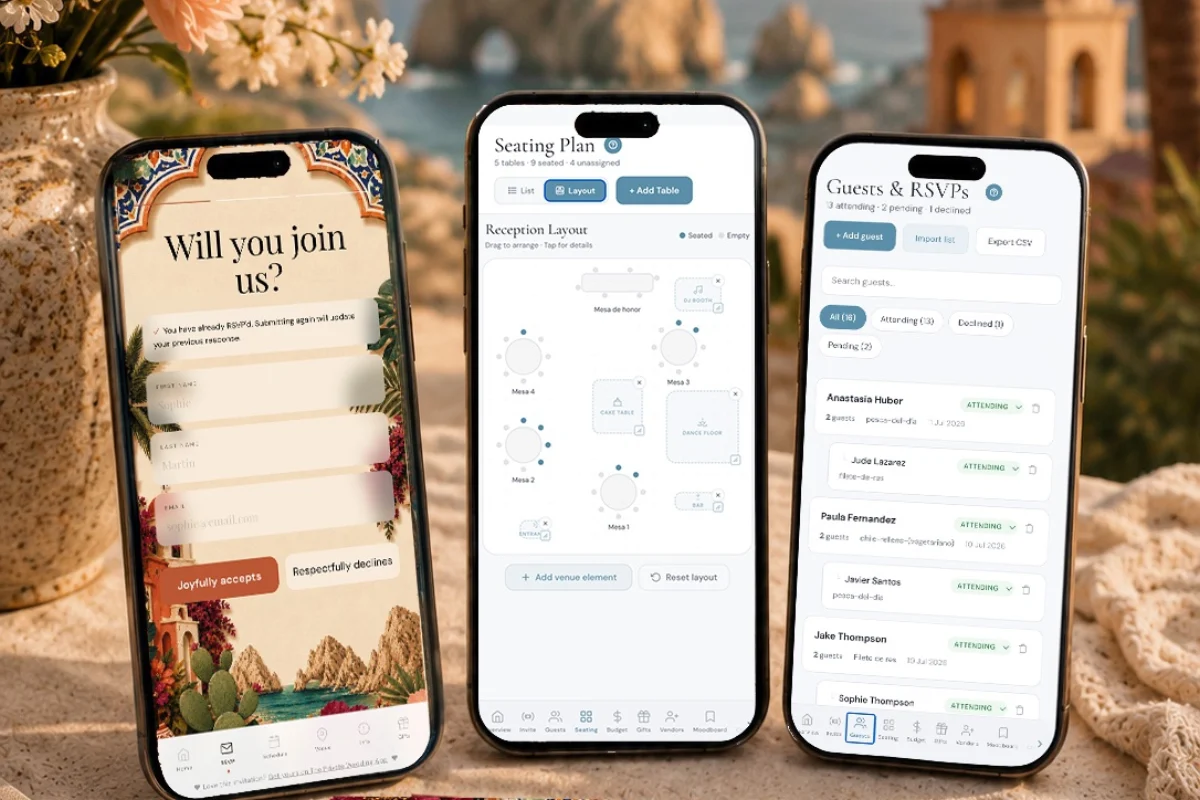
A destination wedding website should include a welcome message with the dates and the reply-by date, the full schedule by day with who each event is for, a travel page (airport, transfers, hotel and room-block deadline, passports), venue maps with directions, an RSVP that collects attendance per event, meals, allergies and arrival flights, a FAQ for the questions guests will ask anyway, and all of it in the language each guest reads. The Private Wedding App, the full wedding planning platform, builds that website as one private invitation link with day tabs, travel and venue pages with maps, an RSVP per event with flight details and a bilingual version each guest picks on opening, with every answer feeding your guest list, seating chart and budget, for $19.99/month or $189 once. 3-day free trial.
A wedding website for a hometown wedding answers three questions: when, where, and will you come. A destination wedding website answers thirty, because every guest is about to spend money and vacation days on your weekend, and every detail you leave out comes back as a message. The good news is that the questions are always the same. This checklist goes page by page through what a destination wedding website should include, with a real example from a Cabo San Lucas wedding for each one, so you can copy the structure and change the details.
Home: the welcome message and the three dates that matter
The home page is read once, carefully, by every guest. It should carry your names, the dates of the whole weekend rather than the wedding day alone, the place, a short welcome message, and the reply-by date. If the room block has a cut-off, say so here too, because that is the date guests miss.
Example for a Cabo wedding: "We can't wait to celebrate with you in Cabo San Lucas from Thursday November 19 to Sunday November 22, 2026. Please reply by September 26 and book your room by October 20. Everything you need for the trip is in the Travel page." Three sentences, three dates, one place to look.
Add a countdown if you like; guests open the link more often than you think in the weeks before.
The digital invitation home page shows the names, the date, a countdown and your opening and closing lines, and you can edit every word after sending.
Schedule: the weekend by day, and who each event is for
List every event from the first arrival to the last departure, split by day: what it is, where, what time, what to wear, and whether it is for everyone. A destination weekend usually has a welcome party, the ceremony and reception, and a farewell brunch, plus optional things like a boat trip or a beach afternoon.
The trap is showing every event to every guest. If only the family and wedding party are invited to the welcome dinner, the colleagues should not see it. Give each circle of guests its own link that shows only their events, and day tabs only for the days they are invited to.
Write optional events as optional, in plain words. It is the difference between a guest booking an extra night or not.
With multi-event RSVP and group links, each guest group sees only its days and events, and answers each one separately.
Travel: the page guests read three times
The travel page is the heart of a destination wedding website. It answers: which airport, how far, how to get from the airport to the hotel, where to stay and how to book the group rate, until when, what documents to bring, and what the couple is or is not arranging.
Cabo example: "Fly into Los Cabos International Airport (SJD). Most international flights land at Terminal 2. The drive to Cabo San Lucas takes 40 to 50 minutes, longer between 3 and 6 pm. Uber can drop off at the airport but cannot pick up there, so book a shuttle or private transfer ahead, or tell us your flight in the RSVP and we will group pickups. Rooms are held at Casa Dorada until October 20 under our names. You need a passport book, not a passport card, to fly to Mexico."
Open the live Cabo demo to see how that information reads on a phone, on the Info page, in Spanish or English.
Guests give arrival and return flights in the RSVP with guest flight details, so the pickup promise on the travel page is one you can keep.
Venues and maps: addresses a taxi driver can use
Every venue needs its name, its address written in the local format, a map pin that opens directions, and a note on transport: is there a shuttle, from where, at what time, and when is the last one back. Do not translate the venue name; "Hacienda Cocina & Cantina" stays exactly that, so guests can show it to a driver.
Link each event in the schedule to its venue, so a guest reading "Welcome dinner, Playa El Médano" can tap straight to the map.
The shuttle note is the one guests remember at midnight: "Shuttles leave the hacienda for the downtown hotels every 30 minutes from 11 pm, last one at 1 am."
Venue cards on the invitation carry the address, a Show on map button and the shuttle note, and each schedule event links to its venue.
RSVP: per event, with meals, allergies and flights
The RSVP of a destination wedding collects more than yes or no. It needs an answer for each event, the meal choice and any allergy for each meal-served event, plus-ones only where you allow them, and arrival and return flights. A phone number helps for the family who will answer on WhatsApp.
Give it a reply-by date at least two weeks before the room-block cut-off; our guide to the destination wedding RSVP deadline explains how to pick it.
Everything a guest answers should land in one guest list that your seating chart, caterer sheet and budget read from. If the RSVP lives on one site and the planning in a spreadsheet, the numbers drift apart within a week.
The meal and allergy tracker turns every RSVP into per-event plate counts and an allergy list for the caterer, with each guest's table.
FAQ: the questions guests will ask anyway
A destination wedding FAQ saves you dozens of identical messages. Write the answers once, in one or two sentences each, and update them as things change. These are the questions every Cabo couple gets:
Can I bring a plus-one? Are children invited? What should I wear to each event, and is the ceremony on sand? What will the weather be like? Do I need pesos, or are dollars and cards accepted? Is there a shuttle on the wedding night? Do I need travel insurance? What if my flight is delayed? Who do we contact on the ground?
The answers to "what should I wear" belong next to each event as well as in the FAQ, because that is where guests look when they pack.
Info sections on the destination wedding website hold the FAQ, a pinned dress code card and the colour palette, and any section can be shown to one language's guests only.
Language, privacy and sharing
If one family reads Spanish and the other English, the whole website should exist in both, chosen by each guest on opening, RSVP form included. A translated home page with an English-only RSVP is where grandparents give up. See our guide to a bilingual wedding in Mexico.
Keep it private. A destination wedding website carries hotel names, dates and travel plans; it should open from your link, not from a search engine.
Share it where each guest answers: WhatsApp for family in Mexico, email or text for guests in the US and Canada, and a printed QR card for the guests who prefer paper. Send the same link to everyone in a group, and update the website instead of resending it.
Build yours on The Private Wedding App's destination wedding website and start planning: $19.99 a month or $189 once, with the full planner behind the link.
- Home: names, weekend dates, place, welcome message, reply-by date
- Schedule by day, with who each event is for
- Travel: airport, drive time, transfers, hotel, room-block date, passports
- Venues with local addresses, maps and shuttle notes
- RSVP per event with meals, allergies and flights
- FAQ: plus-ones, children, dress code, weather, money, contacts
- Every page in the language each guest reads
Everything you need, in one place
Planning your own wedding without a planner is entirely achievable.
See it for yourself.
Explore the whole platform: cinematic invitation, RSVP with meals and allergies, guest list, seating chart, budget, vendors, checklist, moodboard, photo sharing and the AI planner. No account needed.
Try the full planner →What should a destination wedding website include?
A welcome message with the weekend dates and the reply-by date, the schedule by day with who each event is for, a travel page with the airport, transfers, hotel, room-block deadline and passport notes, venue maps with directions, an RSVP per event with meals, allergies and flights, a FAQ, and every page in the language each guest reads.
What travel information should go on a destination wedding website?
The airport to fly into, the real drive time to the hotel and venue, transfer options and what you are arranging, the hotel with the group-rate booking code and cut-off date, passport and entry requirements, and a contact on the ground. For Cabo: fly into SJD, 40 to 50 minutes to Cabo San Lucas, and Uber cannot pick up at the airport.
What is a good welcome message for a destination wedding website?
Three sentences with three dates: "We can't wait to celebrate with you in Cabo San Lucas from November 19 to 22. Please reply by September 26 and book your room by October 20. Everything you need for the trip is on the Travel page."
Can my destination wedding website show different events to different guests?
Yes, on The Private Wedding App. Guests are organised into groups and each group's link shows only the events and days that group is invited to, with an RSVP per event. The family sees the welcome dinner and brunch; ceremony-only guests never see them.
Should a destination wedding website be in two languages?
When the families read different languages, yes, and the RSVP form most of all. On The Private Wedding App each guest picks their language on opening and the whole website follows, from the schedule to the meal questions, with one-click AI translation you can edit line by line.
Is a destination wedding website the same as the invitation?
On The Private Wedding App, yes: the invitation is the website, on one private link, with the schedule, travel and venue pages, RSVP and gifts. You send it early as the save the date and switch on the RSVP when you are ready.