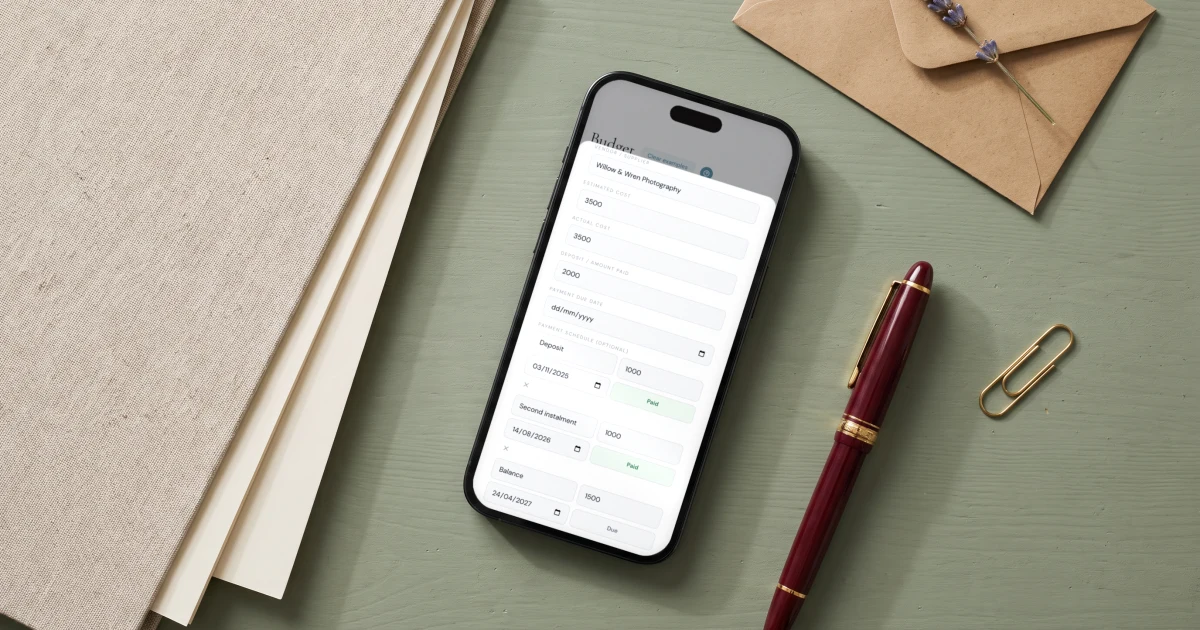
The way to track wedding vendor payments is one budget line per vendor, carrying the total cost, the deposit already paid, and every remaining instalment with its own amount and due date. The Private Wedding App ($19.99/mo, or $189 once for lifetime access) builds this into its wedding budget tracker: each expense has a deposit field and an optional payment schedule for vendors billed in several payments, you tick instalments off as you pay, and overdue or due-this-week payments surface in an alert at the top of the budget, next to the guest list and RSVPs that drive the final headcount your catering balance is based on.
A wedding is not one bill. It is fifteen vendors, each billing on their own rhythm: a deposit to book, sometimes a second instalment, and a final balance due days before the wedding, exactly when you have the least attention to spare. Most couples track this across a spreadsheet, a notes app and their bank statements, and the failure mode is always the same: a due date nobody wrote down. This guide explains how vendor billing actually works, which payment terms to check before you sign, and how to run every deposit, balance and due date from one budget so the money side of the wedding stops living in your head. In The Private Wedding App the budget tracker does this natively: each expense carries its deposits, its payment schedule and its due dates, and anything overdue or due this week surfaces at the top of the page on its own.
How wedding vendors actually bill
Almost no wedding vendor charges once. The standard pattern is a booking deposit of roughly 20 to 50 percent when you sign, sometimes a second instalment at a milestone a few months out, and a final balance due one to two weeks before the wedding. Venues and caterers add a twist: the final invoice is based on the confirmed headcount, so the number is not even fixed until your RSVP deadline has passed.
That structure is reasonable vendor by vendor, and unmanageable in aggregate. Fifteen vendors on two to four payments each is thirty to fifty payment events, spread over a year, with the heaviest cluster landing in the last month. The couples who feel in control are not the ones spending less; they are the ones who can answer three questions at any moment: what have we paid, what do we still owe, and what is due next.
Before you sign any contract, check four things: the deposit amount and whether it is refundable, the exact due dates of every later payment, which payments depend on the final headcount, and the accepted payment methods. Every one of those belongs in your tracker the day you book, not the week the money is due.
- Deposit amount, and whether any of it is refundable
- Every instalment date, copied from the contract
- Which invoices scale with the final guest count
- Final balance due date, and the headcount date it depends on
One budget line per vendor, with its own payment schedule
The system is simple: every vendor is one line in your wedding budget, and every payment that vendor expects is an entry on that line. In The Private Wedding App you add the vendor as an expense with its estimated and actual cost, record the deposit you paid to book, and then use the payment schedule to add each remaining instalment: a label like second instalment or final balance, its amount, and its due date from the contract.
As you pay, you tick each instalment off. The budget's paid total counts your deposits and every instalment you have marked paid, so the outstanding figure at the top of the page is always the real number you still owe across the whole wedding, not an estimate.
Because the schedule lives on the budget line, the context stays attached. Open the caterer and you see the full picture: total cost, deposit paid in May, final balance due the week before the wedding, and the note that the number depends on your confirmed RSVPs.
See the featureBudget trackerLet the due dates come to you
A tracker you have to remember to check is a spreadsheet with better typography. The point of putting due dates into the system is that the system watches them for you. In The Private Wedding App, the budget page opens with an alert strip: any payment past its due date shows as overdue with the amount and the vendor, and anything due in the next seven days appears with its date, instalment by instalment.
This is the difference between managing money and remembering money. The week your florist's balance is due, the page tells you, with the amount, before it becomes an awkward email from the florist.
The final month is where the schedule earns its keep. Most final balances are due in the last two weeks, and most of them depend on the headcount your RSVP deadline produces. Because the budget sits in the same platform as your guest list and RSVPs, the catering line updates from confirmed guests, and the number on the alert is the number on the invoice.

The payment timeline that keeps the last month calm
Work backwards from the wedding. Your RSVP deadline sits three to four weeks out; final headcounts go to venue and caterer one to two weeks out; final balances cluster in the same window. Set every due date in your tracker when you book, then stop carrying them in your head.
Everything you need, in one place
Planning your own wedding without a planner is entirely achievable.
See it for yourself.
Explore the whole platform: cinematic invitation, RSVP with meals and allergies, guest list, seating chart, budget, vendors, checklist, moodboard, photo sharing and the AI planner. No account needed.
Try the full planner →How do I keep track of wedding vendor payments?
Give every vendor one line in your wedding budget and record three things on it: the total cost, the deposit you paid at booking, and each remaining instalment with its amount and due date from the contract. The Private Wedding App's budget tracker has this built in: a deposit field plus a payment schedule per expense, with overdue and due-this-week payments surfaced automatically at the top of the budget.
How much deposit do wedding vendors ask for?
Typically 20 to 50 percent of the total at booking. Venues and photographers tend toward the higher end; smaller vendors often hold a flat booking fee. Always check how much of the deposit is refundable and until when, and record the deposit in your budget the day you pay it.
When are wedding vendor final payments due?
Most final balances are due one to two weeks before the wedding, and venue and catering balances usually depend on your confirmed headcount. Set your RSVP deadline three to four weeks out so the guest count is final before the invoices are.
Can I track wedding payments with multiple due dates per vendor?
Yes. In The Private Wedding App each budget expense has an optional payment schedule: add as many instalments as the contract sets, each with its own label, amount and due date, and tick them off as you pay. Overdue instalments highlight the expense and appear in the alert strip.
What is the best way to track wedding payments as a couple?
Use one shared tracker rather than one partner's spreadsheet. The Private Wedding App's budget is part of the couple's shared planning dashboard, so both partners see the same paid, outstanding and due-next numbers, alongside the guest list, RSVPs, checklist and seating plan the money decisions depend on.
Why does my wedding budget never match what I have actually paid?
Usually because the tracker records totals but not payments: a vendor shows as one number when the reality is a paid deposit plus an unpaid balance. Track at the payment level, deposit and instalments separately, and the paid and outstanding totals reconcile with your bank statement instead of drifting from it.