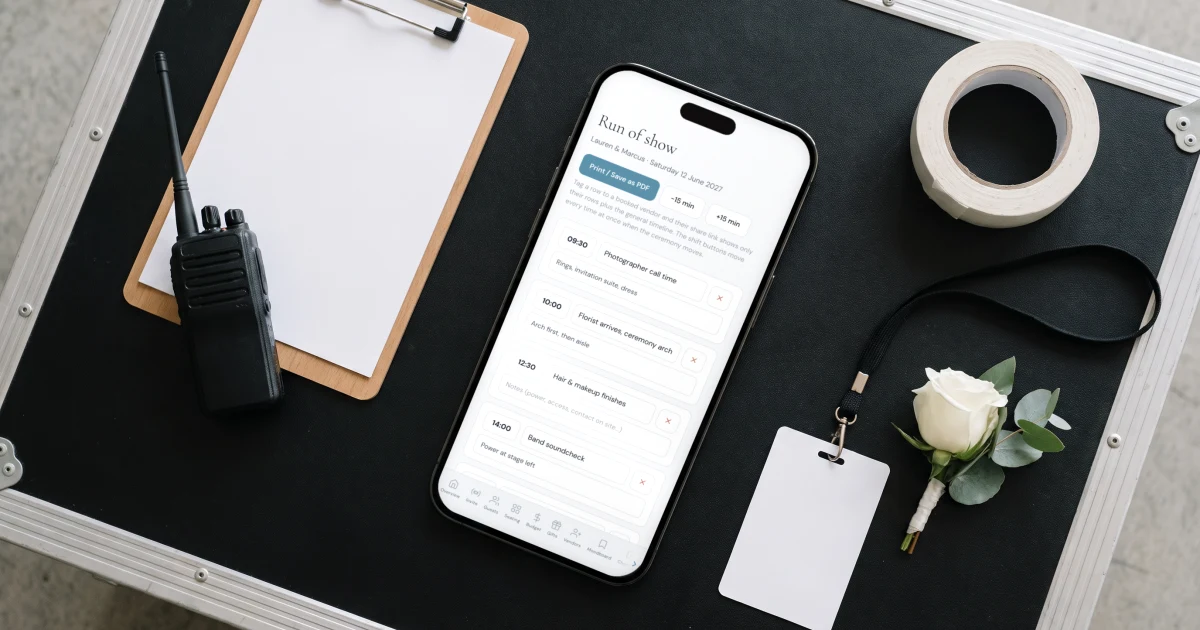
A wedding day timeline is the hour-by-hour schedule of the day, from hair and makeup to the send-off, that keeps the couple, the vendors and the venue in sync. A typical timeline for a 4:00 pm ceremony runs from about 9:00 am getting ready to a 10:00 pm exit, and the whole day is built backwards from the ceremony time. The sample below is a full timeline you can copy and shift to your own start time. In The Private Wedding App, planners turn this into a run of show with each vendor's call time and send every supplier a link showing only their rows. Invitation, RSVP, guest list, seating and budget come together for $19.99/month or $189 once, for good.
Almost everything on a wedding day is decided by one number: the ceremony start time. Move it, and hair and makeup, the photographer's arrival, cocktail hour and dinner all move with it. A wedding day timeline is how you keep that chain in order, so the dress goes on with time to spare, the light is right for portraits, and dinner is not served cold while the toasts run long. This guide gives you a full sample timeline you can copy, shows how to shift it to your own start time and adjust it for a first look and travel, and covers how planners turn the couple's timeline into a run of show with each vendor's call time.
What a wedding day timeline is, and why it runs the day
A wedding day timeline is a single schedule of the day in order: what happens, when, and often where and who is involved. It exists so that the people making the day happen, the couple, the photographer, the caterer, the band, the venue, are all working to the same clock. Without one, the day drifts: makeup runs late, photos eat into cocktail hour, dinner backs up, and the last hour of dancing quietly disappears.
The single most important thing to understand is that a timeline is built backwards from the ceremony start time. You fix that one time, then work outward: earlier for getting ready and photos, later for cocktails, dinner and dancing. Change the ceremony time and everything else shifts with it, which is exactly why a timeline you can move all at once is worth more than a fixed list.
A sample wedding day timeline you can copy
Here is a full timeline built around a 4:00 pm ceremony, the most common start time, with dinner and dancing through the evening. Copy it and shift every time by the gap between 4:00 pm and your own ceremony start. If your ceremony is at 3:00 pm, move everything an hour earlier; at 5:00 pm, an hour later.
Adjust it to your day
The sample is a starting point, not a rule. A few adjustments cover most weddings, and each one ripples through the rest of the timeline, which is why it helps to change them all together rather than line by line.
- First look or not: a first look moves couple and wedding-party photos before the ceremony, which frees up cocktail hour and eases a tight evening; without one, protect a solid block of portrait time right after the ceremony
- Travel between locations: add a realistic buffer any time you move getting-ready, ceremony and reception between venues, and remember guests travel too
- Golden hour: note sunset for your date and leave 15 to 20 minutes near it for couple portraits, especially with no first look
- Buffer time: add 10 to 15 minutes of slack around hair and makeup and the ceremony, the two things that most often run late
- Religious or cultural ceremonies: a longer ceremony or multiple events across a day shift the whole evening, so build them in first
- Sunset and end time: work back from when the music has to stop, which the venue sets, so the last dance and send-off are not cut short
Turn the timeline into a run of show with vendor call times
A couple's timeline and a planner's run of show are the same day seen two ways. The couple's version is the flow; the planner's version adds the operational detail: when each vendor arrives, where they set up, who is cued for what. In The Private Wedding App, planners build the run of show as time-blocked rows and tag each one to a booked vendor, so the florist's delivery, the band's soundcheck and the caterer's service all sit on the one timeline.
Two things make it hold up on the day. When the ceremony moves, a single control shifts every time at once, so a fifteen-minute delay does not mean editing twenty rows by hand. And each vendor gets a read-only link showing only their rows plus the general flow, so the DJ sees the DJ's call times, tailored to their role, rather than a six-page master document. Try it live below.
Put the schedule in front of your guests, once
Guests need a version of this too, minus the operational detail: when to arrive, where to be, what happens next. Rather than a separate printed card that goes out of date the moment the timeline moves, the schedule lives on the couple's invitation, so when the ceremony time shifts you change it in one place and every guest sees the current version.
That is the real advantage of keeping the timeline, the run of show and the guest schedule in one wedding rather than three documents: change the ceremony time once, and the couple's plan, the vendors' call times and the guests' schedule all move together. See how planners run this on the wedding planners page, or read how to give your caterer the final guest count that the timeline feeds into.
Everything you need, in one place
Planning your own wedding without a planner is entirely achievable.
See it for yourself.
Explore the whole platform: cinematic invitation, RSVP with meals and allergies, guest list, seating chart, budget, vendors, checklist, moodboard, photo sharing and the AI planner. No account needed.
Try the full planner →What is a wedding day timeline?
A wedding day timeline is the hour-by-hour schedule of the day, from hair and makeup through the ceremony, cocktail hour, dinner and dancing to the send-off. It keeps the couple, the vendors and the venue working to the same clock. It is built backwards from the ceremony start time, so fixing that one time sets everything else.
How do you make a wedding day timeline?
Start with the ceremony time, then work outward: earlier for getting ready, photographer arrival and portraits, later for cocktail hour, dinner, toasts and dancing, ending when the venue requires the music to stop. Copy a sample timeline like the one above, shift it to your ceremony time, and adjust for a first look, travel between venues and sunset. Planners then turn it into a run of show with each vendor's call time.
What should a wedding day timeline include?
Hair and makeup, the photographer's arrival, getting dressed, an optional first look, wedding-party and family photos, the ceremony, cocktail hour, remaining portraits, the grand entrance and first dance, dinner and toasts, parent dances, the dance floor, cake cutting, the last dance and the send-off. A planner's run of show adds each vendor's arrival and set-up times on top.
What time should a wedding ceremony start?
The most common ceremony start is late afternoon, around 4:00 pm, which leaves room for photos in good light before dinner and a full evening of dancing. The right time depends on your sunset, whether you are doing a first look, and any travel between venues, but once you set it, build the rest of the timeline backwards and forwards from it.
How much buffer time should I leave between wedding events?
Leave 10 to 15 minutes of slack around the two things that most often run late, hair and makeup and the ceremony, and a realistic travel buffer any time you move between venues. Buffers are why a timeline you can shift all at once is useful: when one thing runs over, you move the rest together rather than losing the last hour of the night.
How do wedding planners build a run of show?
A run of show is the planner's operational version of the day: time-blocked rows with each vendor's arrival, set-up and cue times. In The Private Wedding App a planner builds it from the couple's schedule and booked vendors, shifts every time at once when the ceremony moves, and sends each vendor a read-only link showing only their rows, so the timeline stays current for everyone without reprinting a master document.