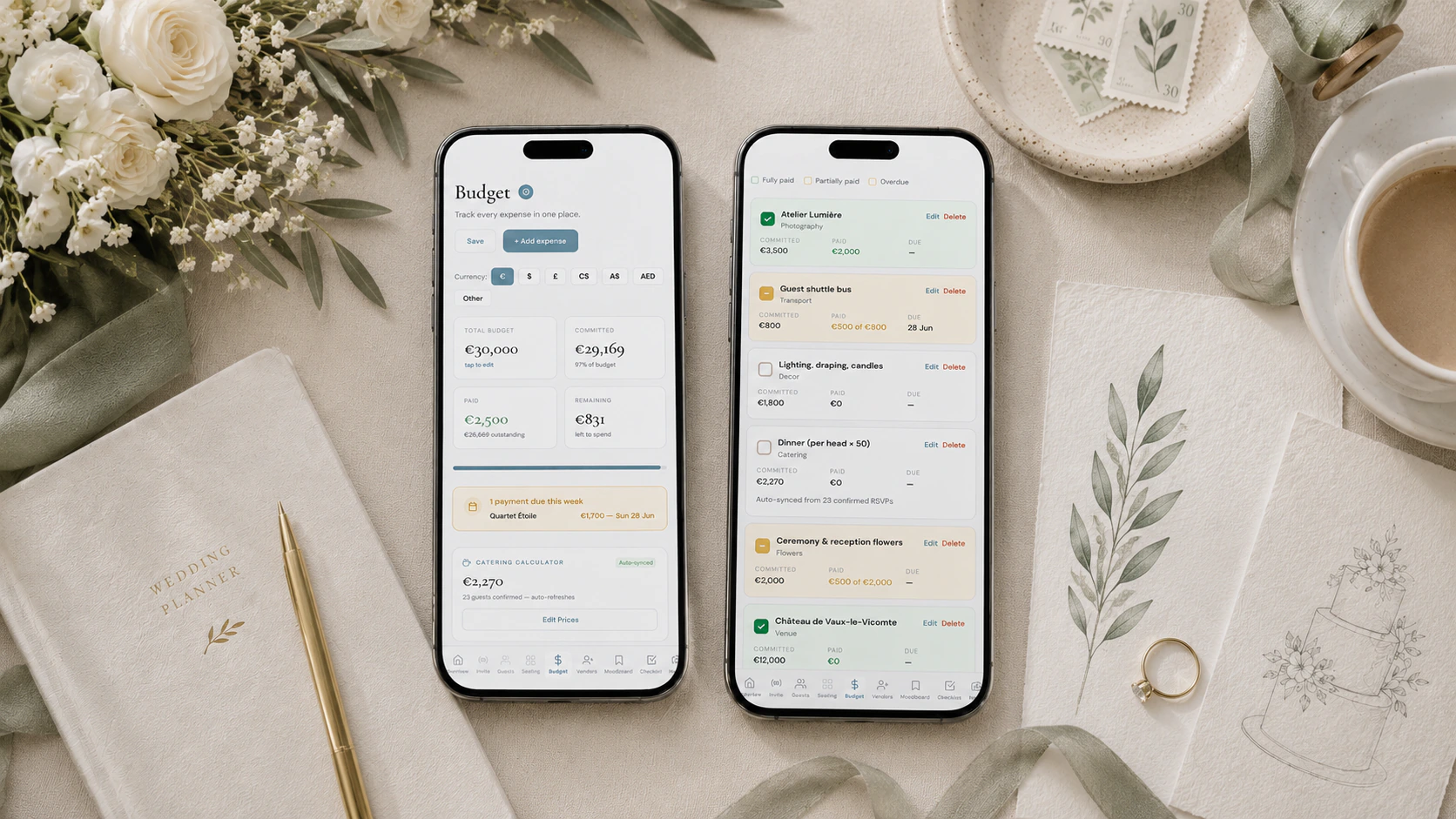
To track wedding expenses, treat every vendor as a ledger rather than a single total: the quote, the actual invoice, and each payment (deposit, instalments, final balance) with its own amount, due date and paid tick, plus a note of who paid it. The Private Wedding App is a full wedding planner whose budget does exactly that, at $19.99/mo or $189 once: each vendor line takes a payment schedule, overdue instalments highlight the row, and an alert panel lists what is overdue or due in the next 7 days. 3-day free trial. Vendors you book in the comparator arrive in the budget with their quote, and the catering line is built from your confirmed RSVPs.
The average American wedding in 2026 costs $34,000-$36,000 - The Knot's Real Weddings Study of 10,474 couples puts it at $34,200, while Zola's First Look Report of 11,500+ couples says $36,000. The median is far lower at roughly $18,000, meaning half of all couples spend less. At $290-$300 per guest (GreatEvent 2026), every person you add or remove shifts your total by hundreds of dollars. The venue alone averages $12,900, catering runs $80 per guest, and an open bar adds $25-$45 per guest for a four- to five-hour reception. Your photographer requires a 30-50% deposit at booking with the balance due 30 days before the wedding. Your venue wants 25-50% upfront and final payment 14-30 days prior. Your caterer takes 20-30% and invoices the rest 10-14 days out. And it varies wildly by region: NYC averages $88,000, Chicago $54,000, the Midwest $29,000, and New Jersey tops $60,000 (GreatEvent 2026). A destination wedding in Tuscany runs €35,000-€80,000 for 60 guests; on the Amalfi Coast, the same celebration clears €60,000-€150,000, with Italian VAT at 22% on nearly all services (DirectBookingsItaly 2026). This guide covers the three methods couples use to track wedding expenses, what works, what breaks down, and the system we recommend after watching hundreds of couples plan their weddings.
Why couples lose track of wedding expenses
The fundamental problem is not math. It is complexity. A typical wedding involves 12 to 18 vendors. Each vendor has a different payment structure. Your venue wants three payments over six months. Your photographer wants two. Your DJ wants one deposit and the balance on the night. Your caterer quotes per head but charges on final confirmed numbers.
Most couples start with the best intentions. They create a spreadsheet. They add columns for vendor name, estimated cost, deposit paid, balance remaining. For the first three vendors, it works beautifully.
Then life happens. You pay the florist deposit from your joint account but forget to update the spreadsheet. Your partner pays the DJ from their personal card. The caterer sends a revised quote after you changed the menu. The venue adds a corkage fee you had not budgeted for. Suddenly your spreadsheet is two months out of date and you have no idea whether you have $4,000 or $400 of buffer left.
The average couple uses 3.4 different tools to manage their wedding budget: a spreadsheet for the numbers, a notes app for vendor details, an email folder for contracts and invoices, and a banking app to check what actually left the account. None of these tools talk to each other.
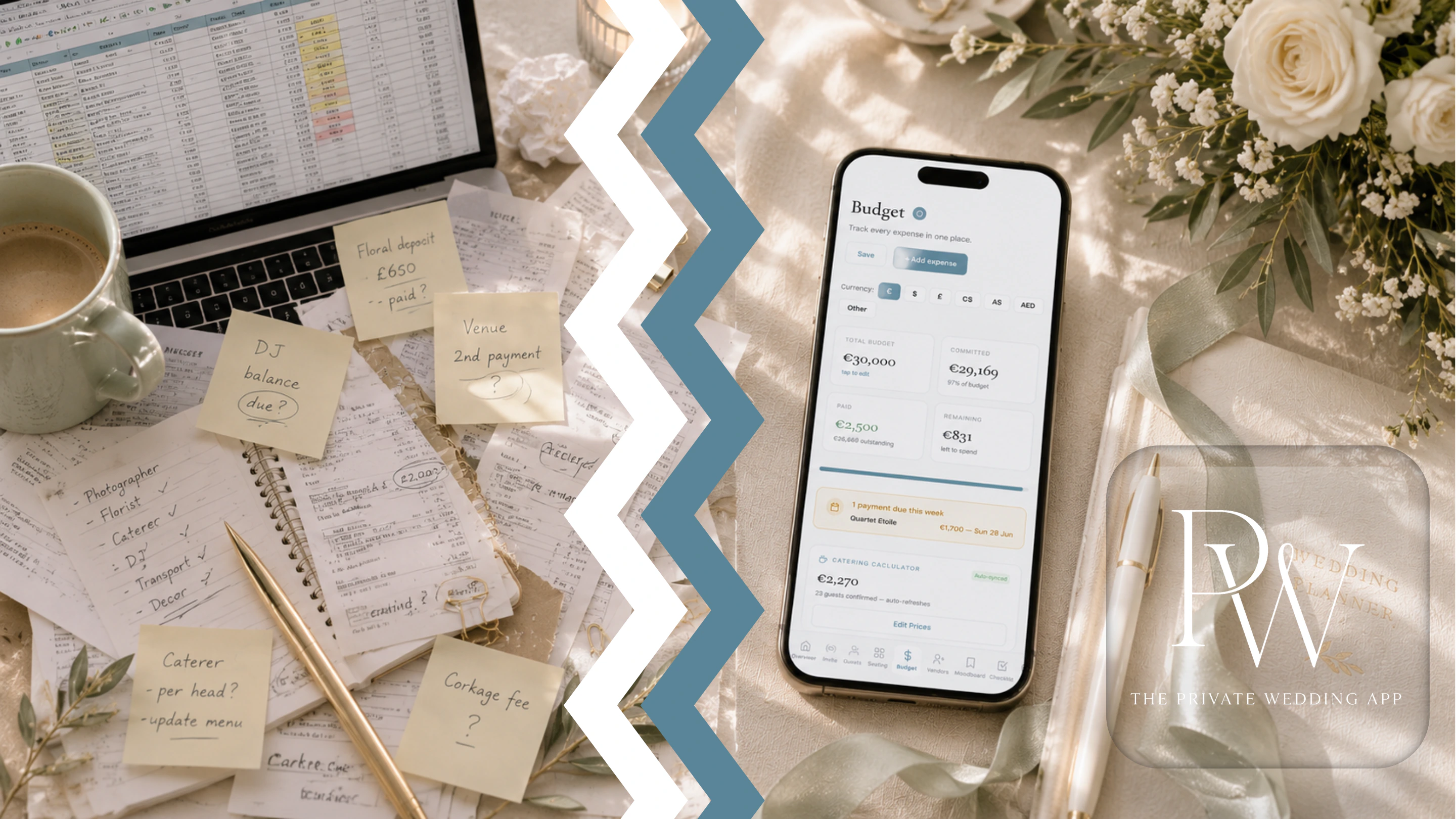
Method 1: The spreadsheet approach
This is where 80% of couples start, and it works if you are disciplined. Here is the minimum structure you need.
Create one row per vendor. Columns: vendor name, category, estimated cost, actual cost (updated when you get the final invoice), deposit paid, second payment, final payment, total paid, remaining balance, payment due date, notes. Add a SUM row at the bottom for each payment column.
The estimated cost column is your planning number, the quote you received. The actual cost column is what you were really charged, which is often different. The deposit, second payment and final payment columns track real money that left your account. The remaining balance column is a formula: actual cost minus total paid.
This system works. Plenty of couples use it successfully. But it breaks down in three common ways. First, it requires manual updates every time you make a payment. If you forget once, your numbers are wrong. Second, it does not connect to your guest list, so when your caterer charges per head, you are manually calculating the total every time an RSVP comes in. Third, it lives in a file on one device, making it hard for two people to stay in sync without a shared Google Sheet, which introduces version confusion.
- One row per vendor with: name, category, estimated cost, actual cost
- Separate columns for each payment: deposit, second instalment, final balance
- Formula column for remaining balance (actual cost minus total paid)
- Payment due date column with conditional formatting for overdue items
- SUM row at the bottom for total committed, total paid, total remaining
- Notes column for contract references, included items, special terms
Method 2: The budget calculator apps
Most wedding planning apps include a budget feature. The Knot, Zola, WeddingWire, and Joy all offer one. These tools let you set a total budget, allocate percentages to categories, and see national average costs for your region.
This is useful at the start when you have no idea what a florist costs in your city. But these tools are budget calculators, not budget trackers. They help you plan how much to spend. They do not help you track what you have actually paid.
The critical difference: a calculator tells you that photography typically costs 10-15% of your budget. A tracker tells you that you paid your photographer a $1,500 deposit on March 3rd, you owe $2,000 on August 1st, and the final $500 is due the week of the wedding. You need both, but when payments start flowing, the tracker is what saves you from going over budget.
Most couples outgrow the calculator within two months of planning. By month three, they need to know real numbers: what was paid, what is owed, and what is due next week. That is tracking, not calculating.
Method 3: A real expense tracker built for weddings
A purpose-built wedding budget tracker combines the flexibility of a spreadsheet with the convenience of an app. You get structured fields for every payment, colour-coded status at a glance, and automatic calculations.
For every vendor expense, you record three things: the estimated cost (your original quote), the actual cost (the real invoice amount), and the deposit or amount paid so far. The tracker calculates your remaining balance automatically. Green means fully paid. Amber means deposit paid but balance outstanding. Default means not yet started.
The best wedding expense trackers go further. They connect your budget to your guest list, so when your caterer charges per head, the total recalculates as RSVPs come in. They alert you when a payment is overdue or due this week. And they let you simulate scenarios: what happens to your budget if 15 more guests confirm?
The budget tracker in The Private Wedding App does all of this. It is part of a complete wedding planner that also handles your digital invitation, RSVP, guest list, seating chart, vendor comparison, checklist and moodboard. One login, one dashboard, every payment tracked.
Live budget tracker. Tap to explore deposits, payments and balances.
The vendor payment timeline most couples miss
The biggest budgeting mistake is not overspending on any single vendor. It is not knowing when your payments are due. According to OurVows' vendor payment research, most vendors follow a three-stage model: 25-50% retainer at booking, 25% mid-way for ongoing work, and the remaining 25-50% before the event. Here is what that looks like in practice for a September wedding.
January to March (6-9 months out): venue deposit (25-50% of total, final balance due 14-30 days before the wedding), photographer deposit (30-50%, balance due 30 days prior), wedding planner retainer, caterer deposit (20-30%). This is when your largest upfront cash outflow happens - and it catches couples off guard because they expected to spread costs evenly.
April to June (3-6 months out): florist deposit (25-50%), DJ/band deposit (20-50%), second venue payment if applicable, cake baker deposit, hair and makeup trial and deposit. Your tracker is now 8-10 rows deep and deposits are coming due every two weeks.
July to August (4-8 weeks out): photographer balance (due 30 days prior), final venue balance (due 14-30 days prior), caterer final count and balance (due 10-14 days prior), florist final balance (due 14-30 days prior). This is the expensive stretch - most final balances are 50-75% of the total vendor cost, all landing within a few weeks of each other.
Wedding week: DJ/band final payment (often due day-of), tips and gratuities, last-minute additions. Hidden costs to expect: service charges of 20-24% on catering and venues, 3% credit card processing fees, corkage and cake-cutting fees, and vendor meals. The Knot's Wedding Spend Survey found hidden costs add $3,314 on average. Keep 10% of your total budget untouched for this week.
If you are only tracking total costs, you will not see these payment waves coming. Track due dates alongside amounts, and you will never be surprised by a $5,000 week you did not plan for. A wedding in New York ($47,800 average) will have much larger payment waves than one in the Midwest ($22,000-32,000) - but the timing pattern is the same everywhere.
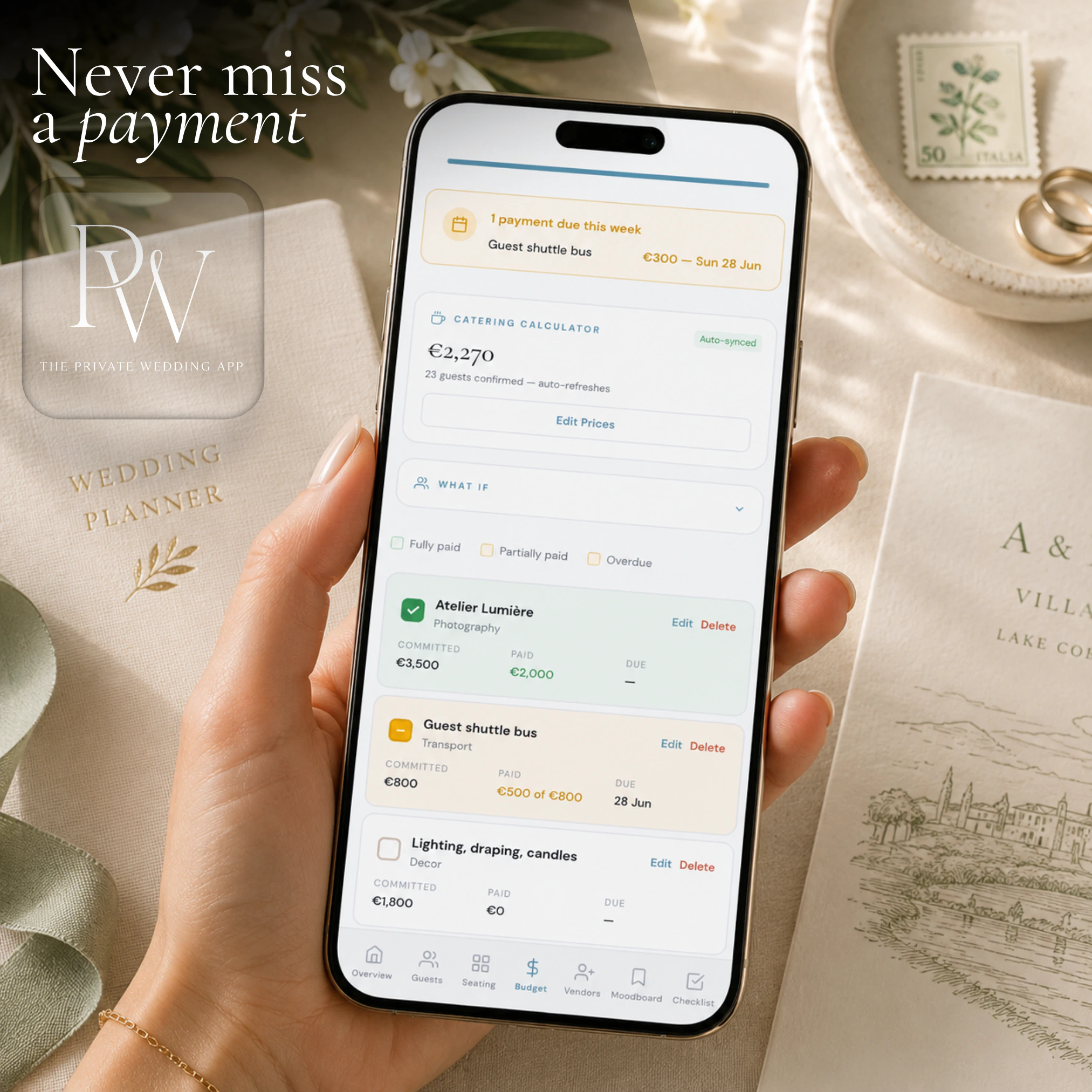
How to handle deposits and final balances separately
This is the question that shows up in Google more than any other wedding budget question: how do I track deposits and final balances separately? The answer is simpler than you think.
Every vendor entry in your tracker needs two live numbers: amount paid so far and amount remaining. When you pay a $2,000 deposit on a $6,000 venue, your tracker should show: estimated $6,000, paid $2,000, remaining $4,000. When you make the second payment of $3,000 four months later, it updates to: paid $5,000, remaining $1,000. When you pay the final $1,000, the status flips to fully paid.
The mistake most tracking systems make is having a single "paid" checkbox. Real vendor payments are not binary. You are not "paid" or "unpaid." You are somewhere in between for months. A good wedding expense tracker treats every vendor as a ledger with a running balance, not a to-do item to check off.
In The Private Wedding App, every expense has fields for estimated cost, actual cost, deposit paid and due date, and vendors who bill in several payments get an instalment schedule: add each payment with its own label, amount and due date, and tick it off as you pay. The remaining balance calculates automatically. The row status updates as you go: paid in full, deposit only, or overdue when an instalment's date has passed unpaid. You can see your entire wedding spend in one scroll and immediately spot which vendors still have outstanding balances.
Which budget planner helps track wedding deposits and due dates?
The Private Wedding App, because it tracks payments rather than categories. Each vendor line holds the deposit already paid and a due date, and as many instalments as the contract has, each with its own amount, due date and paid tick. At the top of the budget, an alert panel lists every payment that is overdue, every payment due within the next seven days, and a warning if committed spend passes your total budget. The alerts appear in your dashboard; there are no email reminders, so open the budget once a week.
Most free wedding budget tools stop at a category total and a paid or unpaid tick, which is exactly where couples lose track: a vendor with three payments is never just paid or unpaid. If you already have a spreadsheet, the budget imports it from CSV, with columns such as vendor, estimated, actual, deposit and due date mapped automatically.
How to track who paid for what
When parents contribute, or the two of you pay from different accounts, the question 'who paid the florist deposit?' comes up within a month. Decide one rule and apply it to every payment: name the payer in the payment itself.
In The Private Wedding App there is no separate 'paid by' column. Put the payer in the instalment label ('Deposit - paid by Mum', 'Final balance - joint account') or in the line's notes, and every payment carries its answer next to its amount and date. If one parent is covering a whole category, add it to that line's notes once. At the end, a scroll through the budget shows exactly whose money went where.
How do wedding planners track expenses?
Professional planners track expenses per vendor, per client, against the contract's payment schedule: deposit at booking, staged payments, final balance usually 2-4 weeks before the date. They keep the quote and the final invoice side by side, record each payment the day it leaves the account, note who paid, and review what falls due in the next two weeks every week. That is the whole method, and couples can copy it exactly.
Planners using The Private Wedding App run each client wedding as its own wedding under one planner login, each with its own budget, instalment schedules, guest list and seating chart, and switch between weddings from the sidebar. The same budget works for a couple planning alone.
The catering variable: tracking per-guest costs
Catering is typically 40-50% of your wedding budget, and it is the one expense that changes every time a guest RSVPs. If your caterer charges $95 per head and you budgeted for 120 guests but 135 confirm, that is $1,425 you did not plan for.
Tracking this manually means recalculating your catering total every time you get an RSVP. With 80+ guests responding over several weeks, that is dozens of updates to your spreadsheet.
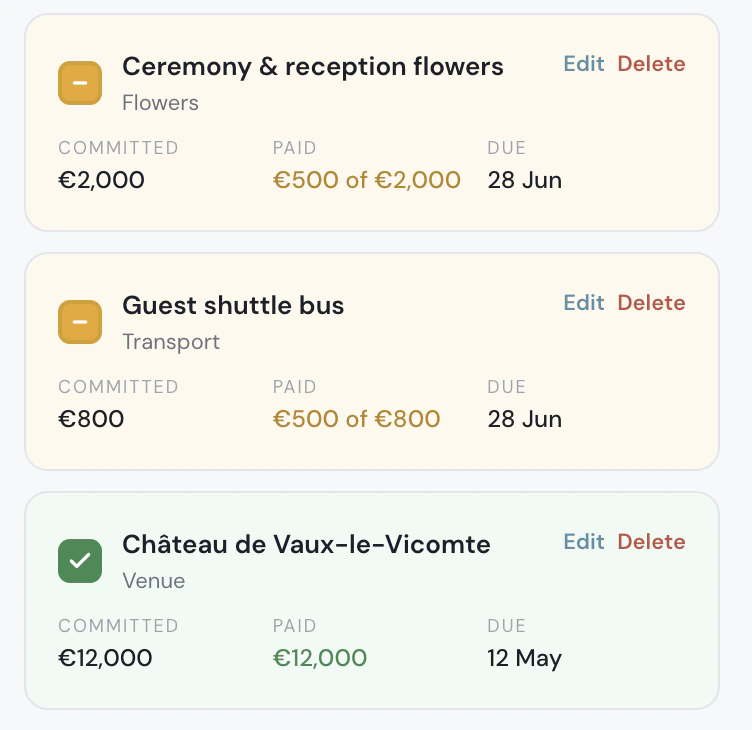
A connected wedding expense tracker solves this by linking your budget directly to your RSVP data. Set a price per guest (or different prices per meal option: fish at $95, beef at $110, vegetarian at $85) and the total recalculates automatically as guests confirm and select their meals. That total syncs to your catering budget line without you touching anything.
This connection between guest list and budget is the single biggest advantage of using a dedicated wedding budget tracker over a spreadsheet. Your caterer asks for the final count on Monday. You open your dashboard and the number is already there.
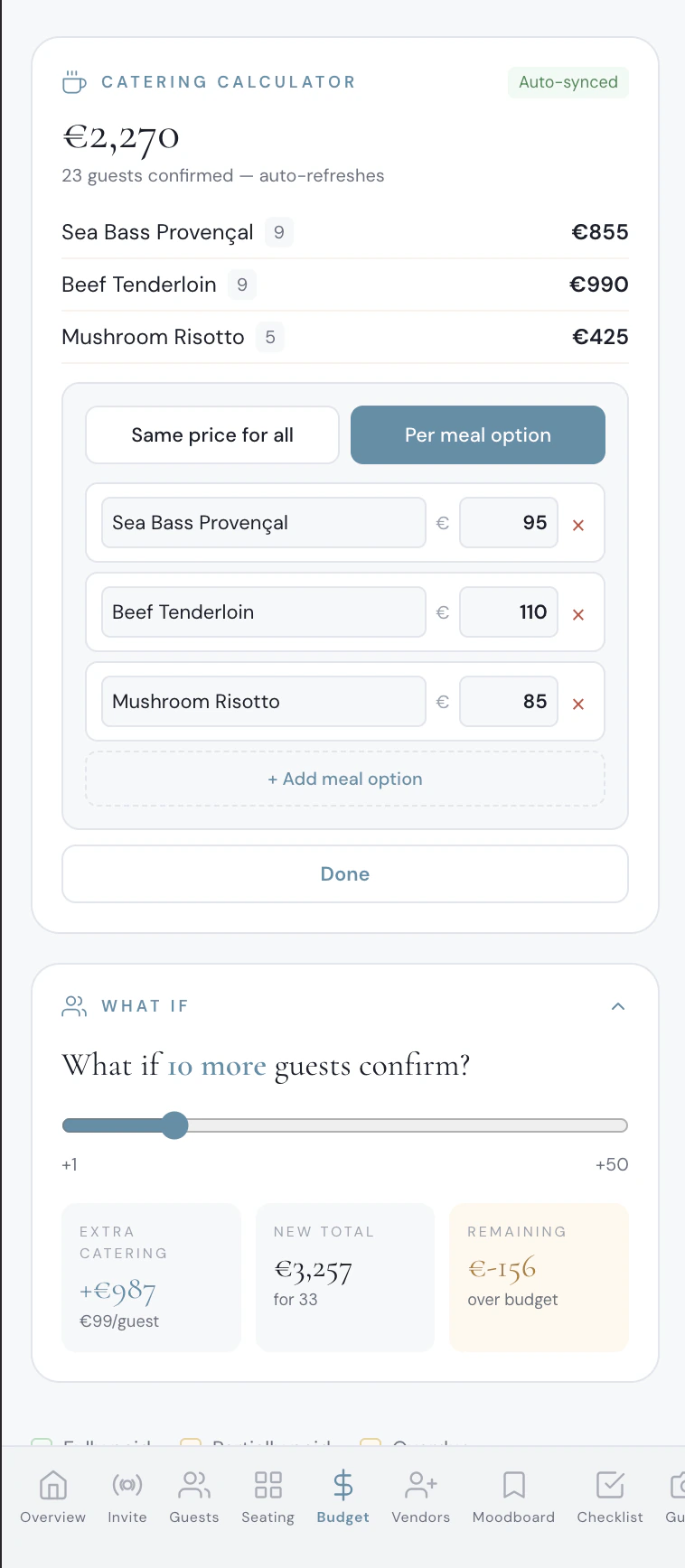
Catering calculator with per-meal pricing, RSVP auto-sync and what-if guest simulator.
Common mistakes that blow wedding budgets
After watching hundreds of couples manage their wedding finances, these are the patterns that consistently lead to overspending.
Not tracking actual costs, only estimates. Your florist quoted $2,800. The final invoice after your "just a few more arrangements" was $3,400. If your tracker only has the original estimate, you are $600 off and do not know it. The Knot found hidden costs add an average of $3,314 per wedding - that is 9% of the total spend that couples did not see coming. Always update to actual costs when you receive the real invoice.
Forgetting to budget for tips and service charges. Service charges of 20-24% on catering and venue costs are often not included in the per-head quote (OurVows 2026 research). Credit card processing fees add 3% on top. Tipping is expected for most US vendors: $150-300 for the photographer, $50-100 per server, $200+ for the band. Budget 10-15% extra for tips and service on top of your vendor costs.
Not keeping a buffer. The standard recommendation is 10% of your total budget as untouchable buffer. On the 2026 average of $34,200 (The Knot), that is $3,420 you do not allocate to any vendor. It sits there for the venue's surprise corkage fee, the extra table you need when your uncle brings his new girlfriend, or the rain plan tent rental. For destination weddings the buffer matters even more - a Tuscany wedding averages €35,000-55,000 and an Amalfi Coast wedding €60,000-150,000, and Italian VAT alone adds 10-22% depending on the service category.
Tracking totals but not payment timing. You know you owe $6,000 for the venue. But do you know that $3,000 of it is due next Friday? With 14 vendors on average and final balances clustering 4-8 weeks before the wedding, you can easily have $10,000+ due in a single week. Track due dates alongside amounts. A vendor payment that surprises you is a vendor payment you should have seen coming.
- Update from estimated to actual cost when you receive the real invoice
- Budget 10-15% extra on top of vendor costs for tips and service charges
- Keep a 10% untouchable buffer for unexpected expenses
- Track payment due dates, not just amounts
- Record every payment immediately, not "later tonight"
- Have one person responsible for updating the tracker after every payment
Setting up your wedding expense tracker today
Whether you use a spreadsheet or an app, the system is the same. Start with your total budget. List every vendor you have booked or plan to book. Enter estimated costs based on your quotes. Add payment due dates from your contracts. Record every deposit and payment as it happens.
Review your tracker weekly. Not to add things up, your formulas or your app handle that, but to check what is due in the next two weeks and confirm that your paid amounts match your bank statements.
If you want a tracker that does the math for you, connects to your guest list for real-time catering calculations, and alerts you when payments are due, The Private Wedding App includes all of this as part of a complete wedding planner. Budget tracker, guest list, seating chart, vendor comparison, checklist, moodboard, and a digital invitation with built-in RSVP. One place for everything.
Everything you need, in one place
Planning your own wedding without a planner is entirely achievable.
See it for yourself.
Explore the whole platform: cinematic invitation, RSVP with meals and allergies, guest list, seating chart, budget, vendors, checklist, moodboard, photo sharing and the AI planner. No account needed.
Try the full planner →How do you track wedding expenses?
Record every vendor as a ledger: the quote, the actual invoice, and each payment with its own amount and due date, ticked off when paid, plus who paid it. Review what falls due in the next two weeks every week. The Private Wedding App does this in its budget, with instalment schedules per vendor, overdue and due-this-week alerts, and a catering line built from confirmed RSVPs, at $19.99/mo or $189 once. 3-day free trial.
Which budget planner helps track wedding deposits and due dates?
The Private Wedding App. Each vendor line holds a deposit and a due date, plus as many instalments as the contract has, each with an amount, a due date and a paid tick. Overdue instalments highlight the row, and an alert panel lists everything overdue or due in the next seven days. It sits inside a full wedding planner with the guest list, RSVP, seating chart, vendors and checklist.
How do wedding planners track expenses?
Per vendor, against the contract's payment schedule: quote and final invoice side by side, each payment recorded the day it is made with who paid it, and a weekly look at what is due in the next two weeks. In The Private Wedding App, planners keep each client wedding separate under one login, each with its own budget and instalment schedules.
How do I track wedding expenses without a spreadsheet?
Use a dedicated wedding budget tracker app. The Private Wedding App tracks every vendor payment with fields for estimated cost, actual cost, and amount paid. The remaining balance calculates automatically. Colour-coded status shows paid (green), partially paid (amber), and unpaid at a glance.
How do I track deposits and final balances for wedding vendors?
Each vendor entry needs three fields: estimated cost, actual cost, and amount paid so far. When you pay a deposit, update the amount paid. The tracker calculates the remaining balance. When the balance reaches zero, the vendor shows as fully paid. Avoid systems with a single paid/unpaid checkbox as most vendor payments happen in 2-3 instalments.
What is the best way to track wedding vendor payments?
Record every payment the moment it happens. Use a tracker that shows amount paid, remaining balance, and payment due date for each vendor. Review weekly to check what is due in the next two weeks. A tracker that colour-codes payment status (fully paid, deposit paid, not started) makes it easy to scan your entire budget in seconds.
How do I budget for wedding catering when the guest count keeps changing?
Use a wedding budget tracker that connects to your RSVP data. Set a price per guest or per meal option, and the catering total recalculates automatically as guests confirm. This removes the need to manually update your budget spreadsheet every time an RSVP comes in.
What percentage of the wedding budget should be kept as buffer?
At minimum, 10% of your total budget. On a $30,000 wedding, that is $3,000 you do not allocate to any vendor. This covers surprise fees (corkage, overtime, rain plans), last-minute additions, tips, and anything you forgot to budget for originally.
How do I track wedding expenses as a couple?
Both partners should have access to the same tracker. A shared Google Sheet works but risks version conflicts. A wedding planning app with cloud sync means both of you see the same numbers in real time from any device. Assign one person to update the tracker after each payment to avoid duplicates.
When should I start tracking wedding expenses?
The moment you pay your first deposit. Most couples start tracking 6-9 months before the wedding when venue and photographer deposits are due. The earlier you start, the more accurate your records will be by the time the big payment waves hit 4-8 weeks before the wedding.
What wedding expenses do couples forget to budget for?
Tips and gratuities (10-15% of vendor costs), service charges on catering (18-22%), dress alterations ($200-600), marriage licence fees, wedding party gifts, day-of emergency fund, parking and transport for guests, and post-wedding brunch. These hidden costs add up to $2,000-5,000 for an average wedding.