
A good wedding budget tracker shows every category, deposit and balance due in one place and warns you before you overspend - which matters, because about half of couples exceed their original budget simply by losing track. The budget tracker in The Private Wedding App is connected to the rest of your planning - vendors, guest list, checklist and seating - so payments and headcounts stay in sync without a spreadsheet. The Private Wedding App costs $19.99/month or $189 once for lifetime access, no subscription.
The average couple planning a wedding uses 3.4 different tools to manage their budget. A spreadsheet for the numbers. A notes app for vendor details. An email folder for contracts. A banking app to check what actually left the account. None of it talks to each other. None of it tells you at a glance whether you've paid your photographer's deposit. And somehow, 50% of couples still exceed their original budget, not because they spent recklessly, but because they lost track. The budget tracker is one feature inside The Private Wedding App, a complete wedding planner that also handles your guest list, seating plan, checklist, moodboard and digital invitation, all connected in one place.
The problem with other wedding budget tools
Most wedding apps call their budget feature a "budget tool." What they actually provide is a budget calculator. You set a total, allocate percentages to categories, and they show you national average costs.
This is useful when you're starting out and have no idea what a florist costs in your city. It is not useful three months before your wedding when you need to know: Did we pay the venue deposit? What's the remaining balance on catering? Have we paid the photographer in full or just the first instalment? How much do we actually have left to spend?
A real wedding budget ledger
The budget tracker in The Private Wedding App works like a proper financial ledger, not an estimate calculator. For every expense you add, you record three things:
Estimated cost: your original quote or budget allocation for this item. Actual cost: what you were actually charged once you received the invoice. Deposit or amount paid: what you've paid so far, whether that's a deposit, an instalment or the full amount.
The tracker calculates your remaining balance automatically. You never have to do the maths yourself.
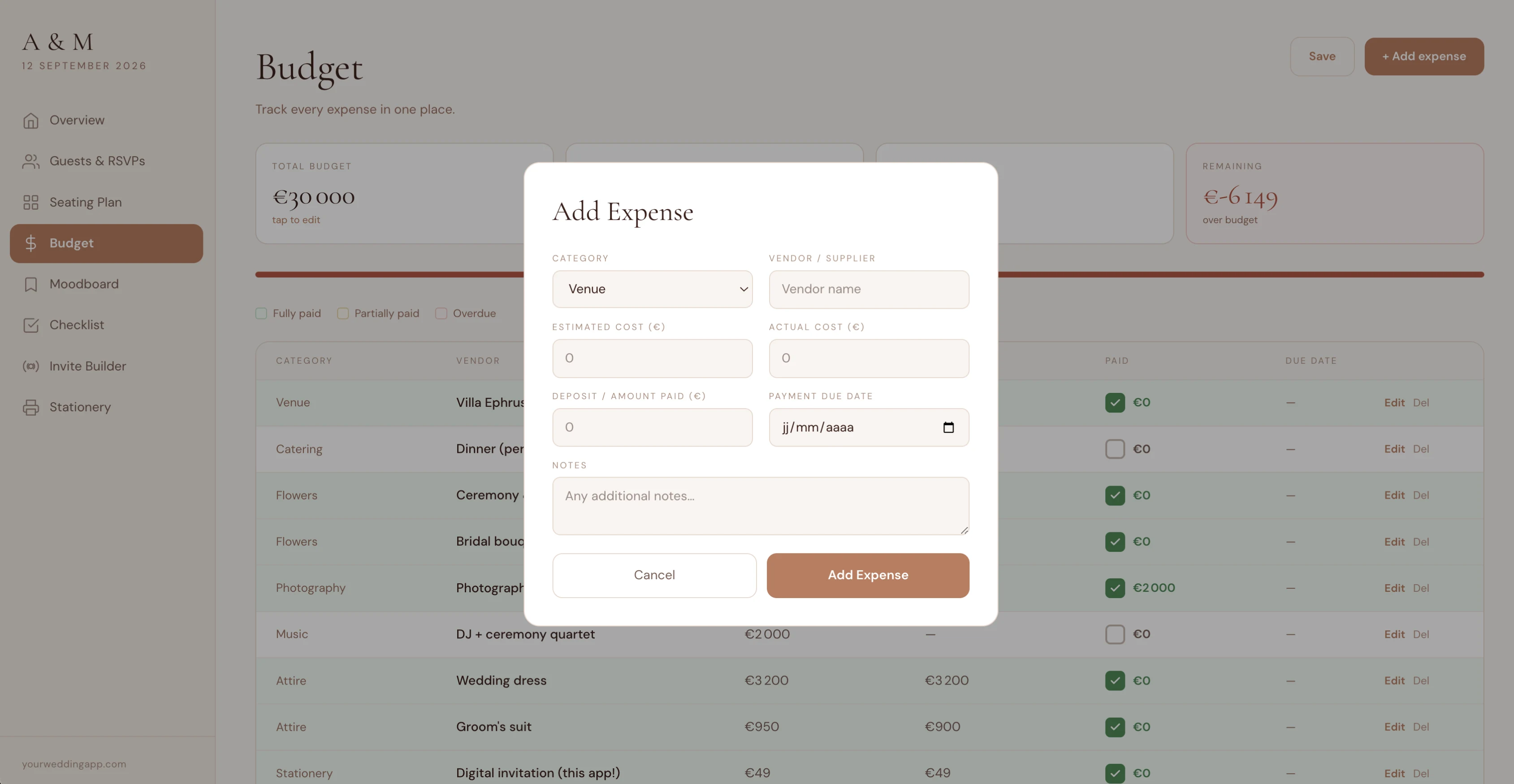
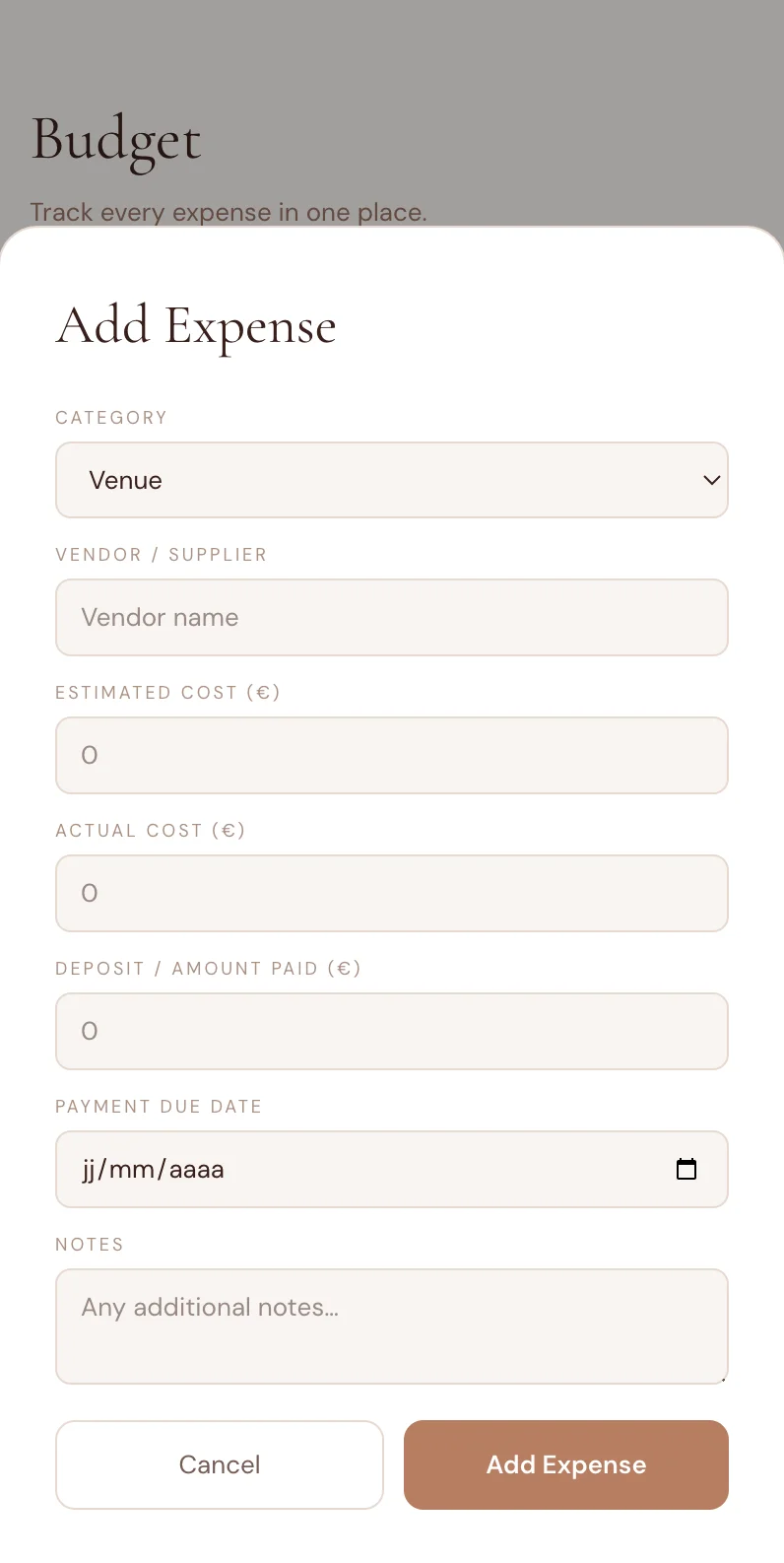
Add an expense in seconds, right from your phone.
Colour-coded payment status
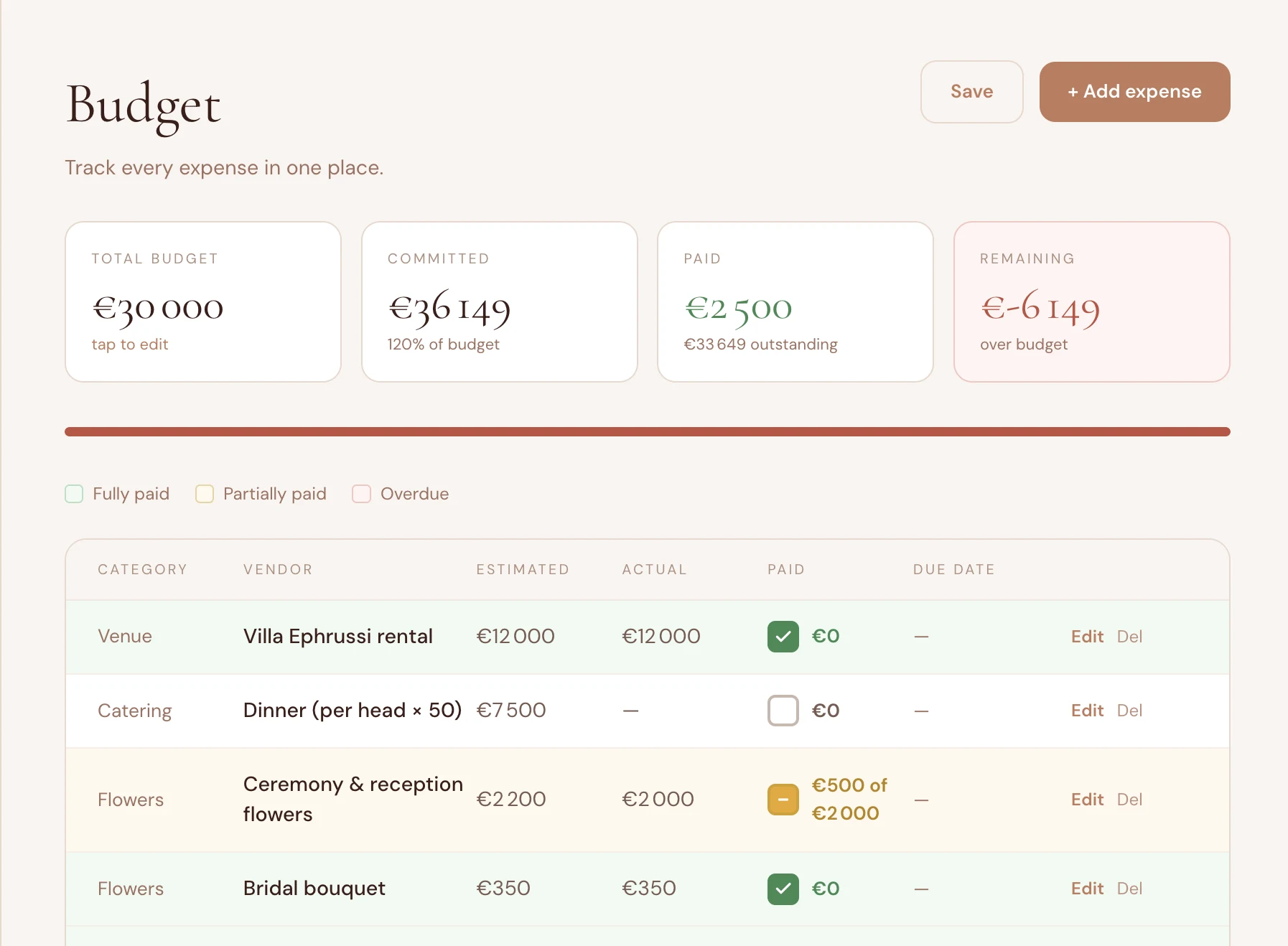
Every item in your budget tracker has a visual status that tells you exactly where you stand. Green means fully paid. The deposit or amount paid equals or exceeds the actual cost, nothing more owed. Amber means partially paid. You've made a deposit or partial payment but there's still a balance outstanding. This is the most important status, the payments you need to remember. Default means not yet paid. You've budgeted for this item but haven't made any payment yet.
This colour coding is visible across the full budget list so you can scan your entire wedding spend in seconds. No more opening individual spreadsheet rows to check payment status.
Partial payment and deposit tracking
This is where every other wedding budget tool falls short. Most vendors don't take a single payment. They want a deposit upfront, then the balance weeks or months later. Some split it into three instalments. Your budget tool should reflect this reality.
With The Private Wedding App, you record each payment as it happens. The tracker shows you exactly how much you've paid, how much remains, and whether the item is fully settled or still outstanding. No mental arithmetic. No scrolling through bank statements to check.
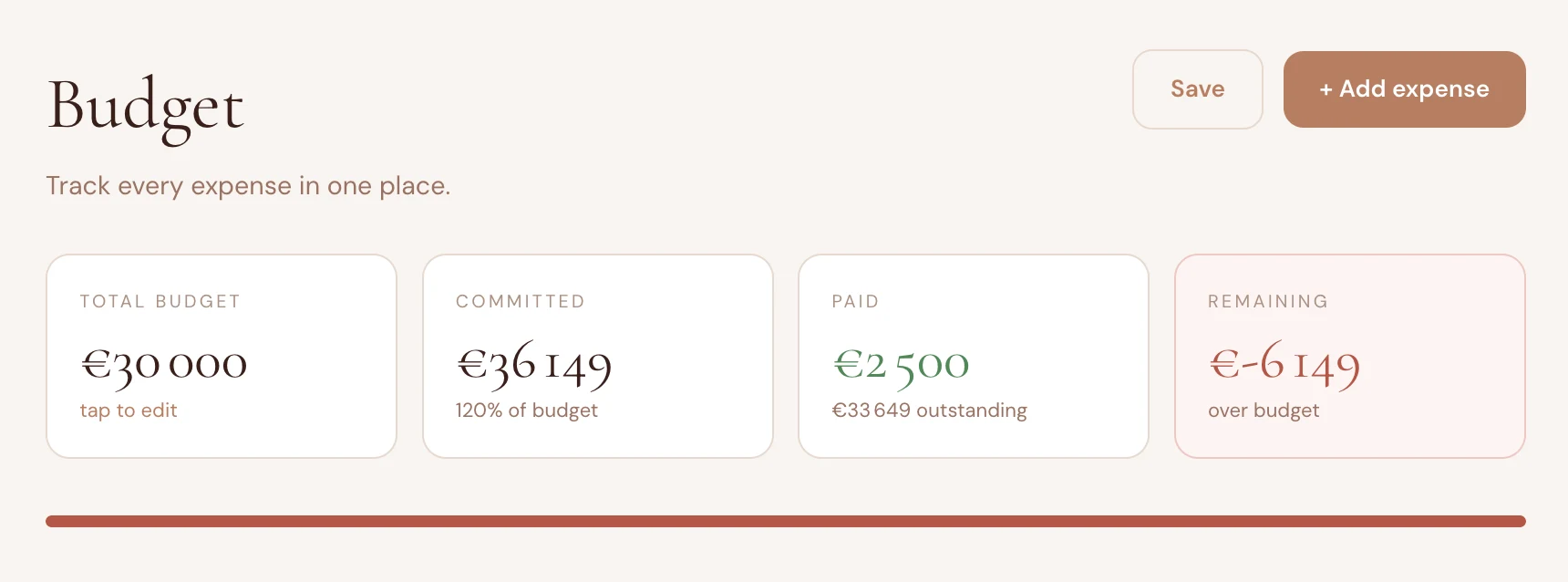
Live budget tracker. Tap to explore.
Budget categories and custom items
The tracker comes with the most common wedding expense categories pre-built: Venue, Catering & bar, Photography, Videography, Flowers & décor, Music & entertainment, Wedding dress & alterations, Groom's attire, Hair & makeup, Stationery & invitations, Transport, Honeymoon, Rings, and Other.
You can also create completely custom categories for anything specific to your wedding: wedding planner fees, rehearsal dinner, morning-after brunch, favours or anything else. Every budget item has a notes field for recording payment schedules, bank transfer details, what's included in the quote, contract reference numbers and payment due dates.
Catering calculator, auto-synced with your RSVPs
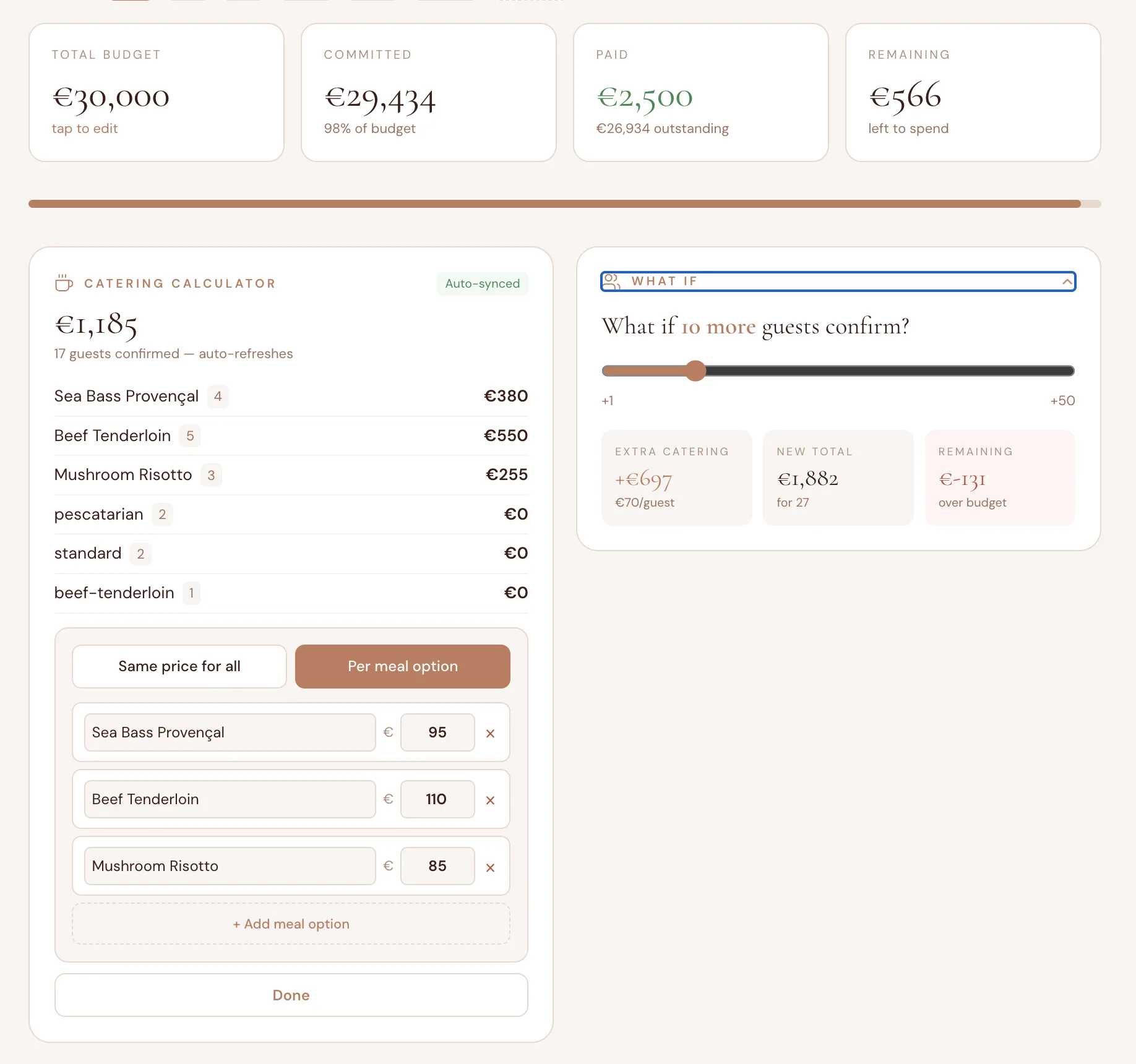
Catering is the biggest variable in any wedding budget, typically 40-50% of total spend. The cost swings every time a guest confirms, declines or changes their meal choice. Most couples track this on a spreadsheet they update manually after every RSVP. With The Private Wedding App, your catering cost calculates itself.
The built-in catering calculator connects directly to your RSVP data. Set a price per guest (same for everyone or different per meal option: Sea Bass at €95, Beef Tenderloin at €110, Risotto at €85) and the tracker multiplies confirmed guests × their chosen meal × cost per head. The total updates automatically every 30 seconds as new RSVPs come in.
That total auto-syncs to your Catering budget line. No "Apply" button, no manual entry. When a new guest confirms, your budget numbers change. When someone switches from beef to fish, the total adjusts. You always see the real number.
Budget alerts and payment reminders
50% of couples exceed their budget, usually not because they overspent intentionally, but because they missed a payment deadline or didn't notice costs creeping up. The budget tracker includes three types of automatic alerts.
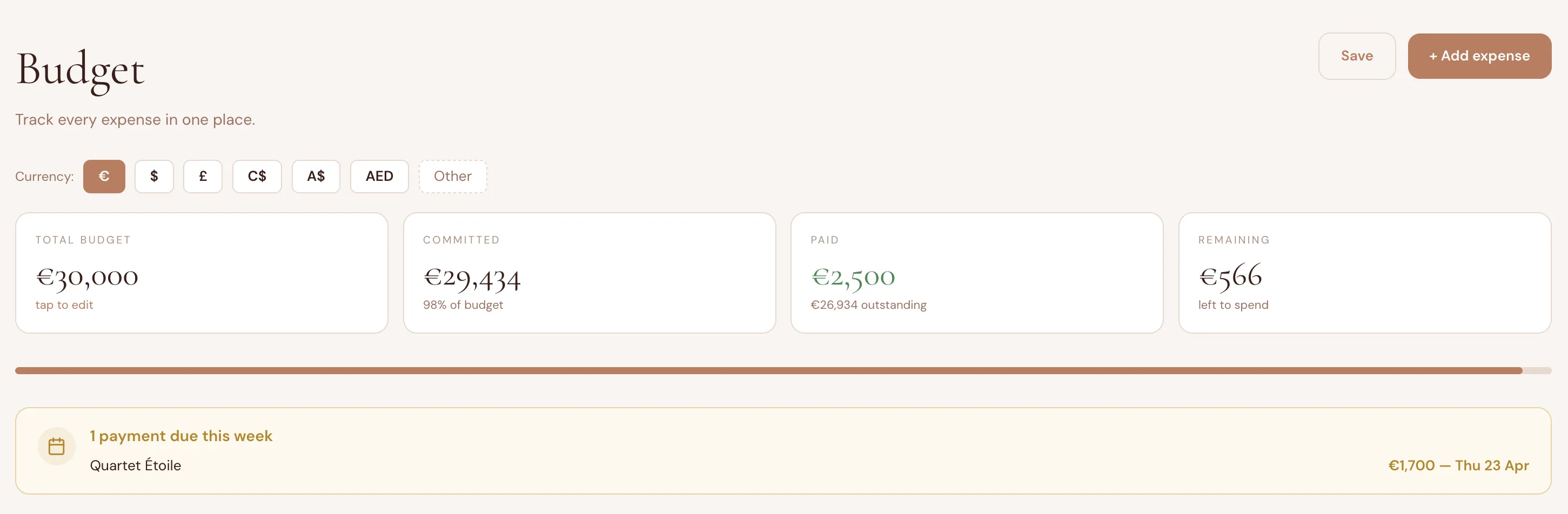
Over-budget warning: a red alert appears the moment your committed expenses exceed your total budget. You see exactly how much you're over and can decide immediately which items to adjust. Overdue payments: any vendor with a payment due date in the past shows a red overdue flag with the outstanding amount. No more forgotten deposits. Upcoming payments: vendors with payments due within the next 7 days show an amber reminder with the amount and exact date. You see what's coming before it arrives.
These alerts sit at the top of your budget page, above the expense table. You see them the moment you open the page, not buried in a settings panel or a separate notification screen.
"What if 15 more guests confirm?"
This is the question every couple asks, and no other wedding budget tool answers it. The guest impact simulator lets you drag a slider from +1 to +50 extra guests and instantly see three numbers: the extra catering cost, the new catering total, and whether you'd still be within budget or over.
If you're currently at 80 confirmed guests with a catering cost of €6,400, dragging the slider to +20 shows you: extra catering cost +€1,600, new total €8,000, budget remaining drops from €3,200 to €1,600. If the remaining goes negative, it turns red. Over budget. This is not a guess. It's calculated from your actual per-guest average based on real RSVP data and real meal prices.
It's the kind of planning tool that turns "I hope we can afford it" into "I know exactly what happens if 15 more people say yes."
What if 15 more guests confirm?
Extra catering
+€1,200
€80/guest
New total
€7,600
for 95
Remaining
€2,400
left to spend
Any currency, any country
Weddings happen everywhere, not just in dollars. The budget tracker supports any currency out of the box. Six presets (€, $, £, C$, A$, AED) cover the most common regions, plus a custom field for Swiss francs, yen, rupees or any other currency. Your choice saves automatically and applies across the entire budget, every total, every line item, every alert. Planning a destination wedding? Multi-currency tracking is essential when paying overseas vendors.
The budget tracker is one part of a complete wedding planning app. The Private Wedding App also includes a digital wedding invitation with cinematic opening and 11 luxury themes plus a save-the-date design, online RSVP with meal choices and allergy tracking, an automated guest list, a drag-and-drop seating plan, a wedding moodboard, a checklist with calendar view, and a printable QR card for instant RSVPs. Everything in one place, from $19.99/mo, or $189 once. Cancel the monthly plan anytime; lifetime is one payment that never renews.
Everything you need, in one place
Planning your own wedding without a planner is entirely achievable.
See it for yourself.
Explore the whole platform: cinematic invitation, RSVP with meals and allergies, guest list, seating chart, budget, vendors, checklist, moodboard, photo sharing and the AI planner. No account needed.
Try the full planner →How is this different from a wedding budget calculator?
Most wedding budget tools are calculators. They show you national averages and help you allocate percentages. The Private Wedding App is a budget tracker. You record actual vendor quotes, actual payments made, and deposits paid. It tracks real money, not estimates.
Can I track deposits and partial payments?
Yes. Every budget item has fields for estimated cost, actual cost, and amount paid. When you pay a deposit, you update the amount paid and the tracker shows the remaining balance. The item turns amber for partial payment and green when fully paid.
What budget categories are included?
The tracker includes 14 pre-built categories covering venue, catering, photography, videography, flowers, music, clothing, hair and makeup, stationery, transport, honeymoon, rings and more. You can also create completely custom categories.
How does the catering calculator work?
You set a price per guest, either one price for everyone or a different price per meal option (e.g. fish €95, beef €110, vegetarian €85). The calculator multiplies each confirmed guest's meal choice by its price and gives you the total. It refreshes every 30 seconds from live RSVP data and auto-syncs the total to your Catering budget line.
What currencies are supported?
Six preset currencies are included (€, $, £, C$, A$, AED) plus a custom field where you can enter any currency symbol (CHF, ¥, ₹ or anything else). Your choice saves automatically and applies across the entire budget.
Does this replace a spreadsheet?
Yes. The budget tracker gives you everything a spreadsheet does, line items, categories, totals, plus colour-coded payment status, a catering calculator linked to your RSVPs, budget alerts for overdue and upcoming payments, a guest impact simulator, and automatic remaining balance calculation. No formulas to maintain, no manual updates.
How much does the budget tracker cost?
The budget tracker is included in the Full Wedding Planner plan at $19.99/mo, or $189 once. This also includes the digital invitation, RSVP tracking, guest list, seating plan, moodboard, checklist and printable QR card. Cancel the monthly plan anytime; lifetime is one payment that never renews.