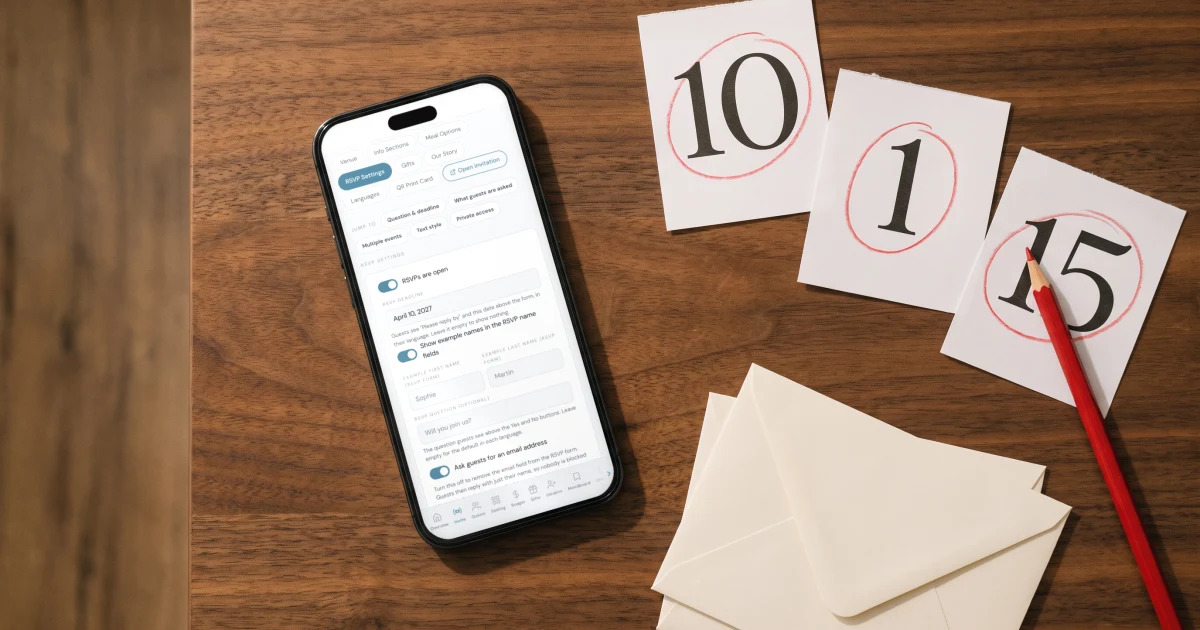
Send wedding invitations 6-8 weeks before a local wedding, or 2-3 months before a destination wedding so guests can book travel, and set your RSVP deadline 3-4 weeks before the wedding date (4-6 weeks for a destination wedding). Your caterer typically needs the final headcount 1-2 weeks out, and the weeks in between are your buffer to chase late responders and finish the seating chart. With a digital invitation from The Private Wedding App, an all-in-one wedding planning platform, the reply-by date you set in the RSVP tab shows above the RSVP form in each guest's language, you can close replies once it passes, and responses fill your guest list automatically with meals, allergies and a running total for each event. Each invitation can carry its own seats (for example 1 adult and 2 children), so the headcount cannot grow past what you planned, and you chase the missing guests one tap at a time on WhatsApp. It costs $19.99 a month or $189 once. 3-day free trial.
Every couple hits the same three questions in the same order: when do we send the invitations, what RSVP deadline do we put on them, and what do we do about the people who never answer? The answers are surprisingly precise, because they all count backwards from one hard date - the day your caterer needs a final headcount. This guide gives you the exact timeline for 2026, how to handle destination weddings and ceremony-only guests, the polite follow-up messages that actually get answers, and the part nobody warns you about: chasing stragglers is the single most annoying job in wedding planning, and it is the one a wedding planning app removes almost entirely.
The whole timeline counts backwards from your caterer
The RSVP deadline is not an etiquette question - it is a logistics question. Your caterer needs a final guest count, usually 1-2 weeks before the wedding, and it drives what you pay. Your seating chart needs a final list before you can finish it. Rentals, favours and the bar order all scale with the same number.
So the math is fixed: caterer needs numbers 1-2 weeks out, you need 1-2 weeks before that to chase the guests who did not answer, which puts your RSVP deadline at 3-4 weeks before the wedding. Give guests 4-5 weeks to respond after receiving the invitation, and you land on sending invitations 6-8 weeks before a local wedding.
Write the deadline as a specific date on the invitation - 'Kindly reply by September 1' - never 'as soon as possible'. Vague deadlines get vague responses.
The 2026 invitation timeline, date by date
Here is the full sequence for a local wedding and a destination wedding side by side. A destination wedding shifts everything earlier because guests need to book flights and hotels - and a save-the-date matters much more.
A worked example: wedding on October 10
Abstract rules are easy to nod at and hard to apply, so here is a real calendar. Say your wedding is Saturday, October 10, local, with a caterer who wants final numbers on October 1.
You would send invitations around August 10-15 (8 weeks out), print 'Kindly reply by September 12' on them (4 weeks before the wedding), send your follow-up messages to anyone missing on September 15, hand the caterer the final count on October 1, and finish the seating chart the same week - from a guest list that is actually final.
One common variant: if your invitations are going out later than planned - say August 1 for a September 1 deadline - that still works. Four weeks is a comfortable response window for a digital invitation, because there is no postal round-trip: guests tap the link and answer in a minute.
See the featureDigital wedding invitation
Tiered deadlines: ceremony-only guests and different groups
Not every guest needs the same deadline. Many couples invite one circle to the full day and a wider circle to the ceremony or the party only. Guests who are only attending the ceremony do not affect the dinner headcount, so their RSVP matters less to the caterer - but they still affect chairs, order of service and the venue's capacity.
The clean way to run this is one deadline for everyone on paper, but different priorities when chasing: dinner guests get the follow-up message first, ceremony-only guests can slide a week. If you are running a multi-event wedding - ceremony plus reception, or a welcome dinner the night before - a digital invitation can ask each guest to RSVP per event, so 'attending the ceremony but not the dinner' is a real answer in your guest list instead of a note you have to remember.
On The Private Wedding App, each guest group gets its own invitation link that shows only the events, schedule moments and info sections that group is invited to, and the WhatsApp button on each guest row sends that guest their own group's link. With RSVP per event on, the guest list shows a running total for each event (attending, pending, declined, counting only the guests invited to it), so on deadline day you see at a glance whether the dinner count is complete even if the ceremony count is not.
The same applies to meals: if you are serving a buffet, you do not need a meal choice at all - but you absolutely still need allergies and dietary restrictions. Ask for those on the RSVP form even when there is no menu to pick from.
How to chase late RSVPs without feeling rude
Expect 10-20% of guests to miss the deadline. It is not rudeness - people read the invitation, mean to answer, and forget. Plan the chase in advance and it stops being awkward: send a short personal message 2-3 days after the deadline, not a group blast.
A message that works: 'Hi Sarah! Finalising numbers with our caterer this week - are you able to make it on October 10? Would love to have you there.' It gives a reason (the caterer), a date, and warmth. For the final stragglers a week later, a phone call settles it in two minutes.
This is the part software genuinely changes. With The Private Wedding App, the guest list shows exactly who has not responded, and each missing guest has a one-tap WhatsApp button that opens a pre-filled chase message to that person. When your deadline passes and the count is final, you can close RSVPs entirely so the link stops accepting responses and the number stops moving under your seating chart.
- Deadline + 2-3 days: short personal WhatsApp or text to each missing guest - never a group message.
- Give a concrete reason: 'the caterer needs final numbers this week'.
- Deadline + 1 week: phone call to the last few - a no answer is better than a maybe.
- No response after the call: count them as not attending, tell them kindly, and finalise.
- Once numbers are final: close your RSVPs so late clicks cannot change the count.
The live guest list: see who has not answered, chase them on WhatsApp in one tap.
Why digital invitations compress this whole timeline
Everything above assumes the classic failure mode: paper invitations go out, responses come back by post or scattered across texts, and someone copies them into a spreadsheet that is out of date the moment it is made. That copying step is where deadlines die.
A digital invitation removes it. Your invitation lives on a private link you share by WhatsApp, text or email - delivery is instant, so the postal buffer disappears from the timeline. The RSVP page shows your deadline to every guest. Each response lands in your guest list the second it is sent, with plus-ones, meal choices, allergies and song requests attached. The guest list feeds the seating chart directly, so 'finalise the seating' stops being a re-copying job and becomes a five-minute check.
Three settings keep the final number honest. Seats per invitation: on each guest you set exactly who they may bring (with children and infants counted separately if you switch that on), the guest reads "You can bring: 1 adult, 2 children." on the RSVP and cannot add more, so families are counted correctly before the deadline instead of surprising you after it (wording ideas in our guide to inviting children, or not, on the invitation). Private access: when switched on, only the emails and phone numbers on your guest list can open the invitation, so a forwarded link does not add strangers to your count. Confirmation email: guests who leave an email address receive a confirmation in their invitation language, so nobody replies twice wondering whether it went through.
And because the invitation and the planning tools are one platform, the rest of the countdown is handled by the same system: the checklist keeps your timeline, the budget tracker holds the caterer's per-head cost, and the AI assistant answers 'what should I be doing right now?' from your real wedding date.
Everything you need, in one place
Planning your own wedding without a planner is entirely achievable.
See it for yourself.
Explore the whole platform: cinematic invitation, RSVP with meals and allergies, guest list, seating chart, budget, vendors, checklist, moodboard, photo sharing and the AI planner. No account needed.
Try the full planner →When should I send my wedding invitations?
Send invitations 6-8 weeks before a local wedding and 2-3 months before a destination wedding, so travelling guests can book flights and hotels. Send save-the-dates earlier: 4-6 months out for local weddings, 8-12 months for destination weddings. Digital invitations deliver instantly, so you keep the full response window even if you are running late.
When should my wedding RSVP deadline be?
Set the RSVP deadline 3-4 weeks before your wedding date (4-6 weeks for destination weddings). Your caterer typically needs the final headcount 1-2 weeks before the wedding, and you need the weeks in between to chase late responders and finish the seating chart. Always print a specific date, not 'as soon as possible'.
How long should I give guests to RSVP?
Give guests 4-5 weeks between receiving the invitation and the RSVP deadline. Shorter than 3 weeks feels rushed for guests arranging childcare or travel; longer than 6 weeks and people put it off and forget. With a digital invitation there is no postal round-trip, so a 4-week window is comfortable.
What do I do when guests don't respond by the RSVP deadline?
Wait 2-3 days after the deadline, then send each missing guest a short personal message - not a group blast - giving a concrete reason: 'finalising numbers with our caterer this week, can you make it?'. A week after the deadline, phone the last few. Anyone still unreachable is counted as not attending. Expect 10-20% of guests to need this nudge; a wedding planning app that shows non-responders with one-tap WhatsApp chase messages turns it into a ten-minute job.
Can I stop guests from RSVPing after the deadline?
On paper, no - late cards keep arriving. With a digital invitation on The Private Wedding App, yes: once your headcount is final you close RSVPs, and the invitation link stops accepting responses so the number underneath your catering order and seating chart cannot change.
Do ceremony-only guests need the same RSVP deadline?
Use one printed deadline for everyone, but prioritise dinner guests when chasing, since only they affect the caterer's headcount. If you are inviting some guests to the ceremony only, use an invitation that supports per-event RSVP, so each guest answers separately for the ceremony and the reception and your guest list shows exactly who attends what.
Should I ask for meal choices on the RSVP if we're having a buffet?
Skip the meal choice, keep the dietary question. A buffet needs no per-guest menu selection, but you still need allergies and dietary restrictions for the caterer. The Private Wedding App lets you ask for dietary requirements on the RSVP form without showing a meal picker, and the answers land in your guest list next to each name.
When does the caterer need the final guest count?
Most caterers ask for the final headcount 1-2 weeks before the wedding - it is usually in your contract, and it is the number your invoice is based on. Confirm the exact date when you book, then set your RSVP deadline at least 2 weeks before it so you have time to chase non-responders.
When should you send wedding invitations and when should the RSVP deadline be?
Send invitations 6-8 weeks before a local wedding (2-3 months before a destination wedding) and set the RSVP deadline 3-4 weeks before the wedding date (4-6 weeks for a destination wedding). That leaves 4-5 weeks for guests to answer and 1-2 weeks after the deadline to chase late replies before the caterer's final count. On The Private Wedding App, the reply-by date shows on the RSVP form in each guest's language, each invitation can carry a fixed number of seats with adults, children and infants counted separately, and the guest list shows a running total for each event, so on deadline day you see exactly who is still missing for each event.