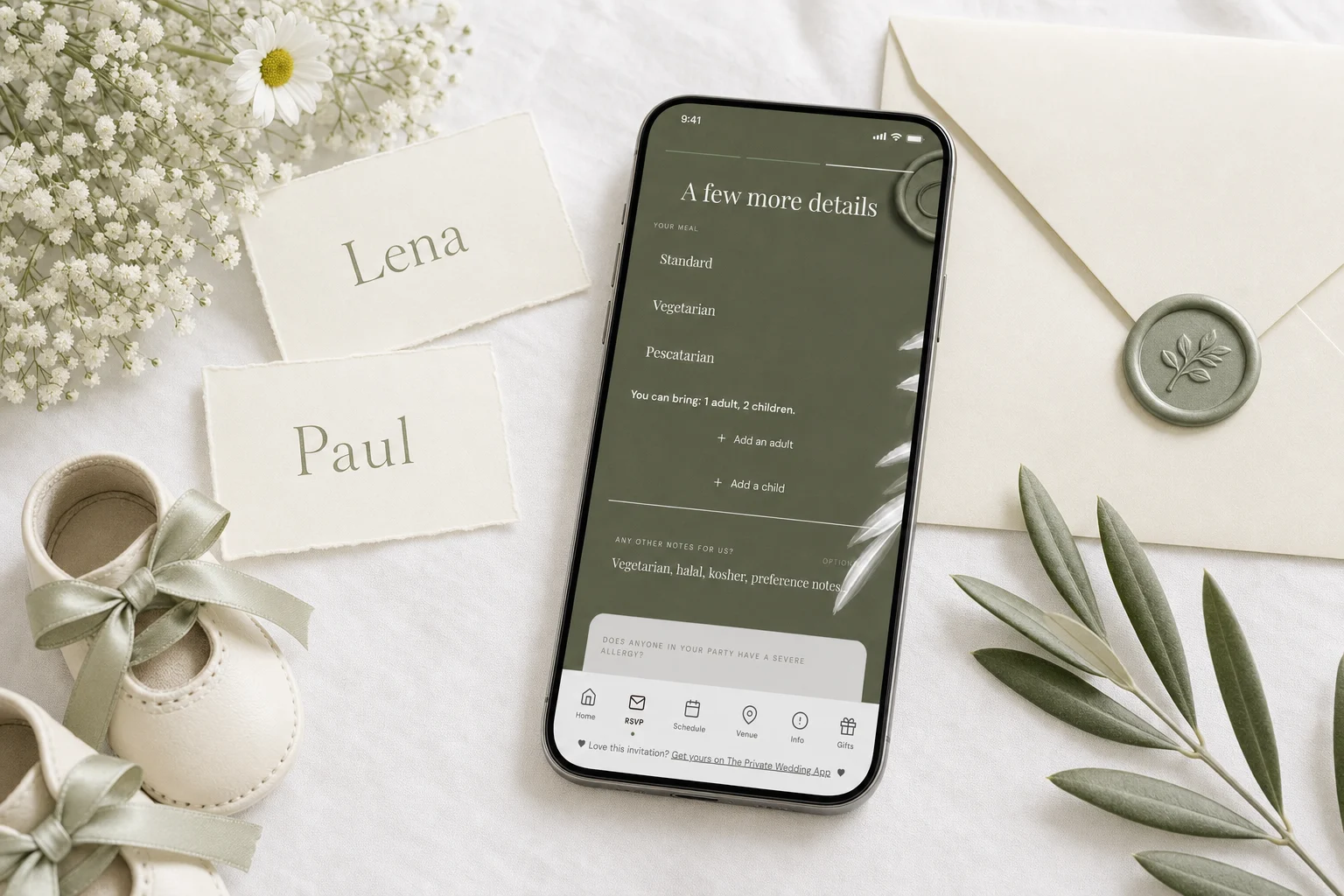
Say who is invited by who you name, then confirm it in one kind line. Children welcome: write the children's names on the invitation or envelope ("The Reed Family" or "Daniel, Sarah, Emma and Jack Reed"), or add "Little ones are very welcome." Adults only: address the invitation to the adults only and add "We love your little ones, but our celebration will be adults only." Only some children: name the children you invite on their family's invitation and explain the rule once, for example "Due to limited space, we are only able to invite children of immediate family." Wording only asks, though: guests can still reply for the whole family. With The Private Wedding App, an all-in-one wedding planning platform, each invitation carries its own seats: you set how many adults, children and infants each guest may bring, the guest reads "You can bring: 1 adult, 2 children." on the RSVP, types each name and cannot add more. For an adults only wedding, allow no additional guests at all, or give every guest adult-only seats. It costs $19.99 a month or $189 once. 3-day free trial.
Children are one of the few wedding decisions that every guest with a family will read closely. Some couples want the whole family there, nieces and nephews on the dance floor. Some want an adults only evening. Many want something in between: the children of the family, the flower girl and the page boy, a nursing baby, and no one else. Each choice is fine. The hard part is saying it clearly and kindly, and then making it hold, because the wording on an invitation only asks. A guest can still reply "Yes, the four of us!". This guide gives you wording to copy for every case, US and UK, answers the etiquette questions couples actually search, and shows how an invitation can carry its own seats, so each family can only reply for the people you invited.
The rule that does most of the work: the names
Before any line about children, the names on the invitation already tell guests who is invited. That is true in the US and the UK alike, and it is the first thing a well brought up guest reads.
If an envelope says "Mr. and Mrs. Daniel Reed", only the two adults are invited. If it says "The Reed Family", or names the children ("Daniel, Sarah, Emma and Jack Reed"), the children are invited. In the UK, the children's first names often go on the line below their parents: "Mr and Mrs Daniel Reed, Emma and Jack". With traditional double envelopes in the US, the outer envelope carries the parents and the inner envelope lists everyone: "Mr. and Mrs. Reed, Emma and Jack".
The trouble is that not every guest reads names that closely, and a digital invitation often has no envelope at all. So most couples add one clear line, which is what the next sections give you.
Children welcome: wording to copy
If children are invited, say it warmly so parents do not have to ask. It also helps to say what you have planned for them, since that is the question parents have next.
- Little ones are very welcome. We cannot wait to see them on the dance floor.
- Children are warmly invited. There will be a kids' table, a kids' menu and plenty of room to run around.
- Bring the whole family! Please include your children's names and ages when you RSVP.
- We would love for your children to celebrate with us. A babysitting room will be available from 9pm.
- UK: Children are very welcome at the ceremony and the wedding breakfast.
Adults only: how to politely say no kids
The kindest adults only wording is short, warm and not apologetic. Explain once, do not over justify, and never put it in capital letters. A line that sounds like a rule makes parents feel told off. A line that sounds like a choice is easy to respect.
Put the line on the RSVP page or the details page as well as the invitation, because that is where parents look when they reply.
- We love your little ones, but our celebration will be adults only.
- While we adore your children, we have chosen to make our wedding an adults only celebration. We hope this gives you a night off to enjoy.
- Our wedding will be an adults only affair. Thank you for understanding.
- Please note that we are unable to accommodate children at our wedding. We hope you can still join us.
- UK: We are sorry that we are unable to extend this invitation to children.
- UK: Adults only ceremony and reception. We hope you enjoy an evening off.

Only some children: wording that explains the rule
This is the most searched case and the most delicate. Inviting your nieces and nephews but not your colleagues' children is completely normal. What upsets people is a rule that looks random. So pick a clear rule, apply it to everyone, and say it once.
Common rules: children of immediate family only, children in the wedding party only, children above a certain age, or babies in arms only. Then the names do the rest: the children you invite are named on their family's invitation, and the others are not.
- Due to limited space, we are only able to invite children of immediate family. Thank you for understanding.
- We love your little ones, but we are only able to include the children in our wedding party.
- Children aged 12 and over are very welcome. We hope younger ones enjoy a cozy night with a sitter.
- With the exception of our flower girl and page boy, our day will be adults only.
- On a family's own invitation: We would be delighted if Emma and Jack joined us too.
Exceptions: a nursing baby, the flower girl and the page boy
Most adults only weddings make two kinds of exception, and both are worth saying out loud so other parents understand why some children are there.
A nursing baby is the classic one. A mother who is breastfeeding cannot leave her baby for a whole day, so most couples invite babies in arms even when the rest of the wedding is adults only. Say it directly to that guest, on her invitation: "Of course, baby Leo is very welcome." For the other guests, a general line works: "Babies in arms are welcome."
Children in the wedding party are the second: the flower girl, the page boy, the ring bearer. They are part of the ceremony, so everyone expects them. If they are the only children, it is fine to say so: "With the exception of our flower girl and page boy, our celebration will be adults only."
Wording only asks: the reply that breaks the rule
Here is what every couple discovers. You wrote "adults only". You named only the two adults. And a guest replies: "Yes! The four of us will be there." Or a family you invited with one child adds the second, because surely one more child does not matter.
On a paper RSVP card or a free text form, nothing stops this. You then have to write back, which is the awkward conversation the wording was meant to avoid, and you have to do it for every guest who did not read closely. Meanwhile your caterer counts change and a table you planned for eight now seats ten.
The fix is not better wording. It is an invitation that makes the wording true: each invitation carries its own seats, so a family invited as two adults and two children can reply for exactly that, and a couple invited without children has no way to add any.
How The Private Wedding App makes the invitation enforce it
The Private Wedding App is an all-in-one wedding planning platform: the invitation and its pages, guest list and RSVP with meal choices and allergies, seating chart, day-of schedule, budget, vendors and checklist in one place. Here is how it handles children.
Seats on each invitation. In the RSVP Settings tab of the invitation builder, switch on "Allow additional guests", then "Count children and infants separately". On the Guests page, each guest has a "Seats" button: you type how many adults, children and infants that guest may bring. Leave it empty and your wedding-wide rule applies to that guest. Set everything to zero and that guest cannot bring anyone.
What the guest sees. When the guest replies, they read "You can bring: 1 adult, 2 children.", in their own language (the RSVP is translated into 26 languages). They get one button per category you gave them, "Add an adult", "Add a child" or "Add an infant", and they type each person's name. A button disappears once that category is full, so they cannot add a third child or a baby you did not invite. Children you already listed by name under a guest stay as you wrote them, and you can mark each one as a child or an infant.
Meals and allergies. Infants are not asked for a meal choice. Children choose from your menu, so if you want a kids' dish, add it as one of your meal options. The allergy question is asked for everyone, children included.
- Adults only: switch off "Allow additional guests" so no one can bring anyone, or give every guest seats: adult seats for those who may bring a partner, zero for everyone else. A guest with empty seats falls back to your wedding-wide rule and could still add a child
- Only some children: give each invited family its own children and infant seats, for example 2 adults and 2 children
- A nursing baby: one infant seat on that guest's invitation
- Children welcome: give each family the seats that match its household
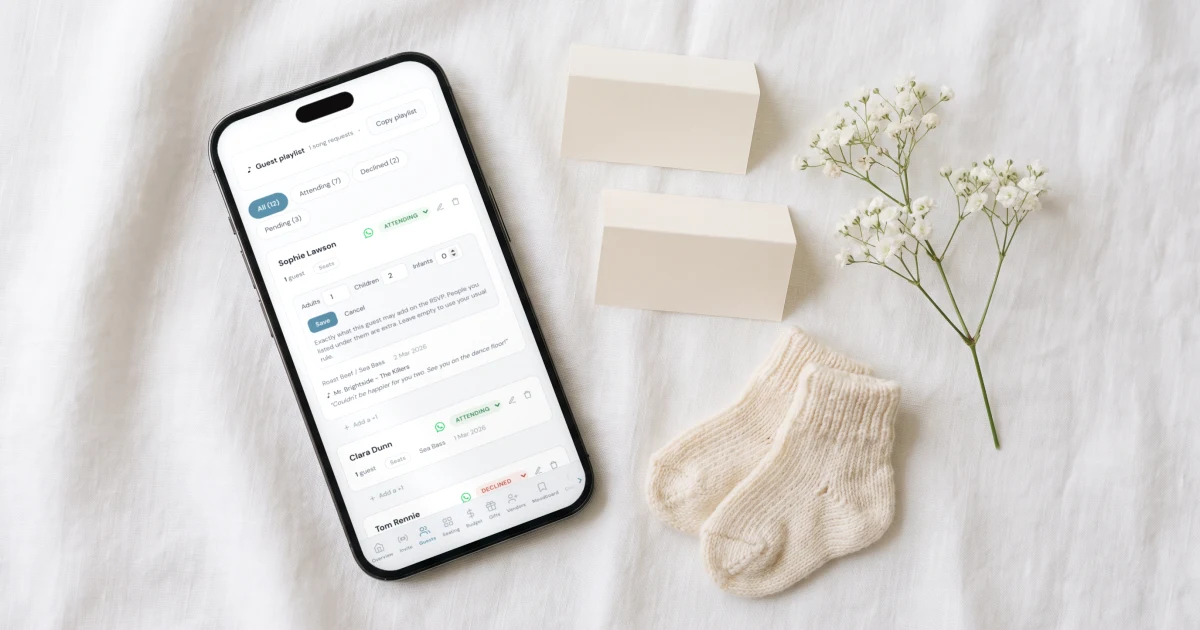
What you see as replies come in
The Guests page shows your attending totals as "X adults · Y children · Z infants". The CSV export gains an Age group column and a Seats allowed column. The caterer day sheet counts adults, children and infants, leaves infants out of the plate count, and shows children and infants per table, so the venue knows how many high chairs and kids' plates to set.
When you send invitations by WhatsApp from the Guests page, the message for a guest with seats says "This invitation covers 4 of you.", the same number your invitation allows, so the count is clear before they even open the link.
One honest limit: the app does not apply a rule such as "children of family only" for you. You decide the seats for each invitation, one guest at a time, which is also what lets you make an exception for the nursing baby or the flower girl. For the seats to apply, the guest types their name as it is written on your guest list, the same way the plus one works.
Open the live demo invitation, then start your own invitation and planner: the full wedding planner, at the price of a streaming subscription. For the message that goes with the link, see our wedding invitation message templates, and for the numbers your caterer needs, our guide to the final guest count.
Everything you need, in one place
Planning your own wedding without a planner is entirely achievable.
See it for yourself.
Explore the whole platform: cinematic invitation, RSVP with meals and allergies, guest list, seating chart, budget, vendors, checklist, moodboard, photo sharing and the AI planner. No account needed.
Try the full planner →How do you politely say no kids at a wedding?
Address the invitation to the adults only, then add one warm line: "We love your little ones, but our celebration will be adults only." Repeat it on the RSVP page, where parents look when they reply, and do not over explain. With The Private Wedding App, either allow no additional guests at all, or give every guest adult-only seats: they then see only an "Add an adult" button, or none, and cannot add a child to their reply. A guest left with empty seats follows your wedding-wide rule instead.
How do you invite only some kids to a wedding?
Pick one clear rule, such as children of immediate family or children in the wedding party, apply it to everyone, and name the invited children on their family's invitation. Add a line for everyone else: "Due to limited space, we are only able to invite children of immediate family." In The Private Wedding App you then give each invited family its own children seats on the Guests page; the rule itself is yours to apply, invitation by invitation.
Should children's names be on the wedding invitation?
Yes, if they are invited. Naming them ("Daniel, Sarah, Emma and Jack Reed", or in the UK "Mr and Mrs Daniel Reed, Emma and Jack") is the clearest way to show they are included. "The Reed Family" also includes the children. If children are not named, guests should read the invitation as adults only.
How do you add kids to a wedding invitation and RSVP?
Name them on the invitation, then let the family confirm them on the RSVP. With The Private Wedding App, you give that guest children seats on the Guests page, for example 2 children. On the RSVP the guest reads "You can bring: 1 adult, 2 children.", taps "Add a child" and types each child's name. If you already know the names, you can list the children under the guest yourself and mark them as children.
Is it rude to have a child free wedding?
No. An adults only wedding is a common and accepted choice in the US and the UK. What matters is saying it clearly, kindly and early, so parents can arrange childcare or decline in good time. Exceptions for a nursing baby or children in the wedding party are expected and do not need an apology.
What if guests RSVP with their kids anyway?
On a paper card or a free text form, you have to contact them and explain, kindly and privately. The better fix is an invitation that does not allow it: in The Private Wedding App, each invitation carries its own seats for adults, children and infants, and the guest cannot add more people than you gave them. Give seats to every guest, since a guest with empty seats follows your wedding-wide rule.
Are babies included in an adults only wedding?
Usually a nursing baby is the exception. Say so on that guest's invitation ("Of course, baby Leo is very welcome") or write "Babies in arms are welcome" for everyone. In The Private Wedding App, give that guest one infant seat: infants are counted separately, are not asked for a meal choice and are left out of the caterer's plate count.