
In 2026 a wedding website has to do the work, not just display it. The Private Wedding App is a full wedding planning platform: the link your guests open carries the invitation, the schedule, the venue map and the travel details, and takes the RSVP with meal choice and allergies in the same tap. Behind that link sit the guest list, the seating chart, the budget and the vendor comparator, all fed by those answers, so one confirmed yes moves the headcount, the table plan and the caterer count together. A static website builder stops at publishing the page and leaves you collecting replies in a spreadsheet, which is the part that actually costs couples their evenings. It is built phone first, because that is where guests open it, and details can be corrected after sending without reissuing anything. The Private Wedding App costs $19.99/month or $189 once for lifetime access, no subscription.
The wedding website used to be a simple page with your names, a date, a venue address and a link to your registry. Guests would open it on a laptop, skim the details, and close the tab. That was fine in 2015. It is not fine in 2026. Today, 82% of couples aged 25 to 45 prefer digital invitations. 75% of wedding-related traffic comes from mobile. Your guests are not sitting at desks. They are scrolling on their phones in bed, on the train, between meetings. If your wedding website does not work beautifully on a phone, most of your guests will never engage with it. The good news: the tools have caught up. The modern wedding website is not a website at all. It is a digital invitation that does everything the old website did, but better, faster, and on the device your guests actually use.
The old wedding website is dead
The traditional wedding website was built for desktop browsers. A homepage with your names and a photo. A separate tab for the schedule. Another for venue directions. Another for RSVP. Another for accommodation. Guests clicked through five pages to find what they needed, assuming they could find it at all.
The problem is not the information. The problem is the format. Tab-based navigation does not work on phones. Guests pinch and zoom. Links break. RSVPs require filling out forms on a screen too small for the input fields. And most couples build these sites on platforms designed in 2014 and reskinned every year with slightly different fonts.
In 2026, the couples who are getting the best guest engagement have moved past the website entirely. They send one link. It opens on any phone as a cinematic, scrollable experience. Guests see everything: names, date, venue, schedule, travel info, dress code, and they RSVP directly inside it. No tabs. No navigation. No friction.
What your guests actually need in one link
Every couple building a wedding website asks the same question: what should I include? The answer has not changed much. What has changed is how you deliver it. Here is what guests need, and how the modern digital invitation handles each one.
Your names, date and venue. This is the first thing guests see. On a digital invitation, it is the opening screen with a cinematic animation, your cover photo, and the key details front and centre. No searching. No clicking through to a subpage.
Your schedule and itinerary. Whether it is a single-day celebration or a multi-day destination wedding, your guests need to know what happens when. Welcome drinks, ceremony, reception, brunch the next day. Times and locations for every event, visible in a single scroll.
Venue location with a map. Not a text address your guests have to copy and paste into Google Maps. An interactive map they can tap for directions from wherever they are.
Travel information. Hotel recommendations, airport transfers, local tips, parking details. This matters for every wedding but is critical for destination weddings where guests are unfamiliar with the area.
RSVP with meal choice, allergies and plus-ones. The biggest difference between a website and a modern invitation. On a website, the RSVP is a form on a separate page. On a digital invitation, it is part of the experience. Guests confirm attendance, select their meal, note dietary requirements, and add their plus-one in under 30 seconds. Every response feeds directly into your guest list.
Dress code. A single line that saves dozens of WhatsApp messages asking what to wear.
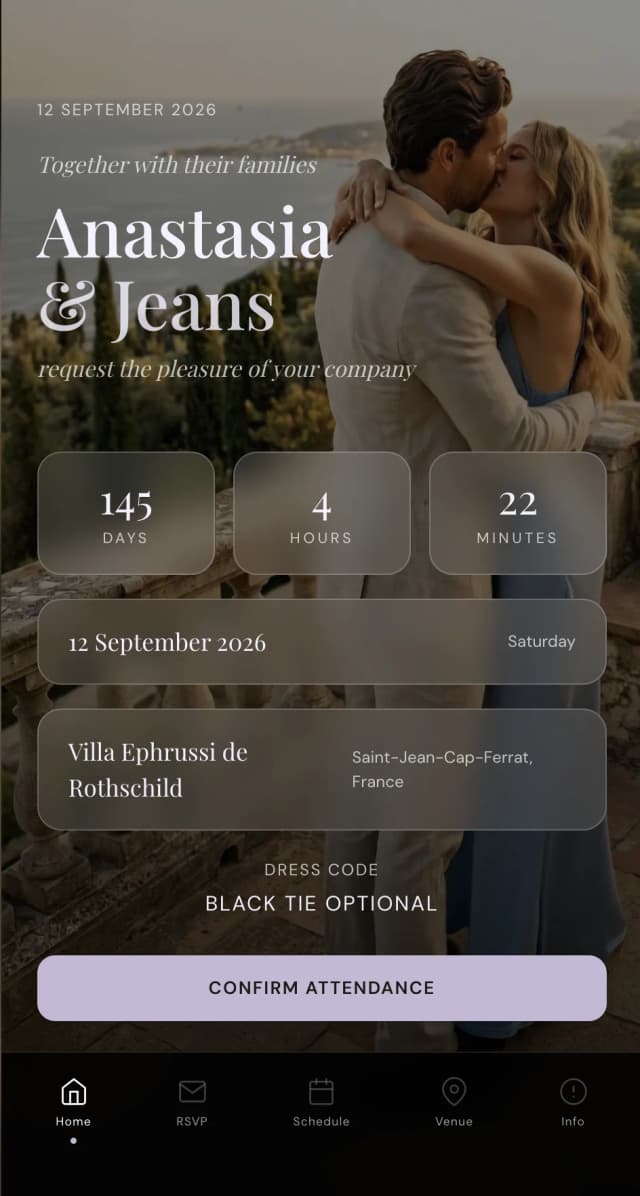
Tap the menu, explore every section. Meal choice, allergies and plus-ones appear once RSVP is confirmed.
The wedding itinerary problem
One of the most searched wedding planning terms right now is wedding itinerary. Couples are looking for templates to create a printed schedule for their guests: a card to leave in hotel rooms or a PDF to email before the weekend.
The problem with a printed itinerary is that it is out of date the moment you print it. The ceremony moves from 3pm to 4pm. The welcome dinner location changes. A new event gets added. You either reprint everything or accept that half your guests have the wrong information.
A digital invitation solves this permanently. Your schedule lives inside the invitation link. When you update it, every guest sees the new version instantly. No reprinting. No re-emailing. No confusion about which version is current.
This is especially valuable for wedding weekend itineraries where events span multiple days. Welcome drinks on Friday, ceremony Saturday afternoon, pool party Saturday morning, farewell brunch Sunday. Each event with its own time, location and details, all in one scrollable view.
Why RSVP changes everything
On a traditional wedding website, the RSVP form sits on a separate page. Guests fill in their name, tick a box, and maybe type a dietary note into a free-text field. You receive an email or a database entry that you then manually transfer into a spreadsheet.
On a modern digital invitation, the RSVP is built into the experience. Guests open the invitation, scroll through your details, and RSVP in context. They see your venue, your schedule, your dress code, and then confirm attendance. The meal choice is a dropdown, not a free-text field. Allergies have a dedicated input. Plus-one details are captured on the same screen.
Every response flows directly into a live dashboard. Your guest list updates automatically. Meal counts calculate themselves. Allergy notes sit next to each guest name. Your seating plan pulls from confirmed attendees. No spreadsheets. No manual data entry. No chasing anyone for information you already asked for.
This is the single biggest advantage of a digital invitation over a traditional wedding website. The website collects information. The invitation collects information and connects it to every other part of your wedding planning.
Mobile-first is not optional
Look at how your guests will actually receive your invitation. You will share it via WhatsApp, text message, email, or a QR code on a printed card. In every scenario, the first device they open it on is their phone.
A traditional wedding website built on a desktop-first platform will technically work on mobile. But technically working and actually being pleasant to use are very different things. Small text. Horizontal scrolling. Forms that require precise tapping. Navigation menus that collapse into hamburger icons.
A mobile-first digital invitation is designed for the phone screen from the start. Full-width layouts. Large tap targets. Smooth scrolling. No navigation menus because there is nothing to navigate. The guest scrolls down and sees everything in order: names, date, venue, schedule, travel info, RSVP. It feels like opening a beautifully designed message, not visiting a website.
This matters for guest engagement. If your invitation is easy to use on a phone, more guests will RSVP immediately instead of bookmarking it for later. And later often means never.
QR codes bridge physical and digital
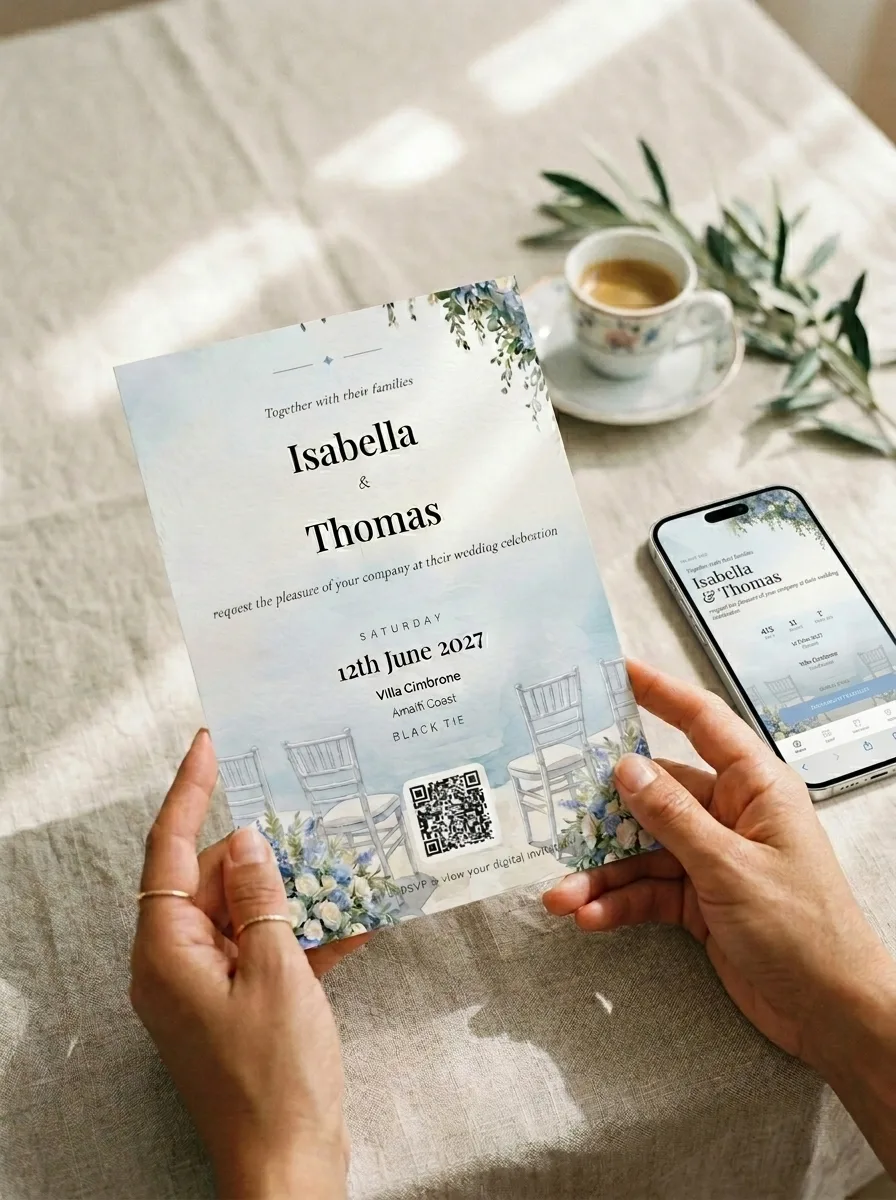
Many couples still want something physical to give or mail. A printed save-the-date, a card at an engagement party, or a small insert with a formal invitation suite. A QR code makes this seamless.
Print a card with your names, your date, and a QR code. Guests scan it with their phone camera and land directly on your digital invitation. They RSVP on the spot. The response flows into your dashboard. You get the warmth of a physical card and the efficiency of a digital system.
This is the hybrid approach that works best in 2026. Physical stationery for the keepsake. Digital invitation for the functionality. One does not replace the other. They work together.
What happens after guests RSVP
This is where a wedding website stops and a modern wedding platform continues. On a website, the RSVP is the end of the guest interaction. You have their response in a database. Now you manually export it, build your seating plan in a separate tool, count meals in a spreadsheet, and track allergies in a notes app.
On a connected platform, the RSVP is the beginning. Every response automatically updates your guest list with attendance, meal choice, allergy notes, and plus-one details. Your budget tracker recalculates catering costs based on confirmed guests. Your seating plan shows only confirmed attendees. Your meal count dashboard gives you exact numbers to send to your caterer.
You edit your invitation anytime. Venue change, schedule update, travel advisory: guests always see the latest version. No re-sending. No confusion about which link is current.
After the wedding, the platform keeps working. Enable guest photo sharing and your guests upload their photos via QR code or link - every image lands in your private gallery without any app download.
This is the fundamental shift. A wedding website is a page. A modern digital wedding invitation is a system that connects your guest communication to your entire wedding planning workflow.
Everything you need, in one place
Planning your own wedding without a planner is entirely achievable.
See it for yourself.
Explore the whole platform: cinematic invitation, RSVP with meals and allergies, guest list, seating chart, budget, vendors, checklist, moodboard, photo sharing and the AI planner. No account needed.
Try the full planner →Do I still need a wedding website in 2026?
Not a traditional one. A modern digital invitation includes everything a wedding website offered, your names, date, venue, schedule, travel info and RSVP, but delivered as a mobile-first experience that guests actually engage with. It replaces the website, not supplements it.
What should I include on my wedding website?
Your names and date, venue with a map, schedule or itinerary, RSVP with meal choice and allergy fields, travel information for out-of-town guests, dress code, and any special details. A digital invitation includes all of this in a single scrollable link.
How do I share a wedding itinerary with guests?
Include it directly in your digital invitation. Guests see every event with times and locations as they scroll. When you update the schedule, guests see the changes instantly. No reprinting, no re-emailing, no PDF attachments.
Can I print something physical and still use a digital invitation?
Yes. Print a card with a QR code that links to your digital invitation. Guests scan it on their phone and see everything: your details, schedule, venue map, and RSVP. Physical keepsake, digital functionality.
What is the best free wedding website builder?
Most free wedding website builders (The Knot, Zola, Joy) offer desktop-first templates with basic RSVP forms. If you want a mobile-first experience with connected guest management, automatic meal tracking, and a wedding planner built in, The Private Wedding App lets you explore live demos before choosing a plan.
Is a digital wedding invitation the same as a wedding website?
It does everything a website does, plus more. The difference is the format: a wedding website is a static page with tabs. A digital invitation is a cinematic, mobile-first experience with built-in RSVP that connects to your guest list, seating plan and budget tracker automatically.