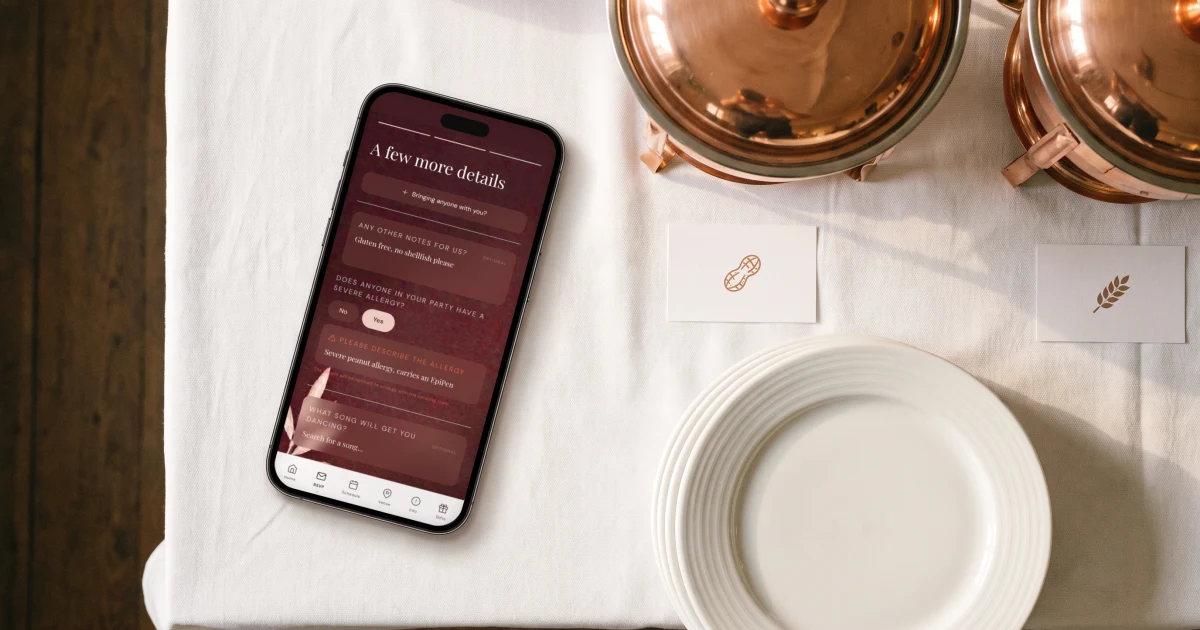
For a buffet or family-style wedding, remove the meal choice from your RSVP but keep two questions: a free-text field for dietary restrictions ('vegetarian, gluten-free, halal...') and a direct yes/no question about severe allergies with space for details. In The Private Wedding App builder, turn meal selection off and switch on 'Still ask about dietary restrictions & allergies' - guests see no menu, their answers land next to their name in your guest list, and you export one caterer-ready list with a dietary and allergy column per guest. The Private Wedding App is $19.99/month or $189 once, lifetime, with the full platform either way.
Most RSVP advice assumes a plated dinner: chicken, fish or vegetarian, tick one box. But a huge share of weddings serve a buffet, food stations or a family-style meal - and then the standard RSVP form stops making sense. There is nothing for guests to choose. What couples actually need in that case is different and simpler: no meal selection, but a reliable way to collect allergies and dietary restrictions from every single guest, because a buffet does not make a nut allergy less dangerous. This guide covers what to ask on a buffet RSVP, the exact wording that gets honest answers, and how to end up with one clean list for your caterer instead of forty scattered texts.
Why a buffet changes the RSVP - and why it doesn't
With a plated dinner, the meal question exists for the kitchen: the caterer needs to know how many of each plate to fire. A buffet removes that need entirely - everyone serves themselves, so asking guests to 'choose' a meal is confusing and produces answers nobody uses.
What a buffet does not remove is the safety question. A guest with a severe nut allergy needs the caterer to know before the day, buffet or not - cross-contamination at a self-serve station is arguably a bigger risk than with a plated meal. And guests with dietary patterns - vegetarian, vegan, gluten-free, halal, kosher - still determine what the buffet needs to include so everyone eats well.
So the rule is: drop the meal selection, keep the dietary questions. The mistake couples make is dropping both, then spending the final month collecting allergies over WhatsApp one guest at a time.
What to ask, and the exact wording
Two questions cover everything. First, an open dietary field - open, because a fixed list of checkboxes always misses someone's situation. Second, a direct severe-allergy question - direct, because guests routinely leave allergies out of a general 'dietary requirements' box, assuming they will just avoid the dish on the day.
See the featureMeal and allergy trackerHow to set it up on a digital RSVP
On The Private Wedding App this is a two-toggle setup in the invitation builder's Meals tab: switch meal selection off, then switch on 'Still ask about dietary restrictions & allergies'. Your guests see no menu and no meal picker - just the dietary field and the allergy question as part of their one-minute RSVP.
Every answer lands in your guest list automatically, attached to the right name - including plus-ones, who answer for themselves when they RSVP. No copying from texts, no 'wait, who was the gluten-free one?' in the final week. If some guests are invited to the ceremony only, per-event RSVP keeps their answers separated from the dinner headcount too.
The same form handles the rest of the buffet logistics: attendance counts for the caterer's per-head pricing, and the deadline shown on the RSVP page so answers arrive before you finalise the menu.
Dietary answers land next to each guest, live. Tap to explore.

Handing your caterer one clean list
What your caterer actually wants is one document: every guest, their dietary restriction if any, and severe allergies flagged loudly. From the guest list you export exactly that - a spreadsheet with a column for dietary notes, a yes/no severe-allergy column and the allergy details, one row per guest including plus-ones.
Send it with the final headcount 1-2 weeks before the wedding, and point out the severe-allergy rows explicitly in your message. For the buffet menu itself, the dietary column doubles as your planning input: three vegans and two gluten-free guests means the buffet needs a labelled vegan dish and a gluten-free option - decisions you can make a month out because the answers arrived with the RSVPs.
- Builder → Meals tab: meal selection off, 'Still ask about dietary restrictions & allergies' on.
- Check the RSVP preview: guests should see the dietary field and allergy question, no menu.
- As responses arrive, scan the guest list for severe-allergy flags - contact those guests if details are vague.
- Export the guest list and send your caterer the dietary and allergy columns with the final headcount.
- Ask the caterer to label buffet dishes for allergens and keep serving spoons separate - then relax.
Everything you need, in one place
Planning your own wedding without a planner is entirely achievable.
See it for yourself.
Explore the whole platform: cinematic invitation, RSVP with meals and allergies, guest list, seating chart, budget, vendors, checklist, moodboard, photo sharing and the AI planner. No account needed.
Try the full planner →Do I need meal options on my wedding RSVP if we're having a buffet?
No. Meal choices exist so a plated-service kitchen knows how many of each dish to prepare - a buffet makes that unnecessary because guests serve themselves. But keep two questions on the RSVP: dietary restrictions and severe allergies. Those matter regardless of service style, and collecting them at RSVP time saves you chasing guests one by one later.
How do I ask about food allergies on a wedding RSVP?
Ask two separate questions: an open dietary field ('Any dietary requirements we should know about? vegetarian, vegan, gluten-free, halal...') and an explicit allergy question ('Does anyone in your party have a severe food allergy? Please tell us exactly what.'). Keep them separate - guests often leave serious allergies out of a general dietary box, assuming they will manage on the day.
Can a digital wedding invitation ask about allergies without showing meal choices?
Yes. In The Private Wedding App's invitation builder, turn meal selection off and enable 'Still ask about dietary restrictions & allergies' in the Meals tab. Guests see no menu - just the dietary and allergy questions as part of the RSVP - and every answer lands next to the right guest in your guest list automatically.
How do I give my caterer the allergy list?
Export your guest list as a spreadsheet with a dietary-notes column, a severe-allergy flag and allergy details per guest, and send it together with the final headcount 1-2 weeks before the wedding. Call out the severe-allergy rows explicitly in your message, and ask the caterer to label buffet dishes for allergens.
What dietary restrictions should a wedding buffet cover?
Let your guests' actual answers decide instead of guessing: collect restrictions at RSVP time and read the list a month out. In practice most weddings need at least one labelled vegetarian or vegan dish and one gluten-free option, plus halal or kosher accommodation if your guest list calls for it. The point of asking on the RSVP is that you plan from real data, not assumptions.
Should plus-ones answer the dietary questions too?
Yes - a plus-one's allergy is just as real. On a digital RSVP where the invited guest adds their plus-one, the dietary and allergy questions are answered for each person in the party, and each lands as its own row in your guest list and caterer export.