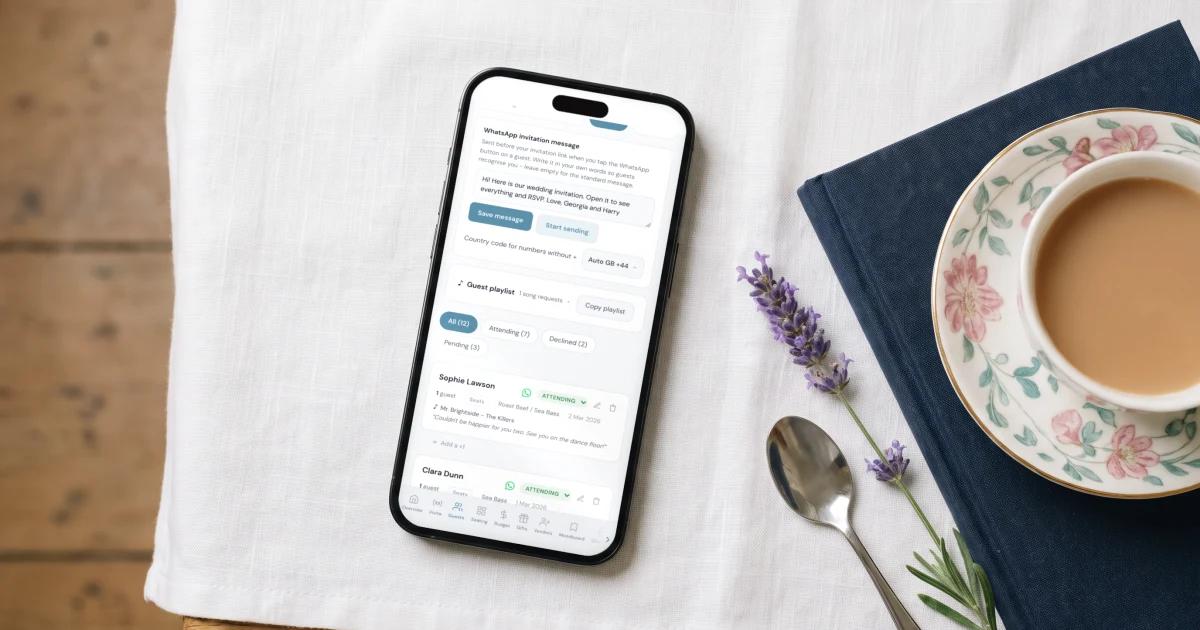
The best way to send wedding invitations on WhatsApp is a private interactive link, not a PDF or image: each guest taps the link, RSVPs, picks a meal and lists allergies, and your guest list updates itself. The Private Wedding App generates that link and a per-guest sending workflow, so every WhatsApp message becomes a tracked RSVP inside your wedding planner instead of a lost reply in a group chat. Invitation, RSVP, guest list, seating and budget come together for $19.99/month or $189 once, for good.
Your guests already live on WhatsApp - it is where the group chats happen, where your aunt asks what time the ceremony starts, and where they will reply no matter how you send the invitation. So the real question is not whether to send your wedding invitation on WhatsApp, but how to do it well. Because there is a way that looks fine for ten seconds and then turns into chaos (the PDF or image), and a way that turns every message into a tracked RSVP: a private interactive link, sent with one tap per guest. This guide walks through it step by step - including the exact sending workflow and what to do about guests who don't use WhatsApp.
Why WhatsApp is the natural channel for your invitation
For most families, WhatsApp is not a messaging app - it is where the wedding already lives. The family groups, the logistics, the questions: it all happens there. Sending your invitation through another channel (international post, an email nobody opens) means swimming against the current.
WhatsApp also solves distance. If you have family abroad or guests spread across cities, the link reaches everyone equally fast, for free. And because the conversation stays open, guests can ask you anything the invitation does not answer - though, as you will see, a good digital invitation answers almost everything.
The problem with sending a PDF or image
The most common approach is also the most fragile: sending the invitation as an image, PDF or video. It looks good on arrival - and that is where the advantages end. Within days, the file is buried under new messages. If the time or venue changes, the old file keeps circulating through forwards and nobody knows which version is right.
And the expensive part: there is no RSVP. 'Just confirm here please' means replies trickle in as loose messages across three different phones for weeks. You (or your mother) end up copying everything into a notebook or spreadsheet by hand - and that list never matches reality when the caterer asks for final numbers.
A PDF is a photo of your wedding at one moment in time. What you need is something alive: an invitation that updates itself and records the answers for you.
The alternative: a private interactive link
Instead of a file, you send a private link. When guests open it, they see a real animated invitation: a cover with your names, a countdown, the schedule, the venue map, the dress code - and the RSVP button. WhatsApp shows the link with a preview card of your cover photo, so the message arrives dressed as an invitation, not as a bare URL. Try it yourself below - this demo is interactive, exactly what your guests would receive.
A live invitation your guests open from WhatsApp. Tap through every screen.

Sending it: one WhatsApp tap per guest
Here is where The Private Wedding App does the work for you. Import your guest list - paste it from anywhere, and names, emails and phone numbers are picked up automatically - or add guests one by one. Every guest with a phone number gets a WhatsApp button next to their name in your guest list.
Tap it, and that guest's chat opens with a friendly message and your invitation link already typed. Add a personal line ('Maria! It would mean so much to have you there') and hit send. It goes out from your own WhatsApp, so replies come straight back to you in the conversation your guests already have with you - and it costs nothing, with no per-guest fees and no limits.
For the wider circle, family groups work perfectly too: one message to the group with the link and a clear RSVP deadline. Everyone opens the same link and confirms individually - the responses never get mixed up.
- Import your list - phone numbers are detected automatically
- Personal one-tap WhatsApp message for key guests: parents, wedding party, close friends
- One message with the link and an RSVP deadline for each family group
- Send in waves - close family first, then friends, then everyone else
- Follow up with pending guests a week later, with the same WhatsApp button
RSVPs land in your guest list automatically
This is where the link beats the PDF beyond argument: each guest confirms inside the invitation - attendance, plus-ones, meal choice, allergies - and everything flows into your guest list automatically. No copying answers, no spreadsheet, no 'wait, who confirmed with you?'.
Your dashboard shows in real time how many guests confirmed, which meals they picked and who has not answered yet. When the caterer asks for final numbers, it is one glance - and the same list feeds your seating chart, which you build by dragging and dropping confirmed guests. Try the guest list below - the WhatsApp button sits right in each guest's row.
The guest list with a WhatsApp button per guest. RSVPs update it live.
Guests without WhatsApp: email, SMS and the QR card
There are always exceptions: the uncle without a smartphone, the grandparents who deserve something to hold. For them, the same invitation has two more doors. By email or SMS, you send the exact same link and the experience is identical.
And for older guests, the printable QR card: an elegant card in your invitation's design carrying a QR code. Scanned with any phone camera - theirs or a family member's - it opens the full invitation. They keep the paper as a keepsake, you keep the digital RSVP. One system for 100% of your guests.
Everything you need, in one place
Planning your own wedding without a planner is entirely achievable.
See it for yourself.
Explore the whole platform: cinematic invitation, RSVP with meals and allergies, guest list, seating chart, budget, vendors, checklist, moodboard, photo sharing and the AI planner. No account needed.
Try the full planner →Does sending wedding invitations on WhatsApp cost anything?
No. The per-guest WhatsApp button uses a standard WhatsApp link and the message goes out from your own WhatsApp account - completely free, no per-guest fees, no message credits, no limits.
What does the invitation look like when I send it on WhatsApp?
The link shows a preview card: your cover photo, your names and the invitation title appear right in the message. It looks like an invitation before it is even opened, not like a cold link.
Can I send the invitation link to WhatsApp groups?
Yes. Everyone opens the same link and each guest confirms individually with their own name, plus-ones and meal choice. Responses never get mixed up, even from the same link.
How do I track who has RSVP'd?
Automatically. Each confirmation lands in your guest list in real time with attendance, plus-ones, meal choice and allergies. Filter by pending to see who has not answered, and use the same WhatsApp button to send a personal reminder.
Can I change the invitation after sending it?
Yes, as often as you want: times, venue, sections, photos. Everyone always sees the current version at the same link - no outdated files circulating through forwards.
What about guests who don't use WhatsApp or a smartphone?
Send them the same link by SMS or email, or print the QR card in your invitation's design: they scan it with any phone camera (or a family member does it for them) and the full invitation opens.
Do my guests need to install anything or create an account?
No. The link opens in the browser of any phone or computer. No downloads, no sign-ups, no passwords.
How much does a WhatsApp wedding invitation with RSVP cost?
The Private Wedding App is $19.99/month (or your local equivalent) and includes the interactive invitation, unlimited WhatsApp sending, automatic RSVP with meals and allergies, the guest list, seating chart, budget tracker and wedding checklist. 3-day free trial.