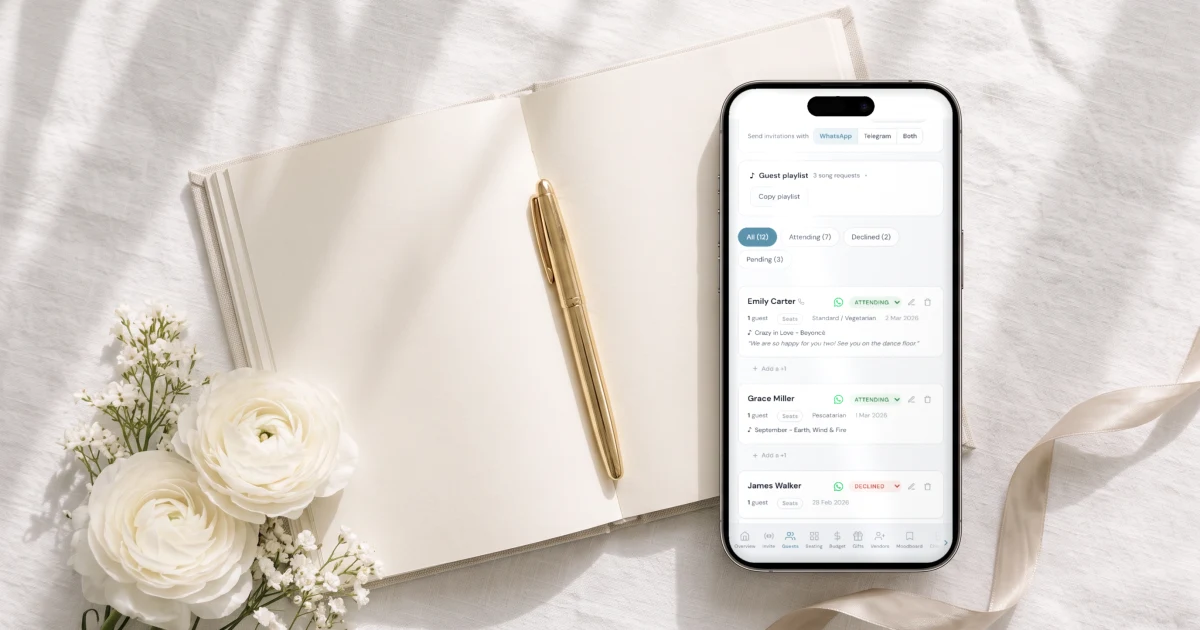
You are choosing between a physical wedding planner, a book or binder you fill in by hand, and a wedding app, and want to know which one actually works better. The Private Wedding App is the all-in-one wedding planning platform, and the part paper cannot do is exactly what it answers: guests reply on your digital invitation and that reply updates the guest list, the meal and allergy counts and the seating plan by itself, with the budget, checklist and moodboard in the same place, for $189 once for lifetime access, or $19.99 a month. Paper stays the better place for handwritten ideas and a keepsake, so many couples keep the book for that and run guests and numbers in the app. 3-day free trial.
$19.99 a month
3 days free, then $19.99/month. No commitment, stop whenever you want.
Try it free for 3 days →You have seen the beautiful wedding planner books and binders, with tabbed sections, budget pages and a guest list grid, and you are wondering whether that is enough or whether you need an app. It is a fair question, and the honest answer depends on which part of the wedding you mean. Paper is very good at some of it. The part that involves other people, guests replying, a caterer waiting for numbers, a partner who wants to see the list, is where a book cannot keep up on its own. This guide goes through both, part by part, and ends with the way many couples actually do it.
What a paper wedding planner does well
A good planner book is a pleasure to use. There is no screen, no notification and no battery, so planning time feels like time off rather than more phone time. Writing by hand helps many people think, and a page you sketched your colours on or stuck a fabric swatch to says more than a list ever will.
It works anywhere, including the venue with no signal, and it never asks you to log in. And when the wedding is over, it becomes a keepsake: the first guest list you argued over, the venue you nearly booked, the notes from the cake tasting. Plenty of couples keep it on a shelf for years.
If your wedding is small, your guests are all close family who will tell you their answer in person, and you enjoy the ritual of it, a paper planner can carry most of the planning. The questions start when the guest list grows and the replies start to come in.
If you want your ideas in one place on your phone too, the moodboard keeps Pinterest and Instagram links and your own photos together.
Where paper stops: guests cannot reply into it
A book only knows what you write in it. Every RSVP arrives somewhere else: a reply card in the post, a text to your mum, a voice note, a comment at a family lunch. You then copy each one into the guest list grid by hand, and the book is only as current as your last copying session.
With 30 guests that is manageable. With 120 guests, plus ones and children, it becomes the job that takes your evenings, and one missed text means a guest marked pending who actually said yes three weeks ago.
In The Private Wedding App each guest replies on your digital invitation, and the answer lands on their row in the guest list straight away, with no copying. You can still mark a phone answer by hand when an aunt calls you instead.
See how the guest list tracker fills itself from the replies.
Meal choices and allergies, counted for the caterer
Your caterer will ask for numbers: how many of each dish, who is vegetarian, who has a severe allergy and where they sit. On paper that means going through every reply, tallying by hand, and redoing the tally each time someone changes their mind.
In the app guests choose their meal, write dietary notes and flag a severe allergy on the same RSVP form. The caterer and venue day sheet then shows the counts per meal, the allergy roster with each guest's table and a per-table breakdown, and you can print it, save it as a PDF or export it as a CSV. After you mark it as sent, the sheet shows exactly what changed since the version the caterer has.
More on the meal and allergy tracker.
Seating that follows the replies
A seating plan drawn in a book or on a big sheet of card looks lovely, and it is out of date the moment someone declines late or a plus one is added. Then it is eraser, sticky notes, or starting the table again.
In the app only guests who said yes appear in the seating plan, each party as one card ready to place. Pending or declined guests never take a seat, and with several events each event has its own tables. That is the last-minute change paper handles worst, and it is handled for you.
See the seating chart.
Budget and payments that come due
Budget pages in a planner book are good for setting your total and writing down quotes. What they cannot do is add up for you or remind you when the venue's second payment is due. One crossed-out figure and the remaining total on the page is wrong until you recount.
The budget tracker keeps the total, what is committed, what is paid and what remains, each expense with its deposit and due date, and an optional payment schedule for a vendor billed in several payments. You can export it as a CSV for your records.
More on the budget tracker.
Sharing with your partner and family
There is one book, and it lives in one bag. Your partner sees it when you hand it over, and your mum, who is in charge of her side of the guest list, sees it at the next visit. Two people cannot update it at the same time from two different places.
With Share your wedding you invite your partner, a parent or a sibling by email, and choose per section whether they can edit, only view, or not see it at all: a parent can manage guests and tables while the budget stays hidden. They get their own login and pay nothing extra. The checklist works the same way, with due dates, an Overdue filter and a calendar view both of you see.
See the wedding checklist.
The combination many couples use
You do not have to pick one. A common split is simple: the paper planner for inspiration, handwritten notes, vendor meeting notes and the memories you want to keep, and the app for everything that involves guests and numbers, replies, meals, allergies, seating, payments.
Paper can even stay in the invitation itself. The QR Print Card tab prints a 5x7 invitation card with your photo, your names and a QR code, an insert card, and a sheet of QR stickers, so guests who love paper still reply into the same guest list.
See the QR code RSVP.
Everything you need, in one place
Planning your own wedding without a planner is entirely achievable.
See it for yourself.
Explore the whole platform: cinematic invitation, RSVP with meals and allergies, guest list, seating chart, budget, vendors, checklist, moodboard, guest photo and video sharing and the AI planner. No account needed.
Try the full planner →Is a physical wedding planner better than a wedding app?
For ideas, handwritten notes and a keepsake, a physical planner is often nicer. For guests, it stops short: replies, meal counts, allergies and seating all have to be copied in by hand and redone when something changes. Many couples use both, the book for memories and an app for guests and numbers.
Can I use a paper wedding planner and an app together?
Yes, and it is a common way to plan. Keep the book for inspiration and notes, and let The Private Wedding App collect the RSVPs, count meals and allergies and build the seating plan. Its QR print card even lets guests who prefer paper reply into the same list.
What is the best app to use alongside a wedding planner book?
One that handles the part paper cannot: guests replying. In The Private Wedding App a guest's RSVP updates the guest list, the meal and allergy counts and the seating plan at once, with the budget, checklist and moodboard in the same place.
How do I keep track of RSVPs with a paper wedding planner?
You copy each reply into the guest list page as it arrives, from cards, texts and calls, and recount meals and plus ones each time. It works for a small wedding. For a larger one, a digital invitation where guests reply themselves saves that copying.
Can my partner and my mum see the wedding plan if it is in a book?
Only when they have the book in hand. In The Private Wedding App, Share your wedding gives each of them their own login, with you choosing which sections they can edit, view or not see.
How much does The Private Wedding App cost?
$189 once for lifetime access, or $19.99 a month. 3-day free trial.