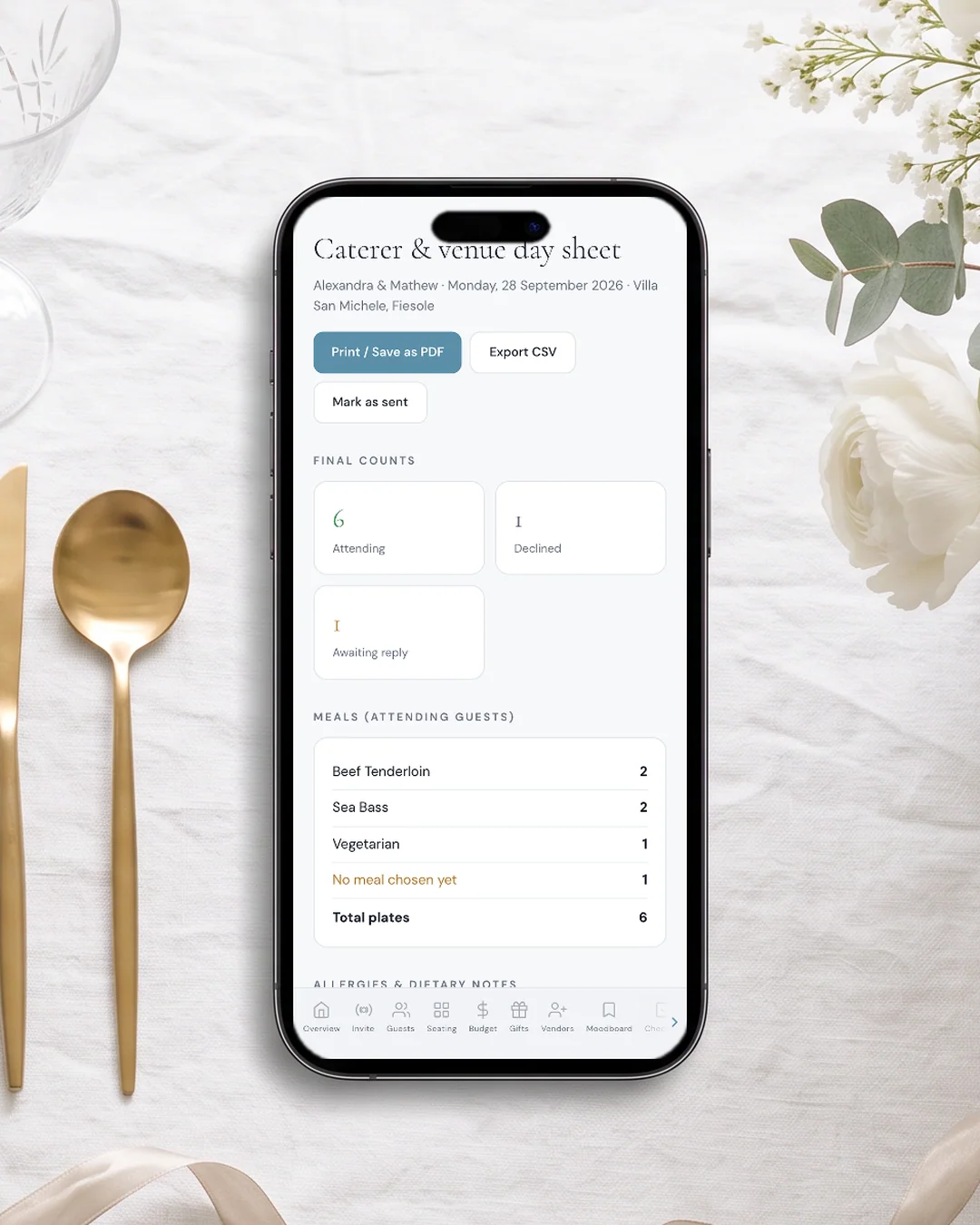
A banquet function prospectus (FP) is the one-page internal order a banquet team issues for each function: host and booking details, hall and timings, expected and guaranteed guest counts, set-up, menu, beverages, AV, special instructions, billing instructions and sign-offs. The Private Wedding App does not produce the whole FP. Its caterer and venue day sheet supplies the guest half (final counts, plates per meal, the allergy roster by table and a change log) and the day's timeline, while the venue account adds a bookings calendar with date-clash warnings and the hall drawn to scale.
- The FP is the single source of truth for kitchen, service, housekeeping, engineering and accounts.
- Issue one FP per function: a wedding with a sangeet, a wedding and a reception needs three.
- Write three guest figures: expected, guaranteed and set-for. Kitchens cook to the wrong one when only one is written.
- The Private Wedding App fills the guest half of the FP from the guests' own RSVPs, with a log of what changed since the last version sent.
- Menu costing, staffing and billing instructions stay in your own FP format.
- The venue account also holds the bookings calendar, with date-clash warnings, and the hall drawn to scale.
वेडिंग प्लानर के लिए · सभी गाइड
Every banquet hall, hotel banquet team, marriage garden and lawn runs on some version of the same sheet. Hotels call it the function prospectus or FP, others call it the function sheet or banquet event order. It tells the chef how many plates, the steward how many tables, engineering when to switch on the stage lights and accounts what to bill. During wedding season, the FP for a Saturday muhurat is revised again and again, and mistakes on the day usually trace back to a department working from an older copy or to a guest count that came from one phone call with the family. This guide gives you a clean FP format for weddings, a checklist for the guaranteed count, and an honest account of which parts software can fill.
What is a banquet function prospectus (FP)?
The function prospectus is the internal instruction sheet for one function in one hall. Sales or the banquet manager prepares it after the booking is confirmed, and it is circulated to every department that touches the event: kitchen, banquet service, housekeeping, engineering, security, front office and accounts.
It is different from the documents around it. The quotation and the booking agreement are between the venue and the client. The planner's function sheet describes what the planner and their vendors need. The FP translates all of that into what your own staff must do, by department and by time.
For weddings, issue one FP per function, each with its own number. The sangeet on the lawn and the reception in the hall are two events, with different counts, menus and set-ups.
Banquet function prospectus format: what goes in the FP template?
The format below fits on one page and can be built in Word or Excel and circulated as a PDF. The third column tells you who supplies each section, which is the quickest way to see why an FP is late: one of those people has not answered.
How do you take the guaranteed guest count for a wedding?
The guaranteed count is the figure the client commits to pay for, whoever turns up. It is common for venues to ask for it some days before the function and to prepare for a margin above it, but the number of days and the margin are your own policy and belong in your booking agreement. What the FP needs is clarity: three figures, each labelled, each dated.
Run through this checklist with the family or their planner each time you take the count.
- Ask for the count per function, never one figure for the whole wedding.
- Record three figures: expected (invited and likely), guaranteed (billing minimum), set-for (covers you will lay).
- Write the date and the name of the person who confirmed the guaranteed figure.
- Split the count by meal type: veg, non-veg, Jain, and any pre-ordered plated choices.
- Ask separately for children, and for vendor and staff meals that the family is paying for.
- Collect severe allergies by guest name and table, not as a general remark.
- Agree the cut-off after which the guaranteed figure can go up but not down.
- Agree how extra plates above the guarantee are counted and billed on the night.
- Issue a revised FP, with a new revision number, every time any of the three figures changes.
- Collect back or cancel earlier revisions in each department.
Which parts of the FP can The Private Wedding App fill?
Be exact about this before you rely on it. The Private Wedding App does not generate a function prospectus. It has no menu costing, no staffing or roster section, and no billing instructions. Those stay in your own FP format, prepared by your sales, kitchen and accounts teams.
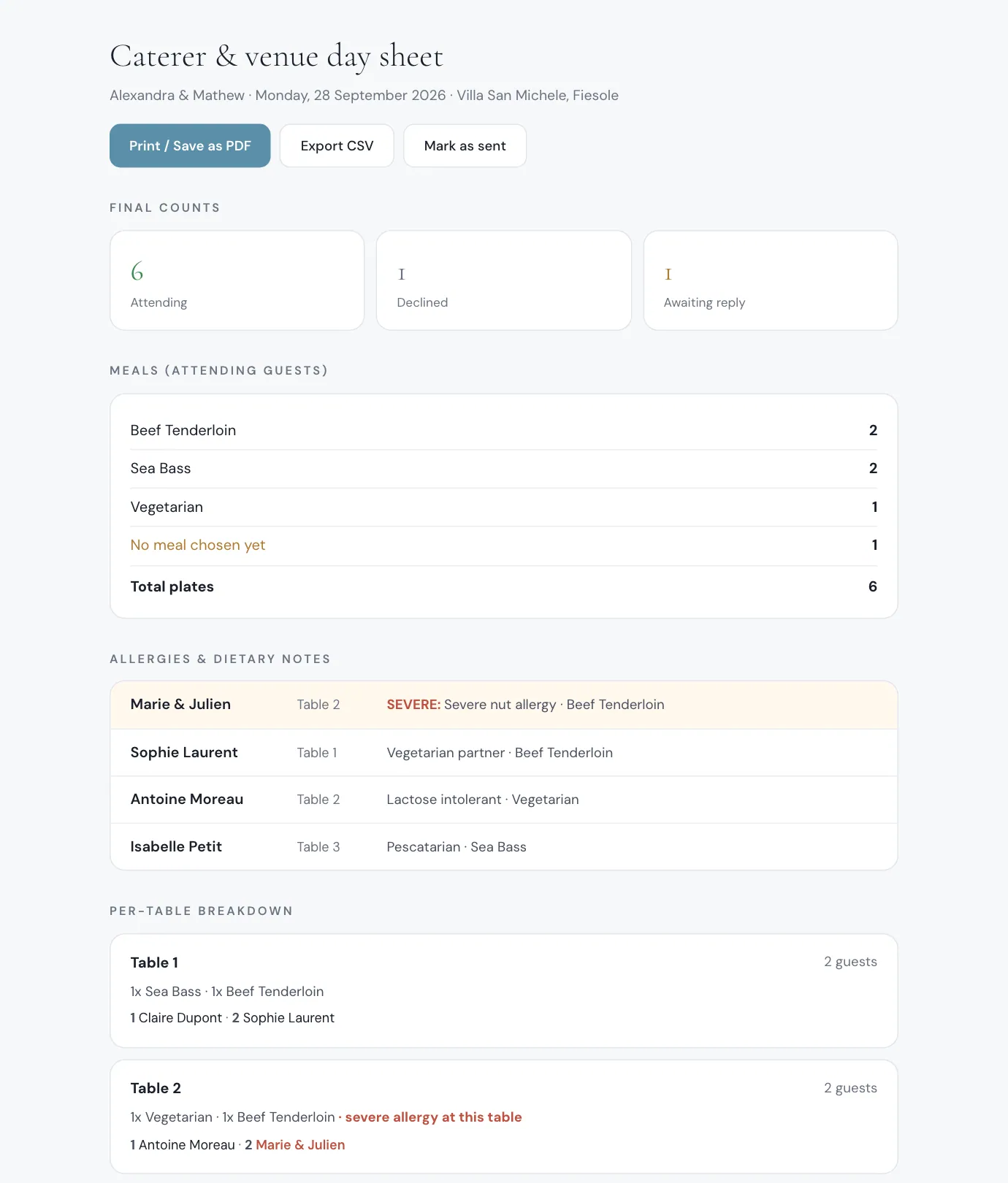
What it produces is the guest half, which is the half that changes most. In a venue account, each wedding at your property has its own guest list, and guests reply online on the couple's private invitation link, function by function, with a meal choice, dietary notes and a severe-allergy flag. From those replies, the caterer and venue day sheet puts on one page: final counts (attending, declined, pending), plates per meal choice, the allergy and dietary roster with each guest's table and a SEVERE flag, a per-table breakdown, the contacts of booked vendors, the day's timeline and an alphabetical seating list.
You print it, save it as a PDF or export it as CSV, and copy the figures into the guest count and dietary sections of your FP. The pending figure is useful in itself: it tells you how firm the guaranteed number really is.
How do you keep the FP current when the numbers change?
Revisions are where FPs fail. The chef has revision 2, service has revision 4, and the family told the sales manager about twenty extra guests on a call that never reached paper.
On the day sheet, "Mark as sent" takes a snapshot of the numbers at the moment you pass them to the kitchen. The next time the sheet is opened, it shows a change log against that snapshot: which counts moved, which meals, which allergies. You raise the next FP revision from a list of differences.
Each wedding also carries a final-numbers deadline per vendor. The app's defaults are 30 days before the wedding for the venue and 10 days for the caterer, and both are editable to match your own policy. When a deadline is within a week and guests are still awaiting reply, the wedding is flagged in your portfolio as final counts at risk, which tells your sales team which family to call today.
How do you stop two FPs being raised for the same hall and date?
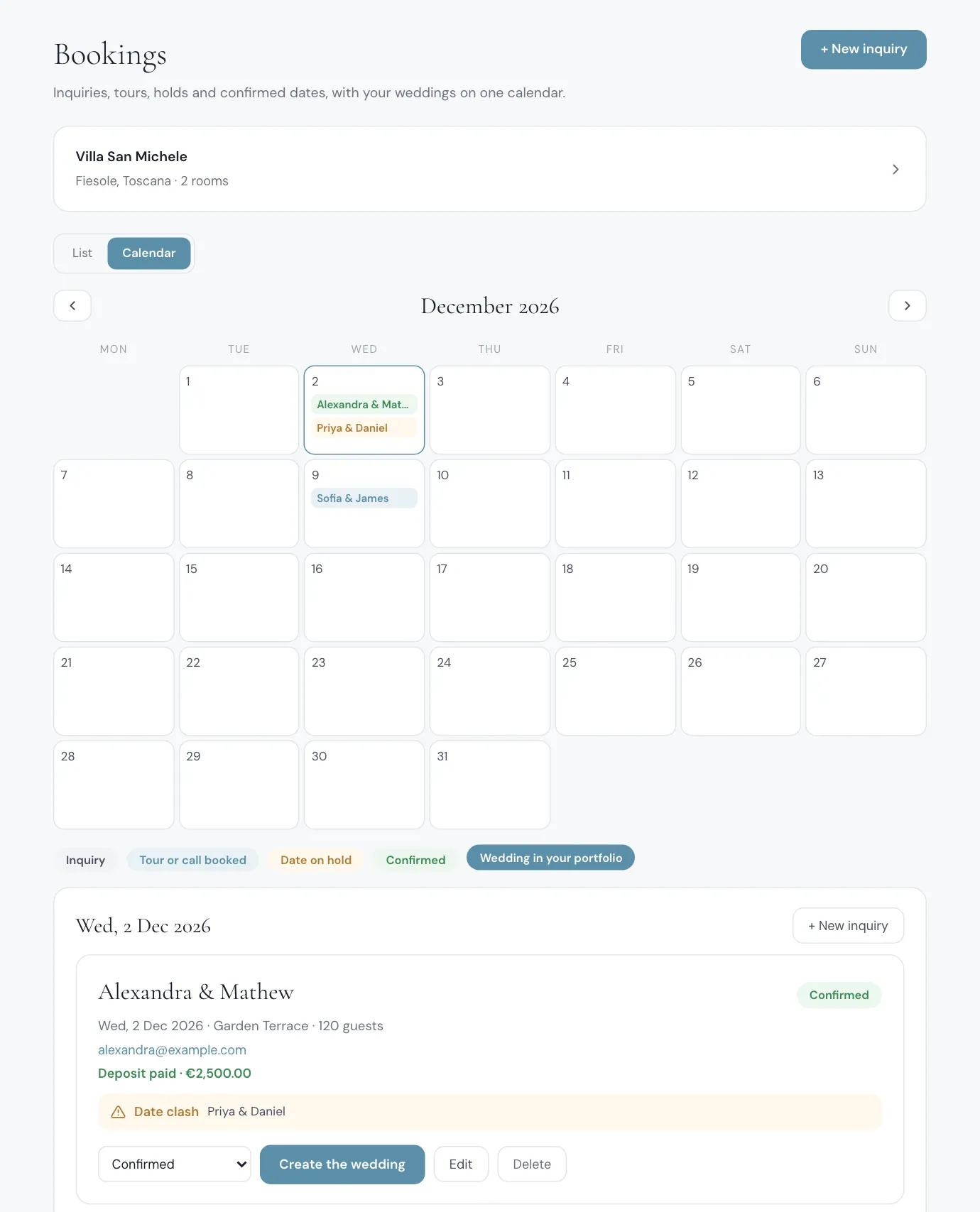
A clean FP starts with a clean booking. On auspicious dates, two families will ask for the same hall on the same evening, and a diary kept by two sales executives is how a double booking happens. In the venue account, every inquiry is a booking entry with the couple, their contact, the date or tentative date, the hall, the expected guest count and a status: inquiry, tour or call scheduled, date on hold, confirmed, or lost. The list and the month calendar flag a date clash when two entries take the same hall on the same date.
The advance on a booking is a tracking note: the amount and whether it has been received. You fill it in yourself when the money arrives, and no payment is taken on the booking. A confirmed booking can create its wedding, with the couple, date and hall already filled in. The hall hire agreement can be sent from the Contracts screen with your own text, for the family to sign online by typing their name.
The advance and the later instalments go on an invoice in rupees (INR), with due dates proposed from the wedding date, your business details, your tax number, a tax line and your own invoice number. The invoice carries your bank details and a payment reference; the family opens it from a private link and pays you directly by bank transfer (NEFT or UPI), cash or cheque, and you mark each instalment as paid yourself. Online card payment is optional: it needs your own Stripe account, which Stripe opens only in the countries it supports. Your accountant or billing software stays in charge of tax documents and of the final banquet bill.
How do you show the hall set-up on the FP?
A line of text is not a set-up plan: the decorator, the furniture vendor and your own stewards each imagine a different room. Attach a drawing to the FP.
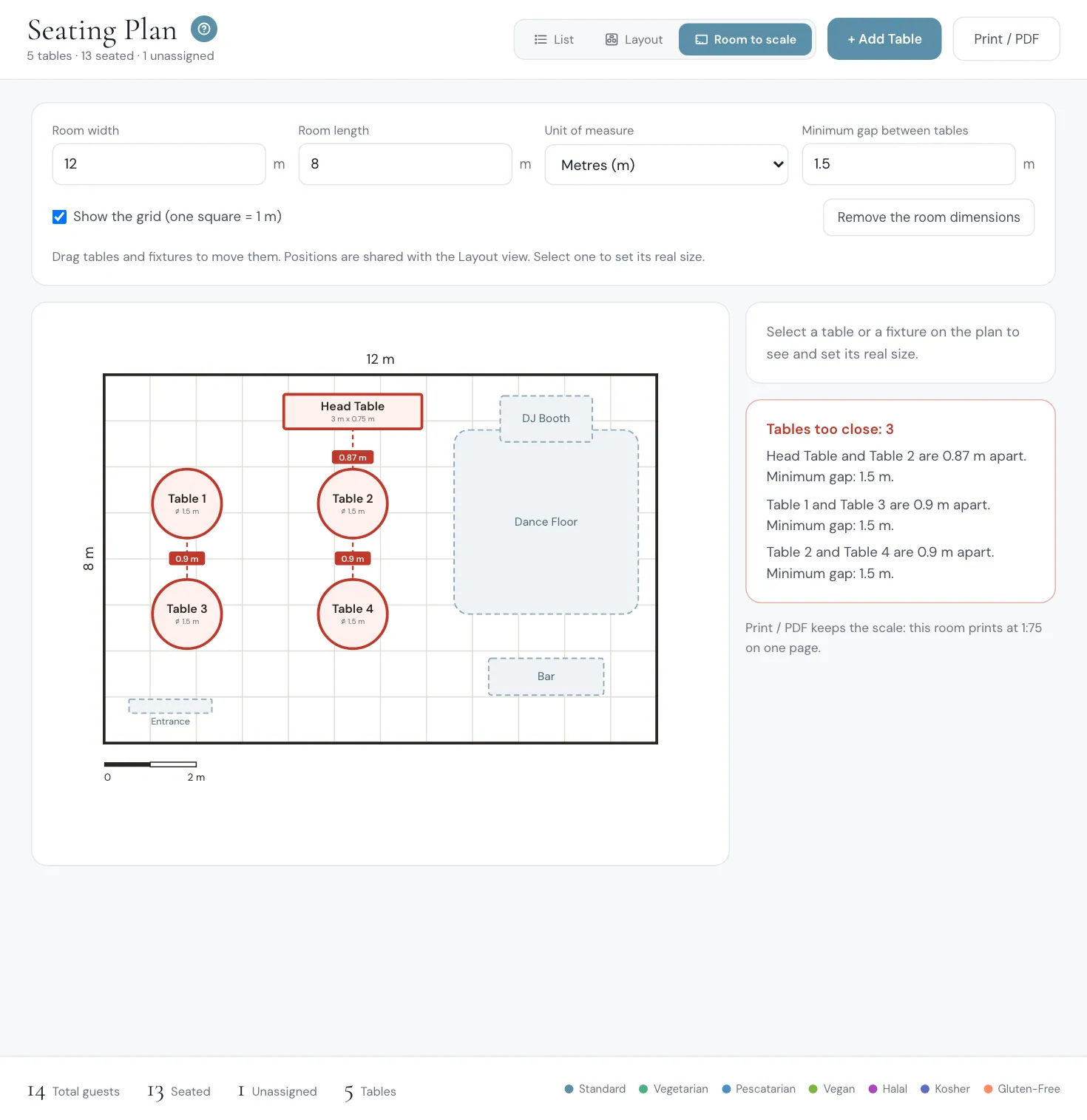
In The Private Wedding App, you enter the hall's width and length in metres or feet, and the seating plan is drawn to scale in 2D, seen from above: tables at their real size, the dance floor, stage, bar, DJ booth and entrance as fixtures, an optional grid and a scale bar. Any two tables closer than your minimum gap are flagged with a clearance warning (the default is 1.5 m or 5 ft, adjustable), which is how you find out that the service aisle is blocked before the furniture arrives. The plan prints or saves as a PDF at a standard scale.
Draw each hall once and save it as a room layout. For the next wedding in the same hall, apply the layout to the new, empty seating plan and adjust the table count.
How do timings and outside vendors get onto the FP?
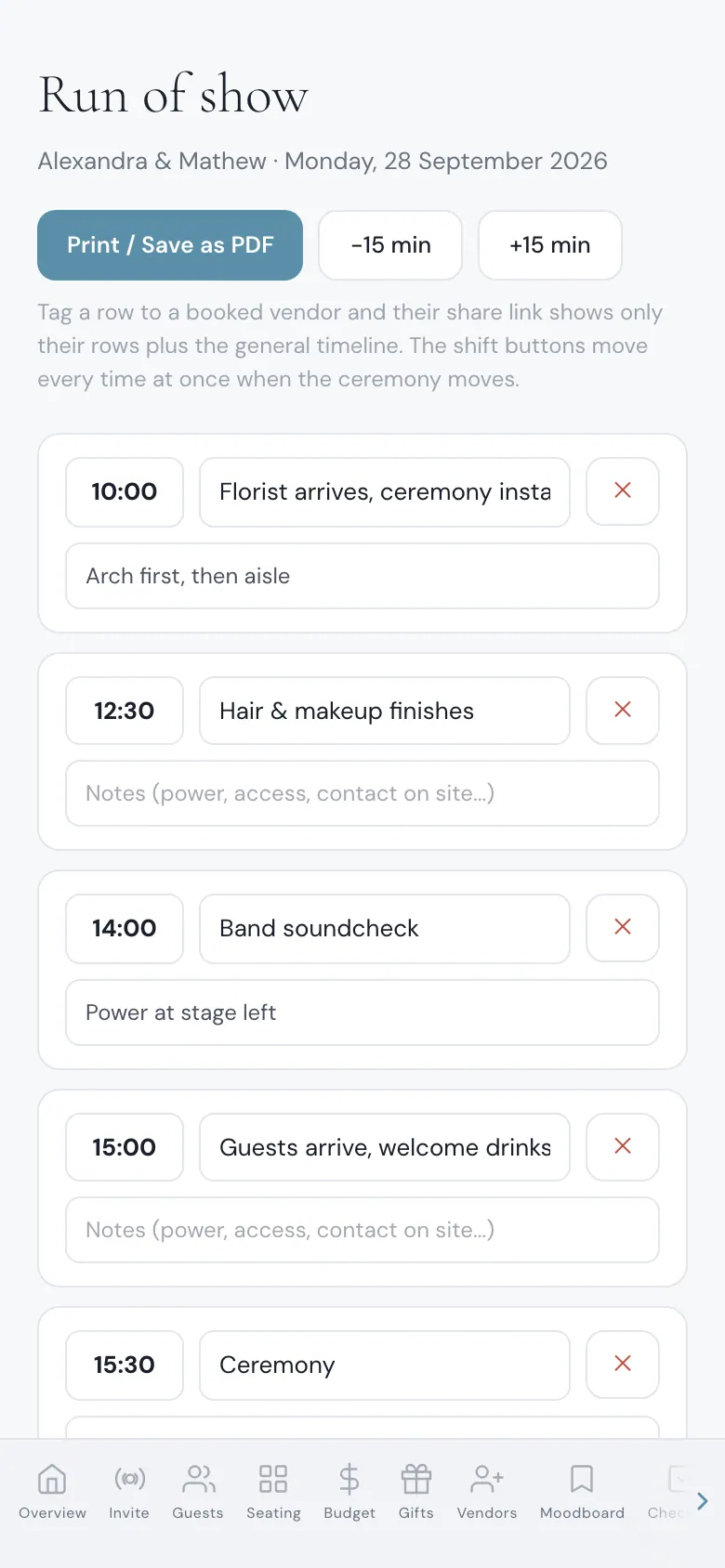
The timings section of an FP usually has a few lines. A wedding has dozens of moments that concern the venue: the decorator's load-in, the sound check, the baraat at the gate, dinner service, the pheras, the last coach. The run of show in The Private Wedding App holds these as timed rows (time, what happens, where, notes), each of which can be tagged to a booked vendor. When the baraat is late, the +15 min and -15 min buttons shift every time at once.
Your banquet manager gets the read-only link to the full timeline, and each vendor gets a link with only their own rows, so the entry times on your FP and the times the decorator is working to are the same. Planners build this document from their side too, as described in the wedding function sheet and run sheet format, and when the wedding has a planner it is worth agreeing whose timeline is the master.
Who signs off the FP, and what should your team do next?
An FP is live only when it is signed: by the banquet manager, the chef and the F&B manager internally, and confirmed by the client or their planner for the counts, menu and timings. Keep the confirmation in writing. Circulate the final revision to every department and keep one printed copy at the banquet desk during the event, with the day sheet behind it.
If the family is collecting replies on WhatsApp calls, the count you sign will always be soft. Giving each wedding its own guest list and online RSVP is what makes the guaranteed figure reliable, and the guide to guest management and RSVP software explains how the replies are collected per function. The conditions behind the count (cut-off dates, minimum guarantee, extra plates) belong in the booking agreement, and the clause table in the wedding planner agreement format guide is a useful model for writing them.
To try it on your next booking, create your venue account, add your halls with their capacity, and enter the first inquiry. Your coordinators can have their own team seats, and seats do not change the price. If you also plan weddings for clients outside your property, see the wedding planner software page.
ख़ुद अपनी आँखों से देखें।
वह सब जिस पर एक वेन्यू अपनी शादियां चलाता है: तारीख के टकराव की चेतावनी वाला बुकिंग कैलेंडर, स्केल के अनुसार बने हॉल, दोबारा इस्तेमाल होने वाले हॉल के लेआउट, कैटरर और वेन्यू के लिए दिन की शीट, दिन का कार्यक्रम, टीम की सीटें, इनवॉइस और ऑनलाइन साइन होने वाले एग्रीमेंट, साथ में हर शादी का इनविटेशन, RSVP, गेस्ट लिस्ट, बैठने की व्यवस्था और बजट।
वेन्यू के टूल देखें →Is there a banquet function prospectus format in Word or PDF?
The table in section 02 is the format: fourteen sections with what to write and who supplies each. Build it once in Word or Excel with your own letterhead and circulate each revision as a PDF. The Private Wedding App does not generate the FP itself. It supplies the guest counts, meal split and allergy roster that go into it.
What is the difference between an FP and a BEO?
They are the same kind of document under different names. Indian hotels mostly say function prospectus or FP, international chains often say banquet event order or BEO, and many halls and marriage gardens simply say function sheet. All of them instruct the venue's own departments for one function.
What is the guaranteed guest count?
It is the minimum number of guests the client agrees to pay for, confirmed by a cut-off date set in your booking agreement. It sits on the FP beside the expected figure and the set-for figure. This guide does not give a standard margin or number of days: those are your venue's policy.
Can the family's guests RSVP separately for each function at our venue?
Yes. In The Private Wedding App each wedding has a private invitation link, and guests reply per function with their meal choice and allergies. The counts appear in your venue portfolio and on the caterer and venue day sheet as the replies come in.
Does the app calculate menu cost or staff requirement per function?
No. There is no menu costing, no staffing calculation and no billing instruction. The app covers bookings, the hall layout, guest counts, meals and allergies, seating, the day's timeline and agreements signed online. Costing, rosters and the banquet bill stay in your existing systems.
What does it cost a banquet hall to use The Private Wedding App?
No software fee. Each wedding carries its own plan, ₹14,999 lifetime or ₹1,599 a month. You can bill it to the couple. The bookings calendar, halls, room layouts, team seats and portfolio come with the venue account. See the pricing page for details.
Can a marriage garden or lawn without a banquet department use this format?
Yes. Drop the rooms and engineering sections if they do not apply, and keep the header, guest counts, set-up, menu, vendors, timings, billing and sign-off. Even a two-person team benefits from one written sheet per function with a revision number.